1. Produktas baigtasview
The Fender Monterey Bluetooth Speaker delivers clear, powerful audio with a design inspired by classic Fender amplifiers. This speaker is engineered for high-fidelity sound reproduction, featuring 120 watts of power, two woofers, and two tweeters. It supports audio streaming via Bluetooth and direct connection through a 3.5mm auxiliary jack or RCA inputs.
1 pav.: priekis view of the Fender Monterey Bluetooth Speaker, showcasing its classic amplifier-inspired grille and Fender logo.
2. Kas yra dėžutėje
Patikrinkite, ar pakuotėje yra visi toliau išvardyti daiktai:
- Fender Monterey Bluetooth Speaker
- 3.5 mm pagalbinis kabelis
- RCA kabelis
- Maitinimo kabelis
3. Sąrankos vadovas
3.1 Maitinimo jungtis
- Ensure the speaker's volume control is set to minimum before connecting power.
- Prijunkite pridedamą maitinimo laidą prie kintamosios srovės įvesties lizdo, esančio garsiakalbio galiniame skydelyje.
- Kitą maitinimo laido galą prijunkite prie tinkamo sieninio lizdo (100–240 V, 50/60 Hz).
- Flip the power switch on the top panel to the "ON" position. The speaker will emit a chime indicating it is powered on.
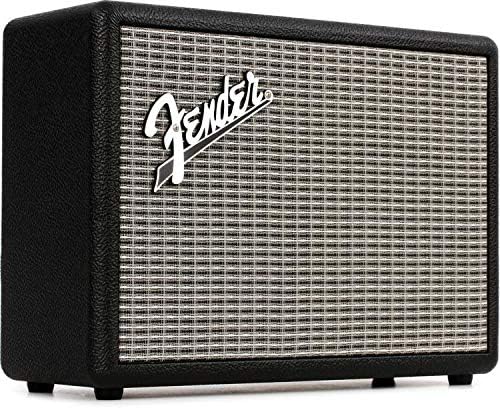
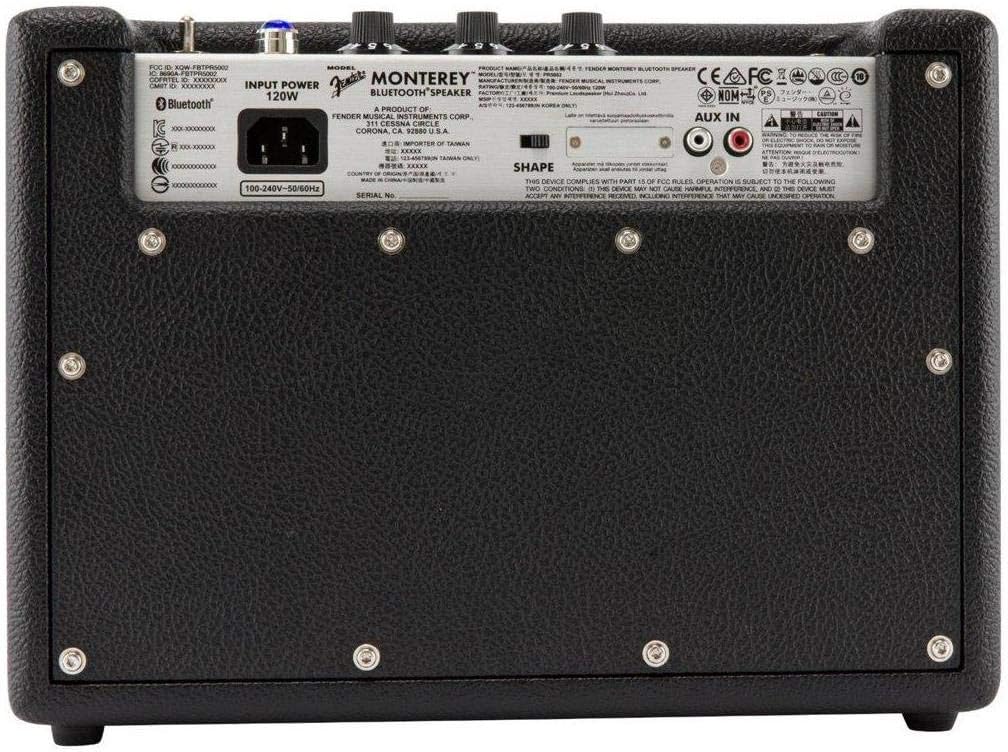
Figure 2: Rear panel of the Fender Monterey speaker, showing the power input and auxiliary connections.
3.2 Bluetooth poravimas
- With the speaker powered on, press the PAIR button on the top panel. The Bluetooth indicator light will begin to flash, indicating it is in pairing mode.
- Garso įrenginyje (išmaniajame telefone, planšetiniame kompiuteryje, kompiuteryje) eikite į „Bluetooth“ nustatymus.
- Select "Fender Monterey" from the list of available devices.
- Once successfully paired, the Bluetooth indicator light on the speaker will turn solid blue, and a confirmation chime will sound.
3.3 Pagalbinio įėjimo prijungimas
For devices without Bluetooth, use the provided 3.5mm auxiliary cable or RCA cable.
- 3.5 mm pagalbinis lizdas: Connect one end of the 3.5mm cable to your audio device's headphone jack and the other end to the MINI input on the speaker's top panel.
- RCA: Connect the RCA cable to your audio device's RCA outputs and the other end to the RCA inputs on the speaker's rear panel.
Select the appropriate source (BLUETOOTH, MINI, arba RCA) naudojant ŠALTINIS mygtuką viršutiniame skydelyje.

Figure 3: Top panel controls of the Fender Monterey speaker, including Volume, Treble, Bass, Source, and Pair buttons.
4. Naudojimo instrukcijos
4.1 Garso atkūrimas
- Ensure your audio source is connected and selected (Bluetooth, Mini, or RCA).
- Pradėkite leisti garsą iš prijungto įrenginio.
- Sureguliuokite TOMAS knob on the speaker's top panel to your desired listening level.
4.2 Tonų valdikliai
The Fender Monterey speaker features dedicated controls for customizing your sound:
- TREBLE: Adjusts the high-frequency response of the audio. Turn clockwise for brighter sound, counter-clockwise for warmer sound.
- BOSAS: Adjusts the low-frequency response of the audio. Turn clockwise for more bass, counter-clockwise for less bass.
- SHAPE: A toggle switch located on the rear panel. This control modifies the overall tonal character, offering different sound profiles. Experiment with both positions to find your preferred sound.
5. Priežiūra
- Valymas: Use a soft, dry cloth to clean the speaker's exterior. Avoid abrasive cleaners, solvents, or sprays that may damage the finish.
- Saugykla: Kai garsiakalbio nenaudojate ilgesnį laiką, laikykite jį vėsioje, sausoje vietoje, toliau nuo tiesioginių saulės spindulių ir ekstremalių temperatūrų.
- Vėdinimas: Užtikrinkite tinkamą ventiliaciją aplink garsiakalbį, kad jis neperkaistų. Neužblokuokite jokių ventiliacijos angų.
- Skysčio ekspozicija: Keep the speaker away from liquids. In case of accidental spills, immediately disconnect power and allow it to dry completely before re-use.
6. Problemų sprendimas
Nėra galios
- Įsitikinkite, kad maitinimo laidas yra tvirtai prijungtas tiek prie garsiakalbio, tiek prie veikiančio sieninio lizdo.
- Verify the power switch on the top panel is in the "ON" position.
- Patikrinkite, ar sieninis lizdas veikia, prijungdami kitą įrenginį.
Nėra garso
- Confirm the correct audio source (Bluetooth, Mini, or RCA) is selected using the ŠALTINIS mygtuką.
- Padidinkite TOMAS knob on the speaker and the volume on your connected audio device.
- If using Bluetooth, ensure the device is properly paired and connected. Try re-pairing if necessary.
- If using auxiliary inputs, ensure cables are fully inserted and not damaged.
„Bluetooth“ poravimo problemos
- Ensure the speaker is in pairing mode (flashing Bluetooth indicator). Press the PAIR button if it's not flashing.
- Move your audio device closer to the speaker to ensure it's within range.
- Turn off and on the Bluetooth function on your audio device.
- If the speaker was previously paired with another device, disconnect it from that device first.
7. Techninės specifikacijos
| Modelio numeris | 6960200000 |
| Prekės ženklas | Sparnas |
| Išėjimo vattage | 120 vatų |
| Garsiakalbio konfigūracija | Two woofers, two tweeters |
| Ryšys | Bluetooth, 3.5mm Auxiliary Input, RCA Input |
| Gaminio matmenys (D x P x A) | 9.3 colio x 16.8 colio x 14.6 colio (23.6 cm x 42.7 cm x 37.1 cm) |
| Prekės svoris | 18.6 svaro (8.44 kg) |
| Spalva | Juoda |
| Gamintojas | Fender Musical Instruments Corp. |
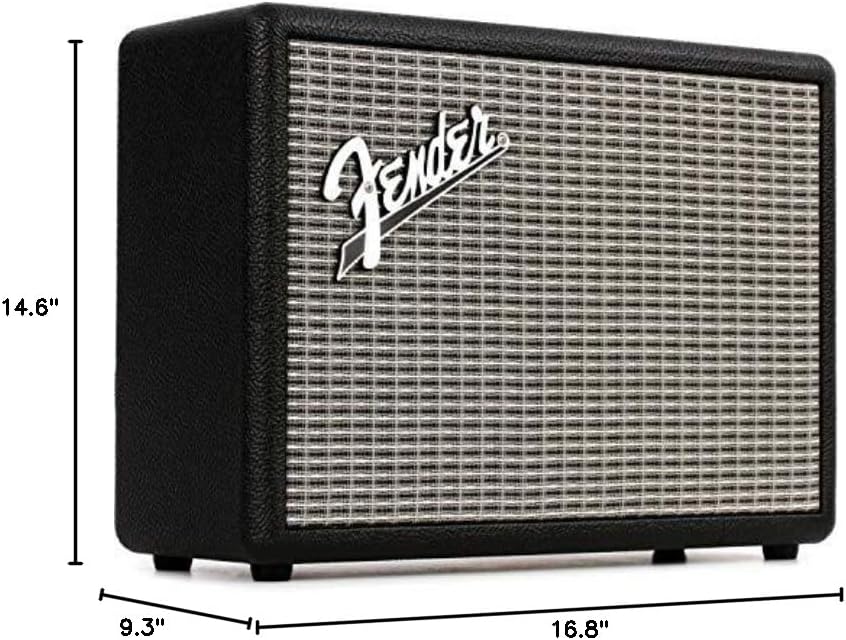
Figure 4: Dimensions of the Fender Monterey Bluetooth Speaker.
8. Garantija ir palaikymas
For warranty information, product registration, or technical support, please refer to the official Fender website or contact Fender customer service. Keep your proof of purchase for warranty claims.
Internetiniai ištekliai: www.fender.com


