1. Įvadas
The HP EliteOne 800 G3 All-in-One PC is designed to provide a powerful and integrated computing experience. This manual will guide you through the setup, operation, and maintenance of your new device, ensuring optimal performance and longevity.
Key features include a 23.8-inch display, robust processors, advanced security features, and enhanced collaboration tools. The sleek design integrates all components into a single unit, minimizing cable clutter and maximizing workspace efficiency.
2. Kas yra dėžutėje
Patikrinkite, ar pakuotėje yra visi komponentai:
- Personal computer (HP EliteOne 800 G3 All-in-One)
- Atlošiamas stovas
- Pelė
- Klaviatūra
- Maitinimo adapteris ir laidas
- Dokumentacija (šis vadovas, garantijos informacija)
3. Sąranka
Follow these steps to set up your HP EliteOne 800 G3 All-in-One PC:
- Išpakuokite kompiuterį: Carefully remove the All-in-One PC and its components from the packaging. Place the PC on a stable, flat surface.
- Pritvirtinkite stovą: Securely attach the recline stand to the back of the All-in-One PC according to the instructions provided in the quick setup guide (if applicable). Ensure it clicks into place or is fastened with screws as directed.
- Prijunkite išorinius įrenginius:
- Connect the USB keyboard to an available USB port on the PC.
- Connect the USB mouse to another available USB port on the PC.
- If using wired network, connect an Ethernet cable to the RJ-45 port.
- Prijunkite maitinimą: Connect the power cable to the power adapter, then plug the adapter into the PC's power input port. Plug the other end of the power cable into a grounded electrical outlet.
- Maitinimas: Press the power button, usually located on the side or bottom bezel of the display. The PC will boot up, and the Windows 10 Pro operating system will begin its initial setup process. Follow the on-screen prompts to complete the setup, including language selection, network connection, and user account creation.
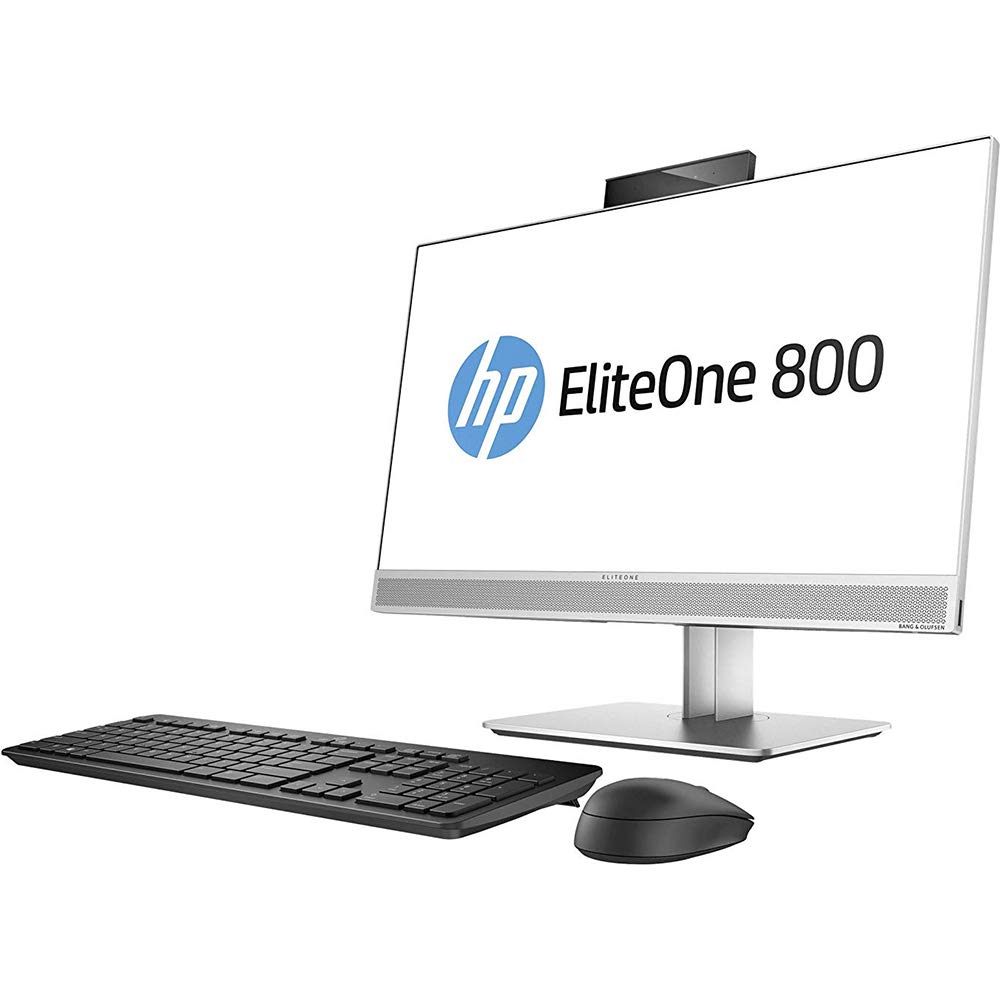
3.1 paveikslas: HP EliteOne 800 G3 All-in-One PC with connected peripherals. This image illustrates the general appearance of the computer and its basic setup components.
4. Operating the PC
Your HP EliteOne 800 G3 is pre-installed with Windows 10 Pro, offering a familiar and productive computing environment. Here are some operational highlights:
- Ekranas: The 23.8-inch Full HD (1920x1080) display provides clear visuals for work and entertainment. Some models may feature an optional non-glare touchscreen for interactive use.
- Garsas: Experience enhanced audio with Audio by Bang & Olufsen. The PC also includes HP Noise Cancellation software and HP Audio Boost for clear communication during calls and meetings.
- Webkameros: Utilize the integrated front and optional rear-facing webcams for video conferencing and capturing images.
- Našumas: Equipped with powerful Intel processors, 8 GB DDR4 RAM, and a 256 GB SSD, the system delivers responsive performance. Intel HD Graphics 630 handles visual tasks efficiently.
- Ryšys: Connect to networks via 802.11abg wireless or Gigabit Ethernet. Multiple USB ports are available for connecting external devices.
- Saugumas: Benefit from HP's integrated security features designed to protect your data and system.
5. Priežiūra
Proper maintenance ensures the longevity and optimal performance of your All-in-One PC:
- Ekrano valymas: Naudokite minkštą, nepūkuotą šluostę, specialiai skirtą elektronikai. Lengvai nuvalykiteampNuvalykite šluostę vandeniu arba neabrazyviniu ekrano valikliu. Venkite purkšti skysčio tiesiai ant ekrano.
- Važiuoklės valymas: Išorinius paviršius nuvalykite minkšta, damp audinys. Nenaudokite stiprių cheminių medžiagų ar abrazyvinių valiklių.
- Programinės įrangos atnaujinimai: Regularly check for and install operating system updates (Windows Update) and driver updates (HP Support Assistant) to ensure system stability and security.
- Vėdinimas: Ensure that the ventilation openings on the PC are not blocked to prevent overheating. Keep the PC in a well-ventilated area.
- Duomenų atsarginė kopija: Periodiškai kurkite svarbių duomenų atsargines kopijas išoriniame diske arba debesies saugykloje, kad išvengtumėte duomenų praradimo.
6. Problemų sprendimas
Šiame skyriuje aptariamos dažniausiai pasitaikančios problemos, su kuriomis galite susidurti:
- No Power / PC Does Not Turn On:
- Ensure the power cable is securely connected to both the PC and the electrical outlet. Try a different outlet. Verify the power adapter is functioning correctly.
- Nėra ekrano / Tuščias ekranas:
- Check if the PC is powered on. If the PC is on but the screen is blank, try restarting the computer. Ensure no external display cables are connected that might be redirecting the output.
- Nėra garso:
- Check the volume settings in Windows. Ensure speakers are connected and powered on (if external). Verify audio drivers are installed and up to date in Device Manager.
- Tinklo ryšio problemos:
- For Wi-Fi, ensure the wireless adapter is enabled and you are connected to the correct network. For wired connection, check the Ethernet cable and router status. Restart your router/modem.
- System Slowdown / Unresponsive:
- Close unnecessary applications. Check Task Manager for processes consuming high CPU or RAM. Run a virus scan. Ensure sufficient free space on the SSD.
If problems persist, consult the HP support websvetainėje arba susisiekite su klientų aptarnavimo tarnyba.
7. Specifikacijos
Detailed technical specifications for the HP EliteOne 800 G3 All-in-One PC:
| Funkcija | Specifikacija |
|---|---|
| Modelio numeris | 1JF75UT#ABA |
| Ekrano dydis | 23.8 colių |
| Maksimali ekrano skiriamoji geba | 1920 x 1080 pikselių (Full HD) |
| Procesorius | Intel Core (3.4 GHz Cortex) |
| RAM | 8 GB DDR4 |
| Sandėliavimas | 256 GB SSD |
| Grafikos koprocesorius | Intel HD Graphics 630 |
| Operacinė sistema | Windows 10 Pro |
| Belaidis tipas | 802.11abg |
| Optinio disko tipas | DVD-R |
| Prekės svoris | 13.29 svaro (apie 6.03 kg) |
| Gaminio matmenys (IxPxH) | 21.2 x 2.1 x 13.5 colio (apytiksliai 53.8 x 5.3 x 34.3 cm) |
| Spalva | Juoda/Sidabrinė |
8. Garantija ir palaikymas
Your HP EliteOne 800 G3 All-in-One PC comes with a standard manufacturer's warranty. Please refer to the warranty documentation included with your product for specific terms and conditions, including coverage duration and service procedures.
For technical support, driver downloads, and additional resources, please visit the official HP support website. You may also consider optional protection plans for extended coverage and support, such as the 3-Year Protection Plan or Complete Protect monthly plan, which can be purchased separately.
When contacting support, have your product model number (1JF75UT#ABA) and serial number ready.