1. Įvadas
This manual provides detailed instructions for the assembly, operation, and maintenance of your VIVO STAND-V102F Dual Monitor Free-Standing Desk Mount. This mount is designed to hold two flat or curved display screens ranging from 13 to 30 inches, with a maximum weight capacity of 17.6 lbs per screen. It supports VESA mounting patterns of 75x75mm or 100x100mm.
Saugos įspėjimas:
- Prieš naudodami įsitikinkite, kad visi komponentai yra tvirtai pritvirtinti.
- Do not exceed the maximum weight capacity of 17.6 lbs per screen.
- Avoid pulling monitors too far forward or backward unless the stand is bolted down, as this may compromise stability.
- Always check that the base size fits your available desk space to prevent tipping.
2. Pakuotės turinys
Please verify that all components listed below are present in your package. If any parts are missing or damaged, contact VIVO customer support.
- Heavy-Duty Base (11" x 15.4")
- Center Pole (16.4" height)
- Dual Monitor Arms with VESA Plates
- Kabelių valdymo spaustukai
- All necessary hardware (screws, washers, Allen keys)
3. Surinkimo instrukcijos
Follow these steps to assemble your VIVO Dual Monitor Free-Standing Desk Mount.
- Attach the Center Pole to the Base: Securely fasten the center pole to the heavy-duty base using the provided screws and Allen key. Ensure it is stable.
- Install Monitor Arms: Slide the dual monitor arms onto the center pole. Adjust their height to your preference and tighten the locking mechanism.
- VESA plokščių tvirtinimas prie monitorių: Remove the VESA plates from the monitor arms. Attach these plates to the back of your monitors using the appropriate screws for your monitor's VESA pattern (75x75mm or 100x100mm).
- Montuojami monitoriai: Carefully slide the monitors (with attached VESA plates) onto the monitor arms. Ensure they click securely into place.
- Kabelių valdymas: Utilize the included cable management clips to route and organize your monitor cables along the arms and down the center pole for a tidy setup.

Figure 1: Assembled VIVO Dual Monitor Free-Standing Desk Mount with monitors.

Figure 2: Detail of VESA plate for monitor attachment.
4. Naudojimo instrukcijos
The VIVO STAND-V102F offers full articulation for optimal viewkampų.
- Aukščio reguliavimas: Atlaisvinkite klamp on the center pole to slide the monitor arms up or down. Re-tighten the clamp tvirtai, kai pasiekiamas norimas aukštis.
- Pakreipimo reguliavimas: Monitors can be tilted +45° to -45°. Adjust the tilt knob on the VESA plate to achieve your preferred vertical viewing kampas.
- Sukimosi reguliavimas: The monitor arms allow for 180° swivel, enabling you to adjust the horizontal angle of each monitor independently.
- Pasukimas: Monitors can be rotated 360° for portrait or landscape orientation. Simply turn the monitor to the desired orientation.
- Arm Articulation: The double center arm joints provide additional articulation, allowing for flexible monitor placement and positioning.

Figure 3: Full articulation features including tilt, swivel, and rotation.
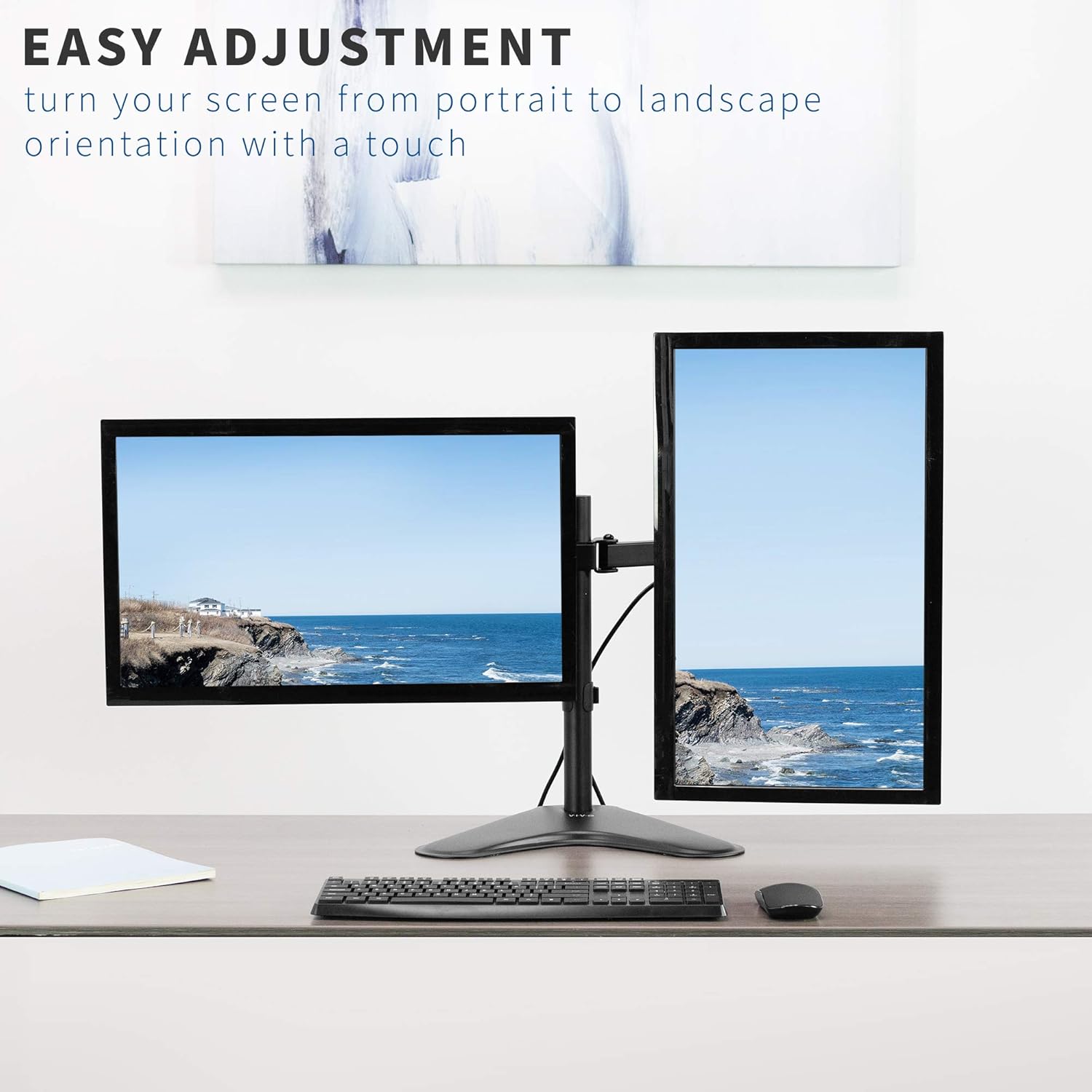
4 pav. Pvzample of monitors in both portrait and landscape orientations.
5. Savybės
- Visuotinis suderinamumas: Fits two screens from 13" to 30" and up to 17.6 lbs each. Supports VESA 75x75mm or 100x100mm mounting patterns.
- Pilna artikuliacija: Offers +45° to -45° tilt, 180° swivel, and 360° rotation for flexible viewing.
- Aukščio reguliavimas: Monitors can be adjusted along the 16.4" center pole.
- Heavy-Duty Base: A solid steel 11" x 15.4" base ensures stability for your monitor setup.
- Integruotas kabelių valdymas: Clips are included to keep cables organized and out of sight.

Figure 5: Key dimensions and compatibility information.

Figure 6: The heavy-duty base providing stability.

Figure 7: Integrated cable management system.
6. Specifikacijos
| Atributas | Detalė |
|---|---|
| Modelio numeris | STANDAS-V102F |
| Ekrano dydžio suderinamumas | 13" to 30" (Dual) |
| Svorio talpa | 17.6 lbs per screen |
| VESA suderinamumas | 75x75mm, 100x100mm |
| Pakreipimo kampas | +45° iki -45° |
| Pasukimo kampas | 180° |
| Rotacija | 360° (portretas / peizažas) |
| Stulpo aukštis | 16.4 colių |
| Pagrindo matmenys | 11" x 15.4" |
| Medžiaga | Legiruotasis plienas |
| Spalva | Juoda |
7. Priežiūra
Norėdami užtikrinti VIVO monitoriaus laikiklio ilgaamžiškumą ir optimalų veikimą, laikykitės šių priežiūros gairių:
- Reguliarus valymas: Nuvalykite laikiklį minkšta,amp cloth to remove dust and debris. Avoid abrasive cleaners or solvents.
- Patikrinkite tvirtinimo detales: Periodiškai patikrinkite visus varžtus ir veržles, kad jie būtų tvirtai priveržti. Prireikus priveržkite, kad išlaikytumėte stabilumą.
- Tepimas: If any joints become stiff, a small amount of silicone-based lubricant can be applied to the moving parts.
8. Problemų sprendimas
If you encounter any issues with your monitor mount, refer to the following common problems and solutions:
- Mount is Unstable/Tipping:
- Ensure the heavy-duty base is fully on a flat, stable surface.
- Verify that the combined weight of your monitors does not exceed the maximum capacity.
- Avoid extending monitors too far forward or backward from the center pole without securing the base to the desk (if applicable).
- Monitors Sagging/Not Holding Position:
- Tighten the tilt adjustment knob on the VESA plate.
- Ensure all arm joints are securely tightened with the provided Allen key.
- Difficulty Adjusting Tilt:
- Some tilt bolts may require a specific Allen key or tool for proper tightening/loosening. Refer to the assembly diagram for exact locations.
- Ensure the monitor is not exceeding the weight limit, which can make adjustments difficult.
9. Oficialūs produktų vaizdo įrašai
Full Motion Dual Monitor Free-Standing Desk Stand
This video demonstrates the full motion capabilities of the VIVO Dual Monitor Free-Standing Desk Stand, including articulation and double center arm joints for flexible monitor positioning.
Dual Monitor Free-Standing Desk Stand (STAND-V102F) Overview
Šis vaizdo įrašas suteikia pabaigąview of the VIVO STAND-V102F Dual Monitor Free-Standing Desk Stand, showcasing jo dizainą ir savybes.
10. Garantija ir palaikymas
VIVO products are backed by a manufacturer's warranty. For specific warranty details, product registration, or technical support, please visit the official VIVO websvetainėje arba susisiekite su jų klientų aptarnavimo skyriumi. Išsaugokite pirkimo kvitą, jei prireiktų pateikti pretenziją dėl garantijos.
VIVO is a US-based company committed to providing quality ergonomic solutions. Their sales and technical support teams are available to assist with any product-related inquiries.
Figure 8: VIVO's commitment to customer support.


