Įvadas
Ačiū, kad pirkoteasing the POWERFLEX PF-AZ01-Z003 Portable Bluetooth Speaker. This device is designed to provide high-quality audio playback and hands-free calling capabilities. Please read this manual carefully before using the speaker to ensure proper operation and to maximize its performance.

Vaizdas: The POWERFLEX PF-AZ01-Z003 Portable Bluetooth Speaker is shown from an angled perspective, highlighting its black finish, front grille, and the touch-sensitive control panel on its top surface, which features illuminated volume controls.
Pakuotės turinys
Pažymėkite langelį prie šių elementų:
- POWERFLEX PF-AZ01-Z003 Portable Bluetooth Speaker
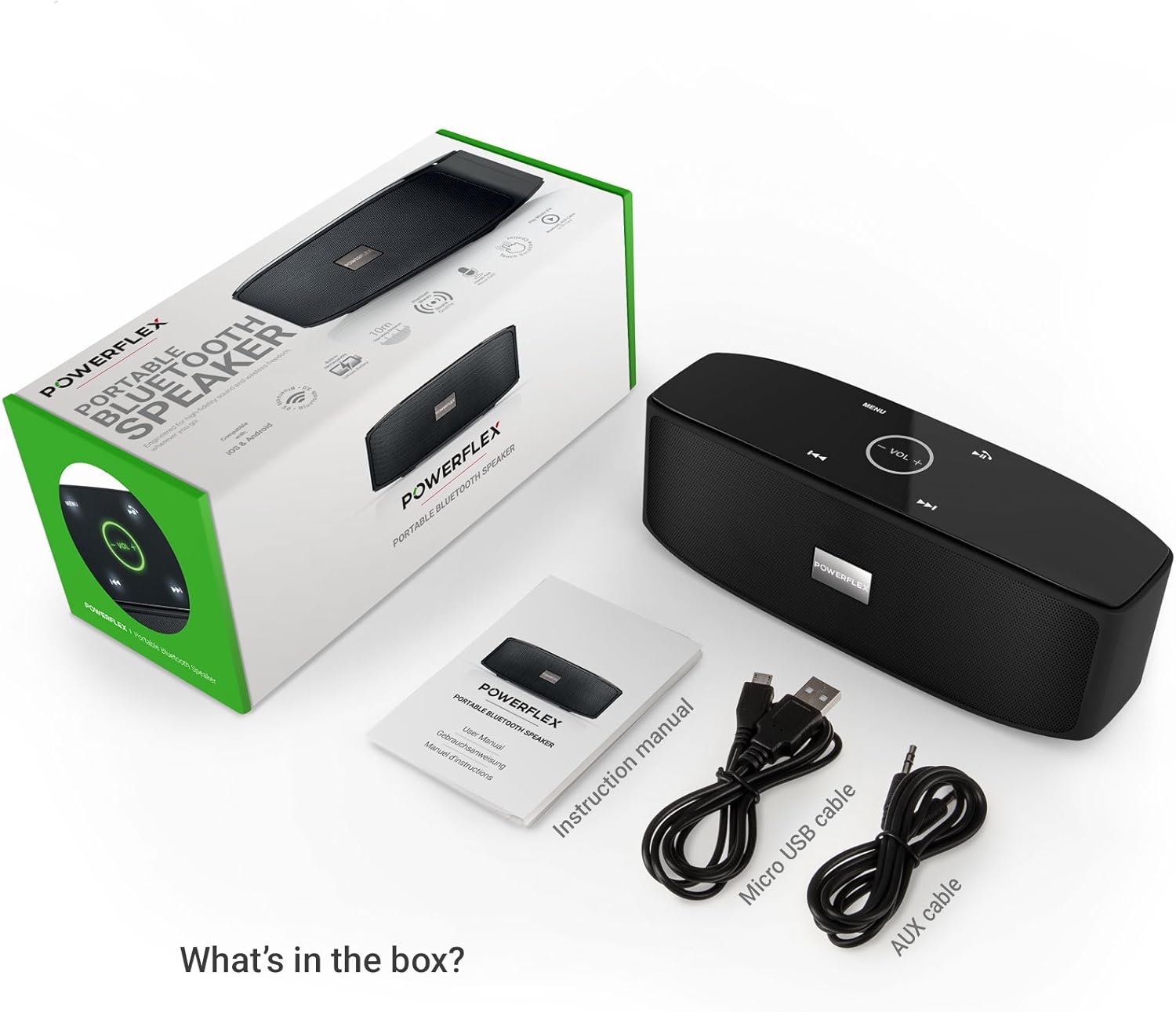
- Mikro USB įkrovimo laidas
- AUX laidas
- Vartotojo vadovas

Vaizdas: This image displays the POWERFLEX PF-AZ01-Z003 Portable Bluetooth Speaker alongside its accessories: a Micro USB charging cable, an AUX cable, and the instruction manual. These are the items typically found inside the product packaging.
Savybės baigėsiview
The POWERFLEX PF-AZ01-Z003 speaker offers several key features for an enhanced audio experience:
- Geresnis garsas: Equipped with dual five-watt drivers for clear highs, detailed mid-ranges, and deep bass.
- Bluetooth 3.0 ryšys: Provides a stable wireless connection up to 10 meters (33 feet).
- Skambinimas laisvų rankų įranga: Integrated microphone allows for clear phone calls.
- Kelios atkūrimo parinktys: Supports Bluetooth, AUX input, and TF (MicroSD) card playback.
- Jutikliniai valdikliai: Intuitive touch-sensitive panel for easy music and call management.
- Nešiojamas dizainas: Compact build for easy transport.

Vaizdas: This image presents a cutaway view of the POWERFLEX PF-AZ01-Z003 speaker, revealing its internal components, specifically the dual five-watt drivers. The visual emphasizes the speaker's design for delivering vibrant highs, detailed mid-ranges, and deep bass for true stereo sound.

Vaizdas: This image showcases the POWERFLEX PF-AZ01-Z003 speaker positioned in front of a collection of diverse iOS and Android Bluetooth-enabled devices, including smartphones and tablets. The arrangement visually confirms the speaker's broad compatibility with various mobile operating systems.

Vaizdas: This image demonstrates the compact design of the POWERFLEX PF-AZ01-Z003 speaker, showing it being easily placed into a backpack. The accompanying text highlights its portability and specific dimensions (190 x 58 x 70mm), indicating it fits conveniently into bags.
Sąranka
1. Įkraukite garsiakalbį
The speaker is powered by an internal 1800 mAh rechargeable battery. Before first use, fully charge the speaker.
- Prijunkite „Micro USB“ įkrovimo laidą prie garsiakalbio DC5V prievado.
- Kitą USB kabelio galą prijunkite prie USB maitinimo adapterio (nepridedamas) arba kompiuterio USB prievado.
- The charging indicator light will illuminate. Once fully charged, the light will change color or turn off (refer to LED indicator section in the full manual for details).
2. Įjungimas/išjungimas
To power on the speaker, slide the ON/OFF switch to the 'ON' position. To power off, slide the switch to the 'OFF' position.
Vaizdas: Šis paveikslėlis pateikia išsamų view of the speaker's rear panel, highlighting the physical ON/OFF switch, the DC5V port for charging, the AUX input jack for wired connections, and the TF (MicroSD) card slot for direct media playback.
Naudojimo instrukcijos
1. „Bluetooth“ poravimas
- Įsitikinkite, kad garsiakalbis įjungtas ir yra ne toliau kaip 10 metrų (33 pėdų) atstumu nuo jūsų „Bluetooth“ įrenginio.
- The speaker will automatically enter Bluetooth pairing mode, indicated by a flashing LED light (refer to LED indicator section in the full manual).
- Savo įrenginyje (išmaniajame telefone, planšetiniame kompiuteryje ir kt.) eikite į „Bluetooth“ nustatymus ir ieškokite galimų įrenginių.
- Select "PF-AZ01-Z003" from the list.
- Kai garsiakalbis bus susietas, pasigirs garsinis patvirtinimas ir LED lemputė pradės šviesti nuolat.

Vaizdas: This image demonstrates the speaker's Bluetooth connectivity, showing a smartphone wirelessly streaming music to the POWERFLEX PF-AZ01-Z003. Blue concentric circles emanate from the phone towards the speaker, symbolizing the wireless connection, and text indicates playback from up to 10 meters.
2. Muzikos grojimas
Once connected via Bluetooth, you can play music from your device. The speaker also supports AUX cable and TF card playback.
- Bluetooth: Play music directly from your paired device.
- AUX įvestis: Prijunkite garso įrenginį prie AUX prievado naudodami pridedamą 3.5 mm AUX laidą. Garsiakalbis automatiškai persijungs į AUX režimą.
- TF kortelė: Insert a TF (MicroSD) card with MP3 fileį TF kortelės lizdą. Garsiakalbis automatiškai pradės groti muziką iš kortelės.
3. Palieskite Valdikliai
The speaker features touch-sensitive controls on its top panel for easy operation.
- Leisti / pristabdyti: Tap the Play/Pause button (usually indicated by a triangle or two vertical bars).
- Garsumo didinimas / sumažinimas: Tap the '+' or '-' buttons to adjust the volume.
- Kitas takelis: Tap the '>>|' button.
- Ankstesnis takelis: Tap the '|<<' button.
- Režimas / meniu: Tap the 'MENU' button to switch between input modes (Bluetooth, AUX, TF).

Vaizdas: This image shows a hand interacting with the touch-sensitive controls on the top surface of the POWERFLEX PF-AZ01-Z003 speaker. A finger is pressing the 'VOL +' button, which is illuminated in green, while a smartphone displaying music playback is visible in the foreground, emphasizing the ease of control.
4. Skambinimas laisvų rankų įranga
The speaker includes a built-in microphone, allowing you to answer phone calls when connected via Bluetooth.
- When a call comes in, the music will pause.
- Tap the Play/Pause button to answer the call.
- Speak into the speaker.
- Tap the Play/Pause button again to end the call.

Vaizdas: This image depicts a smartphone displaying an incoming call, positioned next to the POWERFLEX PF-AZ01-Z003 speaker. The text "Make hands free calls with the built-in microphone" is prominently displayed, indicating the speaker's capability for hands-free communication.
Priežiūra
To ensure the longevity and optimal performance of your POWERFLEX PF-AZ01-Z003 speaker, follow these maintenance guidelines:
- Valymas: Garsiakalbio paviršių nuvalykite minkšta, sausa šluoste. Nenaudokite abrazyvinių valiklių, alkoholio ar cheminių tirpiklių.
- Saugykla: Garsiakalbį laikykite vėsioje, sausoje vietoje, toliau nuo tiesioginių saulės spindulių ir ekstremalių temperatūrų.
- Vandens ekspozicija: Šis garsiakalbis nėra atsparus vandeniui. Saugokite jį nuo vandens ar per didelės drėgmės.
- Akumuliatoriaus priežiūra: To preserve battery life, avoid fully discharging the battery frequently. Charge the speaker regularly, even if not in use for extended periods.
Trikčių šalinimas
If you encounter issues with your POWERFLEX PF-AZ01-Z003 speaker, refer to the following common problems and solutions:
| Problema | Galima priežastis | Sprendimas |
|---|---|---|
| Garsiakalbis neįsijungia. | Baterija išsikrovusi. | Įkraukite garsiakalbį naudodami „Micro USB“ laidą. |
| Nepavyksta susieti per „Bluetooth“. | Speaker is not in pairing mode; device is too far; Bluetooth is off on device. | Ensure speaker is in pairing mode (flashing LED). Move device closer. Enable Bluetooth on your device. Forget previous pairings and try again. |
| Nėra garso arba garsas per mažas. | Volume too low on speaker or device; incorrect input mode; loose AUX cable. | Increase volume on both speaker and connected device. Press 'MENU' to select correct input mode. Ensure AUX cable is securely connected. |
| Garso iškraipymas. | Per didelis garsumas; įrenginys per toli nuo garsiakalbio. | Reduce volume on speaker and/or connected device. Move device closer to the speaker. |
Specifikacijos
| Funkcija | Detalė |
|---|---|
| Modelio pavadinimas | PF-AZ01-Z003 |
| Prekės ženklas | POWERFLEX |
| Ryšio technologija | Bluetooth, USB |
| Bluetooth versija | 3.0 |
| Ypatinga funkcija | Portable, Built-in Microphone |
| Suderinami įrenginiai | Universal (iOS & Android Bluetooth enabled devices) |
| Montavimo tipas | Stalviršis |
| Maitinimo šaltinis | Baterija |
| Baterijos talpa | 1800 mAh |
| Baterijos energijos kiekis | 6.66 vatvalandės |
| Lithium Ion Cells | 1 |
| Gaminio matmenys | 23 x 10.6 x 9.6 cm |
| Produkto svoris | 760 g |
| Spalva | Juoda |
Garantija ir palaikymas
For warranty information and technical support, please refer to the documentation included with your purchase or contact POWERFLEX customer service. Keep your proof of purchase for warranty claims.
Gamintojas: POWERFLEX
Produktas ASIN: B074M8W712


