1. Įvadas
This manual provides essential instructions for the safe and efficient use of your HUAWEI E5577s-324 Mobile WiFi device. Please read this manual thoroughly before operating the device and retain it for future reference.
2. Saugos informacija
Observe all safety precautions to ensure proper operation and to prevent damage to the device or injury. Keep the device away from water, extreme temperatures, and direct sunlight. Do not attempt to disassemble or modify the device. Use only approved accessories.
3. Pakuotės turinys
Patikrinkite, ar jūsų prekės pakuotėje yra visi šie daiktai:
- HUAWEI E5577s-324 Mobile WiFi Device
- Įkraunama baterija
- USB įkrovimo laidas
- Greitos pradžios vadovas / garantijos kortelė
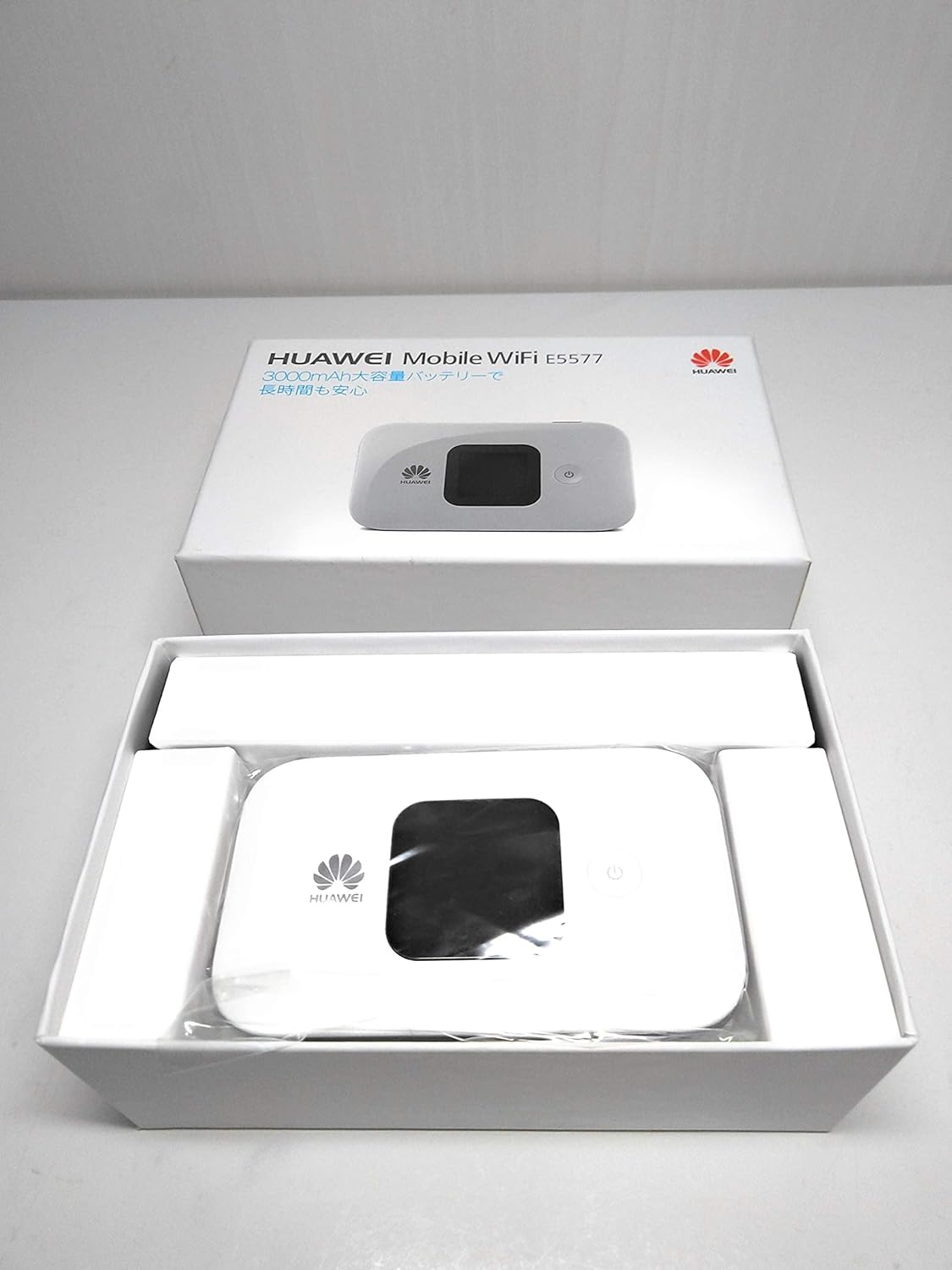

4. Įrenginys baigtasview
The HUAWEI E5577s-324 features a compact design with an LCD screen for status display, a power button, and a removable back cover for battery and SIM card access. Familiarize yourself with the device's physical components before proceeding with setup.
5. Sąranka
5.1. SIM kortelės montavimas
- Nuimkite galinį įrenginio dangtelį.
- Raskite SIM kortelės lizdą.
- Insert your standard or micro SIM card into the slot with the gold contacts facing down and the notched corner aligned correctly.
- Įsitikinkite, kad SIM kortelė yra saugiai įdėta.
5.2. Akumuliatoriaus įdėjimas
- After installing the SIM card, insert the battery into its compartment, aligning the contacts.
- Uždėkite galinį dangtelį, kol jis spragtelėdamas užsifiksuos vietoje.
5.3. Įjungimas/išjungimas
- Norėdami įjungti: Paspauskite ir palaikykite maitinimo mygtuką, kol ekranas užsidegs.
- Norėdami išjungti: Press and hold the power button until the power-off option appears on the screen, then confirm.
6. Naudojimo instrukcijos
6.1. Prisijungimas prie Wi-Fi
- Ensure your HUAWEI E5577s-324 is powered on.
- Kompiuteryje, išmaniajame telefone arba planšetiniame kompiuteryje ieškokite galimų „Wi-Fi“ tinklų.
- Select the network name (SSID) displayed on your Mobile WiFi's screen.
- Enter the Wi-Fi password (Key) also displayed on the device's screen.
- Prisijungus, galite prisijungti prie interneto.
6.2. Nustatymų tvarkymas
To manage advanced settings, such as changing the Wi-Fi name or password, accessing data usage statistics, or configuring network modes, open a web browser on a connected device and navigate to the device's web management interface (usually 192.168.8.1 or 192.168.1.1). Log in using the default username and password (typically 'admin' for both, or as indicated on the device label).
7. Priežiūra
- Valymas: Įrenginiui valyti naudokite minkštą, sausą šluostę. Venkite skystų valiklių.
- Saugykla: Nenaudojamą prietaisą laikykite vėsioje, sausoje vietoje.
- Akumuliatoriaus priežiūra: Norėdami pailginti akumuliatoriaus veikimo laiką, venkite dažnai visiškai jį iškrauti. Reguliariai įkraukite įrenginį.
8. Problemų sprendimas
- Nėra tinklo ryšio:
- Ensure your SIM card is correctly inserted and active. Check if you have mobile data allowance. Try restarting the device.
- Nepavyksta prisijungti prie „Wi-Fi“:
- Verify the Wi-Fi password. Ensure the device is within range. Restart both the Mobile WiFi and the connecting device.
- Lėtas interneto greitis:
- Check your signal strength on the device's screen. Move to an area with better network coverage. Reduce the number of connected devices.
- Įrenginys neįsijungia:
- Ensure the battery is charged. Connect the device to a power source using the USB cable and try again.
9. Specifikacijos
| Funkcija | Aprašymas |
|---|---|
| Prekės ženklas | HUAWEI |
| Modelis | E5577s-324 |
| Ryšio technologija | Wi-Fi |
| Suderinamos operacinės sistemos | macOS (and other common OS for Wi-Fi connectivity) |
| Dažnių juostos klasė | Triband (cellular network bands) |
| Kontrolės metodas | Touch (on device), Remote (via web interface/app) |
| Pakuotės matmenys | 15.5 x 9.9 x 6.1 cm |
| Svoris | 290 g |
10. Garantija ir palaikymas
Your HUAWEI E5577s-324 Mobile WiFi device is covered by a manufacturer's warranty. Please refer to the warranty card included in your package for details regarding warranty terms and conditions. For technical support, software updates, or further assistance, please visit the official HUAWEI support websvetainėje arba susisiekite su jų klientų aptarnavimo tarnyba.
Pastaba: Produkto specifikacijos ir išvaizda gali būti keičiami be išankstinio įspėjimo.


