1. Įvadas
The Fortinet FortiGate-60E-POE is a compact, all-in-one network security appliance designed to deliver comprehensive threat protection for small to medium-sized businesses and branch offices. This device integrates multiple security functions, including firewall, VPN, intrusion prevention, antivirus, web filtering, and application control, into a single platform. The Power over Ethernet (PoE) capabilities simplify deployment for connected devices. This manual provides essential information for the proper installation, configuration, and maintenance of your FortiGate-60E-POE appliance.
2. Saugos informacija
Please read all safety instructions before operating the device. Failure to follow these instructions may result in electric shock, fire, or damage to the product. Keep this manual for future reference.
- Maitinimo šaltinis: Use only the power adapter supplied with the device. Ensure the power outlet is properly grounded.
- Vėdinimas: Neužblokuokite jokių ventiliacijos angų. Užtikrinkite pakankamą oro cirkuliaciją aplink įrenginį, kad jis neperkaistų.
- Aplinka: Operate the device in a dry, well-ventilated area, away from direct sunlight, heat sources, and moisture.
- Aptarnavimas: Nemėginkite patys aptarnauti šio gaminio. Visą techninę priežiūrą patikėkite kvalifikuotam aptarnavimo personalui.
3. Pakuotės turinys
Patikrinkite, ar jūsų pakuotėje yra šie elementai. Jei kurio nors elemento trūksta arba jis pažeistas, susisiekite su pardavėju.
- FortiGate-60E-POE Appliance
- Maitinimo adapteris
- Ethernet kabelis
- Greitos pradžios vadovas
4. Produktas baigtasview
4.1 Priekinis skydelis
The front panel of the FortiGate-60E-POE features status indicators and network ports for connectivity and monitoring.

4.1 paveikslas: Priekyje view of the FortiGate-60E-POE. This image displays the front panel of the FortiGate-60E-POE, featuring the Fortinet logo, model name, and various LED indicators. From left to right, the LEDs include PWR (Power), STATUS, HA (High Availability), and PoE status indicators (A and B). To the right are individual Link/Act and Speed LEDs for each of the network ports (A, B, 1-5, DMZ, WAN1, WAN2).
- PWR šviesos diodas: Rodo maitinimo būseną. Žalia spalva reiškia įprastą veikimą.
- Būsenos šviesos diodas: Nurodo sistemos būseną.
- HA šviesos diodas: Indicates High Availability status.
- PoE LEDs (A, B): Indicate Power over Ethernet status for respective ports.
- Ryšio / veiksmo šviesos diodai: Indicate network link and activity for each port.
- Speed LEDs: Indicate connection speed for each port.
4.2 Galinis skydelis
The rear panel provides essential connectivity ports for power, console access, USB devices, and network interfaces.
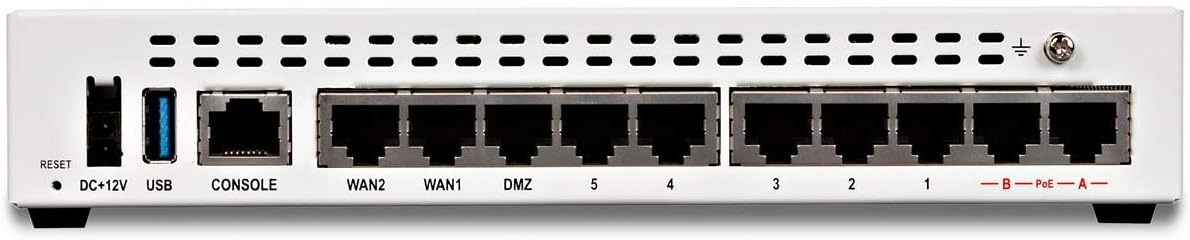
4.2 paveikslas: Galinis view of the FortiGate-60E-POE. This image displays the rear panel of the FortiGate-60E-POE. From left to right, it shows a Reset button, DC+12V power input, a USB port, a CONSOLE port (RJ45), WAN2, WAN1, DMZ, and five LAN ports (1-5). On the far right, there are two PoE ports labeled A and B, and a grounding screw.
- Perkrovimo mygtukas: Naudojamas gamykliniams numatytiesiems nustatymams atkurti.
- DC+12V: Maitinimo įvesties jungtis.
- USB prievadas: For connecting USB devices (e.g., external storage, 3G/4G modem).
- KONSOLE prievadas: RJ45 prievadas, skirtas prieigai per komandinės eilutės sąsają (CLI).
- WAN1/WAN2 Ports: Wide Area Network interfaces for internet connectivity.
- DMZ Port: Demilitarized Zone port for public-facing servers.
- LAN prievadai (1–5): Local Area Network ports for internal network devices.
- PoE Ports (A, B): Power over Ethernet ports for compatible devices.
5. Sąranka
5.1 Fizinis įrengimas
- Vieta: Place the FortiGate appliance on a stable, flat surface or mount it in a rack (if applicable, using a separately purchased rackmount kit). Ensure proper ventilation.
- Maitinimo jungtis: Connect the supplied power adapter to the DC+12V port on the rear panel and then plug it into a grounded electrical outlet.
- Įžeminimas: For optimal protection, connect a grounding wire to the grounding screw on the rear panel and to a suitable earth ground.
5.2 Pradinis tinklo prijungimas
- Prisijunkite prie LAN: Connect an Ethernet cable from one of the LAN ports (e.g., port 1) on the FortiGate to your management computer.
- Connect to WAN: Connect an Ethernet cable from your internet service provider's modem or router to the WAN1 port on the FortiGate.
- Maitinimas: Ensure the power adapter is connected and the device powers on. The PWR LED on the front panel should illuminate green.
5.3 Pagrindinės konfigūracijos prieiga
You can access the FortiGate for initial configuration via a web browser (GUI) or the command-line interface (CLI).
- GUI prieiga: Atidarykite a web browser on your management computer and navigate to
https://192.168.1.99(default IP address). Log in with the default usernameadminand no password. - CLI Access: Connect a console cable from your computer's serial port to the CONSOLE port on the FortiGate. Use a terminal emulator (e.g., PuTTY) with settings: 9600 baud, 8 data bits, no parity, 1 stop bit, no flow control.
6. Operacinis
Once the initial setup is complete, you can configure the FortiGate-60E-POE to secure your network. The device operates as a Unified Threat Management (UTM) appliance, providing multiple layers of security.
- Ugniasienės politika: Configure rules to control incoming and outgoing network traffic.
- VPN: Set up Virtual Private Networks for secure remote access or site-to-site connectivity.
- Įsilaužimų prevencijos sistema (IPS): Protect against known exploits and vulnerabilities.
- Antivirus/Anti-malware: Scan traffic for malicious software.
- Web Filtravimas: Control access to websites based on categories or specific URLs.
- Programos valdymas: Manage and monitor application usage on your network.
- PoE funkcionalumas: The PoE ports (A, B) can power compatible devices such as IP phones or wireless access points, simplifying cabling.
For detailed configuration steps, refer to the FortiGate Administration Guide available on the Fortinet support websvetainę.
7. Priežiūra
Regular maintenance ensures optimal performance and security of your FortiGate appliance.
- Firmware atnaujinimai: Regularly check for and apply the latest firmware updates from Fortinet to ensure you have the most current features and security patches.
- Konfigūracijos atsarginė kopija: Periodically back up your FortiGate configuration. This allows for quick restoration in case of an issue.
- Stebėjimas: Monitor system logs and performance metrics to identify potential issues early.
- Valymas: Keep the device free from dust. Use a soft, dry cloth to clean the exterior. Do not use liquid cleaners.
8. Problemų sprendimas
Šiame skyriuje pateikiami dažniausiai pasitaikančių problemų, su kuriomis galite susidurti, sprendimai.
- Nėra galios: If the PWR LED is off, ensure the power adapter is securely connected to both the device and a working electrical outlet.
- Nėra tinklo ryšio: Check Ethernet cable connections. Verify Link/Act LEDs are illuminated. Ensure correct IP configuration on your management computer.
- Nepavyksta pasiekti grafinės sąsajos: Verify your computer's IP address is in the same subnet as the FortiGate (e.g., 192.168.1.x). Try clearing your browser's cache or using a different browser.
- Pamiršote slaptažodį: If you forget the admin password, you may need to perform a factory reset using the RESET button or via the console port. Refer to the Fortinet documentation for the exact procedure.
- Lėtas našumas: Check system resource utilization (CPU, memory) via the GUI or CLI. Review firewall policies and security profiles for potential bottlenecks.
9. Specifikacijos
| Funkcija | Specifikacija |
|---|---|
| Prekės ženklas | FORTINETAS |
| Modelio numeris | FG-60E-POE-BDL-950-60 |
| Gaminio matmenys | 6.3 x 8.5 x 1.5 colio |
| Prekės svoris | 2.2 svaro |
| Ypatinga funkcija | WPS (Wireless Protected Setup) |
| Suderinami įrenginiai | Nešiojamasis kompiuteris |
| Kontrolės metodas | Programėlė |
| UPC | 739420810356, 609378724510 |
| Pasiekiama pirmoji data | 13 m. rugsėjo 2017 d |
10. Garantija ir palaikymas
Your FortiGate-60E-POE appliance includes a 5-year 24x7 FortiCare and FortiGuard Unified (UTM) Protection bundle, as indicated by the model FG-60E-POE-BDL-950-60. This bundle provides comprehensive support and security services.
- FortiCare: Offers technical support, hardware replacement, and firmware upgrades.
- FortiGuard: Provides real-time threat intelligence updates for services like antivirus, IPS, web filtering, and anti-spam.
For detailed warranty information, service terms, and to access technical support, please visit the official Fortinet support websvetainė: support.fortinet.com.