Įvadas
Ačiū, kad pirkoteasing the Edifier DA5100 5.1 multimedia speaker system. This manual provides detailed instructions to help you set up, operate, and maintain your speakers for optimal performance and longevity. Please read this manual thoroughly before using the product.
Pakuotės turinys
Prieš tęsdami, patikrinkite, ar pakuotėje yra visi komponentai:
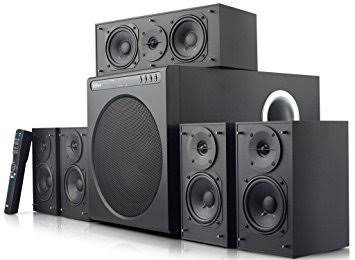
- Žemųjų dažnių garsiakalbio blokas
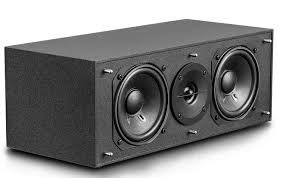
- Centrinis garsiakalbis
- Front satellite speakers (2)
- Rear satellite speakers (2)
- Nuotolinio valdymo pultas
- Audio input cables (RCA to RCA, 3.5mm to RCA)
- Speaker connection cables
- Vartotojo vadovas (šis dokumentas)
Svarbios saugos priemonės
Norėdami užtikrinti saugų darbą ir išvengti žalos, laikykitės šių nurodymų:
- Saugokite įrenginį nuo lietaus ar drėgmės.
- Do not open the speaker enclosures; there are no user-serviceable parts inside.
- Pastatykite įrenginį ant stabilaus, lygaus paviršiaus, kad jis neapvirstų.
- Ensure adequate ventilation around the speakers and subwoofer.
- Disconnect from power during lightning storms or when unused for long periods.
- Laikykite atokiau nuo šilumos šaltinių ir tiesioginių saulės spindulių.
- Naudokite tik nurodytą maitinimo šaltinį ir priedus.
Sąrankos vadovas
1. Garsiakalbio išdėstymas
Proper speaker placement is crucial for optimal 5.1 surround sound experience.
- Centrinis garsiakalbis: Place directly in front of the listening position, typically above or below your display.
- Front Speakers (Left/Right): Position equidistant from the listening position, forming an equilateral triangle with the listener.
- Rear Speakers (Left/Right): Place behind the listening position, slightly to the sides, at ear level or slightly above.
- Žemų dažnių garsiakalbis: Can be placed anywhere in the room, but corner placement often enhances bass. Experiment for best results.
2. Garsiakalbių prijungimas
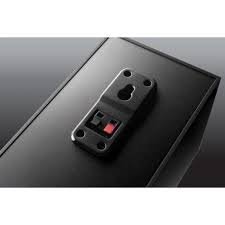
Connect the satellite speakers to the subwoofer unit using the provided speaker cables. Ensure correct polarity (red to red, black to black) for each connection.
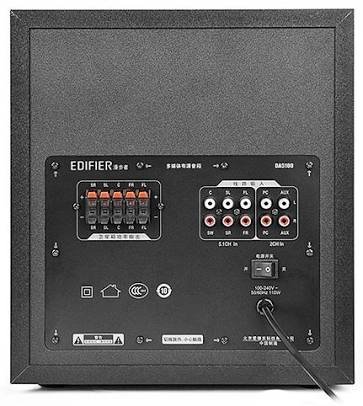
- Identify the speaker output terminals on the rear of the subwoofer. These are typically labeled for Front Left (FL), Front Right (FR), Center (C), Surround Left (SL), and Surround Right (SR).
- Connect each satellite speaker to its corresponding terminal on the subwoofer.
3. Garso šaltinių prijungimas
The DA5100 offers multiple input options. Choose the one that best suits your audio source.
- 5.1 kanalo įvestis: For true 5.1 surround sound, connect your DVD player, Blu-ray player, or sound card's 5.1 analog outputs to the corresponding 5.1 input jacks on the subwoofer (FL, FR, C, SL, SR, SW).
- Kompiuterio įvestis: Use the 3.5mm to RCA cable to connect your computer's audio output to the "PC" input jacks.
- AUX įvestis: Use the RCA to RCA cable to connect other stereo audio devices (e.g., TV, game console) to the "AUX" input jacks.
4. Maitinimo prijungimas
After all audio and speaker connections are made, connect the power cord to the subwoofer and then to a wall outlet. Ensure the power switch on the rear of the subwoofer is in the "OFF" position before plugging in.
Naudojimo instrukcijos
1. Įjungimas/išjungimas
Locate the power switch on the rear panel of the subwoofer. Flip it to the "ON" position to power on the system. Flip it to "OFF" to power off.
2. Įvesties pasirinkimas
Use the "Input" button on the remote control or the control panel on the subwoofer to cycle through the available audio inputs: 5.1, PC, AUX.
3. Garsumo valdymas
Use the "Volume +" and "Volume -" buttons on the remote control or the main volume knob on the subwoofer to adjust the overall system volume.
4. Individual Channel Volume Adjustment
The remote control allows for individual adjustment of the center, surround, and subwoofer volumes to fine-tune your sound experience.
- Press the "Center", "Surround", or "Subwoofer" button on the remote.
- Use the "Volume +" or "Volume -" buttons to adjust the level for that specific channel.
5. Nutildymo funkcija
Press the "Mute" button on the remote control to temporarily silence the audio. Press it again to restore the sound.
Priežiūra ir priežiūra
To keep your Edifier DA5100 speakers in optimal condition:
- Valymas: Use a soft, dry cloth to wipe down the speaker surfaces. Do not use liquid cleaners or abrasive materials.
- Vėdinimas: Ensure that the subwoofer's heat sink and ventilation ports are not obstructed.
- Saugykla: Jei garsiakalbius ilgesnį laiką sandėliuosite, atjunkite juos nuo maitinimo šaltinio ir laikykite vėsioje, sausoje vietoje.
- Kabelių valdymas: Keep cables tidy and avoid sharp bends or kinks to prevent damage.
Trikčių šalinimas
If you encounter issues with your Edifier DA5100 system, refer to the table below for common problems and solutions.
| Problema | Galima priežastis | Sprendimas |
|---|---|---|
| Nėra garso | Power off; incorrect input selected; loose cables; muted. | Check power switch; select correct input; re-connect all cables securely; un-mute. |
| Iškraipytas garsas | Volume too high; poor audio source quality; incorrect cable connection. | Reduce volume; try a different audio source; check cable connections and polarity. |
| Nuotolinio valdymo pultas neveikia | Dead batteries; obstruction between remote and sensor. | Replace batteries; ensure clear line of sight to the subwoofer's IR sensor. |
| Only some speakers producing sound | Incorrect 5.1 setup; loose speaker cables; audio source not 5.1. | Verify 5.1 input connections; check individual speaker cables; ensure audio source is outputting 5.1. |
If the problem persists, please contact Edifier customer support.
Specifikacijos
The following are the general specifications for the Edifier DA5100 5.1 speaker system. Specifications are subject to change without notice.
- Galia: RMS 8W x 5 + 38W (THD+N=10%)
- Dažnio atsakas: R/L/C/SL/SR: 150Hz-20KHz | SW: 20Hz-130Hz
- Įvesties jautrumas: 5.1CH: L/R: 450mV+/-50mV; SW: 150mV+/-50mV | PC: 700mV+/-50mV | AUX: 350mV+/-50mV
- Įvesties tipas: 5.1 Channel, PC, AUX
- Boso vienetas: 8 colių (210mm)
- Mid-range Unit: 3 colių (78mm)
- Aukštųjų dažnių vienetas: 1 colių (25mm)
- Matmenys (subwoofer): 270 mm x 300 mm x 435 mm (P x A x G)
- Dimensions (Satellite): 130 mm x 160 mm x 100 mm (P x A x G)
Informacija apie garantiją
Edifier products come with a limited warranty. Please refer to the warranty card included with your product or visit the official Edifier webIšsamias garantijos sąlygas, taikomas jūsų regionui, rasite svetainėje. Išsaugokite pirkimo kvitą kaip pirkimo įrodymą garantijos pretenzijoms.
Pagalba klientams
For further assistance, technical support, or service inquiries, please contact Edifier customer support through their official websvetainėje arba kontaktinę informaciją, pateiktą jūsų produkto pakuotėje.
Edifier Official Websvetainė: www.edifier.com