1. Įvadas
This manual provides detailed instructions for the installation, operation, and maintenance of your Noctua NF-A14 PWM chromax.Black.swap 140mm fan. Designed for premium quiet cooling performance, this fan features a square frame suitable for various applications, including water cooling radiators and PC cases. The chromax.Black.swap edition offers an all-black design with swappable anti-vibration pads for aesthetic customization.
2. Produktas baigtasview
The Noctua NF-A14 PWM chromax.Black.swap is a high-performance 140x140x25mm fan with a 4-pin PWM connector for automatic speed control. It delivers excellent airflow and static pressure, making it an effective solution for demanding cooling scenarios while maintaining low noise levels.

Image 2.1: The Noctua NF-A14 PWM chromax.Black.swap fan, showcasing its black design with red anti-vibration pads installed, alongside a selection of other colored anti-vibration pads.
3. Pakuotės turinys
Patikrinkite, ar pakuotėje yra visi reikalingi daiktai:
- Noctua NF-A14 PWM chromax.Black.swap fan
- NA-AVP1 chromax Black Anti-Vibration Pads (pre-installed)
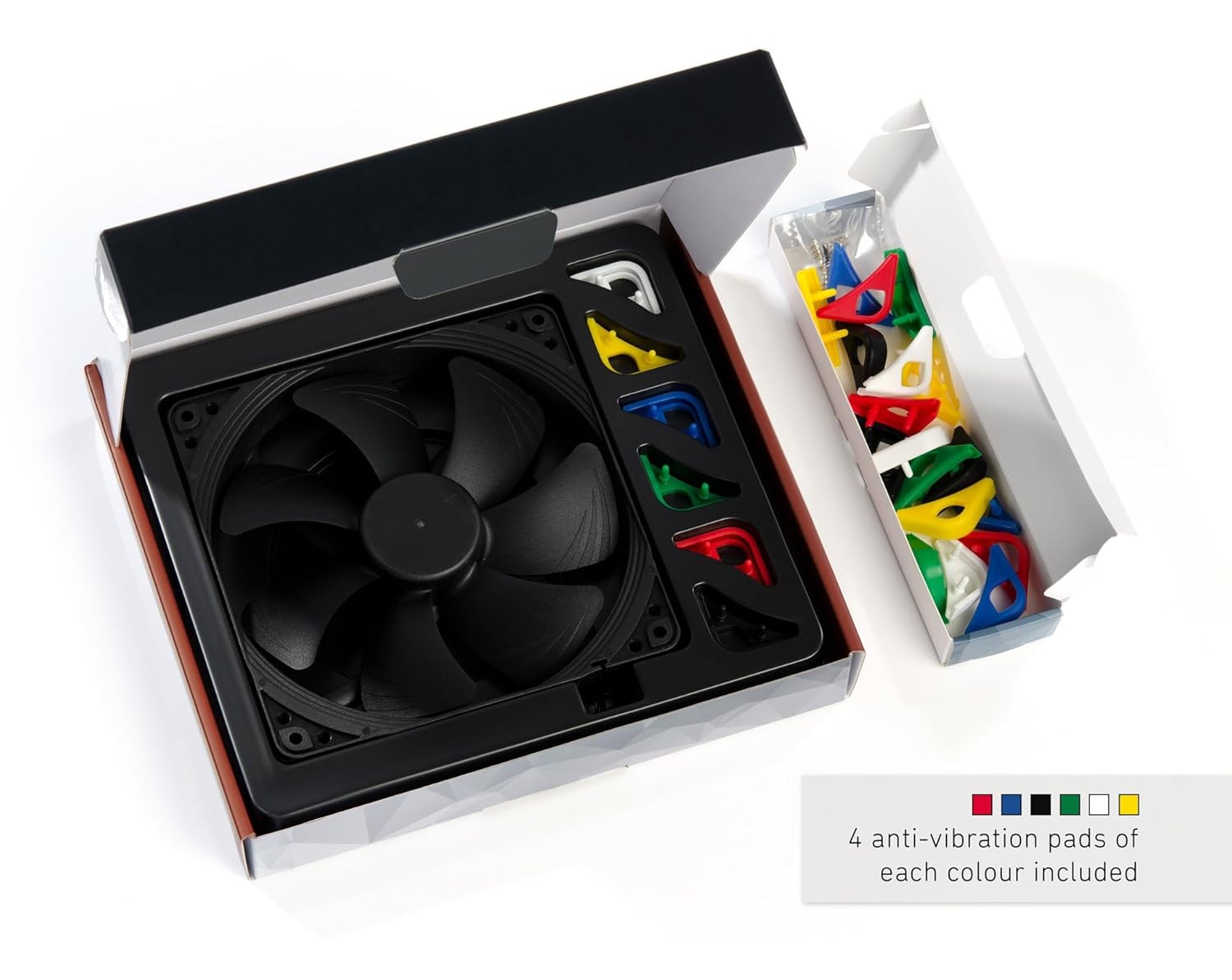
- Additional NA-AVP1 chromax Anti-Vibration Pads in Red, White, Blue, Green, Yellow (4 of each color)
- Ventiliukai
- NA-EC1 30cm Extension Cable (Black)

Image 3.1: Contents of the Noctua NF-A14 PWM chromax.Black.swap package, including the fan, various colored anti-vibration pads, and an extension cable.
4. Sąranka ir diegimas
Follow these steps to install your Noctua fan:
- Prepare the Fan: If you wish to customize the fan's appearance, carefully remove the pre-installed black anti-vibration pads from the corners of the fan. Select your desired color from the included NA-AVP1 chromax pads and firmly press them onto the fan corners.
- Ventiliatoriaus montavimas: Position the fan in your desired location (e.g., PC case, radiator). Use the included fan screws to secure the fan. Ensure the fan's airflow direction (indicated by arrows on the fan frame) is correct for your cooling setup.
- Prijunkite ventiliatorių: Connect the fan's 4-pin PWM cable to an available 4-pin fan header on your motherboard or fan controller. If the cable length is insufficient, use the provided NA-EC1 30cm extension cable.

Image 4.1: The NF-A14 fan demonstrating various color options for the anti-vibration pads, allowing for aesthetic integration into different system builds.
4.2 pav.: Stambus planas view of the 4-pin PWM connector, which enables automatic speed control via compatible motherboard headers.
Video 4.1: An official video from Noctua showcasing the chromax product line, highlighting the customization options and integration into various PC builds.
5. Naudojimo instrukcijos
The NF-A14 PWM fan utilizes a 4-pin Pulse Width Modulation (PWM) connection, allowing your motherboard or fan controller to automatically adjust the fan speed based on system temperature. This ensures optimal cooling performance when needed and reduced noise levels during lighter loads.
- Automatinis greičio valdymas: Connect the fan to a 4-pin PWM fan header. The motherboard's BIOS/UEFI or dedicated fan control software can be used to configure fan curves, setting desired speed responses to temperature changes.
- Maksimalus našumas: The fan can operate at a maximum rotational speed of 1500 RPM, providing significant airflow and static pressure.
- Tylus veikimas: At lower speeds, the fan operates with minimal noise, rated at a maximum of 24.6 dB(A) at full speed.
6. Pritaikymas
The chromax.Black.swap series allows for extensive aesthetic customization. The fan comes with swappable anti-vibration pads in six colors: black, red, white, blue, yellow, and green. These pads not only reduce vibration but also enable you to match the fan's appearance with your system's color scheme.

Image 6.1: A visual representation of multiple NF-A14 fans, each fitted with different colored anti-vibration pads (blue, red, green, yellow, black, white), illustrating the customization possibilities.
7. Priežiūra
Reguliarus ventiliatoriaus aptarnavimas užtikrina optimalų veikimą ir ilgaamžiškumą:
- Dulkių šalinimas: Periodically clean the fan blades and frame to prevent dust buildup, which can impede airflow and increase noise. Use compressed air or a soft brush.
- Patikra: Check for any obstructions or loose cables that might interfere with the fan's operation.
8. Problemų sprendimas
If you encounter issues with your fan, consider the following:
- Ventiliatorius nesisuka: Ensure the 4-pin PWM connector is securely attached to the motherboard header. Check BIOS/UEFI settings to confirm the fan header is enabled and configured correctly.
- Per didelis triukšmas: Verify that the fan is securely mounted and not vibrating against the case. Ensure no cables or other components are touching the fan blades. Check fan speed settings in BIOS/UEFI or software; high speeds will naturally produce more noise.
- Prastas aušinimo našumas: Confirm the fan's airflow direction is appropriate for your system's cooling design. Ensure there are no significant dust buildups on the fan or any connected heatsinks/radiators.
9. Specifikacijos
| Funkcija | Specifikacija |
|---|---|
| Ventiliatoriaus dydis | 140x140x25 mm |
| Jungties tipas | 4-Pin PWM |
| ttage | 12 voltų |
| Vattage | 1.19 vatų |
| Maksimalus sukimosi greitis | 1500 aps./min |
| Triukšmo lygis | 24.6 dB(A) (max) |
| MTTF (Mean Time To Failure) | >150,000 valandų |
| Guolio tipas | SSO2 Bearing |
| Medžiaga | Fibre-glass reinforced PBT |
| Gaminio matmenys | 5.51 colio ilgio x 5.51 colių pločio x 0.98 colio aukščio |
10. Garantija ir palaikymas
Noctua products are manufactured to the highest quality standards and feature a long lifespan, supported by the trusted premium-grade SSO2 bearing. For detailed warranty information, technical support, or further assistance, please visit the official Noctua websvetainėje arba susisiekite su jų klientų aptarnavimo tarnyba.


