Įvadas
This manual provides comprehensive instructions for the Elitech BT-3 Digital Hygrometer Thermometer. This device is designed to accurately monitor both indoor and outdoor temperature, as well as indoor humidity levels, offering essential environmental data for various settings.
Produkto savybės
- Digital Thermometer: Monitors indoor and outdoor temperature in both Fahrenheit (℉) and Celsius (℃). The measuring range is -58℉ to +158℉.
- Humidity Monitor: Measures indoor relative humidity (RH) within a range of 20% to 99%RH.
- MAX & MIN Records: Automatically stores and displays the maximum and minimum recorded values for indoor/outdoor temperature and indoor humidity.
- Clock Function and Alarming Function: Features a switchable 12 or 24-hour clock display and a settable alarm time.
- Three Mounting Options: Designed for versatility with tabletop, wall-mountable, and magnet-mountable options, allowing convenient placement.
- Oro komforto indikatorius: Displays the comfort level (DRY/COMFORT/WET) based on current indoor humidity, providing a quick assessment of air conditions.
Įrenginio išdėstymas
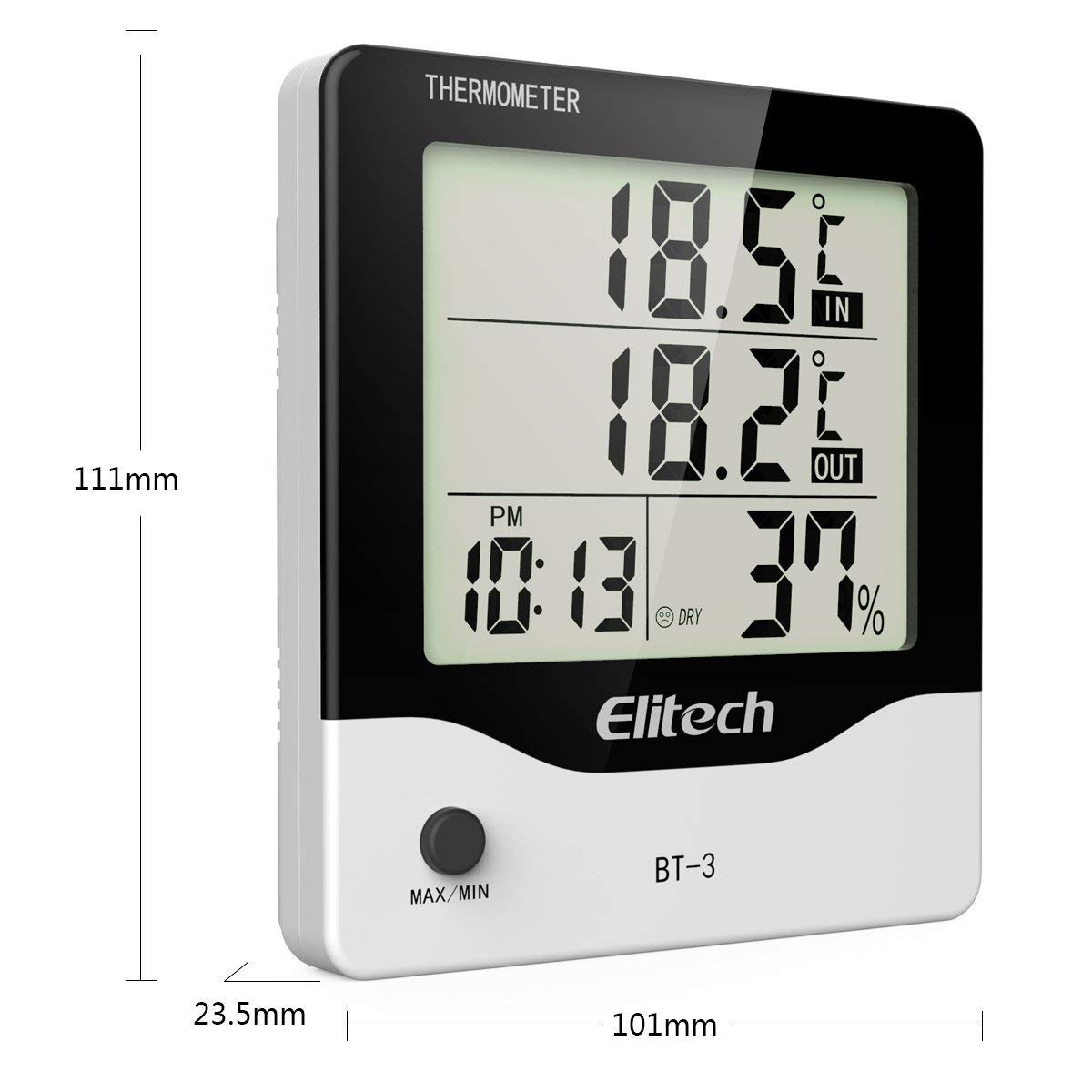
1 paveikslas: Priekyje view of the Elitech BT-3 unit, showing the LCD display with indoor/outdoor temperature, time, and humidity readings. Dimensions are indicated as 111mm height, 101mm width, and 23.5mm depth. A "MAX/MIN" button is visible at the bottom.

2 paveikslas: Galinis view of the Elitech BT-3 unit, showing the battery compartment cover and control buttons: MODE, ADJ, CLEAR, RESET, and a ℃/℉ switch. A keyhole slot for wall mounting is also visible.

3 paveikslas: Galinis view of the Elitech BT-3 unit, illustrating the foldable kickstand for tabletop use and the attached outdoor temperature probe with its long cable.

4 paveikslas: Iš arti view of the open battery compartment on the back of the Elitech BT-3 unit, showing the slot for a AAA battery (not included).
Sąranka
Akumuliatoriaus montavimas
- Locate the battery compartment cover on the back of the unit (refer to Figure 2).
- Slide the cover off to open the compartment (refer to Figure 4).
- Insert one AAA battery, ensuring the correct polarity (+/-) is observed. Note: Battery is not included.
- Uždėkite akumuliatoriaus skyriaus dangtelį, pastumdami jį atgal į vietą.
Zondų išdėstymas
The outdoor temperature probe is connected to the main unit via a long cable. For accurate outdoor temperature readings, place the probe outside in a location that is protected from direct sunlight, rain, and other extreme weather conditions. Ensure the cable is routed safely and does not interfere with windows or doors.
Montavimo parinktys
The BT-3 offers flexible placement options:
- Stalviršis: Extend the foldable kickstand on the back of the unit (refer to Figure 3) to place it securely on any flat surface.
- Tvirtinamas prie sienos: Utilize the keyhole slot on the back of the unit (refer to Figure 2) to hang it on a screw or nail on a wall.
- Magnet-Mountable: The unit features built-in magnets, allowing it to be conveniently attached to metallic surfaces such as refrigerators or metal cabinets.
Naudojimo instrukcijos
Maitinimo įjungimas/išjungimas
The unit powers on automatically once the battery is installed. There is no dedicated power button. To turn off, remove the battery.
Temperature Unit Selection (℃/℉)
On the back of the unit, locate the small switch labeled "℃/℉" (refer to Figure 2). Slide this switch to toggle between Celsius and Fahrenheit temperature displays.
Laiko nustatymas
- Paspauskite REŽIMAS button (on the back) to cycle through display modes until the current time is shown.
- Paspauskite ir palaikykite REŽIMAS button until the hour digit begins to flash.
- Naudokite ADJ button (on the back) to adjust the hour.
- Paspauskite REŽIMAS again to move to the minute digit, then use ADJ sureguliuoti minutes.
- Spauskite toliau REŽIMAS to set the 12-hour (AM/PM) or 24-hour format.
- Paspauskite REŽIMAS one last time to confirm settings and exit time setting mode.
Signalizacijos nustatymas
- Paspauskite REŽIMAS button until the alarm time is displayed (often indicated by an alarm clock icon).
- Paspauskite ir palaikykite REŽIMAS button until the alarm hour digit flashes.
- Naudokite ADJ mygtuką, norėdami reguliuoti žadintuvo valandą.
- Paspauskite REŽIMAS again to move to the alarm minute digit, then use ADJ sureguliuoti minutes.
- Paspauskite REŽIMAS one last time to confirm and exit alarm setting mode.
- Norėdami įjungti arba išjungti žadintuvą, paspauskite ADJ button when the alarm time is displayed. An alarm icon will appear or disappear on the screen to indicate its status.
MAX/MIN Temperature and Humidity Records
Paspauskite MAX/MIN button (on the front of the unit) to view the maximum and minimum recorded indoor/outdoor temperatures and indoor humidity values.
- Paspauskite MAX/MIN button repeatedly to cycle through the current readings, maximum readings, and minimum readings.
- Norėdami išvalyti MAX/MIN įrašus, paspauskite ir palaikykite IŠVALYTI button (on the back of the unit) while the MAX/MIN readings are displayed.
Oro komforto indikatorius
The display includes an indicator that categorizes the indoor air comfort level based on humidity:
- DŽIOVAS: Indicates that the indoor humidity level is low.
- KOMFORTAS: Indicates that the indoor humidity level is within an optimal and comfortable range.
- Šlapias: Indicates that the indoor humidity level is high.
Priežiūra
- Valymas: Clean the unit with a soft, dry cloth. Do not use abrasive cleaners, solvents, or immerse the unit in water.
- Baterijos keitimas: Replace the AAA battery when the low battery indicator appears on the display to ensure continuous and accurate operation.
- Zondų priežiūra: Keep the outdoor probe clean and free from dirt, dust, and debris.
- Aplinkos sąlygos: Avoid exposing the unit to extreme temperatures, direct sunlight, or excessively high humidity for prolonged periods, as this can affect accuracy and lifespan.
Trikčių šalinimas
Netikslūs rodmenys
- Zondo vieta: Ensure the outdoor probe is correctly positioned and not exposed to direct sunlight, heat sources, or moisture, which can skew readings.
- Stabilizavimo laikas: Allow the unit sufficient time (up to 30 minutes) to stabilize and provide accurate readings after initial setup or if it has been moved to a new environment.
- Baterijos lygis: Check the battery level and replace it with a fresh AAA battery if the indicator shows low power.
Ekranas neveikia
- Baterijos patikrinimas: Verify that the battery is installed correctly with the proper polarity.
- Baterijos keitimas: Pakeiskite bateriją nauja AAA baterija.
- Gamykliniai nustatymai: If the display remains unresponsive, perform a factory reset by pressing the RESET button on the back of the unit. This may require a small pointed object like a paperclip.
Specifikacijos
| Specifikacija | Detalė |
|---|---|
| Modelio numeris | BT-3 |
| Spalva | Baltas |
| Prekės ženklas | Elitech |
| Prekės svoris | 0.16 kilogramo (5.6 uncijos) |
| Baterijos tipas | 1 C battery required (Alkaline) |
| Žemesnės temperatūros įvertinimas | 32 laipsnių pagal Farenheitą |
| Viršutinės temperatūros įvertinimas | 122 laipsnių pagal Farenheitą |
| Montavimo tipas | Stalviršis, sieninis laikiklis |
| ttage | 1.5 voltų |
| Temperatūros tikslumas | 0.1 ℃ |
| Gaminio matmenys | 4.25 x 5.82 x 1.1 colio |
Garantija ir palaikymas
Elitech is committed to providing excellent customer service. The product comes with 24/7 US Technician Support available via email and phone.
For warranty claims, technical assistance, or any product-related inquiries, please contact Elitech customer service directly. Refer to the Elitech official webNaujausią kontaktinę informaciją rasite svetainėje arba produkto pakuotėje.
Elitech Company Overview
Šiame vaizdo įraše pateikiama bendra informacijaview of Elitech Technology Inc., its vision, and its range of HVAC/R tools and manufacturing capabilities. It is not specific to the BT-3 product operation but offers insight into the brand's commitment to innovation.
„1“ vaizdo įrašas: Elitech AI HVAC/R Tools Create Green Future - An overview of Elitech's technology and manufacturing.


