1. Įvadas
Ačiū, kad pirkoteasing the GPX PDB1077B Portable DVD Player. This device offers versatile entertainment with its 10.1-inch display, DVD/CD playback capabilities, and built-in Bluetooth wireless transmitter for audio streaming to compatible headphones. This manual provides detailed instructions for setup, operation, and maintenance to ensure optimal performance and longevity of your device.
2. Svarbi saugos informacija
Please read all safety warnings and instructions carefully before using this product. Retain this manual for future reference.
- Maitinimo šaltinis: Naudokite tik nurodytą maitinimo adapterį. Neteisingas garsumastage galite sugadinti įrenginį ir anuliuoti garantiją.
- Vanduo ir drėgmė: Saugokite įrenginį nuo lietaus, drėgmės ir nemerkite jo į vandenį.
- Šiluma: Laikykite įrenginį atokiau nuo šilumos šaltinių, tokių kaip radiatoriai, šildytuvai, viryklės ar kiti prietaisai (įskaitant ampkeltuvai), kurie gamina šilumą.
- Vėdinimas: Užtikrinkite tinkamą vėdinimą. Neužblokuokite jokių ventiliacijos angų.
- Valymas: Valykite tik sausa šluoste. Nenaudokite skystų valiklių ar aerozolinių valiklių.
- Aptarnavimas: Nemėginkite patys aptarnauti šio gaminio. Visą techninę priežiūrą patikėkite kvalifikuotam aptarnavimo personalui.
- Baterijos sauga: The device contains a rechargeable battery. Do not expose to excessive heat or direct sunlight. Dispose of batteries properly according to local regulations.
- Klausos apsauga: Venkite klausytis dideliu garsu ilgą laiką, kad nepažeistumėte klausos.
3. Pakuotės turinys
Patikrinkite, ar pakuotėje yra visi toliau išvardyti daiktai:
- GPX PDB1077B Portable DVD Player
- Belaidės Bluetooth ausinės
- Nuotolinio valdymo pultas
- AC/DC maitinimo adapteris
- Automobilio maitinimo adapteris
- AV kabelis
- Vartotojo vadovas (šis dokumentas)
4. Produktas baigtasview
Familiarize yourself with the components of your GPX PDB1077B Portable DVD Player.
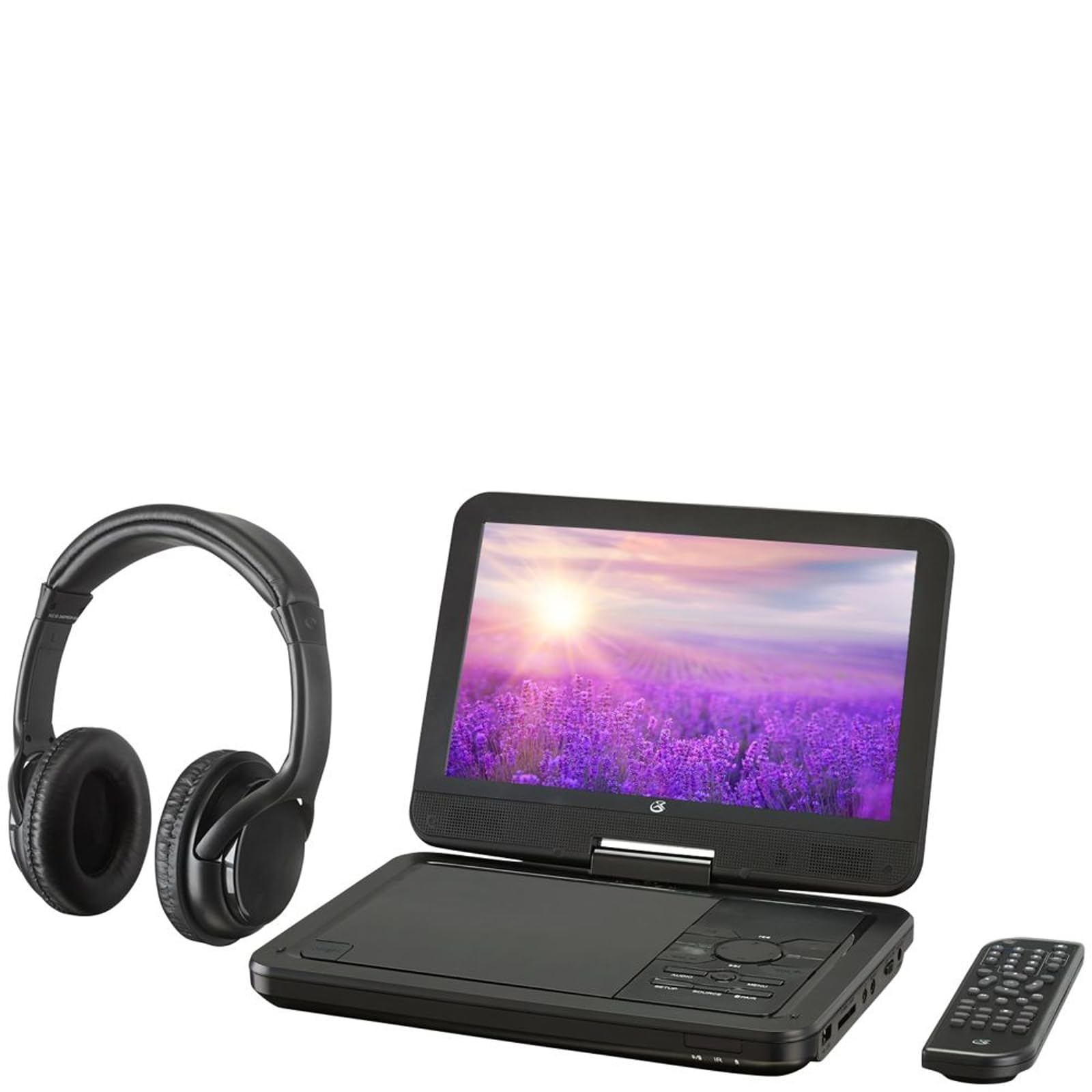
4.1 paveikslas: The GPX PDB1077B Portable DVD Player, showing the 10.1-inch screen, control panel, wireless Bluetooth headphones, and remote control.
4.1 Portable DVD Player Unit
The main unit features a swivel screen, disc tray, and control buttons. Key components include:
- 10.1 colio LCD ekranas: Už viewvaizdo turinio kūrimas.
- Disko dėklas: DVD ir CD diskų įdėjimui.
- Valdymo skydelis: Buttons for playback, menu navigation, volume, and source selection.
- Prievadai: USB, SD card slot, AV out, headphone jack, DC in.
- Garsiakalbiai: Integruoti stereo garsiakalbiai.
4.2 Wireless Bluetooth Headphones
The included headphones connect wirelessly to the DVD player via Bluetooth for private listening.
4.2 paveikslas: Iš arti view of the black wireless Bluetooth headphones, featuring padded earcups and an adjustable headband.
4.3 Nuotolinis valdymas
Nuotolinio valdymo pultas suteikia patogią prieigą prie visų funkcijų per atstumą.
4.3 paveikslas: Iš arti view of the compact black remote control with various buttons for playback, menu navigation, and volume adjustment.
5. Sąrankos vadovas
5.1 Įrenginio įkrovimas
- Connect the AC/DC power adapter to the DC IN port on the DVD player.
- Įkiškite adapterį į standartinį sieninį lizdą.
- Užsidegs įkrovimo indikatoriaus lemputė. Visiškas įkrovimas trunka maždaug 3–4 valandas.
- For in-car use, connect the car power adapter to the DC IN port and your vehicle's 12V power outlet.
5.2 Įjungimas / išjungimas
- To power on, slide the POWER switch to the ON position. The screen will light up.
- Norėdami išjungti, pastumkite POWER jungiklį į OFF padėtį.
5.3 Connecting Bluetooth Headphones
- Įsitikinkite, kad DVD grotuvas įjungtas.
- Turn on the Bluetooth headphones and put them into pairing mode (refer to headphone manual if needed).
- On the DVD player, navigate to the Bluetooth settings menu.
- Select "Scan for Devices" or similar option.
- Choose your headphones from the list of available devices to pair.
- Once paired, audio will automatically transmit to the headphones.
5.4 Connecting to an External Display (Optional)
Use the included AV cable to connect the DVD player to a TV or monitor.
- Prijunkite vieną AV kabelio galą prie DVD grotuvo AV OUT prievado.
- Connect the other end to the AV IN ports (Yellow for Video, White for Left Audio, Red for Right Audio) on your external display.
- Select the correct AV input on your external display.
6. Naudojimo instrukcijos
6.1 DVD ir CD diskų atkūrimas
- Open the disc tray by gently lifting the screen.
- Place a DVD or CD onto the spindle with the label side facing up.
- Gently close the disc tray.
- Grotuvas automatiškai aptiks diską ir pradės atkūrimą arba parodys disko meniu.
- Use the navigation buttons (Up, Down, Left, Right, Enter) on the control panel or remote to navigate menus.
- Paspauskite PALEISTI / PAUZĖ mygtuką, norėdami pradėti arba pristabdyti atkūrimą.
- Paspauskite STOP mygtuką sustabdyti atkūrimą.
6.2 Using USB and SD Card Media
- Įkiškite USB atmintinę į USB prievadą arba SD kortelę į SD kortelės lizdą.
- Paspauskite ŠALTINIS button on the control panel or remote to select "USB" or "SD".
- Naršykite po savo filenaudojant valdymo mygtukus.
- Pasirinkite a file (e.g., MP3, JPEG) and press ENTER žaisti arba view.
6.3 Nustatymų reguliavimas
Access the system settings to customize your viewklausymosi patirtis.
- Paspauskite NUSTATYMAS button on the remote or control panel.
- Use the navigation buttons to select options such as:
- Ekrano nustatymai: Adjust brightness, contrast, color.
- Garso nustatymai: Adjust volume, equalizer.
- Kalbos nustatymai: Select OSD language, audio language, subtitle language.
- Tėvų kontrolė: Nustatykite diskų atkūrimo įvertinimo lygius.
- Paspauskite ENTER patvirtinti pasirinkimus ir NUSTATYMAS dar kartą išeiti.
6.4 Nuotolinio valdymo pulto naudojimas
The remote control provides full functionality. Ensure batteries are correctly inserted (2 x AAA, not included).
| Mygtukas | Funkcija |
|---|---|
| GALIA | Įjungia arba išjungia grotuvą. |
| NUSTATYMAS | Įjungia sistemos nustatymų meniu. |
| ŠALTINIS | Switches between DVD, USB, SD, and AV input modes. |
| PALEISTI / PAUZĖ | Pradeda arba pristabdo atkūrimą. |
| STOP | Sustabdo atkūrimą. |
| VOL + / VOL- | Reguliuoja garsumo lygį. |
| NAVIGATE (Up/Down/Left/Right/ENTER) | Naršo meniu ir patvirtina pasirinkimus. |
| MENIU | Accesses the disc menu during DVD playback. |
7. Priežiūra
7.1 Prietaiso valymas
- Prieš valydami įsitikinkite, kad prietaisas yra išjungtas ir atjungtas.
- Išorinius paviršius valykite minkštu, sausu, nepūkuotu skudurėliu.
- For the screen, use a screen-specific cleaning solution and a microfiber cloth, applying gentle pressure.
- Nenaudokite abrazyvinių valiklių, vaško ar tirpiklių.
7.2 Diskų priežiūra
- Diskus imkite už kraštų, kad išvengtumėte pirštų atspaudų.
- Nenaudojamus diskus laikykite jų dėkluose, kad nesubraižytumėte.
- Nešvarius diskus valykite minkštu, nepūkuotu skudurėliu, šluostydami nuo centro į išorę.
7.3 Akumuliatoriaus priežiūra
- To prolong battery life, fully charge the device before first use.
- If storing the device for an extended period, charge it to approximately 50% every few months.
- Stenkitės, kad prietaisas nepatektų į ekstremalias temperatūras.
8. Problemų sprendimas
If you encounter issues with your GPX PDB1077B, refer to the following common problems and solutions.
| Problema | Galima priežastis | Sprendimas |
|---|---|---|
| Nėra galios | Battery drained; Power adapter not connected properly; Power switch off. | Charge the device; Ensure power adapter is securely connected; Slide power switch to ON. |
| No Disc Playback | Diskas įdėtas neteisingai; diskas nešvarus arba subraižytas; disko formatas nepalaikomas. | Reinsert disc label-side up; Clean or replace disc; Check supported media types in specifications. |
| Nėra garso | Volume too low; Mute function active; Headphones not connected/paired correctly. | Increase volume; Deactivate mute; Reconnect or re-pair headphones. |
| Bluetooth Headphones Not Pairing | Headphones not in pairing mode; Player not in Bluetooth scan mode; Interference. | Ensure headphones are in pairing mode; Activate Bluetooth scan on player; Move closer to player, away from other devices. |
| Nuotolinio valdymo pultas neveikia | Batteries are dead or inserted incorrectly; Obstruction between remote and player; Remote sensor blocked. | Replace batteries, check polarity; Remove obstructions; Ensure remote sensor on player is clear. |
9. Specifikacijos
Technical specifications for the GPX PDB1077B Portable DVD Player.
| Funkcija | Detalė |
|---|---|
| Modelis | PDB1077B |
| Ekrano dydis | 10.1 colių |
| Ekrano tipas | LCD |
| Gimtoji raiška | 1024 x 600 |
| Palaikoma laikmena | DVD, DVD±R/RW, CD, CD-R/RW, MP3 CD, JPEG CD |
| Ryšys | Bluetooth wireless transmitter, USB port, SD card slot, AV Out, Headphone Jack, DC In |
| Maitinimo šaltinis | Built-in rechargeable battery, AC/DC adapter, Car adapter |
10. Garantija ir klientų aptarnavimas
GPX products are designed for reliability and performance. For specific warranty information, please refer to the warranty card included with your purchase or visit the official GPX website. If you require technical assistance or have questions regarding your device, please contact GPX customer support.
GPX Official Websvetainė: www.gpx.com
Please note that warranty terms and customer support availability may vary by region.


