Įvadas
Thank you for choosing the Sephia A11 Portable Bluetooth Speaker. This manual provides essential information for setting up, operating, and maintaining your speaker to ensure optimal performance and longevity. The Sephia A11 offers versatile connectivity options, including Bluetooth, USB, Micro SD, and AUX input, delivering clear and powerful audio in a compact design.
Kas yra dėžutėje
- Sephia A11 Bluetooth Speaker
- Įkrovimo kabelis
- Aux kabelis
- Vartotojo vadovas (šis dokumentas)

Image: The Sephia A11 Portable Bluetooth Speaker, showcasindėl savo elegantiško juodo dizaino ir priekinių grotelių.
Produktas baigtasview
Familiarize yourself with the buttons and ports on your Sephia A11 speaker.
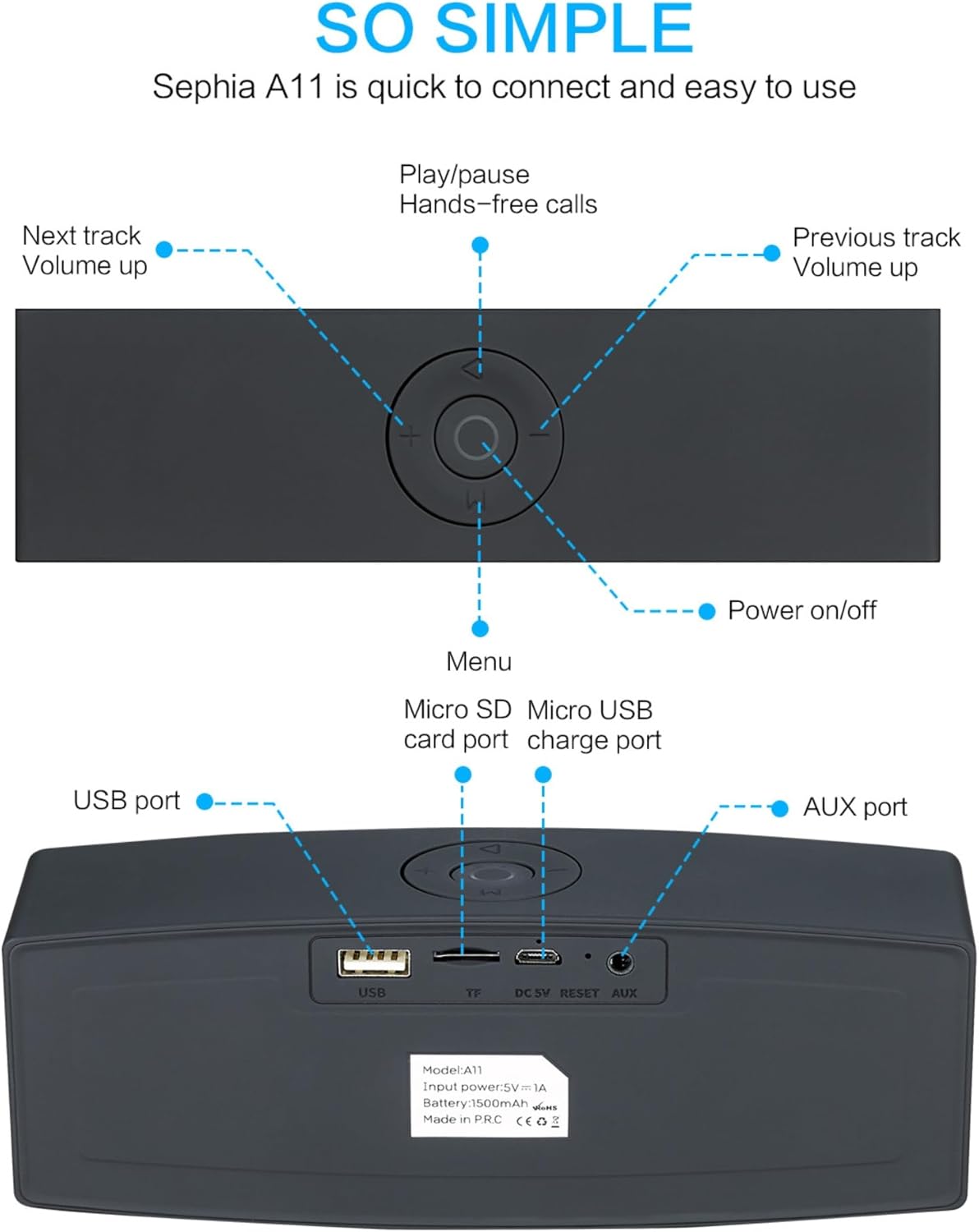
Image: Detailed diagram illustrating the top control panel and rear input/output ports of the Sephia A11 speaker.
Top Controls:
- Įjungimo / išjungimo mygtukas: Paspauskite ir palaikykite, kad įjungtumėte arba išjungtumėte garsiakalbį.
- Atkūrimo / pristabdymo mygtukas: Press to play or pause audio. Also used for hands-free calls (answer/end).
- Previous Track / Volume Down Button (-): Trumpas paspaudimas – ankstesniam takeliui, ilgas paspaudimas – garsumui sumažinti.
- Next Track / Volume Up Button (+): Trumpas paspaudimas – kitam takeliui, ilgas paspaudimas – garsumui padidinti.
- Meniu mygtukas (M): Press to switch between input modes (Bluetooth, USB, Micro SD, AUX).
Galiniai prievadai:
- USB prievadas: For playing audio from a USB drive or charging external devices.
- Micro SD Card Slot (TF): Skirta garso įrašams iš „Micro SD“ kortelės leisti.
- Micro USB Charge Port (DC 5V): Garsiakalbio įkrovimui.
- Atkūrimo mygtukas: Small pinhole for resetting the device if needed.
- AUX prievadas: For wired audio connection using the provided 3.5mm AUX cable.
Sąranka
1. Įkraukite garsiakalbį
- Connect the supplied charging cable to the Micro USB Charge Port (DC 5V) on the rear of the speaker.
- Kitą įkrovimo laido galą prijunkite prie USB maitinimo adapterio (nepridedamas) arba kompiuterio USB prievado.
- The charging indicator light will illuminate. Once fully charged, the light will change or turn off (refer to specific model behavior if indicated by LED). A full charge provides up to 8 hours of playtime.
2. Įjungimas/išjungimas
- To power on, press and hold the Power On/Off button on the top panel until you hear an audible prompt or see an indicator light.
- To power off, press and hold the Power On/Off button again until the speaker shuts down.
3. „Bluetooth“ poravimas
- Ensure the speaker is powered on and in Bluetooth mode. If not, press the 'M' (Menu) button to switch to Bluetooth mode. The speaker will enter pairing mode, indicated by a flashing LED light and an audible prompt.
- Mobiliajame įrenginyje (išmaniajame telefone, planšetiniame kompiuteryje, nešiojamajame kompiuteryje) įjunkite „Bluetooth“ ir ieškokite galimų įrenginių.
- Select "Sephia A11" from the list of found devices.
- Once successfully paired, the speaker will provide an audible confirmation, and the LED indicator will stop flashing.
- Garsiakalbio „Bluetooth“ veikimo atstumas yra iki 10 metrų (33 pėdų).
4. Wired Connections (AUX, USB, Micro SD)
- AUX įvestis: Connect one end of the supplied 3.5mm AUX cable to the AUX port on the speaker and the other end to the audio output of your device (e.g., MP3 player, computer). The speaker will automatically switch to AUX mode or can be selected using the 'M' button.
- USB atkūrimas: Įdėkite USB atmintinę su garso įrašu fileį USB prievadą. Garsiakalbis automatiškai aptiks ir paleis garsą files.
- „Micro SD“ kortelės atkūrimas: Insert a Micro SD card containing audio files into the Micro SD (TF) slot. The speaker will automatically detect and play the audio files.
Garsiakalbio valdymas
Garso atkūrimas
- Leisti / pristabdyti: Press the Play/Pause button to toggle between playing and pausing audio.
- Garso reguliavimas: Long press the '+' button to increase volume, and long press the '-' button to decrease volume.
- Kitas / ankstesnis takelis: Short press the '+' button for the next track, and short press the '-' button for the previous track.

Image: A hand demonstrating how to interact with the top control buttons of the Sephia A11 speaker.
Skambinimas laisvų rankų įranga
- When a call comes in while connected via Bluetooth, press the Play/Pause button to answer the call.
- Norėdami baigti skambutį, dar kartą paspauskite mygtuką „Groti / pristabdyti“.
- Integruotas mikrofonas užtikrina aiškų bendravimą.
Priežiūra
- Valymas: Garsiakalbio paviršių valykite minkšta, sausa šluoste. Nenaudokite abrazyvinių valiklių, alkoholio ar cheminių tirpiklių, nes jie gali pažeisti apdailą.
- Saugykla: Garsiakalbį laikykite vėsioje, sausoje vietoje, toliau nuo tiesioginių saulės spindulių ir ekstremalių temperatūrų.
- Akumuliatoriaus priežiūra: Norėdami pailginti baterijos veikimo laiką, venkite dažnai visiškai iškrauti garsiakalbį. Reguliariai įkraukite garsiakalbį, net jei ilgą laiką nenaudojate.
- Atsparumas vandeniui: Šis garsiakalbis nėra atsparus vandeniui. Venkite vandens ar per didelės drėgmės.
Trikčių šalinimas
| Problema | Galima priežastis | Sprendimas |
|---|---|---|
| Garsiakalbis neįsijungia. | Išsikrovusi baterija; Maitinimo mygtukas nepakankamai ilgai laikomas. | Visiškai įkraukite garsiakalbį. Paspauskite ir palaikykite maitinimo mygtuką 3–5 sekundes. |
| Iš garsiakalbio nėra garso. | Per mažas garsumas; Neteisingas įvesties režimas; Įrenginys netinkamai prijungtas. | Increase speaker and device volume. Press 'M' button to select correct input mode. Re-pair Bluetooth or re-connect AUX/USB/SD. |
| „Bluetooth“ susiejimas nepavyksta. | Garsiakalbis neporavimo režime; Įrenginys per toli; Trukdžiai. | Ensure speaker is in Bluetooth pairing mode (flashing LED). Move speaker closer to device. Turn off other Bluetooth devices. Try forgetting "Sephia A11" on your device and re-pairing. |
| Prasta garso kokybė. | Low battery; Device volume too high (distortion); Interference. | Charge the speaker. Adjust volume on both speaker and device. Move away from sources of interference. |
Specifikacijos
| Modelio pavadinimas | A11 |
| Matmenys | 18 x 7 x 5 cm |
| Svoris | 426 g |
| Ryšio technologija | Bluetooth, USB, Micro SD, AUX |
| Garsiakalbio išėjimo galia | 6 vatų (2 x 3 W garsiakalbiai) |
| Dažnio atsakas | 20 Hz–20 kHz |
| Baterijos tipas | Ličio jonas |
| Žaidimo laikas | Iki 8 valandų |
| Bluetooth diapazonas | Iki 10 metrų (33 pėdų) |
| Ypatingos savybės | Bass Boost, Portable, Hi-Res Audio, Built-in Microphone, Shockproof |

Image: Visual representation of the Sephia A11 speaker's dimensions.
Garantija ir palaikymas
The Sephia A11 Portable Bluetooth Speaker comes with a 12 mėnesių garantija nuo pirkimo datos, apimanti gamybos defektus. Prašome išsaugoti pirkimo įrodymą garantiniams reikalavimams.
For technical support, warranty inquiries, or further assistance, please refer to the contact information provided with your purchase or visit the official Sephia websvetainę.


