1. Produktas baigtasview
The TTEC 2KM102S Tone Bluetooth Headset is designed for wireless communication, offering convenience and clear audio. This manual provides instructions for setting up, operating, and maintaining your headset.
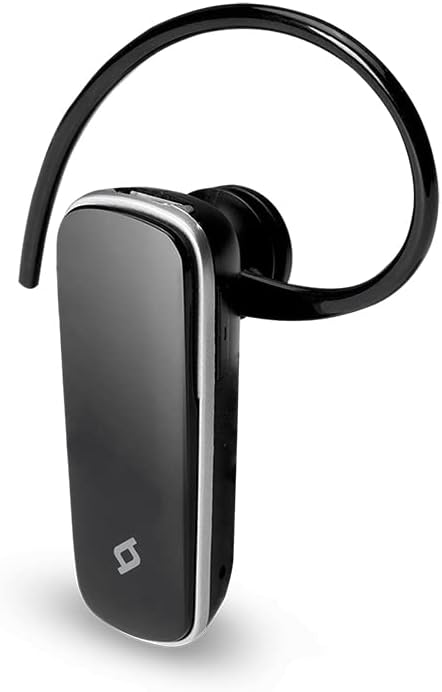
1 pav.: priekis view of the TTEC 2KM102S Tone Bluetooth Headset.
2. Pakuotės turinys
Įsitikinkite, kad pakuotėje yra visi daiktai:
- TTEC 2KM102S Tone Bluetooth Headset
- Ausies kabliukas
- USB įkrovimo laidas
3. Sąrankos vadovas
3.1 Ausinių įkrovimas
Before first use, fully charge the headset. Use the provided USB charging cable.
- Prijunkite mažąjį USB įkrovimo laido galą prie ausinių įkrovimo prievado.
- Connect the larger end of the USB cable to a USB power source (e.g., computer USB port, USB wall adapter).
- The LED indicator on the headset will show the charging status. Refer to the "LED Indicator" section for details.
- Visiškai įkrovę atjunkite įkrovimo kabelį.
Pastaba: The headset features an integrated rechargeable battery. Charging time may vary.
3.2 Susiejimas su įrenginiu
To use the headset wirelessly, it must be paired with a Bluetooth-enabled device.
- Įsitikinkite, kad ausinės išjungtos.
- Press and hold the multi-function button on the headset until the LED indicator flashes red and blue alternately. This indicates pairing mode.
- Savo įrenginyje (išmaniajame telefone, planšetiniame kompiuteryje ir kt.) įjunkite „Bluetooth“ ir ieškokite galimų įrenginių.
- Select "TTEC Tone" or "2KM102S" from the list of found devices.
- Once paired, the LED indicator will flash blue periodically, and you may hear a confirmation tone.
Patarimas: For iPhone and iPad users, the battery status of the headset can be monitored on your device's screen.
3.3 Multi-Device Pairing
The TTEC Tone headset supports simultaneous connection with two different Bluetooth devices.
- Sujunkite ausines su pirmuoju įrenginiu, kaip aprašyta 3.2 skyriuje.
- Išjunkite „Bluetooth“ pirmame įrenginyje.
- Grąžinkite ausines į susiejimo režimą (LED mirksi raudonai ir mėlynai).
- Sujunkite ausines su antruoju įrenginiu.
- Iš naujo įjunkite „Bluetooth“ pirmajame įrenginyje. Ausinės turėtų automatiškai prisijungti prie abiejų įrenginių.
The headset will manage audio from both connected devices, prioritizing incoming calls.
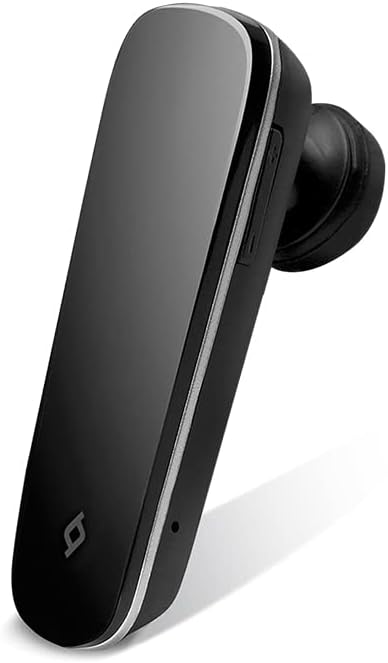
2 pav.: šonas view of the TTEC 2KM102S Tone Bluetooth Headset, showing control buttons.
4. Naudojimo instrukcijos
4.1 Maitinimo įjungimas/išjungimas
- Maitinimas: Paspauskite ir palaikykite daugiafunkcį mygtuką maždaug 3 sekundes, kol šviesos diodas mirksės mėlynai.
- Išjungti: Press and hold the multi-function button for approximately 5 seconds until the LED flashes red and then turns off.
4.2 Skambučių valdymas
The multi-function button controls call functions:
- Atsiliepti į skambutį: Kai skambinate, vieną kartą paspauskite daugiafunkcį mygtuką.
- Baigti skambutį: Skambučio metu vieną kartą paspauskite daugiafunkcį mygtuką.
- Atmesti skambutį: Kai skambinate, maždaug 2 sekundes palaikykite nuspaudę daugiafunkcį mygtuką.
- Perrink paskutinį numerį: Kai nekalbate telefonu, dukart paspauskite daugiafunkcį mygtuką.
4.3 Garsumo valdymas
Use the dedicated volume buttons on the headset:
- Padidinti garsumą: Paspauskite garsumo didinimo mygtuką (+).
- Sumažinti garsumą: Paspauskite garsumo mažinimo mygtuką (-).
4.4 LED indikatoriaus būsena
The LED indicator provides visual cues for the headset's status:
- Flashing Red & Blue: Poravimo režimas.
- Flashing Blue (slowly): Connected/Standby.
- Vientisa raudona: Įkrovimas.
- LED Off (after solid red): Pilnai įkrautas.
- Mirksi raudonai (greitai): Senka baterija.
5. Priežiūra
Proper care ensures the longevity of your headset.
- Valymas: Use a soft, dry cloth to clean the headset. Do not use abrasive cleaners or immerse in water.
- Saugykla: Laikykite ausines vėsioje, sausoje vietoje, toliau nuo tiesioginių saulės spindulių ir ekstremalių temperatūrų.
- Akumuliatoriaus priežiūra: Norėdami taupyti akumuliatoriaus veikimo laiką, venkite dažnai visiškai iškrauti ausines. Reguliariai jas įkraukite, net jei ilgą laiką nenaudojate.
6. Problemų sprendimas
| Problema | Galimas sprendimas |
|---|---|
| Ausinės neįsijungia. | Įsitikinkite, kad ausinės įkrautos. Prijunkite jas prie maitinimo šaltinio naudodami USB laidą. |
| Nepavyksta susieti su įrenginiu. |
|
| Nėra garso arba garso kokybė prasta. |
|
| Ausinės dažnai atsijungia. |
|
7. Gaminio specifikacijos
| Modelio pavadinimas: | Tonas |
| Modelio numeris: | 2KM102S |
| Prekinis ženklas: | TTEC |
| Ryšys: | Bluetooth |
| Įrenginio tipas: | Bluetooth ausinės |
| Pokalbio laikas: | Iki 4 valandų |
| Budėjimo laikas: | Iki 100 valandų |
| Kelių taškų jungtis: | Yes, connect to 2 devices simultaneously |
| Matmenys (P x P x A): | 4.5 x 1.7 x 2 cm |
| Spalva: | Juoda |
| Įkrovimo prievadas: | USB |
8. Garantija ir palaikymas
For warranty information and customer support, please refer to the warranty card included with your product or visit the official TTEC websvetainėje. Išsaugokite pirkimo kvitą kaip pirkimo įrodymą.
Gamintojas: ttec


