1. Įvadas
This manual provides essential information for the proper use and care of your Texecom Premier Elite PKK Proximity Key Tag Pack. These tags are designed to integrate seamlessly with compatible Texecom alarm systems, offering a convenient method for arming and disarming.
The pack includes five individual proximity key tags, each identified by the Texecom Reference: CDB-0001.
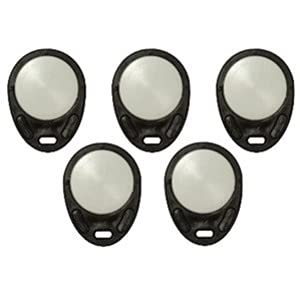
This image displays a pack of five Texecom Premier Elite PKK Proximity Key Tags. Kiekvienas tag is black with a circular metallic-looking center, designed for use with compatible alarm system keypads.
2. Sąranka ir programavimas
The Texecom Premier Elite PKK Proximity Key Tags are compatible with Premier Elite Series and Premier Series alarm systems, specifically for use with LCDP, LCDLP, and DBD remote keypads equipped with proxy readers.
2.1 Adding Tags to Your System
To enable a new proximity key tag, it must be programmed into your Texecom alarm system. The exact procedure for adding new users and fobs can vary depending on your specific alarm panel model and firmware version.
- Žr. savo signalizacijos sistemos vadovą: Refer to the user or installer manual for your Texecom Premier Elite or Premier Series alarm panel. Look for sections on 'Adding Users', 'Programming Fobs', or 'Proximity Tag Enrollment'.
- Prieiga prie programavimo režimo: Typically, this involves entering an engineer or master user code on the keypad.
- Vykdykite ekrane pateikiamus nurodymus: The keypad will guide you through the process of presenting the new proximity tag to the reader for enrollment.
- Bandymo funkcionalumas: After enrollment, test the tag by attempting to arm and disarm the system to ensure it has been successfully added.
For visual guidance, some users find it helpful to search for official Texecom programming videos or tutorials specific to their alarm panel model on reputable video platforms.
3. Naudojimo instrukcijos
Once programmed, using your Texecom Premier Elite PKK Proximity Key Tag yra tiesmukas.
3.1 Sistemos įjungimas ir išjungimas
To arm or disarm your alarm system using the proximity key tag:
- Pateikite Tag: Hold the proximity key tag firmly against the designated proximity reader area on your Texecom LCDP, LCDLP, or DBD remote keypad.
- Palaukite patvirtinimo: The keypad will typically provide an audible beep or visual indication (e.g., a change in LED status or a message on the LCD screen) to confirm that the tag buvo sėkmingai perskaitytas.
- Sistemos atsakas: The alarm system will then arm or disarm according to its current state and programming.
Užtikrinti, tag is held steady against the reader until the system responds to avoid misreads.
4. Priežiūra
Texecom Premier Elite PKK Proximity Key Tags are designed for durability and require minimal maintenance.
- Valymas: Jei tag becomes dirty, wipe it gently with a soft, dry cloth. Avoid using abrasive cleaners, solvents, or excessive moisture, as these can damage the tag's surface or internal components.
- Saugykla: Parduotuvė tags vėsioje, sausoje vietoje, apsaugotoje nuo tiesioginių saulės spindulių ir ekstremalių temperatūrų.
- Fizinė žala: Venkite numesti tags or subjecting them to strong impacts, which could compromise their functionality.
- Magnetiniai laukai: Laikykite tags away from strong magnetic fields, which could potentially interfere with their internal circuitry.
5. Problemų sprendimas
If you encounter issues with your Texecom Premier Elite PKK Proximity Key Tag, apsvarstykite šiuos trikčių šalinimo veiksmus:
- Tag Neatpažinta:
- Užtikrinti, tag is held correctly and steadily against the keypad's proximity reader.
- Patikrinkite, ar tag was successfully programmed into the alarm system. If unsure, attempt to re-program it following the instructions in Section 2.
- Check if the keypad's proximity reader is clean and unobstructed.
- Confirm that the alarm system is powered on and functioning correctly.
- Operacija su pertraukomis:
- This could indicate a weak signal or interference. Try using the tag in a slightly different position relative to the reader.
- Ensure there are no other RFID devices or strong electronic signals nearby that could cause interference.
- Sistema nereaguoja:
- Jei tag is recognized but the system does not arm/disarm, consult your alarm system's manual. There might be system-specific settings or conditions preventing the action (e.g., open zones).
- Contact your alarm system installer or Texecom technical support if the issue persists after reviewing your alarm panel's manual.
6. Specifikacijos
| Funkcija | Specifikacija |
|---|---|
| Prekės ženklas | Texecom |
| Modelio numeris | CDB-0001 (also B078GPJW3S) |
| Suderinamumas | Texecom Premier Elite Series, Premier Series (with LCDP, LCDLP, DBD remote keypads with proxy readers) |
| Spalva | Juoda |
| Forma | Rectangular (with rounded edges) |
| Medžiagos tipas | Plastikiniai |
| Prekės svoris | Approximately 10 g per tag |
| Pakuotės matmenys | 10 x 6 x 6 cm (for pack of 5) |
| Skaičius Tags | 5 |
7. Garantija ir palaikymas
For information regarding warranty coverage for your Texecom Premier Elite PKK Proximity Key Tags, please refer to the documentation provided with your original alarm system purchase or contact your authorized Texecom installer or reseller. Warranty terms typically vary by region and purchase date.
For technical support, product inquiries, or further assistance with programming and troubleshooting, please contact Texecom directly through their official website or customer service channels. Ensure you have your alarm system model number and any relevant purchase details available when seeking support.


