1. Įvadas
Ačiū, kad pirkoteasing the Edifier XM2BT Bluetooth 2.1 Multimedia Speaker System. This manual provides essential information for the safe and efficient use of your new speaker system. Please read it thoroughly before operation and retain it for future reference.
2. Svarbios saugos instrukcijos
- Atidžiai perskaitykite šias instrukcijas.
- Išsaugokite šias instrukcijas, kad galėtumėte pasinaudoti ateityje.
- Atkreipkite dėmesį į visus įspėjimus.
- Vykdykite visas instrukcijas.
- Nenaudokite šio prietaiso šalia vandens.
- Valykite tik sausa šluoste.
- Neužblokuokite jokių ventiliacijos angų. Montuokite pagal gamintojo instrukcijas.
- Nemontuokite šalia jokių šilumos šaltinių, pvz., radiatorių, šilumokaičių, viryklių ar kitų įrenginių (įskaitant ampkeltuvai), kurie gamina šilumą.
- Saugokite maitinimo laidą, kad ant jo neužeitų ar nesuspaustų, ypač prie kištukų, patogių lizdų ir toje vietoje, kur jie išeina iš aparato.
- Naudokite tik gamintojo nurodytus priedus/priedus.
- Atjunkite šį įrenginį žaibuojant arba kai nenaudojate ilgą laiką.
- Visus techninės priežiūros darbus patikėkite kvalifikuotam techninės priežiūros personalui. Techninė priežiūra reikalinga, kai aparatas buvo kaip nors pažeistas, pvz., pažeistas maitinimo laidas arba kištukas, į aparatą išsiliejo skystis ar įkrito daiktai, aparatas buvo paveiktas lietaus ar drėgmės, neveikia normaliai. , arba buvo numestas.
3. Pakuotės turinys
Prašome įsitikinti, kad pakuotėje yra visi daiktai:
- Žemųjų dažnių garsiakalbio blokas
- Satellite speakers (2 units)
- Audio input cable (3.5mm to 3.5mm AUX)
- Nuotolinio valdymo pultas
- Vartotojo vadovas
4. Produktas baigtasview
The Edifier XM2BT system consists of a subwoofer and two satellite speakers, designed to deliver a balanced audio experience. The subwoofer houses the main controls and connectivity ports.

4.1 paveikslas: Galinis view of the Edifier XM2BT subwoofer, showing input ports, power switch, and control knobs.
- 1. Bass Control Knob: Reguliuoja žemųjų dažnių lygį.
- 2. Speaker Out (L/R): Connects to the satellite speakers.
- 3. AUX įvestis: 3.5 mm stereo įvestis išoriniams garso įrenginiams.
- 4. USB prievadas: USB atmintinės įrašų atkūrimui.
- 5. SD kortelės lizdas: Skirta SD kortelės atkūrimui.
- 6. Maitinimo jungiklis: Įjungia arba išjungia sistemą.
- 7. Maitinimo laidas: Connects to AC power outlet.
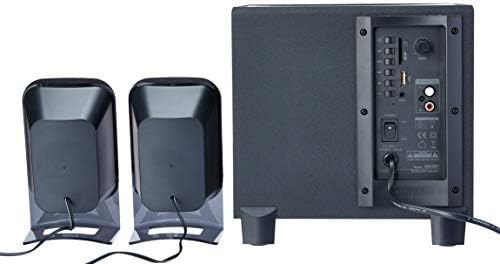
4.2 paveikslas: Complete Edifier XM2BT 2.1 speaker system from the rear, illustrating connections between subwoofer and satellite speakers.
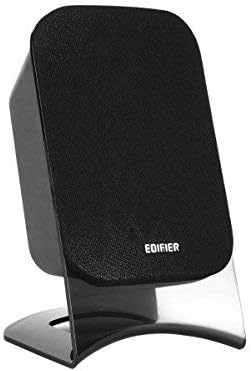
4.3 paveikslas: Close-up of a single Edifier XM2BT satellite speaker.
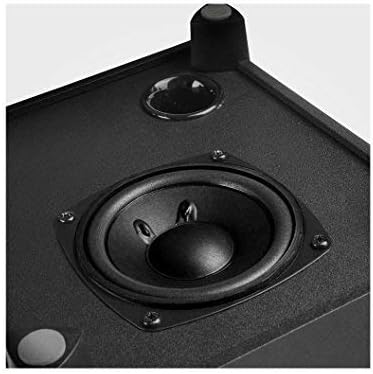
4.4 paveikslas: Iš arti view of the subwoofer driver, located on the side of the main unit.
5. Sąrankos instrukcijos
- Garsiakalbių išdėstymas: Place the subwoofer on a stable surface, preferably on the floor for optimal bass. Position the satellite speakers on either side of your listening area, facing towards you.
- Prijunkite palydovinius garsiakalbius: Connect the cables from the two satellite speakers to the "Speaker Out" (L/R) ports on the rear panel of the subwoofer. Ensure correct polarity if applicable (usually indicated by color or markings).
- Prijungti garso šaltinį:
- AUX įvestis: Use the provided 3.5mm audio cable to connect your audio device (e.g., smartphone, computer) to the "AUX" input port on the subwoofer.
- USB/SD kortelė: Įdėkite USB atmintinę arba SD kortelę su garso įrašu files into the respective port/slot. The system will automatically switch to USB/SD mode if detected.
- Bluetooth: For Bluetooth connection, proceed to the "Operating Instructions" section for pairing details.
- Prijunkite maitinimą: Plug the power cord into a standard AC power outlet.
- Maitinimas: Flip the "Power" switch on the rear panel of the subwoofer to the "ON" position. The system is now ready for operation.
6. Naudojimo instrukcijos
6.1 Maitinimo įjungimas/išjungimas
To power on the system, switch the power button on the rear panel to the "ON" position. To power off, switch it to "OFF".
6.2 Režimo pasirinkimas
The XM2BT supports multiple input modes. Use the "MODE" button on the remote control or the main unit to cycle through the available inputs: Bluetooth, AUX, USB, and SD card.
6.3 Volume and Bass Control
- Apimtis: Adjust the master volume using the main volume knob on the subwoofer or the volume buttons on the remote control.
- Bosas: Adjust the bass level using the "BASS" control knob on the rear panel of the subwoofer.
6.4 Bluetooth poravimas
- Switch the speaker system to Bluetooth mode. The indicator light will flash, indicating it is in pairing mode.
- On your audio device (e.g., smartphone, tablet), enable Bluetooth and search for available devices.
- Select "EDIFIER XM2BT" from the list of found devices.
- Once paired, the indicator light on the speaker system will become solid, and you will hear a confirmation tone.
- You can now play audio from your device through the XM2BT speakers.
6.5 USB / SD kortelės atkūrimas
- Insert a USB flash drive or SD card into the corresponding slot on the subwoofer.
- The system will automatically detect the media and begin playback. If not, switch to USB or SD mode using the "MODE" button.
- Use the playback controls (Play/Pause, Next/Previous Track) on the remote control or main unit to manage your music.
7. Priežiūra
- Valymas: Use a soft, dry cloth to clean the surfaces of the speakers. Do not use liquid cleaners, aerosols, or abrasive materials.
- Saugykla: If storing the system for an extended period, unplug it from the power outlet and store it in a cool, dry place away from direct sunlight and extreme temperatures.
- Vėdinimas: Ensure that the ventilation openings on the subwoofer are not blocked to prevent overheating.
8. Problemų sprendimas
| Problema | Galima priežastis | Sprendimas |
|---|---|---|
| Nėra garso |
|
|
| Bluetooth ryšio problemos |
|
|
| USB / SD kortelė neveikia |
|
|
9. Specifikacijos
| Funkcija | Detalė |
|---|---|
| Prekės ženklas | Redagavimo priemonė |
| Modelio numeris | XM2BT |
| Garsiakalbio tipas | 2.1 Multimedijos garsiakalbių sistema |
| Ryšio technologija | Laidinis, Bluetooth |
| Ypatinga funkcija | Bluetooth, USB, SD Card, AUX Input |
| Maitinimo šaltinis | Su laidu elektra |
| Maksimali garsiakalbio išvesties galia | 21 vatų |
| Gaminio matmenys | 32.3 x 31 x 27.7 cm (apytiksliai 12.7 x 12.2 x 10.9 colio) |
| Prekės svoris | 3.55 kg (apie 7.8 svaro) |
| Suderinami įrenginiai | Planšetinis kompiuteris, nešiojamas kompiuteris, išmanusis telefonas |
| Spalva | Juoda |
10. Garantija ir palaikymas
Edifier products are designed with quality and reliability in mind. For detailed warranty information, please refer to the warranty card included with your product or visit the official Edifier website. For technical support, product inquiries, or service, please contact Edifier customer service or visit the Edifier Brand Store.