1. Įvadas
This user manual provides comprehensive instructions for the installation, operation, and maintenance of the Secukey SK4-W Standalone Access Control System. Please read this manual carefully before installation and use to ensure proper functionality and safety.
The Secukey SK4-W is a robust, IP66-rated access control device designed for outdoor use, featuring RFID card and PIN code access. It is an ideal solution for securing doors, gates, and other entry points.
2. Produktas baigtasview
2.1 Pagrindinės savybės
- IP66 Waterproof and Anti-Vandal Design: Tinka atšiaurioms lauko sąlygoms.
- Keli prieigos režimai: Supports RFID card only, PIN code only, or Card + PIN for enhanced security.
- Didelis naudotojų pajėgumas: Manages up to 1000 users.
- Integruota relė: Built-in NO, NC, Com relay for direct door lock control.
- Adjustable Output Times: Programmable lock output time (1-99 seconds) and alarm output time (1-3 minutes).
- Wiegand 26-bit Interface: Supports external Wiegand readers, exit buttons, and alarms.
- Latch Mode: Allows the door or gate to remain open.
- Platus ttage Diapazonas: Operates on 12~28V AC/DC.
- Apšviesta klaviatūra: Užtikrina matomumą esant prastam apšvietimui.
- Patvari konstrukcija: Cinko lydinys casing with powder coating.
2.2 Įtraukti komponentai
- 1 x Secukey SK4-W Standalone Access Control Device (RFID/PIN)
- 1 x Master Add Card
- 1 x Master Delete Card
- 1 x Vartotojo vadovas
2.3 Produktas Views

1 pav.: priekis view of the SK4-W unit, highlighting the keypad and Secukey branding.

2 pav.: Kampinis view of the SK4-W, providing a perspective of its slim profile.

3 pav.: šonas view of the SK4-W unit.
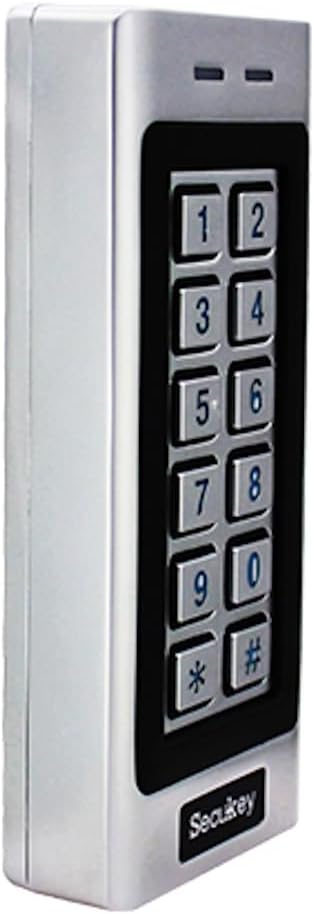
4 pav.: Kita pusė view of the SK4-W unit.

5 pav.: Nugara view of the SK4-W unit, displaying the integrated wiring for installation.
3. Sąranka ir diegimas
3.1 Įrenginio montavimas
The SK4-W is designed for surface mounting. Choose a secure location near the door or gate, ensuring it is within reach for users and protected from direct impact. Use appropriate screws and wall plugs for the mounting surface.
3.2 Sujungimo schema
The device requires a 12~28V AC/DC power supply (not included). Connect the wires according to the diagram provided in the full manual. Ensure all connections are secure and insulated to prevent short circuits.
- Maitinimo įvestis: Connect to 12~28V AC/DC power source.
- Lock Output (NO/NC/COM): Connect to your electric lock.
- Signalizacijos išėjimas: Connect to an external alarm system (if applicable).
- Wiegand In/Out: For connecting external Wiegand readers or other Wiegand devices.
- Išėjimo mygtukas: Connect a push-to-exit button for convenient egress.
For detailed wiring schematics, please refer to the comprehensive wiring diagram included in the product packaging.
4. Naudojimo instrukcijos
4.1 Initial Setup and Master Cards
Upon first power-up, the device will be in factory default mode. Use the included Master Add Card and Master Delete Card to manage user access.
- Pridedami vartotojai: Present the Master Add Card, then present the new user's RFID card or enter their PIN.
- Naudotojų ištrynimas: Present the Master Delete Card, then present the user's RFID card or enter their PIN to be deleted.
4.2 Access Modes
The SK4-W supports three primary access modes:
- Card Only Mode: Users gain access by presenting a valid RFID card.
- PIN Only Mode: Users gain access by entering a valid 4-6 digit PIN code.
- Card + PIN Mode: Users must present a valid RFID card and then enter their corresponding PIN code for access. This mode offers the highest security.
Refer to the full programming guide for instructions on how to switch between access modes and manage user PINs.
4.3 Visitor PINs
The SK4-W supports up to 10 visitor PINs, which can be set to be valid for 1 to 10 uses. This feature is useful for temporary access for guests or service personnel.

Figure 6: The SK4-W supports visitor PINs and is IP66 waterproof, suitable for outdoor installation.
4.4 Latch Mode
The latch mode allows the door or gate to remain unlocked for an extended period, which can be useful during peak hours or for maintenance. Consult the programming manual for activation and deactivation procedures.
5. Priežiūra
The Secukey SK4-W is designed for minimal maintenance due to its robust construction and IP66 rating. However, regular checks can prolong its lifespan and ensure optimal performance.
- Valymas: Wipe the keypad and casing su minkštu, damp skudurėliu. Venkite abrazyvinių valiklių ar tirpiklių.
- Ryšio patikrinimas: Periodically inspect wiring connections for any signs of wear, corrosion, or loosening.
- Firmware atnaujinimai: Patikrinkite gamintojo websvetainėje, kurioje pateikiami visi galimi programinės įrangos atnaujinimai.

Figure 7: The SK4-W is designed to withstand extreme operating temperatures, from -40°C to 60°C.
6. Problemų sprendimas
| Problema | Galima priežastis | Sprendimas |
|---|---|---|
| Įrenginys neįsijungia. | Nėra maitinimo šaltinio; neteisingas garsumastage; loose wiring. | Check power connections and ensure correct 12~28V AC/DC supply. Verify wiring. |
| RFID kortelė neatpažinta. | Card not enrolled; incorrect card type (not 125 KHz EM); damaged card. | Ensure the card is properly enrolled. Verify it is a 125 KHz EM card. Try another card. |
| PIN kodas neveikia. | Incorrect PIN; PIN not enrolled; device in card-only mode. | Double-check the PIN. Ensure the PIN is enrolled. Verify the access mode setting. |
| Door lock not activating. | Incorrect lock wiring (NO/NC); lock power issue; relay output time too short. | Check lock wiring and power. Adjust the lock output time in settings. |
| Wiegand output issues. | Incorrect Wiegand wiring; incompatible Wiegand device. | Verify Wiegand 26-bit wiring. Ensure external device compatibility. |
If the problem persists, please contact Secukey technical support for assistance.

Figure 8: Wiegand 26-bit input and output signal timing diagram.
7. Specifikacijos
| Atributas | Vertė |
|---|---|
| Modelio numeris | SK4-W |
| Prekės ženklas | Secukey |
| Matmenys (I x P x A) | 13.0 x 5.6 x 2.3 cm |
| Svoris | 500 gramų |
| Spalva | Sidabras |
| Maitinimo šaltinis | 12 ~ 28 V AC/DC |
| Apsaugos nuo patekimo (IP) įvertinimas | IP66 (Waterproof, Anti-Vandal) |
| Vartotojo talpa | Iki 1000 vartotojų |
| PIN kodo ilgis | Nuo 4 iki 6 skaitmenų |
| Kortelės tipas | 125 KHz EM Card |
| „Wiegand“ sąsaja | Wiegand 26-bit Input & Output |
| Užrakinti išvesties apkrovą | 3A maks |
| Aliarmo išvesties apkrova | 3A maks |
| Darbinė temperatūra | -40 °C iki 60 °C (nuo -40 F iki 140 F) |
| Darbinė drėgmė | nuo 10% iki 90% (nekondensuojantis) |
| Casing Medžiaga | Zinc Alloy with Powder Coating |
8. Garantija ir palaikymas
Secukey products are manufactured to high quality standards. For warranty information and technical support, please refer to the warranty card included with your product or visit the official Secukey websvetainę.
Kontaktinė informacija:
- Gamintojas: Secukey
- Websvetainė: www.secukey.com (Pvzampnuoroda, tikroji nuoroda gali skirtis)
- Klientų aptarnavimas: Žiūrėkite ant produkto pakuotės arba webregioninės pagalbos kontaktų svetainė.
Išsaugokite pirkimo įrodymą, kad galėtumėte kreiptis dėl garantijos.


