1. Įvadas
The MOOER Micro Preamp M013 Matchbox is a compact digital preamp pedal designed to accurately recreate the sound and feel of a Matchless amplifier. It features dual channels (Clean and Gain), a 3-band EQ, and an integrated cabinet simulator, making it suitable for direct recording, practice, or integration into a pedalboard setup.
2. Saugos informacija
- Use only the specified 9V DC power adapter (center negative).
- Saugokite įrenginį nuo vandens, drėgmės ar ekstremalių temperatūrų.
- Venkite pedalo numetimo ar stiprių smūgių.
- Nebandykite ardyti ar modifikuoti įrenginio.
- Laikyti vaikams nepasiekiamoje vietoje.
3. Produktas baigtasview
The M013 Matchbox pedal features a robust metal casing and intuitive controls for shaping your tone.

1 pav.: Iš viršaus į apačią view of the MOOER Micro Preamp M013 Matchbox pedal, illustrating the layout of controls and jacks.
Valdikliai:
- VOL (garsumas): Adjusts the overall output level of the selected channel.
- TRE (aukšti dažniai): Valdo aukšto dažnio atsaką.
- MID (Middle): Valdo vidutinio dažnio atsaką.
- BASS (bosas): Controls the low-frequency response.
- GAUTIS: Adjusts the amount of overdrive/distortion for the selected channel.
- CH/CAB Switch: This toggle switch has two functions:
- In normal operation, it switches between the Clean and Gain channels.
- When holding down the footswitch, it toggles the cabinet simulator on/off.
- Kojinis jungiklis: Toggles between the two channels (Clean/Gain) or bypasses the pedal.
Jungtys:

Figure 2: Input Jack (left side)

Figure 3: Output Jack (right side)
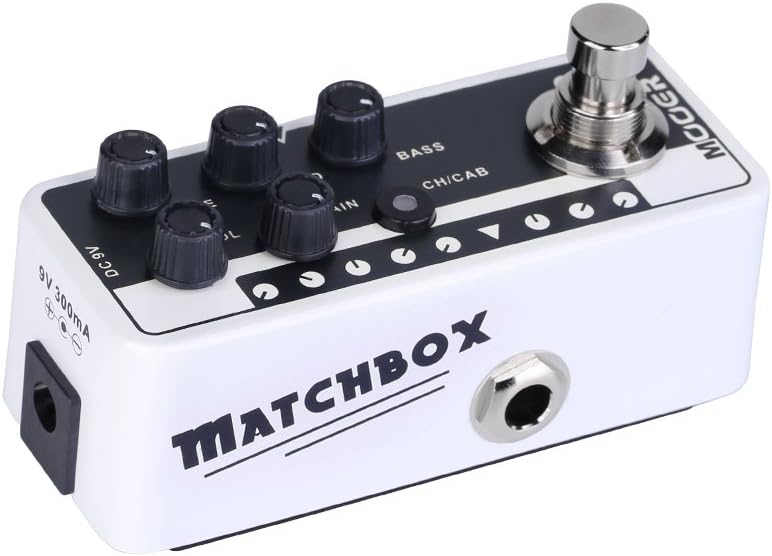
Figure 4: DC 9V Power Input
- Įvesties lizdas: Connect your guitar or other instrument here.
- Išvesties lizdas: Prisijunkite prie savo ampkeltuvas, maišytuvas arba garso sąsaja.
- 9 V nuolatinė srovė: Power input for a 9V DC (center negative) power supply.
4. Sąranka
- Prijunkite gitarą prie Įvesties lizdas on the right side of the pedal.
- Prijunkite Išvesties Džekas on the left side of the pedal to your amplifier's input, a mixer, or an audio interface.
- Connect a 9V DC (center negative) power adapter to the DC 9V įvestis.
- Prieš įjungdami maitinimą, įsitikinkite, kad visos jungtys yra tvirtos ampkeltuvas arba garso sistema.
5. Naudojimo instrukcijos
Kanalo pasirinkimas:
The M013 Matchbox offers two distinct channels: Clean and Gain. Use the CH/CAB switch to toggle between these channels. The LED indicator will change color to show the active channel (typically blue for Clean, red for Gain).
Cabinet Simulator:
The integrated cabinet simulator can be toggled on or off. To activate or deactivate the cabinet simulator, press and hold the Kojinis jungiklis for approximately 1 second. The LED will flash to indicate the change in status.
Tono formavimas:
Sureguliuokite VOL, TRE, VIDURYS, BASS, ir GAIN knobs to achieve your desired tone for each channel. Experiment with different settings to explore the full range of sounds this pedal can produce.
Footswitch Functionality:
A quick press of the Kojinis jungiklis will toggle between the currently selected channel and bypass mode. The LED will indicate whether the pedal is active or bypassed.
Demonstracinis vaizdo įrašas:
Video 1: Official MOOER demonstration of the Micro Preamp M013 Matchbox, showcasing both Clean and Gain channels with and without cabinet simulation. This video provides examples of the pedal's tonal capabilities.
6. Priežiūra
- Pedalą valykite minkšta, sausa šluoste. Nenaudokite abrazyvinių valiklių ar tirpiklių.
- Store the pedal in a dry environment away from direct sunlight and extreme temperatures.
- Reguliariai tikrinkite kabelių jungtis, ar nėra susidėvėjimo.
7. Problemų sprendimas
Nėra galios:
- Ensure the 9V DC power adapter is correctly connected and functioning.
- Patikrinkite, ar įjungtas maitinimo lizdas.
Nėra garso:
- Patikrinkite visas kabelių jungtis (gitaros įvestį, išvesties į amp/mixer).
- Ensure the pedal is not in bypass mode (check LED indicator).
- Verify that the volume knobs on the pedal and your ampgelbėjimo įtaisai yra įjungti.
- Test with different cables and a different power supply if possible.
Nepageidaujamas triukšmas / ūžesys:
- Ensure you are using a regulated 9V DC (center negative) power supply. Unregulated power supplies can introduce noise.
- Check for ground loops by trying different power outlets or isolating the pedal's power.
- Keep the pedal away from other electronic devices that may cause interference.
8. Specifikacijos
- Prekės svoris: 5.8 uncijos (165 gramų)
- Gaminio matmenys: 3.58 x 1.26 x 1.42 colio
- Maitinimo šaltinis: Su laidu elektra
- ttage: 9 voltų DC
- Išėjimo vattage: 30 Watts (referring to the amp model it simulates, not the pedal's power output)
- Jungties tipas: 6.35 mm lizdas
- Suderinami įrenginiai: Gitara
- Spalva: Juoda
9. Garantija ir palaikymas
For warranty information and technical support, please refer to the official MOOER websvetainėje arba susisiekite su vietiniu pardavėju. Išsaugokite pirkimo kvitą kaip pirkimo įrodymą bet kokiems garantiniams reikalavimams.


