Produktas baigtasview
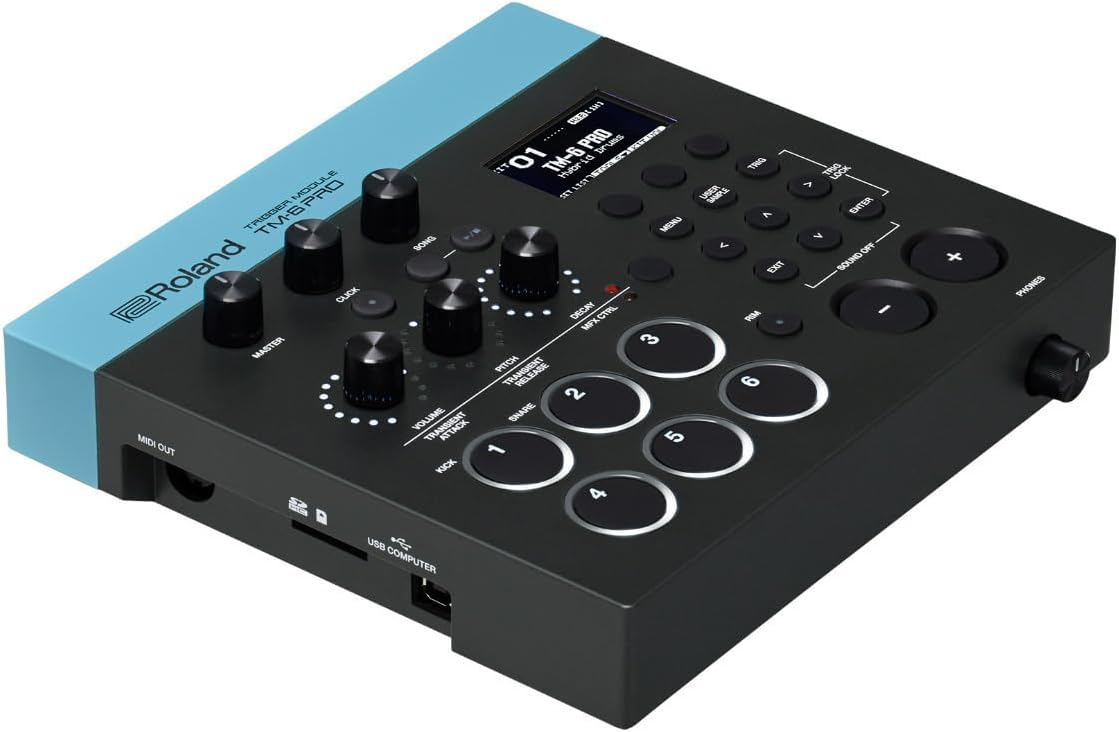
The Roland TM-6 PRO is an advanced acoustic drum trigger module designed to seamlessly integrate electronic sounds with your acoustic drum kit. This module provides drummers with instant and reliable access to a vast library of drum sounds, enhancing performance flexibility in various settings.
Pagrindinės funkcijos:
- Pre-loaded with 500 one-shot sampled sounds, including tones recorded at world-class studios.
- 268 V-Drums sounds onboard for expressive drum performance.
- 80 ready-to-use drum kits featuring high-quality preloaded sounds, plus natural and expressive V-Drums sounds.
- Original user samples can be imported from SD card to accurately reproduce studio tones onstage.
- Six trigger inputs available; separate Y-cable allows you to connect up to 12 triggers or pads.
- Powerful layer function to customize sounds.
- Three Sound Modify knobs for intuitive control of volume, pitch, decay or other effects including MFX and Transient.
- Newly developed Transient effect to effectively control attack and release of drum sounds.
- Independent EQ, Transient effect, Compressor and MFX for each trigger, plus Master Comp and Master EQ for mastering sounds.
- LED indicators shows status of the triggers, even with the lights down.
Sąranka
1. Išpakavimas ir pradinė apžiūra
Carefully remove the TM-6 PRO module and all accessories from the packaging. Inspect for any signs of damage during transit. Ensure all components listed in the packing list are present.
2. Maitinimo prijungimas
- Connect the included AC adapter to the DC IN jack on the rear panel of the TM-6 PRO.
- Plug the AC adapter into a standard AC outlet.
- Turn on the power using the POWER switch.
3. Connecting Triggers and Pads
The TM-6 PRO features six trigger inputs, allowing connection of up to 12 triggers or pads using Y-cables (TRS splitters). Roland RT series acoustic drum triggers and most Roland V-Drums pads are compatible.
- Connect your drum triggers (e.g., Roland RT-30K, RT-30HR) or V-Drums pads to the TRIGGER IN jacks (1-6) on the rear panel.
- For dual-zone pads or connecting two single-zone triggers to one input, use a TRS (stereo) cable and Y-splitter.
4. Garso išvesties jungtis
- Connect the TM-6 PRO's OUTPUT (L/MONO, R) jacks to your mixer, amplifier, or audio interface using standard 1/4-inch TS cables.
- For stereo output, use both L and R jacks. For mono, use the L/MONO jack.
- Prijunkite ausines prie PHONES lizdo stebėjimui.
5. USB and MIDI Connections
- Use the USB COMPUTER port to connect the TM-6 PRO to a computer for MIDI communication and audio recording.
- MIDI IN/OUT ports allow connection to other MIDI devices for expanded control and synchronization.

Naudojimo instrukcijos
1. Pagrindinė operacija
- Maitinimo įjungimas/išjungimas: Use the POWER switch on the rear panel.
- Garsumo valdymas: Adjust the MASTER knob for overall output volume.
- Rinkinio pasirinkimas: Use the [KIT] buttons to navigate through the 80 preset kits.
- Sound Modification: Use the three Sound Modify knobs (VOLUME, PITCH, DECAY) to adjust parameters for the selected sound. These knobs can also control MFX and Transient effects.
2. Paleidimo nustatymai
Each of the six trigger inputs can be individually configured for optimal response.
- Press the [TRIG] button to enter the trigger settings menu.
- Adjust parameters such as Sensitivity, Threshold, Curve, and Crosstalk Cancellation to prevent false triggers and ensure accurate response.
- Utilize the newly developed Transient effect to fine-tune the attack and release characteristics of your drum sounds.
3. Importing User Samples
The TM-6 PRO allows you to import your own WAV samples via an SD card.
- Insert an SD card containing your WAV files į SD kortelės lizdą.
- Navigate to the USER SAMPLE menu to import and assign your custom sounds to pads.
- This feature is ideal for replicating specific studio tones or adding unique sounds to your live performance.
4. Effects and EQ
Each trigger has independent EQ, Transient effect, Compressor, and Multi-Effects (MFX). A Master Compressor and Master EQ are also available for overall sound shaping.
- Use the [MENU] button to access the effects and EQ settings.
- Adjust parameters to sculpt your drum sounds and achieve desired tonal characteristics.

Priežiūra
1. Valymas
- Nuvalykite įrenginį minkštu, sausu skudurėliu.
- Nenaudokite abrazyvinių valiklių, vaško ar tirpiklių.
2. Sandėliavimas
- Įrenginį laikykite sausoje, vėsioje vietoje, apsaugotoje nuo tiesioginių saulės spindulių ir ekstremalių temperatūrų.
- Disconnect all cables and the AC adapter when storing for extended periods.
Trikčių šalinimas
1. Nėra garso išvesties
- Check all cable connections (power, audio output, triggers).
- Ensure the MASTER volume knob is turned up.
- Verify that the connected amplifier/mixer is powered on and its volume is adjusted.
- Check individual pad volumes and mute settings within the kit.
2. Incorrect Trigger Response (Double Triggering, Missed Triggers)
- Adjust the Sensitivity and Threshold settings for the problematic trigger in the [TRIG] menu.
- Increase Crosstalk Cancellation if other pads are triggering unintentionally.
- Ensure triggers are securely mounted and making proper contact with the drumhead.
3. SD Card Issues
- Įsitikinkite, kad SD kortelė tinkamai įdėta.
- Verify that the WAV files are in a compatible format (e.g., 16-bit, 44.1 kHz).
- Try formatting the SD card within the TM-6 PRO (this will erase all data on the card).
Specifikacijos
| Funkcija | Detalė |
|---|---|
| Prekės ženklas | Rolandas |
| Modelio pavadinimas | TM-6 PRO |
| Prekės modelio numeris | ROL-TM-6-PRO |
| Matmenys (I x P x A) | 9.25 x 9 x 2.63 colio |
| Prekės svoris | 1.6 uncijos |
| Korpuso Medžiaga | Plastikas, Metalas |
| Trigerio įvestys | 6 (supports up to 12 with Y-cables) |
| Sounds Onboard | 500 one-shot samples, 268 V-Drums sounds |
| Būgnų rinkiniai | 80 iš anksto nustatyti rinkiniai |
| Vartotojas Sample Importuoti | SD kortelių palaikymas |
| Ryšys | USB Type B, MIDI IN/OUT, 1/4-inch Output, 1/4-inch Phones |
Garantija ir palaikymas
For warranty information, technical support, or service inquiries, please refer to the official Roland website or contact your authorized Roland dealer. Keep your proof of purchase for warranty claims.
Online resources including FAQs, driver downloads, and additional manuals may be available on the Roland support page.
Susiję vaizdo įrašai
Roland Electronic Drum Accessory (TM-6PRO)
Šis vaizdo įrašas suteikia pabaigąview of the Roland TM-6 PRO, demonstrating its features and how it integrates into an electronic drum setup. It highlights the module's capabilities as a versatile electronic drum accessory.
Roland Hybrid Drums
Explore the concept of hybrid drumming with Roland's solutions. This video illustrates how to combine acoustic and electronic drum sounds for a richer, more dynamic performance, showcasing the potential of trigger modules like the TM-6 PRO.
Roland TM-2 Acoustic Drum Trigger Module
A detailed look at the Roland TM-2, another acoustic drum trigger module. While a different model, it shares core functionalities and demonstrates the versatility and ease of use common across Roland's trigger module line.
ddrum CETT Chrome Elite Tom Trigger
This video demonstrates the setup and use of a ddrum CETT Chrome Elite Tom Trigger. It provides general insights into how drum triggers are mounted and connected to modules, which can be helpful for TM-6 PRO users.


