Įvadas
Ačiū, kad pirkoteasing the VONYX SPX-PA9210 Portable PA System. This manual provides essential information for the safe and efficient operation of your device. Please read it thoroughly before use and retain it for future reference.
Saugos instrukcijos
- Prieš naudodami įrenginį, atidžiai perskaitykite visas instrukcijas.
- Laikykite įrenginį atokiau nuo vandens, drėgmės ir ekstremalių temperatūrų.
- Neatidarykite casing; visus techninės priežiūros darbus patikėkite kvalifikuotiems darbuotojams.
- Įkrovimui naudokite tik nurodytą maitinimo adapterį.
- Užtikrinkite tinkamą vėdinimą, kad išvengtumėte perkaitimo.
- Venkite ilgalaikio didelio garsumo poveikio, kad nepažeistumėte klausos.
Pakuotės turinys
Patikrinkite, ar pakuotėje yra visi reikalingi daiktai:
- VONYX SPX-PA9210 Portable PA System Unit
- 2 x UHF belaidžiai mikrofonai
- Maitinimo adapteris / įkrovimo laidas
- Vartotojo vadovas (šis dokumentas)
Produktas baigtasview
The VONYX SPX-PA9210 is a portable PA system designed for various audio applications. It features integrated speakers, media playback options, and wireless microphones for versatile use.
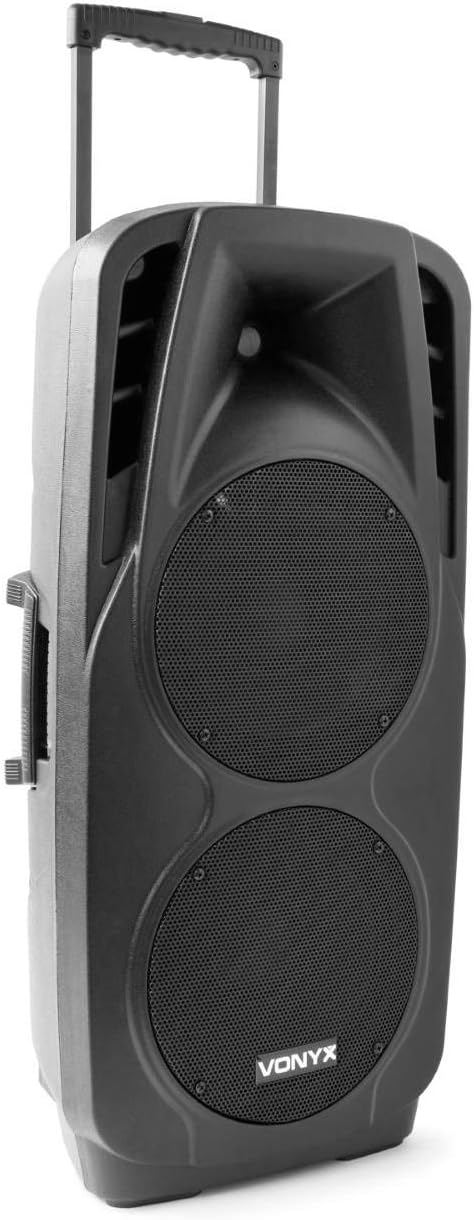
An image showing the VONYX SPX-PA9210 portable PA system. It features a black casing, two large speaker grilles on the front, and a retractable handle at the top for easy transport. A side handle is also visible.
Pagrindinės funkcijos:
- Integrated 2x 10-inch speakers with titanium tweeter controller.
- Built-in media player with USB and SD/MMC card slots.
- „Bluetooth“ ryšys belaidžiam garso transliavimui.
- High-performance 12V/7A rechargeable battery for 4-6 hours of autonomy.
- Two UHF wireless microphones with up to 50m range.
- Integrated trolley with telescopic handle and wheels for portability.
- LCD screen for media information display.
Sąranka
1. Pradinis įkrovimas
Before first use, fully charge the internal 12V/7A battery. Connect the provided power adapter to the charging port on the PA system and then to a suitable power outlet. The charging indicator will show the charging status. A full charge typically provides 4-6 hours of operation.
2. Įjungimas/išjungimas
- To power on the unit, locate the power switch (usually on the rear or control panel) and set it to the "ON" position.
- To power off, set the switch to the "OFF" position.
3. Mikrofono sąranka
- Insert fresh batteries into the two UHF wireless microphones.
- Turn on the microphones. They should automatically connect to the PA system.
- Adjust the microphone volume on the PA system's control panel. The wireless range is up to 50 meters.
Naudojimo instrukcijos
1. Media Playback (USB/SD/MMC)
- Insert a USB flash drive or an SD/MMC card into the corresponding slot on the control panel.
- The system will automatically detect the media and begin playback, or you may need to select the input source using the "Mode" button.
- Use the playback controls (Play/Pause, Next, Previous) on the control panel to manage your music.
- The LCD screen will display track information.
2. „Bluetooth“ poravimas
- Press the "Mode" button on the PA system until "Mode" button on the PA system until "Bluetooth" is selected.
- Išmaniajame telefone, planšetiniame kompiuteryje ar kitame įrenginyje su „Bluetooth“ ryšiu įjunkite „Bluetooth“ ir ieškokite galimų įrenginių.
- Select "VONYX SPX-PA9210" (or similar name) from the list to pair.
- Once paired, you can stream audio wirelessly from your device to the PA system.
3. Garsumo ir tono valdikliai
- Adjust the master volume knob to control the overall sound output.
- Separate volume controls are available for microphones and media playback.
- Use the bass and treble controls (if available) to adjust the tone of the audio.
Priežiūra
1. Valymas
Wipe the exterior of the unit with a soft, dry cloth. Do not use abrasive cleaners or solvents. Ensure no liquids enter the device.
2. Akumuliatoriaus priežiūra
- Norėdami pailginti akumuliatoriaus veikimo laiką, venkite dažnai visiškai jį iškrauti.
- Charge the unit regularly, even if not in use, to maintain battery health.
- Kai prietaisas ilgą laiką nenaudojamas, laikykite jį vėsioje, sausoje vietoje.
Trikčių šalinimas
- Nėra galios: Ensure the unit is charged or connected to a power source, and the power switch is in the "ON" position.
- Nėra garso: Check all volume controls (master, microphone, media player). Ensure the correct input source is selected. Verify microphone batteries.
- „Bluetooth“ neprisijungia: Ensure the PA system is in Bluetooth mode and discoverable. Turn off and on Bluetooth on your device and try pairing again. Move closer to the PA system.
- Iškraipytas garsas: Reduce the volume. Check audio cables if using wired inputs. Ensure microphones are not too close to the speakers (feedback).
Specifikacijos
| Prekės ženklas | VONIKAS |
| Modelio numeris | Sky-170.082 (SPX-PA9210) |
| Matmenys (I x P x A) | 27 x 38.5 x 81 cm |
| Svoris | 16.25 kg |
| Ryšio technologija | Bluetooth, USB |
| Rekomenduojamas produkto naudojimas | Išmanieji telefonai ar planšetiniai kompiuteriai |
| Ypatingos savybės | Bluetooth, USB Port, Portable, LCD Screen |
| Maitinimo šaltinis | Wireless (Internal Battery) |
| Baterija | 12V/7A, 4-6 hours autonomy |
| Medžiaga | Akrilnitrilo butadieno stirenas (ABS) |
| Kanalų skaičius | 5 |
| Garsiakalbiai | 2x 10-inch woofers, Titanium tweeter controller |
| Mikrofonai | 2x UHF Wireless Microphones (up to 50m range) |
Garantija ir palaikymas
For warranty information and technical support, please refer to the documentation provided with your purchase or contact VONYX customer service directly.
Atsarginių dalių prieinamumas: Šiuo metu nėra informacijos apie šio gaminio atsarginių dalių prieinamumą.
Programinės įrangos atnaujinimai: Information regarding guaranteed software updates for this product is currently unavailable.


