Įvadas
This manual provides instructions for the proper setup, operation, and maintenance of your Oneal OMX-6 6-Channel Audio Mixer. Please read this manual thoroughly before using the device to ensure optimal performance and safety.
The Oneal OMX-6 is a compact mixing console designed for versatile audio applications. It features 6 input channels plus an auxiliary input, 3-band equalization, and balanced microphone/line inputs, offering flexibility for various audio configurations.
Svarbios saugos instrukcijos
- Perskaitykite šias instrukcijas.
- Išsaugokite šias instrukcijas.
- Atkreipkite dėmesį į visus įspėjimus.
- Vykdykite visas instrukcijas.
- Nenaudokite šio prietaiso šalia vandens.
- Valykite tik sausa šluoste.
- Neužblokuokite jokių ventiliacijos angų. Montuokite pagal gamintojo instrukcijas.
- Nemontuokite šalia jokių šilumos šaltinių, pvz., radiatorių, šilumokaičių, viryklių ar kitų įrenginių (įskaitant ampkeltuvai), kurie gamina šilumą.
- Nepažeiskite poliarizuoto arba įžeminto kištuko saugos tikslo. Poliarizuotas kištukas turi du ašmenis, kurių vienas platesnis už kitą. Įžeminimo tipo kištukas turi dvi mentes ir trečią įžeminimo šakelę. Platus ašmenys arba trečioji šakelė yra jūsų saugumui. Jei pateiktas kištukas netelpa į jūsų elektros lizdą, kreipkitės į elektriką, kad pakeistų pasenusį lizdą.
- Saugokite maitinimo laidą, kad ant jo neužeitų ar nesuspaustų, ypač prie kištukų, patogių lizdų ir toje vietoje, kur jie išeina iš aparato.
- Naudokite tik gamintojo nurodytus priedus/priedus.
- Atjunkite šį įrenginį žaibuojant arba kai nenaudojate ilgą laiką.
- Visus techninės priežiūros darbus patikėkite kvalifikuotam techninės priežiūros personalui. Techninė priežiūra reikalinga, kai aparatas buvo kaip nors pažeistas, pvz., pažeistas maitinimo laidas arba kištukas, į aparatą išsiliejo skystis ar įkrito daiktai, aparatas buvo paveiktas lietaus ar drėgmės, neveikia normaliai. , arba buvo numestas.
Sąrankos vadovas
1. Išpakavimas ir patikrinimas
Carefully remove the mixer from its packaging. Inspect the unit for any signs of damage during transit. Retain the packaging for future transport or storage.
2. Maitinimo prijungimas
Connect the power cord to the AC IN port on the rear panel of the mixer. Ensure the power switch is in the OFF position before connecting to a power outlet. This mixer supports a wide voltage diapazonas 120-240V.

Figure 1: Rear panel connections, including the AC IN port and power switch.
3. Garso įvesties jungtys
The OMX-6 features 6 channels with balanced microphone (XLR) and line (1/4" TRS) inputs, plus an additional auxiliary input.
- Mikrofono įėjimai: Connect microphones to the XLR inputs (MIC) on each channel.
- Eilučių įėjimai: Connect instruments or other line-level devices to the 1/4" TRS inputs (LINE) on each channel.
- Pagalbinė įvestis: Use the dedicated auxiliary input for connecting CD players, DVD players, or MP3 devices.
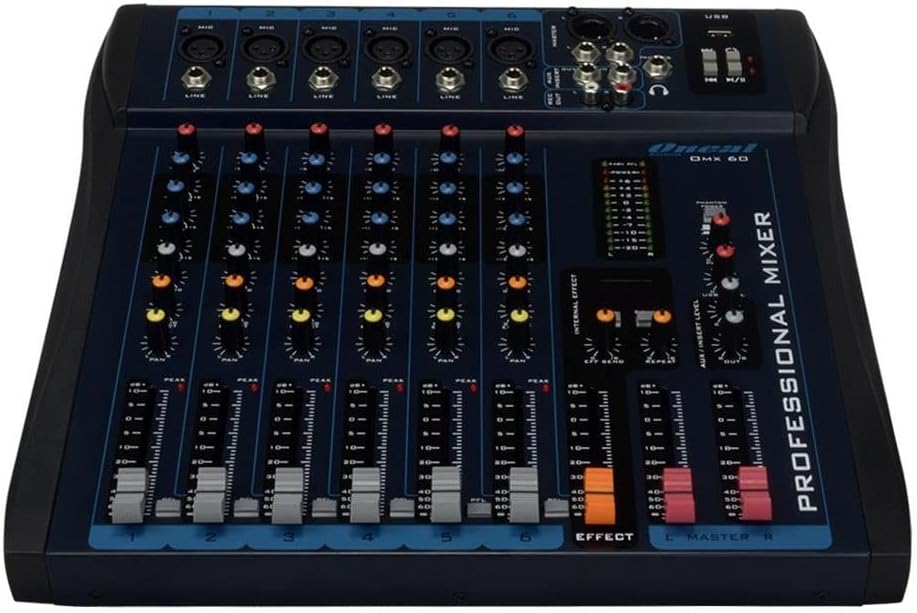
Figure 2: Front panel showing microphone and line inputs for each channel.
4. Garso išvesties jungtys
Connect your main speakers or recording devices to the master output ports. The mixer also includes a headphone output for monitoring.
Naudojimo instrukcijos
1. Įjungimas
After all connections are made, switch the power button to the ON position. The power indicator light should illuminate.
2. Kanalų valdikliai
Each of the 6 channels features the following controls:
- GAUTIS: Adjusts the input sensitivity for the microphone or line input. Start with the GAIN knob fully counter-clockwise and gradually increase until the PEAK LED flashes only occasionally.
- HIGH, MID, LOW (3-Band EQ): Adjusts the treble, midrange, and bass frequencies for the respective channel.
- AUX: Controls the level of the channel signal sent to the auxiliary output for external effects or monitor mixes.
- PAN: Adjusts the stereo position of the channel signal (left to right).
- LYGIO slopiklis: Valdo bendrą kanalo išvesties lygį.
- PFL (klausymasis prieš garsinį signalą): Activates pre-fader monitoring for the channel through headphones.
- PEAK LED: Indicates when the input signal is too high, potentially causing distortion. Reduce GAIN if this LED lights up frequently.
3. Equalization Turbo Loud
The Turbo Loud button provides an instant enhancement to the equalization, offering a more pronounced sound profile. Experiment with this feature to suit your audio needs.
4. Master Section Controls
The master section controls the overall output of the mixer:
- MASTER L/R Faders: Control the main stereo output level.
- LYGIO MATUOKLIS: Displays the output level of the main mix. Aim for levels around 0 dB during normal operation, avoiding consistent peaking into the red.
- TELEFONAI: Headphone output jack and level control for monitoring.
- USB atkūrimas / įrašymas: If equipped, use the USB port for connecting a USB drive for playback or for connecting to a computer for recording. Refer to specific USB instructions if applicable.
5. Internal Effects (if applicable)
If your model includes internal effects, use the dedicated controls (e.g., EFFECT, REPEAT, SEND) to apply and adjust effects to your mix. The AUX/INSERT LEVEL control may also be used for external effects loops.
Priežiūra
Valymas
Wipe the mixer with a soft, dry cloth. Do not use liquid cleaners or aerosols. Ensure the unit is powered off and unplugged before cleaning.
Sandėliavimas
When not in use for extended periods, store the mixer in a cool, dry place, away from direct sunlight and extreme temperatures. Keep it covered to prevent dust accumulation.
Trikčių šalinimas
Nėra garso išvesties
- Patikrinkite visas maitinimo jungtis ir įsitikinkite, kad maišytuvas įjungtas.
- Verify that the MASTER L/R faders are raised.
- Ensure individual channel LEVEL faders are raised and GAIN is set appropriately.
- Check connections to speakers or ampgelbėtojai.
- Confirm that input sources are active and sending a signal.
Iškraipytas garsas
- Reduce the GAIN on individual channels if the PEAK LED is frequently lighting up.
- Lower the MASTER L/R faders if the main level meter is consistently in the red.
- Check input cables for damage or improper connection.
Dūzgimas arba triukšmas
- Įsitikinkite, kad visi laidai yra tinkamai ekranuoti ir prijungti.
- Check for ground loops. Try connecting all audio equipment to the same power outlet or power conditioner.
- Garso kabelius laikykite atokiau nuo maitinimo laidų.
Specifikacijos
| Funkcija | Detalė |
|---|---|
| Prekės ženklas | Oneal |
| Modelis | OMX-6 |
| Kanalų skaičius | 6 + 1 Auxiliary |
| Garso įvestis | 6 channels (microphones, line, CD/DVD/MP3) + 1 auxiliary |
| Išlyginimas | 3-Band (Low/Mid/Hi) per channel, Turbo Loud feature |
| Mikrofono įėjimai | Balanced per channel |
| Linijiniai įėjimai | Balanced per channel |
| Monitoriaus valdymas | Individual per channel (MON/PFL) |
| Maitinimo šaltinis | Laidinė elektra |
| ttage | 120-240V |
| Maksimalus suvartojimas | 7W |
| Pakuotės matmenys | 52 x 35 x 11 cm |
| Prekės svoris | 4.4 kg |
| ASIN | B079F662Y4 |
| EAN/GTIN | 7898584231223, 7898934820107 |
Informacija apie garantiją
This product comes with a standard manufacturer's warranty against manufacturing defects for 90 days from the date of purchase.
Please retain your proof of purchase for warranty claims. The warranty does not cover damage caused by misuse, accidents, unauthorized modifications, or normal wear and tear.
Pagalba klientams
For technical assistance, service, or warranty inquiries, please contact Oneal customer support through their official websvetainėje arba įgaliotuose aptarnavimo centruose.
Websvetainė: www.oneal.com.br


