Įvadas
This manual provides detailed instructions for the safe and efficient operation of your Mikado MD-856 Multimedia Bluetooth Speaker system. Please read this manual thoroughly before using the product and retain it for future reference.
Saugos informacija
- Saugokite įrenginį nuo lietaus ar drėgmės, kad išvengtumėte gaisro ar elektros smūgio.
- Neatidarykite casing. Visus techninės priežiūros darbus patikėkite kvalifikuotiems darbuotojams.
- Užtikrinkite tinkamą vėdinimą aplink įrenginį.
- Naudokite tik šiam įrenginiui nurodytą maitinimo šaltinį.
- Laikyti atokiai nuo tiesioginių saulės spindulių, šilumos šaltinių ir stiprių magnetinių laukų.
- Nedėkite ant įrenginio sunkių daiktų.
Pakuotės turinys
Patikrinkite, ar jūsų pakuotėje yra visi toliau išvardyti daiktai:
- Main Subwoofer Unit
- Palydoviniai garsiakalbiai (5 vnt.)
- Nuotolinio valdymo pultas
- Usage Manual (this document)
- Garantijos liudijimas
- RCA kabelis
- Antenos kabelis
Produktas baigtasview
The Mikado MD-856 is a 5.1 channel multimedia speaker system designed to deliver rich audio. It features multiple connectivity options including Bluetooth, USB, SD card, FM radio, and AUX input.
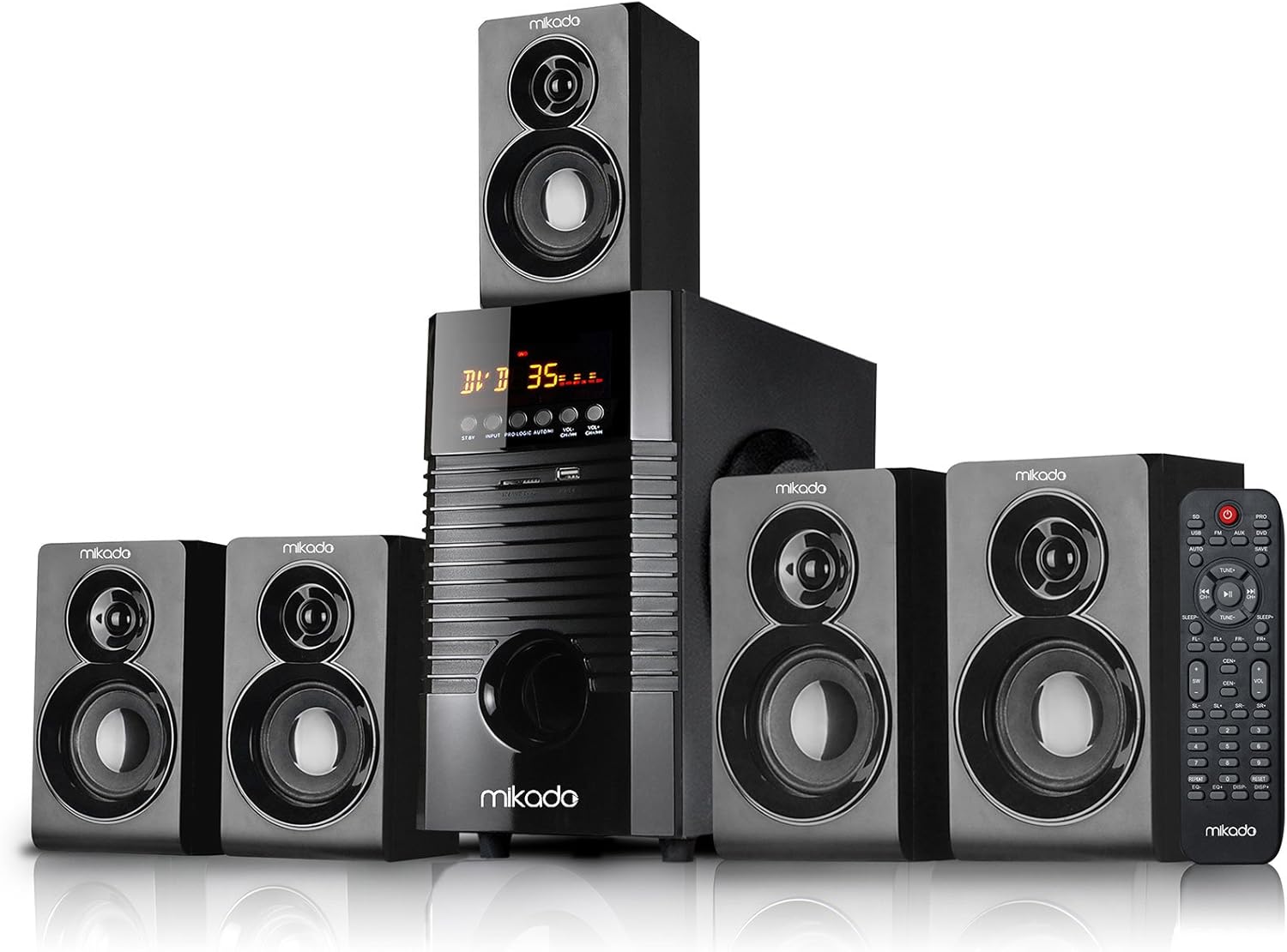
1 paveikslas: Priekyje view of the Mikado MD-856 5.1 Multimedia Bluetooth Speaker system, showing the central subwoofer unit, five satellite speakers, and the remote control.

2 paveikslas: Rear panel of the Mikado MD-856 subwoofer, displaying various audio input and output ports, power switch, and power cable connection.
Sąranka
1. Garsiakalbio prijungimas
- Connect the five satellite speakers to the corresponding output ports on the rear panel of the main subwoofer unit. Ensure correct polarity (+ to + and - to -).
- Position the speakers for optimal 5.1 surround sound experience. Typically, one center speaker, two front speakers, and two rear speakers.
2. Maitinimo prijungimas
- Įsitikinkite, kad maitinimo jungiklis galiniame skydelyje yra IŠJUNGTOJE padėtyje.
- Connect the power cable to the main subwoofer unit and then plug it into a standard electrical outlet.
3. Garso įvesties jungtys
Pasirinkite vieną iš šių būdų, kaip prijungti garso šaltinį:
- RCA (AUX) įvestis: Use the provided RCA cable to connect your audio source (e.g., TV, PC, DVD player) to the "AUX AUDIO INPUT" ports on the rear panel. Match the red and white connectors.
- USB/SD kortelė: Insert a USB flash drive or SD card into the respective slots on the front panel of the subwoofer.
- FM antena: Connect the included antenna cable to the FM antenna port on the rear panel for improved radio reception.
Naudojimo instrukcijos
1. Maitinimo įjungimas/išjungimas
Flip the power switch on the rear panel to the ON position. The display on the front panel will illuminate.
2. Režimo pasirinkimas
Press the "MODE" button on the front panel or the remote control to cycle through available input modes: Bluetooth, USB, SD, FM, and AUX.
3. Garsumo valdymas
Adjust the master volume using the large knob on the front panel or the volume buttons on the remote control.
4. „Bluetooth“ poravimas
- Switch the speaker system to Bluetooth mode. The display will show "BT" or a similar indicator.
- Įjunkite „Bluetooth“ savo mobiliajame įrenginyje (išmaniajame telefone, planšetiniame kompiuteryje ir kt.) ir ieškokite galimų įrenginių.
- Select "MD-856" from the list of devices. Once paired, you will hear a confirmation sound.
5. USB/SD atkūrimas
When a USB drive or SD card is inserted, the system will automatically switch to USB/SD mode and begin playing compatible audio files. Use the remote control for playback functions (play/pause, next/previous track).
6. FM radijas
In FM mode, press the "SCAN" button on the remote control to automatically scan and save available radio stations. Use the "PREV/NEXT" buttons to navigate through saved stations.
Priežiūra
- Valymas: Garsiakalbių paviršiams valyti naudokite minkštą, sausą šluostę. Nenaudokite skystų valiklių ar abrazyvinių medžiagų.
- Saugykla: Jei įrenginį ilgesnį laiką sandėliuosite, atjunkite jį nuo maitinimo šaltinio ir laikykite vėsioje, sausoje vietoje.
- Vėdinimas: Ensure that the ventilation openings on the subwoofer are not blocked to prevent overheating.
Trikčių šalinimas
| Problema | Galima priežastis | Sprendimas |
|---|---|---|
| Nėra galios | Power cable not connected; Power switch off; Power outlet faulty | Check power cable connection; Turn power switch ON; Try a different power outlet |
| Nėra garso | Volume too low; Incorrect input mode; Audio cables not connected properly; Source device not playing | Increase volume; Select correct input mode; Check audio cable connections; Ensure source device is playing audio |
| „Bluetooth“ nesusieja | Speaker not in Bluetooth mode; Device too far; Bluetooth on device off | Switch to Bluetooth mode; Move device closer; Enable Bluetooth on your device |
| Prastas FM priėmimas | Antena neprijungta; silpnas signalas | Prijunkite FM anteną; sureguliuokite antenos padėtį, kad signalas būtų geresnis |
Specifikacijos
- Modelis: MD-856
- Prekinis ženklas: Mikado
- Garsiakalbio tipas: Multimedia 5.1 Channel
- Ryšio technologija: Bluetooth, USB
- Didžiausia garsiakalbio išėjimo galia: 25 vatų
- Erdvinio garso kanalo konfigūracija: 5.1
- Rekomenduojami naudojimo būdai: PC - TV
- Gaminio matmenys: 35 x 35 x 44 cm
- Prekės svoris: 7.9 kilogramo
- Spalva: Juoda
- Įtraukti komponentai: Controller, Usage Manual, Warranty Certificate, RCA Cable, Antenna Cable
Garantija ir palaikymas
Your Mikado MD-856 speaker system comes with a Warranty Certificate. Please refer to the certificate for details regarding warranty coverage and terms. For technical support or service inquiries, please contact your local Mikado dealer or authorized service center.


