1. Įvadas
Ačiū, kad pirkoteasing the Sharp HT-SBW110 2.1 Bluetooth Soundbar System. This manual provides essential information for setting up, operating, and maintaining your soundbar system. Please read it thoroughly before use to ensure proper functionality and safety.
The HT-SBW110 is a powerful 2.1 channel soundbar system designed to enhance your audio experience, featuring 180W total RMS power, a dedicated wireless subwoofer, and versatile connectivity options including Bluetooth, HDMI ARC, Optical, and AUX inputs.

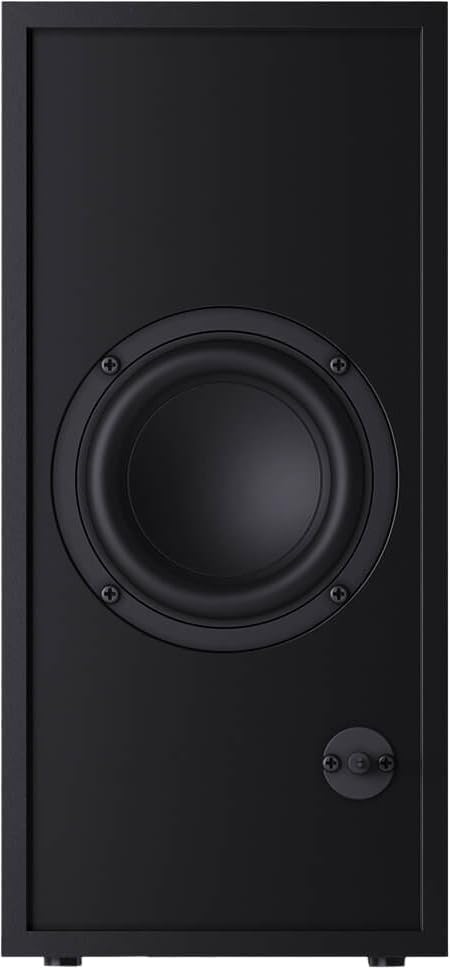
Figure 1.1: Sharp HT-SBW110 Soundbar and Subwoofer
This image displays the Sharp HT-SBW110 soundbar and its accompanying separate subwoofer, showcasindėl jų elegantiško juodo dizaino.
2. Pakuotės turinys
Prašome patikrinti, ar pakuotėje yra visi reikalingi daiktai:
- Sharp HT-SBW110 Soundbar
- Belaidis žemųjų dažnių garsiakalbis
- Nuotolinio valdymo pultas
- Garso juostos maitinimo laidas
- Žemųjų dažnių garsiakalbio maitinimo laidas
- Vartotojo vadovas (šis dokumentas)
- Batteries for Remote Control (1 x CR2)
3. Saugos informacija
Always follow basic safety precautions when using this product to reduce the risk of fire, electric shock, or injury:
- Saugokite šį prietaisą nuo lašančių ar taškomų skysčių.
- Ant aparato nedėkite daiktų, pripildytų skysčių, pavyzdžiui, vazų.
- Užtikrinkite tinkamą vėdinimą. Neužblokuokite jokių ventiliacijos angų.
- Do not place the soundbar or subwoofer near heat sources such as radiators, heat registers, stoves, or other apparatus (including ampkeltuvai), kurie gamina šilumą.
- Naudokite tik gamintojo nurodytus priedus/priedus.
- Atjunkite šį įrenginį žaibuojant arba kai nenaudojate ilgą laiką.
- Visus techninės priežiūros darbus patikėkite kvalifikuotam techninės priežiūros personalui.
4. Sąranka
4.1 Įdėjimas
Garso juosta: Place the soundbar on a flat, stable surface directly in front of your TV, centered for optimal sound dispersion. Ensure there are no obstructions in front of the soundbar's speakers.
Žemų dažnių garsiakalbis: The wireless subwoofer can be placed anywhere in the room, ideally within 5-10 meters of the soundbar, for best bass response. Avoid placing it in enclosed spaces that might muffle the sound.
The soundbar is also wall-mountable. Refer to the included wall-mounting template (if provided) for proper installation.
4.2 Jungtys
Connect your soundbar to your TV or other audio sources using one of the following methods:

Figure 4.1: Soundbar Rear Panel Connections
This image shows the rear panel of the Sharp HT-SBW110 soundbar, highlighting the various input ports including HDMI ARC, Optical, and AUX.
- HDMI ARC (rekomenduojama):
Connect an HDMI cable from the HDMI ARC port on your soundbar to the HDMI ARC port on your TV. This allows audio from your TV to be sent to the soundbar and enables control of the soundbar volume using your TV remote (if your TV supports HDMI CEC).
- Optinis:
Connect an optical audio cable from the OPTICAL input on your soundbar to the optical digital audio output on your TV or other audio source.
- AUX:
Connect a 3.5mm audio cable from the AUX input on your soundbar to the headphone jack or audio output of your device (e.g., smartphone, MP3 player).
- Maitinimo jungtis:
Connect the power cables to the soundbar and subwoofer, then plug them into a wall outlet (AC 220-240V, 50Hz).
The subwoofer will automatically pair with the soundbar once both are powered on. A blue indicator light on the subwoofer will confirm a successful connection.
5. Naudojimo instrukcijos
5.1 Nuotolinio valdymo pultasview
5.1 pav. Nuotolinio valdymo pultas
This image displays the sleek, minimalist remote control for the Sharp HT-SBW110 soundbar, showing its various buttons for power, input selection, volume, bass, treble, and EQ modes.
The remote control allows you to manage all functions of your soundbar system. Insert the provided CR2 battery into the remote control before first use.
- Įjungimo mygtukas (⏷): Įjungia / išjungia garso juostą.
- Įvesties / šaltinio mygtukas (↵): Switches between HDMI ARC, Optical, AUX, and Bluetooth inputs.
- Garsumo didinimas / sumažinimas (+/-): Reguliuoja pagrindinį garsumo lygį.
- Nutildymo mygtukas (🔇): Nutildo arba įjungia garsą.
- Bosas +/-: Reguliuoja žemųjų dažnių garsiakalbio bosų lygį.
- Aukštai +/-: Reguliuoja aukštųjų dažnių lygį.
- EQ mygtukas: Cycles through preset equalizer modes: Music, Film, Talk.
- Bluetooth mygtukas (Ⓘ): Enters Bluetooth pairing mode.
5.2 Pagrindinės operacijos
- Maitinimo įjungimas/išjungimas: Press the Power button on the remote or on the soundbar's top panel.
- Pasirinkite įvestį: Press the Input/Source button repeatedly to cycle through available inputs (HDMI ARC, Optical, AUX, Bluetooth). The LED indicator on the soundbar will change color to indicate the selected input.
- Reguliuoti garsumą: Use the Volume +/- buttons on the remote or the soundbar to adjust the listening level.
- Keisti EQ režimą: Press the EQ button to select between Music, Film, or Talk sound modes.
5.3 Bluetooth poravimas
- Press the Input/Source button on the soundbar or remote until the Bluetooth input is selected (usually indicated by a blue LED).
- The soundbar will automatically enter pairing mode, and the Bluetooth LED will flash.
- „Bluetooth“ įrenginyje (išmaniajame telefone, planšetiniame kompiuteryje ir kt.) įjunkite „Bluetooth“ ir ieškokite galimų įrenginių.
- Select "SHARP HT-SBW110" from the list of devices.
- Once paired, the Bluetooth LED on the soundbar will stop flashing and remain solid blue. You can now play audio from your device through the soundbar.
6. Priežiūra
- Valymas: Garso juostos ir žemųjų dažnių garsiakalbio paviršius valykite minkšta, sausa šluoste. Nenaudokite skystų valiklių ar aerozolinių purškalų.
- Vėdinimas: Ensure that the ventilation openings on the soundbar and subwoofer are not blocked by dust or debris.
- Saugykla: Jei įrenginį ilgesnį laiką sandėliuosite, atjunkite jį nuo elektros lizdo ir laikykite vėsioje, sausoje vietoje.
7. Problemų sprendimas
| Problema | Galima priežastis | Sprendimas |
|---|---|---|
| Nėra galios | Maitinimo laidas neprijungtas; Maitinimo lizdas neaktyvus. | Ensure power cables are securely connected to the soundbar, subwoofer, and wall outlet. Try a different outlet. |
| Nėra garso | Pasirinkta neteisinga įvestis; per mažas garsumas; netinkamai prijungti laidai. | Pasirinkite tinkamą įvesties šaltinį. Padidinkite garsumą. Patikrinkite visas garso kabelių jungtis. Įsitikinkite, kad televizoriaus garso išvestis nustatyta į išorinius garsiakalbius. |
| „Bluetooth“ susiejimas nepavyksta | Garso juosta neįjungta susiejimo režimu; Įrenginys per toli; Trukdžiai. | Ensure soundbar is in Bluetooth pairing mode (flashing blue LED). Move device closer to soundbar. Avoid strong electromagnetic interference. Try unpairing and re-pairing. |
| Nuotolinio valdymo pultas neveikia | Išsikrovusios baterijos; kliūtis tarp nuotolinio valdymo pulto ir garso juostos. | Replace batteries. Ensure clear line of sight between remote and soundbar's IR receiver. |
Jei problema išlieka, daugiau pagalbos ieškokite skyriuje „Garantija ir palaikymas“.
8. Specifikacijos
| Garso kanalai | 2.1 kanalai |
| Bendra RMS galia | 180 W |
| Soundbar RMS Power | 30 W |
| Žemųjų dažnių garsiakalbio RMS galia | 30 W |
| Dažnių diapazonas | 60–20 000 Hz |
| Ryšio technologija | Laidinis ir belaidis |
| Bluetooth versija | 4.2 |
| HDMI prievadai | 1 (ARC) |
| Optinė garso įvestis | 1 |
| AUX įvestis | Taip |
| AC įėjimas Voltage | 220–240 V |
| AC įvesties dažnis | 50 Hz |
| Tipiškas energijos suvartojimas | 30 W |
| Energijos suvartojimas budėjimo režimu | 0.5 W |
| Garso juostos matmenys (P x G x A) | 800 x 60 x 60 mm (31.5 x 2.4 x 2.4 colio) |
| Garso juostos svoris | 1.3 kg (2.9 svaro) |
| Subwoofer Dimensions (W x D x H) | 150 x 320 x 220 mm (5.9 x 12.6 x 8.7 colio) |
| Žemųjų dažnių garsiakalbio svoris | 2.7 kg (6 svaro) |
| Spalva | Juoda |
| Montuojamas ant sienos | Taip |
| Nuotolinio valdymo pultas | Įtraukta |
| Sertifikatai | CE (EMC), CB (Safety), ErP (Energy) |
9. Garantija ir palaikymas
This Sharp HT-SBW110 Soundbar System comes with a limited warranty. Please refer to the warranty card included in your package for specific terms and conditions.
Atsarginių dalių tiekimui suteikiama 1 metų garantija nuo įsigijimo datos.
For technical support, troubleshooting beyond this manual, or warranty claims, please contact Sharp customer service or visit the official Sharp website for your region. Contact information can typically be found on the product packaging or Sharp's official websvetainę.


