1. Įvadas
This manual provides essential instructions for the proper setup, operation, and maintenance of your PAX S300 v2 PIN Pad/Card Reader. The S300 v2 is an integrated retail payment solution designed for secure transaction processing, supporting contactless, e-Signature, magnetic stripe, and EMV Chip & PIN payments. Please read this manual thoroughly before using the device to ensure optimal performance and security.
2. Saugos informacija
- Do not disassemble, repair, or modify the device. Unauthorized modifications may void the warranty and pose safety risks.
- Naudokite tik gamintojo pateiktą maitinimo adapterį ir laidus.
- Avoid exposing the device to extreme temperatures, direct sunlight, dust, or moisture.
- Saugokite įrenginį nuo stiprių magnetinių laukų.
- Įrenginį veikimo metu padėkite ant stabilaus, lygaus paviršiaus.
- Jei prietaisas pažeistas arba sugenda, nedelsdami nutraukite jo naudojimą ir susisiekite su klientų aptarnavimo tarnyba.
3. Pakuotės turinys
Patikrinkite, ar pakuotėje yra visi reikalingi daiktai:
- PAX S300 v2 PIN Pad/Card Reader
- Maitinimo adapteris
- Connectivity Cable (e.g., USB, Ethernet, RS232)
- Stylus (for signature capture)
- Greito paleidimo vadovas (jei taikoma)
4. Produktas baigtasview
4.1. Pagrindinės savybės
- Secure Payment Processing: PCI PTS 3.x and SRED certified for enhanced security.
- Multiple Payment Options: Supports EMV Chip & PIN, magnetic stripe, and contactless (NFC) transactions.
- Spalvotas jutiklinis ekranas: Large display for clear transaction prompts and e-Signature capture.
- Didelis našumas: Equipped with a 32-bit ARM11 processor for efficient operation.
- Ryšys: Offers USB, Ethernet (LAN), and RS232 connectivity options.
4.2. Įrenginio komponentai

- Spalvotas jutiklinis ekranas: Displays transaction information and allows for signature capture.
- Klaviatūra: For PIN entry and menu navigation.
- Magnetinių juostelių skaitytuvas: Located on the side for swiping cards.
- EMV Chip Card Slot: Located at the bottom for inserting chip cards.
- Bekontaktis skaitytuvas: Integrated into the screen area for NFC payments.
- Prisijungimo prievadai: Located at the rear for power, USB, Ethernet, and RS232 connections.
5. Sąranka
5.1. Prietaiso prijungimas
- Prijunkite maitinimą: Plug the power adapter into the power port on the back of the S300 v2, then plug the adapter into a wall outlet.
- Prisijungimas prie pagrindinės sistemos:
- USB: Connect the USB cable from the S300 v2 to an available USB port on your point-of-sale (POS) system or computer.
- Ethernet (LAN): Connect an Ethernet cable from the S300 v2's LAN port to your network router or switch.
- RS232: Connect the RS232 cable from the S300 v2 to the serial port on your POS system or computer.
- Maitinimas: The device should power on automatically once connected to power. If not, press and hold the power button (if available) until the screen illuminates.
- Programinės įrangos konfigūracija: Follow the instructions provided by your payment processor or POS software vendor to configure the S300 v2 with your system. This typically involves selecting the correct communication port and device type within the POS application.
6. Naudojimo instrukcijos
The PAX S300 v2 supports various transaction types. Always follow the prompts displayed on the device screen.
6.1. EMV Chip Card Transactions
- When prompted by the POS system, instruct the customer to insert their EMV chip card into the slot at the bottom of the S300 v2.
- Ensure the chip faces upwards and is fully inserted.
- The device will process the transaction. The customer may be prompted to enter their PIN or provide a signature.
- Once the transaction is complete, the device will prompt the customer to remove their card.
6.2. Magnetic Stripe Card Transactions
- When prompted, instruct the customer to swipe their magnetic stripe card through the reader slot on the side of the S300 v2.
- Ensure the magnetic stripe faces the device.
- If the swipe is unsuccessful, try again at a consistent speed.
- The customer may be prompted for a signature.
6.3. Contactless (NFC) Transactions
- When prompted, instruct the customer to tap their contactless card or NFC-enabled device (e.g., smartphone, smartwatch) near the contactless symbol on the S300 v2 screen.
- Hold the card/device steady until the transaction is confirmed.
- A beep or visual confirmation on the screen will indicate a successful read.
6.4. PIN Entry
- When the device prompts for PIN entry, the customer should use the physical keypad to enter their Personal Identification Number.
- After entering the PIN, press the green ENTER raktas.
- Ensure the customer's privacy during PIN entry.
6.5. Signature Capture
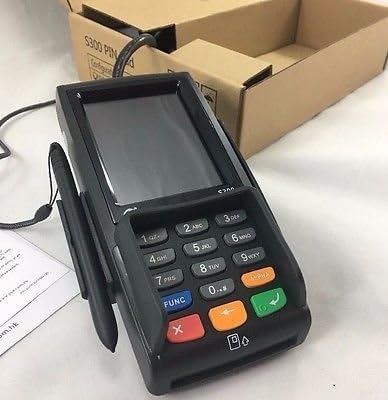
- If a signature is required, the S300 v2 screen will display a signature line.
- Instruct the customer to use the provided stylus or their finger to sign on the touch screen.
- After signing, the customer should tap the PRIIMTI or OK mygtuką ekrane.
7. Priežiūra ir valymas
- Valymas: Šiek tiek naudokite minkštą, be pūkelių šluostę dampened with water or a mild, non-abrasive cleaner to wipe the device's exterior. Do not use harsh chemicals, solvents, or abrasive materials.
- Ekrano priežiūra: For the touch screen, use a screen-specific cleaner and a microfiber cloth. Avoid excessive pressure.
- Prievadai: Keep all ports free of dust and debris. Do not insert foreign objects into any slots or ports.
- Saugykla: Kai prietaisas ilgą laiką nenaudojamas, laikykite jį vėsioje, sausoje vietoje, toliau nuo tiesioginių saulės spindulių.
8. Problemų sprendimas
| Problema | Galima priežastis | Sprendimas |
|---|---|---|
| Įrenginys neįsijungia. | Nėra maitinimo jungties arba sugedęs maitinimo adapteris. | Įsitikinkite, kad maitinimo adapteris yra tvirtai prijungtas prie įrenginio ir veikiančio maitinimo lizdo. Išbandykite kitą lizdą. |
| Transaction fails. | Incorrect card insertion/swipe, communication error, or card issue. | Ensure the card is inserted/swiped correctly. Check cable connections to the POS system. Contact your payment processor for network or card-specific issues. |
| Ekranas nereaguoja. | Laikinas programinės įrangos triktis. | Restart the device by disconnecting and reconnecting power. If the issue persists, contact support. |
| Stylus not working for signature. | Stylus damage or screen calibration issue. | Ensure the stylus tip is intact. Try using a finger. If the screen is generally unresponsive, refer to the "Screen is unresponsive" solution. |
9. Specifikacijos
- Modelis: PAX S300 v2
- Procesorius: 32-bit ARM11
- Saugumas: PCI PTS 3.x, SRED
- Kortelių skaitytuvai: EMV Chip Card, Magnetic Stripe, Contactless (NFC)
- Ryšys: RS232, Ethernet (LAN), USB Type A
- Ekranas: Spalvotas lietimo ekranas
- Matmenys: (Refer to product packaging or official PAX documentation for exact dimensions)
- Darbinė temperatūra: (Refer to product packaging or official PAX documentation)
10. Garantija ir palaikymas
For warranty information and technical support, please refer to the documentation provided with your purchase or contact your authorized PAX distributor or reseller. Keep your purchase receipt and product serial number handy when seeking support.
You can also visit the official PAX Technology webbendros informacijos apie produktus ir pagalbos išteklių svetainė.


