Įvadas
Welcome to your new Sangean HDR-14 HD Radio portable receiver. This manual provides comprehensive instructions for setting up, operating, and maintaining your device. The HDR-14 offers digital and analog AM/FM stereo reception, allowing access to additional content and improved sound quality where available.
Pagrindinės savybės
- HD Radio digital & analog AM/FM-stereo reception
- 40 memory presets (20 FM, 20 AM)
- PAD (Program Associated Data) service
- Supports emergency alerts function
- Automatic multicast reconfiguration
- Battery Powered or AC Adapter
Pakuotės turinys
- Sangean HDR-14 HD Radio
- Kintamosios srovės adapteris
- Naudotojo vadovas (šis dokumentas)
Produktas baigtasview
Priekinio skydelio valdikliai ir ekranas
The front panel features the speaker, LCD display, and control buttons.

This image shows the front of the Sangean HDR-14 HD Radio, highlighting the speaker grille on the left, the LCD display in the center, and various control buttons below and to the right of the display. Buttons include "BAND", "INFO/MENU", "HD SEEK/APS", "PAGE", and numbered preset buttons (1-5), along with up/down tuning buttons and a power button.
Galinis skydelis ir jungtys
The rear panel includes the battery compartment, antenna, and power input.

This image displays the rear of the Sangean HDR-14 HD Radio, showing the extendable telescopic antenna at the top, the battery compartment cover in the middle, and the DC 5V power input jack at the bottom right. Frequency range and battery specifications are printed on the back.
Matmenys
The compact design of the HDR-14 makes it highly portable.
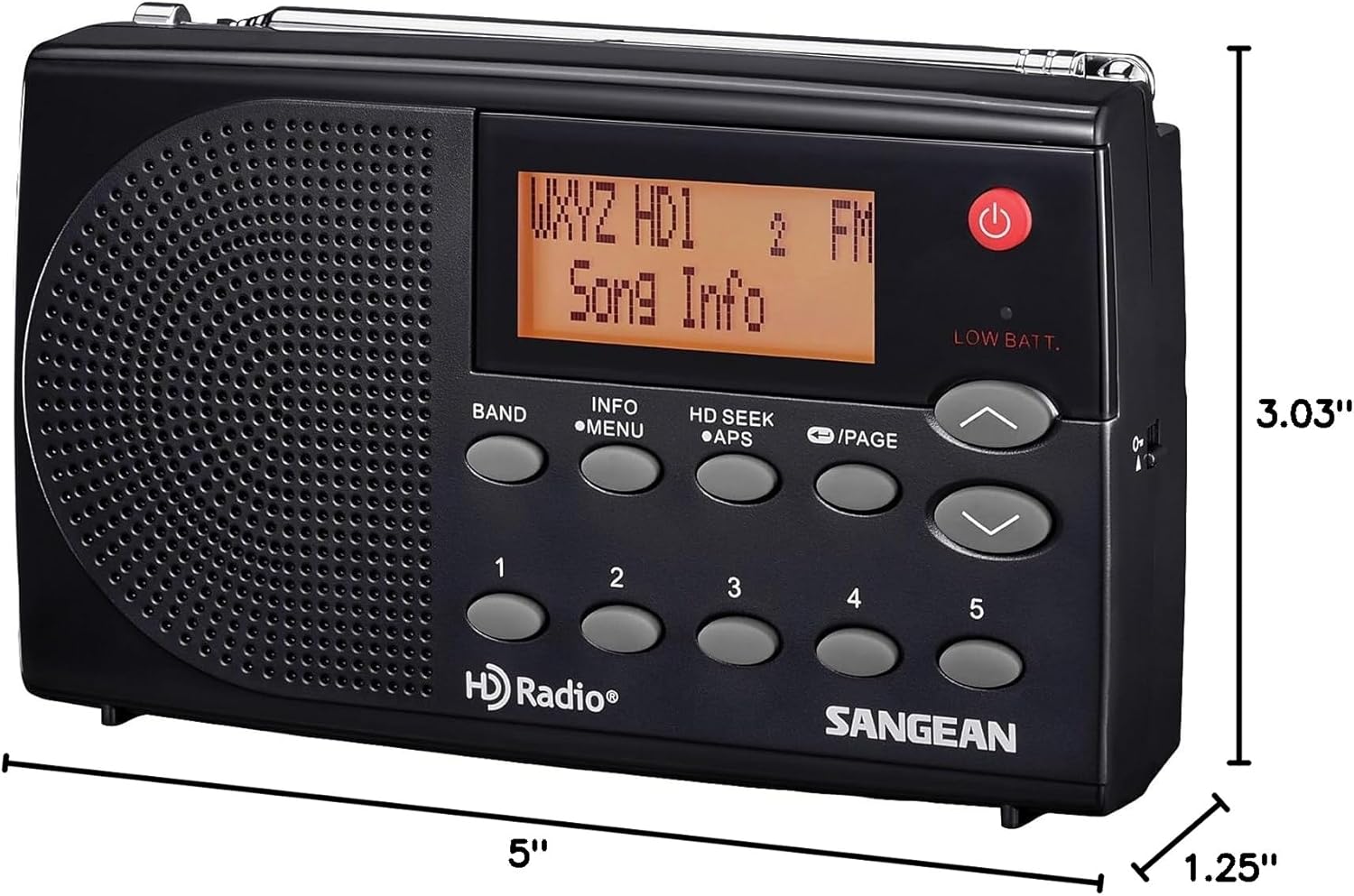
This image illustrates the dimensions of the Sangean HDR-14 HD Radio, indicating a length of 5 inches, a width of 1.25 inches, and a height of 3.03 inches.
Sąranka
Radijo maitinimas
The HDR-14 can be powered by batteries or the included AC adapter.
Akumuliatoriaus montavimas
- Open the battery compartment cover on the rear of the radio.
- Insert 3 x 1.5V AA/UM-3/R6 batteries, ensuring correct polarity (+/-).
- Saugiai uždarykite akumuliatoriaus skyriaus dangtelį.
Kintamosios srovės adapterio prijungimas
- Connect the AC adapter to the DC 5V input jack on the rear of the radio.
- Įjunkite kintamosios srovės adapterį į standartinį sieninį lizdą.
Antenos reguliavimas
For optimal FM and HD Radio reception, fully extend the telescopic antenna. For AM reception, the radio has a built-in AM antenna; rotate the radio for best reception.
Naudojimo instrukcijos
Įjungimas/Išjungimas
Paspauskite GALIA (raudonas mygtukas), skirtas radijo įjungimui arba išjungimui.
Selecting Band (AM/FM/HD)
Paspauskite BAND button to switch between FM and AM bands. When an HD Radio signal is detected on FM, the display will indicate "HD1" or "HD2" for sub-channels.
Stočių derinimas
Naudokite UP ir ŽEMYN arrow buttons to manually tune to frequencies.
HD Seek Tuning
Paspauskite HD SEEK/APS mygtuką, kad automatiškai ieškotumėte kitos prieinamos HD radijo stoties.
Išankstinių nustatymų saugojimas ir atšaukimas
The radio supports 40 memory presets (20 FM, 20 AM).
Išankstinio nustatymo saugojimas
- Nustatykite norimą stotį.
- Press and hold one of the numbered preset buttons (1-5) until the display confirms the station is saved.
- To access additional preset pages, press the PUSLAPIS button, then select a numbered preset.
Išankstinio nustatymo prisiminimas
Briefly press one of the numbered preset buttons (1-5) to recall a saved station. Use the PUSLAPIS button to cycle through preset pages.
Program Associated Data (PAD)
When tuned to an HD Radio station, the display may show Program Associated Data (PAD) such as song title, artist, and station information. Press the INFO / MENIU button to cycle through available information.
Priežiūra
Valymas
Nuvalykite radiją minkšta, damp audinys. Nenaudokite abrazyvinių valiklių ar tirpiklių.
Akumuliatoriaus priežiūra
Jei radijo imtuvas ilgesnį laiką nebus naudojamas, išimkite baterijas, kad išvengtumėte elektrolito nuotėkio.
Trikčių šalinimas
| Problema | Sprendimas |
|---|---|
| Nėra galios | Check battery installation or AC adapter connection. Ensure batteries are not depleted. |
| Poor reception (FM/HD) | Visiškai ištieskite teleskopinę anteną. Pabandykite pakeisti radijo imtuvo padėtį. |
| Poor reception (AM) | Rotate the radio for best reception. AM signals are directional. |
| No HD signal | HD Radio signals may not be available in all areas or for all stations. Ensure you are within range of an HD broadcast. |
Specifikacijos
- Gaminio matmenys: 5 cm ilgio x 1.25 cm pločio x 3.03 cm aukščio
- Prekės svoris: 6.7 uncijos
- Tuner Technology: HD AM/FM
- Power Source: Battery (3 x AA) / Corded Electric (AC Adapter)
- Radio Bands Supported: 2-Band (AM/FM)
- Manufacturer: Sangean America, Inc.
- Spalva: juoda
Garantija ir palaikymas
For warranty information or technical support, please contact Sangean America, Inc. directly. Refer to the official Sangean website or the packaging for contact details.
Svarbi saugos informacija
ĮSPĖJIMAS: Šiame gaminyje yra chemikalų, kuriuos Kalifornijos valstija žino apie vėžį, apsigimimus ar kitokią žalą reprodukcijai.