1. Įvadas
Thank you for choosing the Sceptre 32-inch Class FHD (1080P) LED TV with Built-in DVD, Model E325BD-FSR. This manual provides essential information for the proper setup, operation, and maintenance of your new television. Please read this manual thoroughly before using the product and retain it for future reference.
2. Saugos informacija
Norėdami užtikrinti saugų darbą ir išvengti žalos, laikykitės šių saugos priemonių:
- Prieš naudodami televizorių, perskaitykite visas instrukcijas.
- Išsaugokite šį vadovą ateityje.
- Atkreipkite dėmesį į visus įspėjimus ant prietaiso ir naudojimo instrukcijose.
- Vykdykite visas instrukcijas.
- Valykite tik sausa šluoste.
- Užtikrinkite tinkamą vėdinimą. Neužblokuokite jokių ventiliacijos angų.
- Saugokite maitinimo laidą, kad ant jo neužeitų ar nesuspaustų.
- Atjunkite televizorių nuo elektros tinklo žaibuojant arba kai jis ilgą laiką nenaudojamas.
- Visus techninės priežiūros darbus patikėkite kvalifikuotam techninės priežiūros personalui.
3. Pakuotės turinys
Pažymėkite langelį prie šių elementų:
- Sceptre 32-inch Class FHD (1080P) LED TV with Built-in DVD (Model E325BD-FSR)
- Televizoriaus staliukas
- Nuotolinio valdymo pultas
- Maitinimo laidas
- 6ft Indoor 3-Outlet Extension Cord
- Vartotojo vadovas (šis dokumentas)
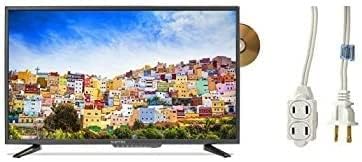
Image: The Sceptre 32-inch Class FHD LED TV with its built-in DVD player visible on the side, accompanied by a 6ft indoor 3-outlet extension cord.
4. Sąranka
4.1 Stovo montavimas
- Atsargiai padėkite televizorių ekranu žemyn ant minkšto, švaraus paviršiaus, kad nesubraižytumėte.
- Sulygiuokite televizoriaus stovą su tvirtinimo angomis televizoriaus apačioje.
- Pritvirtinkite stovą naudodami pateiktus varžtus. Neperveržkite.
4.2 Maitinimo prijungimas
Plug the power cord into the TV's power input, then connect the other end to a standard electrical outlet. Use the included 6ft indoor 3-outlet extension cord if additional outlets are needed.
4.3 Išorinių įrenginių prijungimas
Your TV features various input ports for connecting external devices:
- HDMI: For high-definition video and audio from devices like Blu-ray players, game consoles, or cable/satellite boxes.
- Antenna/Cable (RF): Antenos prijungimui transliacijoms per eterį arba kabelinės televizijos ryšiui.
- USB: Skirta medijos atkūrimui iš USB atmintinių.
Prijunkite įrenginius prie atitinkamų prievadų televizoriaus gale arba šone.
5. Naudojimo instrukcijos
5.1 Maitinimo įjungimas/išjungimas
Paspauskite GALIA mygtuką ant nuotolinio valdymo pulto arba ant paties televizoriaus, kad įjungtumėte arba išjungtumėte televizorių.
5.2 Įvesties šaltinio pasirinkimas
Paspauskite ĮVESTIS or ŠALTINIS button on the remote control to cycle through available input sources (e.g., TV, HDMI1, HDMI2, DVD, USB).
5.3 Channel Scan (TV Input)
If using an antenna or cable connection, select the 'TV' input source. Navigate to the TV's menu, find the 'Channel' or 'Setup' section, and initiate an 'Auto Scan' or 'Auto Program' to find available channels.
5.4 Built-in DVD Player Operation
- Ensure the TV is powered on and the input source is set to 'DVD'.
- Gently insert a DVD disc into the disc slot on the side of the TV, label side facing up. The TV will automatically detect the disc and begin playback.
- Use the DVD control buttons on your remote control (Play, Pause, Stop, Fast Forward, Rewind, Skip) to manage playback.
- Norėdami išimti diską, paspauskite mygtuką IŠMETIMAS nuotolinio valdymo pulto arba televizoriaus mygtuką.
5.5 Meniu naršymas
Paspauskite MENIU button on the remote control to access the TV's settings. Use the arrow buttons to navigate and the ENTER or OK mygtuką, kad pasirinktumėte parinktis. Paspauskite EXIT or MENIU dar kartą, kad uždarytumėte meniu.
6. Priežiūra
6.1 Ekrano valymas
Švelniai nuvalykite ekraną minkštu, sausu, nepūkuotu skudurėliu. Jei dėmės sunkiai pašalinamos, švelniai nuvalykiteampNuvalykite šluostę vandeniu arba specializuotu ekrano valikliu. Niekada nepurkškite skysčio tiesiai ant ekrano.
6.2 Išorės valymas
Wipe the TV's exterior with a soft, slightly damp cloth. Avoid using harsh chemicals, abrasive cleaners, or solvents, as these can damage the finish.
6.3 Saugykla
If storing the TV for an extended period, unplug it from the power outlet and store it in a cool, dry place, preferably in its original packaging.
7. Problemų sprendimas
Prieš kreipdamiesi į klientų aptarnavimo tarnybą, išbandykite šiuos dažniausiai pasitaikančių problemų sprendimus:
- Nėra galios: Įsitikinkite, kad maitinimo laidas yra tvirtai prijungtas tiek prie televizoriaus, tiek prie veikiančio elektros lizdo. Patikrinkite, ar lizde yra elektros.
- Nefotografuoti: Verify the correct input source is selected. Check all cable connections (HDMI, antenna) are secure.
- Nėra garso: Check the volume level and ensure the TV is not muted. Verify audio settings in the menu.
- Nuotolinio valdymo pultas neveikia: Pakeiskite baterijas. Įsitikinkite, kad tarp nuotolinio valdymo pulto ir televizoriaus IR jutiklio nėra jokių kliūčių.
- DVD Playback Issues: Ensure the disc is clean and free of scratches. Verify the disc is inserted correctly. Confirm the input source is set to 'DVD'.
8. Specifikacijos
| Modelis | E325BD-FSR |
| Ekrano dydis | 31.5 colių |
| Rezoliucija | 1080p (viskas viename) |
| Ypatingos savybės | Plokščiaekranis televizorius, integruotas DVD grotuvas |
| Derintuvo technologija | ATSC |
| Kontrolės metodas | Nuotolinis |
| Ekrano paviršius | Blizgus |
| Year (Manufacturing) | 2017 |
| Palaikomos interneto paslaugos | Blokbasteris |
9. Garantija ir palaikymas
Your Sceptre TV is covered by a manufacturer's warranty. For specific warranty details, please refer to the warranty card included with your product or visit the official Sceptre website. For technical assistance, troubleshooting beyond this manual, or warranty claims, please contact Sceptre customer support.


