1. Įvadas
Ačiū, kad pirkoteasing the Ematic EMHD130LED HD 16GB Music Player. This compact and portable device allows you to enjoy your favorite music on the go. Featuring a 1.3-inch OLED display and a MicroSD slot for expanded storage, it is designed for ease of use and portability. This manual provides detailed instructions for setting up, operating, and maintaining your music player.
2. Svarbi saugos informacija
- Nelaikykite prietaiso ekstremaliose temperatūrose, tiesioginiuose saulės spinduliuose ar didelėje drėgmėje.
- Stenkitės, kad prietaisas nenumestų ar nepatirtų stipraus smūgio.
- Nebandykite patys ardyti ar taisyti įrenginio. Visus techninės priežiūros darbus patikėkite kvalifikuotiems specialistams.
- Saugokite prietaisą nuo vandens ir kitų skysčių.
- Naudokite tik gamintojo patvirtintus priedus.
- Atsakingai utilizuokite įrenginį ir jo bateriją laikydamiesi vietinių taisyklių.
3. Pakuotės turinys
Patikrinkite pakuotę, ar joje yra šie daiktai:
- Ematic EMHD130LED HD 16GB Music Player
- Vartotojo vadovas (šis dokumentas)
- Note: A USB charging/data transfer cable is typically required and may be sold separately.
4. Produktas baigtasview
Familiarize yourself with the components and controls of your Ematic music player.
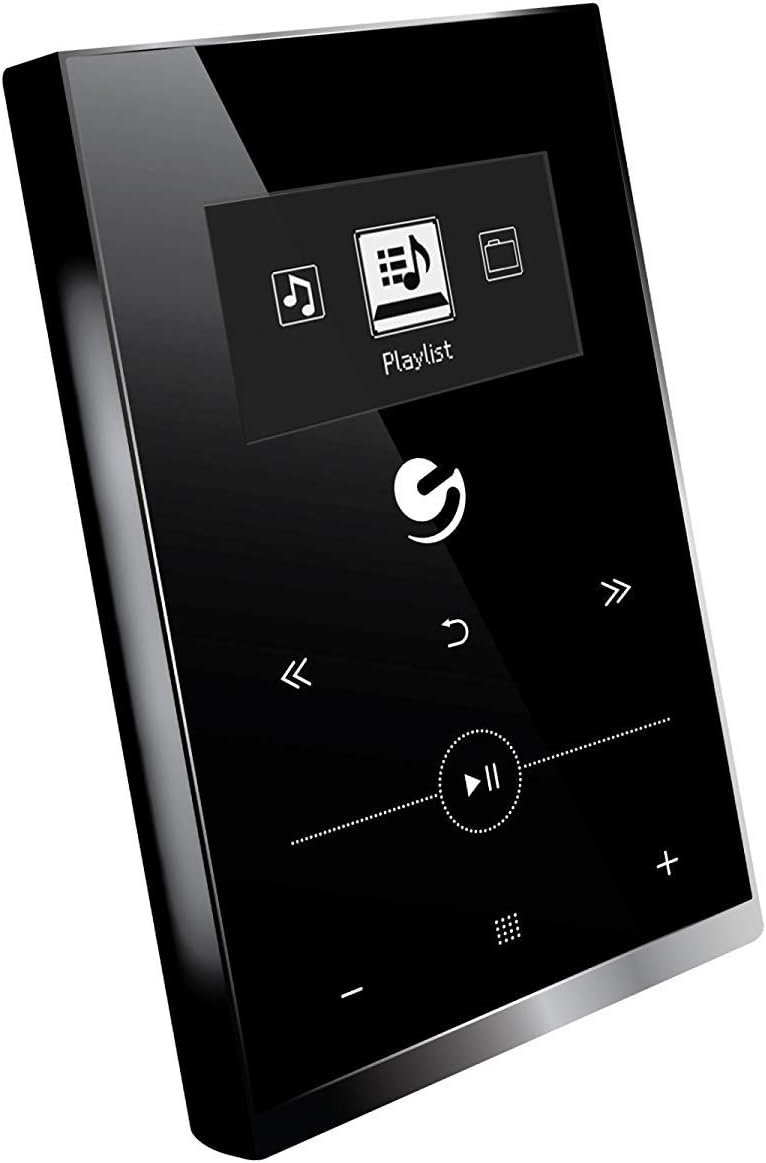
4.1 paveikslas: Priekyje view of the Ematic EMHD130LED Music Player, highlighting its 1.3-inch OLED display and touch-sensitive controls for navigation and playback.

4.2 paveikslas: The Ematic EMHD130LED Music Player shown in a typical usage scenario, demonstrating its small form factor suitable for connection to a computer for media transfer.
Valdikliai ir prievadai:
- OLED ekranas: 1.3-inch screen for track information and menu navigation.
- Naršymo mygtukai: (Implied from image) Up, Down, Left, Right, Select/Play/Pause.
- Garsumo valdikliai: (Implied from image) Plus (+) and Minus (-) buttons for adjusting audio output.
- „MicroSD“ lizdas: For expanding storage capacity beyond the internal 16GB.
- USB prievadas: For connecting to a computer for charging and data transfer.
5. Sąranka
5.1 Įrenginio įkrovimas
Before first use, fully charge your music player. Connect the device to a computer's USB port or a compatible USB wall adapter using a USB cable. The OLED display will indicate charging status. A full charge typically takes a few hours.
5.2 Muzikos įkėlimas
The Ematic EMHD130LED has 16GB of internal storage. You can add more music using a MicroSD card (sold separately).
- Per kompiuterį: Plug your media player directly into your computer using a USB cable. The device will appear as a removable drive. Drag and drop your MP3 audio fileį grotuvo muzikos aplanką.
- Via MicroSD Card: Insert a MicroSD card into the designated slot on the player. You can transfer music files directly to the MicroSD card via a card reader on your computer, or transfer them to the card once it's in the player and connected to the computer.
6. Naudojimo instrukcijos
6.1 Maitinimo įjungimas/išjungimas
Press and hold the Power button (location not specified, typically a side button or integrated with Play/Pause) for a few seconds to turn the device on or off.
6.2 Pagrindinė navigacija
Use the navigation buttons (Up, Down, Left, Right) to browse through menus and select options on the 1.3-inch OLED display. Press the central Select button to confirm a selection or play a track.
6.3 Muzikos atkūrimas
- From the main menu, navigate to 'Music' or 'Playlist'.
- Browse through your stored music by artist, album, genre, or all songs.
- Select a track and press the Play/Pause button to begin playback.
- Use the Skip Forward/Backward buttons to change tracks.
- Adjust the volume using the Volume Up (+) and Volume Down (-) buttons.
6.4 Using the MicroSD Card
Once a MicroSD card is inserted and contains music, the player will automatically detect it. You can typically switch between internal storage and MicroSD card content through the music menu settings.
7. Priežiūra
- Valymas: Įrenginiui valyti naudokite minkštą, sausą, nepūkuotą šluostę. Nenaudokite abrazyvinių valiklių ar tirpiklių.
- Saugykla: Kai prietaisas ilgą laiką nenaudojamas, laikykite jį vėsioje, sausoje vietoje, apsaugotoje nuo tiesioginių saulės spindulių.
- Akumuliatoriaus priežiūra: Norėdami pailginti akumuliatoriaus veikimo laiką, venkite dažnai visiškai jį iškrauti. Reguliariai įkraukite įrenginį, net jei jo nenaudojate.
8. Problemų sprendimas
| Problema | Galima priežastis | Sprendimas |
|---|---|---|
| Įrenginys neįsijungia. | Baterija išsikrovusi. | Įkraukite įrenginį mažiausiai 30 minučių. |
| Nėra garso. | Volume is too low or muted; Headphones not connected properly. | Increase volume; Ensure headphones are fully plugged in. |
| Negalima perkelti files. | Incorrect USB connection; Driver issue; Corrupted files. | Ensure USB cable is securely connected; Try a different USB port or cable; Restart computer and player; Check file format (only MP3 supported). |
| Ekranas tuščias arba užstrigęs. | Programinės įrangos triktis. | Paspauskite ir palaikykite maitinimo mygtuką 10–15 sekundžių, kad priverstumėte paleisti iš naujo. |
9. Specifikacijos
| Funkcija | Detalė |
|---|---|
| Prekės ženklas | Ematic |
| Modelis | EMHD130LED |
| Modelio pavadinimas | 16GB High Definition Music Player with 1.3-inch OLED Display |
| Atminties talpa | 16 GB (vidinė) |
| Skaitmeninės atminties talpa | 16 GB |
| Suderinami įrenginiai | Nešiojamasis kompiuteris, asmeninis kompiuteris |
| Ekrano tipas | OLED |
| Ekrano dydis | 1.3 colių |
| Jungties tipas | USB |
| Suderinamas laikmenos tipas | MP3 |
| Medijos tipas | Micro SD |
| Gaminio matmenys | 11.99 x 8.48 x 2.84 cm; 312.98 g |
| Baterijos elementų sudėtis | Ličio jonas |
| Įkraunama baterija | Taip |
| Gamintojas | Shaghai LTD |
| Pirmoji laisva data | 26 Kovo 2018 d |
10. Garantija ir palaikymas
For warranty information and customer support, please refer to the warranty card included with your product or visit the official Ematic website. You may also contact Ematic customer service directly for assistance with product issues or inquiries.
Ematic Official Websvetainė: www.ematic.us (Note: This is a general placeholder link for Ematic's website. Please verify the correct support URL jūsų regionui.)


