1. Įvadas
Thank you for choosing the ASAKUKI Smart Wi-Fi Essential Oil Diffuser. This device combines aromatherapy with smart technology, allowing you to control it via a mobile application or voice commands. It is designed to humidify and purify the air, creating a relaxing atmosphere in your home or office.
This manual provides detailed instructions for the safe and efficient use of your diffuser. Please read it thoroughly before operation and retain it for future reference.

Image: The ASAKUKI Smart Wi-Fi Essential Oil Diffuser is versatile for various environments, including nurseries, family rooms, bedrooms, yoga studios, and workspaces.
2. Saugos priemonės
Norėdami užtikrinti saugų darbą ir išvengti žalos, laikykitės šių nurodymų:
- Always place the diffuser on a flat, stable surface.
- Do not exceed the maximum water fill line (500ml).
- Use only clean tap water or distilled water. Avoid using hot water.
- Add essential oils carefully to avoid spilling on the exterior of the unit.
- Laikykite difuzorių vaikams ir gyvūnams nepasiekiamoje vietoje.
- Do not cover the mist outlet during operation.
- Unplug the device from the power outlet before cleaning or refilling.
- Nemerkite įrenginio į vandenį ar kitus skysčius.
- If the unit is damaged, do not attempt to repair it yourself. Contact customer support.
- The diffuser features an automatic shut-off when water runs out, but it is recommended to monitor water levels.
3. Pakuotės turinys
Patikrinkite, ar pakuotėje yra visi reikalingi daiktai:
- ASAKUKI Smart Wi-Fi Essential Oil Diffuser (Model DF010)
- Maitinimo adapteris
- Vartotojo vadovas
- Measuring Cup (may be included)
4. Produktas baigtasview
Familiarize yourself with the main components of your diffuser:

Image: The ASAKUKI Smart Wi-Fi Essential Oil Diffuser, showing its sleek design and the accompanying mobile app for control.
- Dangtis: Top cover of the diffuser.
- Mist Outlet: Kur išsiskiria rūkas.
- Vandens bakas: Talpina iki 500 ml vandens.
- Max Water Line: Indicates the maximum fill level.
- Ultrasonic Plate: Located at the bottom of the water tank, responsible for mist generation.
- Oro išleidimo anga: Located on the base.
- Drain Side: Indicated for proper water drainage.
- Šviesos mygtukas: Controls the LED light functions.
- Mist/Wi-Fi Button: Controls mist output and initiates Wi-Fi pairing.
- Maitinimo lizdas: Maitinimo adapterio prijungimui.
5. Sąrankos instrukcijos
Atlikite šiuos pradinės sąrankos veiksmus:
- Difuzoriaus įdėjimas: Padėkite difuzorių ant lygaus, stabilaus ir vandeniui atsparaus paviršiaus.
- Nuimkite dangtelį: Gently lift the top lid off the diffuser.
- Pridėti vandens: Using a measuring cup, fill the water tank with clean tap water or distilled water up to the maximum water line (500ml). Do not overfill.
- Pridėti eterinių aliejų: Į vandens bakelį įlašinkite 3–5 lašus mėgstamo eterinio aliejaus. Kiekį reguliuokite pagal asmeninius pageidavimus ir kambario dydį.
- Pakeiskite dangtelį: Securely place the lid back onto the diffuser.
- Prijunkite maitinimą: Plug the power adapter into the power jack at the base of the diffuser, then plug the adapter into a wall outlet.
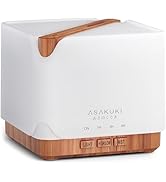
Image: Simple setup guide illustrating connecting power, app pairing, and wireless control.
6. Naudojimo instrukcijos
6.1 Rankinis valdymas
- Rūko kontrolė: Paspauskite Mist/Wi-Fi button once for continuous mist. Press again for intermittent mist (30 seconds on, 30 seconds off). Press a third time to turn off the mist.
- Šviesos valdymas: Paspauskite Šviesa button once to turn on the LED light with automatic color cycling. Press again to fix the light to a specific color. Continue pressing to cycle through colors. Press and hold the Light button to turn off the light.
6.2 Smart Wi-Fi and App Control
The diffuser can be controlled remotely using the TuyaSmart app.
- Atsisiųskite programą: Ieškokite "TuyaSmart" in your smartphone's app store (iOS or Android) and download it.
- Registruotis / Prisijungti: Atidarykite programėlę ir užregistruokite naują paskyrą arba prisijunkite, jei jau turite.
- Įjunkite susiejimo režimą: With the diffuser plugged in, press and hold the Mist/Wi-Fi button for 5 seconds until the indicator light flashes rapidly. This indicates the diffuser is in pairing mode.
- Pridėti įrenginį: In the TuyaSmart app, tap "Add Device" or the "+" icon. Select "Small Home Appliance" > "Diffuser" (Wi-Fi).
- Prisijunkite prie „Wi-Fi“: Follow the in-app instructions to connect the diffuser to your 2.4GHz Wi-Fi network. Ensure your phone is also connected to the same 2.4GHz network during setup.
- Valdymas: Once successfully paired, you can control the mist, light, set timers, and create schedules directly from the TuyaSmart app.

Image: The mobile app allows for convenient control of the diffuser's functions.
6.3 Balso valdymas su „Alexa“
The diffuser is compatible with Amazon Alexa for voice control.
- Įgalinti įgūdžius: In the Alexa app, search for and enable the "TuyaSmart" skill.
- Susieti paskyrą: Link your TuyaSmart account to your Alexa account.
- Atraskite įrenginius: Ask Alexa to "Discover devices" or manually discover them in the Alexa app.
- Balso komandos: Atradus, galite naudoti tokias komandas kaip:
- "Alexa, turn on the diffuser."
- "Alexa, turn off the diffuser."
- "Alexa, set the diffuser to red."
- "Alexa, set diffuser brightness to 50%."

Image: Voice control with Alexa allows hands-free operation of the diffuser.
7. Priežiūra
Regular cleaning helps maintain optimal performance and extends the lifespan of your diffuser.
7.1 Valymas
Clean the diffuser after every 5-6 uses or every 3-5 days, especially when changing essential oils.
- Atjunkite: Disconnect the diffuser from the power outlet.
- Tuščias vanduo: Remove the lid and carefully pour out any remaining water from the drain side of the water tank.
- Nuvalykite: Use a soft cloth or cotton swab with a small amount of mild dish soap to gently wipe the inside of the water tank and the ultrasonic plate.
- Išskalauti: Rinse the water tank with clean water, being careful not to get water into the air outlet.
- Sausas: Wipe all parts dry with a clean, soft cloth.
- Deep Clean (Optional): For stubborn residue, add a small amount of white vinegar to the water tank and let it sit for 10-15 minutes before wiping and rinsing.
7.2 Saugykla
When not in use for an extended period, ensure the diffuser is clean and completely dry. Store it in a cool, dry place away from direct sunlight.
8. Problemų sprendimas
Jei kyla problemų, žr. toliau pateiktas dažniausiai pasitaikančias problemas ir sprendimus:
| Problema | Galima priežastis | Sprendimas |
|---|---|---|
| Nėra rūko arba rūko išmetimas mažas |
|
|
| Diffuser does not power on |
|
|
| Nepavyksta prisijungti prie „Wi-Fi“ / programėlės |
|
|
| Vandens nutekėjimas |
|
|
9. Specifikacijos
| Funkcija | Detalė |
|---|---|
| Prekės ženklas | ASAKUKI |
| Modelio numeris | DF010 |
| Talpa | 500 mililitrų |
| Matmenys | 6 colio ilgio x 6 colių pločio x 7 colio aukščio |
| Medžiaga | Akrilnitrilo butadieno stirenas (ABS), polipropilenas (PP) |
| Maitinimo šaltinis | Su laidu elektra |
| Vattage | 10 vatų |
| Aprėpties sritis | Iki 323 kvadratinių pėdų |
| Ypatingos savybės | App Control, Automatic Shut-Off, Multiple Light Settings, Multiple Mist Settings, Voice Control (Alexa) |
| Triukšmo lygis | Lower than 35 dB |
| Runtime (Full Capacity) | Up to 16 hours (on weak mist setting) |
10. Garantija ir palaikymas
The ASAKUKI Smart Wi-Fi Essential Oil Diffuser comes with a 1 metų techninės pagalbos garantijaŠi garantija taikoma gamybos defektams ir problemoms, kylančioms dėl įprasto naudojimo.
For technical assistance, troubleshooting, or warranty claims, please contact ASAKUKI customer support through the retailer where you purchased the product or visit the official ASAKUKI websvetainė kontaktinei informacijai.
Please have your model number (DF010) and proof of purchase ready when contacting support.


