Produktas baigtasview
The Blackmagic Design Pocket Cinema Camera 4K (model CINECAMPOCHDMFT4K) is a handheld digital film camera designed for professional video production. It features a 4/3" CMOS sensor, 13 stops of dynamic range, and dual native ISO up to 25,600, enabling high-quality video capture in various lighting conditions. The camera supports recording in industry-standard formats such as Apple ProRes and 12-bit Blackmagic RAW.
Pagrindinės funkcijos:
- Incredible Image Quality: 4/3" image sensor with 4096 x 2160 native resolution, active MFT lens mount, 13 stops dynamic range, and dual native ISO up to 25,600.
- Kelios įrašymo parinktys: Records to SD/UHS-II and CFast 2.0 cards, or external SSD via USB-C.
- Universalus File Formatai: Supports Apple ProRes (up to 4K) and 12-bit Blackmagic RAW. Includes DaVinci Resolve Studio activation key.
- Patogus vartotojui dizainas: Lightweight carbon fiber polycarbonate composite body with a multifunction handgrip and a large, bright 5" LCD display.
- Platus ryšys: Full-size HDMI, mini XLR with 48-volt phantom power, 3.5mm microphone and headphones connections, USB-C, and Bluetooth.
Pakuotės turinys
The Blackmagic Design Pocket Cinema Camera 4K package includes:
- Blackmagic Design Pocket Cinema Camera 4K body
- DaVinci Resolve Studio activation key
- Lens turret dust cap
- 30W power supply with locking connector and international adapters
- LP-E6 battery
Sąrankos vadovas
1. Akumuliatoriaus įdėjimas
The camera uses an LP-E6 battery. To install:
- Raskite baterijų skyrių fotoaparato apačioje.
- Atidarykite akumuliatoriaus skyriaus dangtelį.
- Insert the LP-E6 battery, ensuring correct orientation.
- Saugiai uždarykite akumuliatoriaus skyriaus dangtelį.

1 pav.: galinis view of the camera, showing the battery compartment location.
2. Atminties kortelės įdėjimas
The camera supports SD/UHS-II and CFast 2.0 cards. To insert:
- Locate the memory card slots on the side of the camera.
- Atidarykite atminties kortelės angos dangtelį.
- Insert the SD or CFast card into the appropriate slot until it clicks into place.
- Uždarykite atminties kortelės angos dangtelį.

2 pav.: šonas view of the camera, illustrating the memory card slots.
3. Objektyvo tvirtinimas
The camera features an active Micro Four Thirds (MFT) lens mount. To attach a lens:
- Remove the lens turret dust cap from the camera body.
- Suderinkite raudoną tašką ant objektyvo su raudonu tašku ant fotoaparato objektyvo jungties.
- Švelniai įstatykite objektyvą į jungtį ir sukite jį pagal laikrodžio rodyklę, kol jis užsifiksuos vietoje.
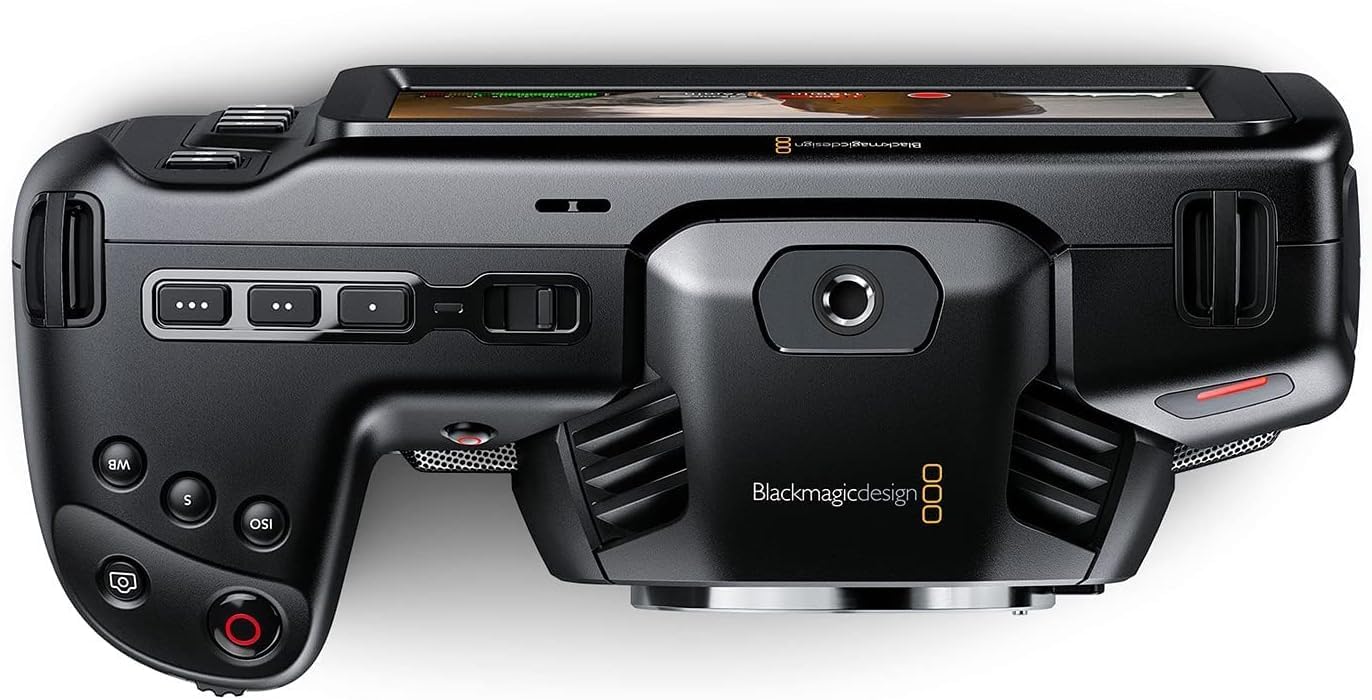
3 pav.: priekis view of the camera, highlighting the MFT lens mount.
4. Maitinimo prijungimas
For extended operation, connect the included 30W power supply:
- Connect the appropriate international adapter to the power supply.
- Įjunkite maitinimo šaltinį į sieninį lizdą.
- Connect the locking DC power connector to the 12V input port on the camera.

4 pav.: šonas view of the camera, showing the 12V power input and other connectivity options.
Naudojimo instrukcijos
1. Įjungimas/išjungimas
To power on the camera, slide the "ON/OFF" switch located on the top left side of the camera body. To power off, slide the switch back to the "OFF" position.
2. Basic Controls and Touchscreen Interface
The camera features a large 5" touchscreen LCD for intuitive control. Physical buttons are also available for quick access to essential functions such as ISO, Shutter, White Balance, and Record.

Figure 5: Camera screen showing various recording settings and options.
3. Įrašymo nustatymai
Access recording settings via the touchscreen menu. You can select:
- Codec and Quality: Choose between Blackmagic RAW (Constant Bitrate, Constant Quality Q0, Q5) or Apple ProRes (422 HQ, 422, 422 LT, 422 Proxy).
- Rezoliucija: Options include 4K DCI (4096x2160), 4K 2.4:1 (4096x1720), Ultra HD (3840x2160), 2.8K Anamorphic (2880x2160), 2.6K 16:9 (2688x1512), and HD (1920x1080).
- Kadrų dažnis: Up to 60fps in 4K and 120fps in HD.

6 pav. Išsamus view of the camera's menu for selecting recording codecs and resolutions.
4. Garso įvestis
The camera offers versatile audio input options:
- Mini XLR: For professional microphones, with 48-volt phantom power support.
- 3.5 mm įvestis: For external microphones or line-level audio.
- Integruoti stereo mikrofonai: For convenient on-camera audio capture.
- 3.5 mm ausinių lizdas: Garso stebėjimui.
5. External Monitoring and Storage
Connect external monitors via the full-size HDMI port. For extended recording, use the USB-C port to connect external SSD media.
Priežiūra
- Valymas: Use a soft, dry cloth to clean the camera body. For the lens and sensor, use specialized cleaning kits and follow manufacturer guidelines.
- Saugykla: Store the camera in a dry, dust-free environment, ideally in a protective case when not in use. Remove batteries during long-term storage.
- Firmware atnaujinimai: Regularly check the Blackmagic Design websvetainę, kurioje rasite programinės įrangos atnaujinimus, kad būtų užtikrintas optimalus našumas ir prieiga prie naujų funkcijų.
Trikčių šalinimas
Jei kyla problemų dėl fotoaparato, atlikite šiuos bendruosius trikčių šalinimo veiksmus:
- Maitinimo problemos: Ensure the battery is fully charged or the power adapter is securely connected. Check battery orientation.
- Įrašymo problemos: Verify that memory cards are correctly inserted and have sufficient free space. Check selected codec and resolution settings for compatibility with your workflow.
- Vaizdo kokybė: Ensure the lens is clean and properly attached. Check ISO settings for excessive noise in low light.
- Programinė įranga: If using DaVinci Resolve Studio, ensure it is updated to the latest version.
For more detailed troubleshooting, refer to the comprehensive manual available on the Blackmagic Design support websvetainę.
Specifikacijos
| Gaminio matmenys | 7.01 x 3.37 x 3.78 colio |
| Prekės svoris | 1.53 svaro |
| Prekės modelio numeris | CINECAMPOCHDMFT4K |
| Prekės ženklas | Blackmagic dizainas |
| Nuotraukų jutiklių technologija | CCD |
| Vaizdo įrašymo raiška | 4K |
| Didžiausia diafragma | 2.8 milimetrų |
| „Flash“ atminties tipas | SD |
| Vaizdo įrašymo formatas | Blackmagic RAW, ProRes 422 |
| Palaikomas garso formatas | AAC, MP3, PCM |
| Ekrano dydis | 5 colių |
| Ryšio technologija | USB |
| Baterijos | Reikalingos 1 A baterijos (pridedamos) |
Garantija ir palaikymas
For warranty information and technical support, please refer to the official Blackmagic Design websvetainėje arba susisiekite tiesiogiai su jų klientų aptarnavimo tarnyba. Išsaugokite pirkimo kvitą kaip pirkimo įrodymą garantijos pretenzijoms.
Online resources and additional documentation can be found at: Blackmagic Design Support


