Įvadas
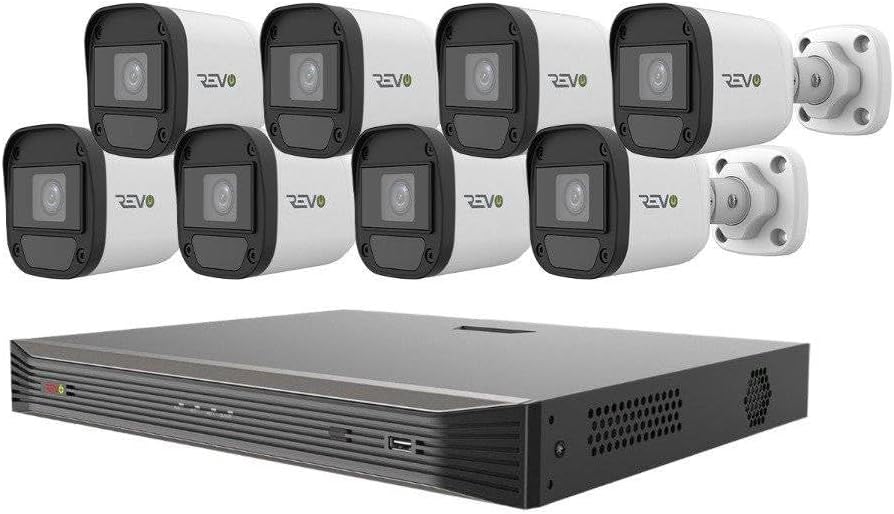
The REVO America Ultra surveillance system offers exceptional video quality, user-friendly operation, and robust networking capabilities. Designed to complement any home or business environment, this system leverages advanced IP technology for superior performance. The RU162ABNDL-1 is a comprehensive, plug-and-play HD surveillance solution, featuring a 16-channel Network Video Recorder (NVR) with a pre-installed 2TB hard disk drive and eight 4MP HD indoor/outdoor bullet cameras. The NVR supports state-of-the-art H.265 compression and 4K video output. REVO Ultra cameras are equipped with optical-grade, IR anti-reflection glass and powerful 4 Megapixel sensors, providing double the resolution of standard 1080P. They also feature commercial-grade "OSRAM" LEDs for clear night vision up to 100 feet in total darkness. Built for outdoor resilience, the cameras can withstand temperatures from -31°F to 140°F. S.M.A.R.T. Technology monitors system health and alerts users to malfunctions. The system's interface is intuitive, accessible via the NVR, mobile app, computer software, or web browser. Setup is simplified with Power over Ethernet (PoE) and Cat 5E cabling, where a single cable handles both power and data between the camera and NVR.
Kas įtraukta
Your REVO America Ultra surveillance system package includes the following components:
- 16 Channel 4K IP NVR with built-in 16 RJ45 PoE ports
- 8 x 4MP Indoor/Outdoor IP Bullet Cameras
- Pre-installed 2TB Video Surveillance Grade Hard Disk Drive (HDD)
- 8 x 100’ Cat 5E Cables
- Pelė
- Maitinimo adapteris NVR
- Ethernet kabelis

Sąranka
The REVO America Ultra system is designed for straightforward DIY installation. Follow these simple steps to set up your surveillance system:
- Išpakuokite komponentus: Carefully remove all items from the packaging and verify against the "What's Included" list.
- Prijungti NVR: Place the NVR in a secure, well-ventilated location. Connect the NVR to a power source using the provided power adapter. Connect the NVR to your network router using the supplied Ethernet cable for remote access capabilities.
- Prijungti kameras: Utilize the 100’ Cat 5E cables to connect each 4MP IP bullet camera to the built-in RJ45 PoE ports on the NVR. The PoE functionality means a single cable provides both power and video signal, simplifying wiring.
- Prijungti ekraną: Connect a monitor to the NVR via HDMI or VGA for local viewinavimas ir konfigūracija.
- Pradiniai nustatymai: Power on the NVR. Follow the on-screen prompts for initial setup, including setting up administrator passwords and network settings.
- Programėlės mobiliesiems sąranka: Download the REVO Ultra mobile app on your smartphone or tablet. Follow the app's instructions to add your NVR for remote monitoring. This typically involves scanning a QR code on the NVR or entering its serial number.
For detailed visual instructions, refer to the DIY installation videos provided by REVO America.
Sistemos valdymas
The REVO Ultra system offers a variety of features for effective surveillance and monitoring:
- Tiesiogiai View: Access live video feeds from all connected cameras via the NVR, mobile app, or web naršyklė.
- 4K Recording & Output: The NVR supports 4K recording and provides 4K video output for crystal-clear imagery.
- H.265 suspaudimas: Advanced H.265 video compression ensures efficient storage and bandwidth usage without compromising video quality.
- Naktinis matymas: Cameras are equipped with powerful IR LEDs, providing clear night vision up to 100 feet in complete darkness.
- Smart Alerts & Notifications: Receive instant notifications via alarms and email for detected events. Configure motion detection zones and sensitivity settings to minimize false alarms.
- Nuotolinis stebėjimas: Use the REVO Ultra mobile app or browser login to view gyvi pašarai, review praeitis footage, receive notifications, adjust settings, set alarms, and check motion events from anywhere. The system allows viewing multiple units simultaneously.
- Koridorius View Režimas: Optimize camera views for narrow spaces like hallways, doors, and windows.


Priežiūra
To ensure optimal performance and longevity of your REVO America Ultra surveillance system, regular maintenance is recommended:
- Švarios kameros: Periodically clean the camera lenses and housings to remove dust, dirt, or cobwebs, kurios gali trukdyti view. Naudokite minkštą, damp audinys.
- Patikrinkite jungtis: Ensure all cable connections (power, Ethernet, camera) are secure and free from damage.
- Monitoriaus saugykla: The NVR features a 2TB HDD. Monitor storage capacity and configure recording settings (e.g., motion-triggered recording) to manage space effectively. The system's S.M.A.R.T. Technology helps monitor its own health, including the HDD, and will alert you of any potential malfunctions.
- Programinės įrangos atnaujinimai: Keep your NVR firmware and mobile app updated. The system supports hassle-free software upgrades via the cloud.
- Aplinkosaugos svarstymai: Ensure the NVR is in a well-ventilated area to prevent overheating. While cameras are built for outdoor use, extreme conditions may require additional protective measures.
Trikčių šalinimas
If you encounter issues with your REVO America Ultra system, consider the following common troubleshooting steps:
- Nėra vaizdo / neprisijungus pasiekiamos kameros:
- Check power and Ethernet connections for the camera and NVR.
- Ensure the Cat 5E cable is not damaged.
- Verify the camera is properly added and configured in the NVR settings.
- Nėra nuotolinės prieigos:
- Confirm the NVR is connected to the internet.
- Check your router settings (firewall, port forwarding if necessary, though usually not required with P2P cloud access).
- Ensure the mobile app or browser client is updated to the latest version.
- Prasta vaizdo kokybė:
- Nuvalykite fotoaparato objektyvą.
- Patikrinkite, ar kameros matymo lauke nėra kliūčių view.
- Verify network bandwidth if experiencing lag or pixelation.
- Nėra įrašo:
- Check the NVR's recording schedule and motion detection settings.
- Verify the 2TB HDD is functioning correctly and has sufficient free space.
For persistent issues, please contact REVO America technical support.
Specifikacijos
| Funkcija | Detalė |
|---|---|
| Prekės ženklas | REVO |
| Modelio numeris | RU162ABNDL-1 |
| Ryšio technologija | Laidinis (PoE) |
| Vaizdo įrašymo raiška | 4 MP (Cameras), 4K (NVR Output) |
| Ypatingos savybės | Portable, Night Vision, Motion Sensor, H.265 Compression, S.M.A.R.T. Technology |
| Kanalų skaičius | 16 |
| Atminties talpa | 2 TB standusis diskas (iš anksto įdiegtas) |
| Spalva | Black (NVR) & Cameras (White) |
| Maitinimo šaltinis | Su laidu elektra |
| Prekės matmenys P x P x A | 22 x 12 x 18 colio |
| Operacinė sistema | Linux |
| Rekomenduojami naudojimo būdai | Indoor, outdoor, home, business, commercial, hospitals, schools, office |
| Suderinami įrenginiai | Desktop, Laptop, Tablet, Smartphone (Android, iOS) |
| Naktinio matymo diapazonas | 100 pėdų |
| Kadrų dažnis | 30 kadrų per sekundę |
| Įrašymo režimas | Nuolatinis, judesio aptikimas |
| Techninės įrangos sąsaja | Ethernet |
| Vaizdo įvestis | VGA, HDMI |
| Prekės svoris | 30 svaro |
Garantija ir palaikymas
REVO America provides comprehensive support for your surveillance system:
- Garantija: A 2-year free warranty is provided, which includes free parts replacement.
- Techninė pagalba: Lifetime technical support is available. Email replies are typically provided within 24 hours.
- Pagalba telefonu: You can also call REVO America at: +1 (866) 625-7386 (Mon: 8am-6pm CST, Tue-Fri: 8am-5pm CST).


