Įvadas
The Akuvox SP-R50 is a business IP phone designed to provide high-quality, cost-effective communication solutions. It features HD Voice, a 2.3-inch 132x64 graphical LCD with backlight, and supports 3-way conferencing. This manual provides essential information for setting up, operating, maintaining, and troubleshooting your SP-R50 IP phone.
Pakuotės turinys
Prieš pradėdami, patikrinkite, ar pakuotėje yra visi reikalingi daiktai:
- IP Phone (Akuvox SP-R50) x 1
- Stovas x 1
- Handset with Cord x 1
- Ethernet kabelis x 1
- Maitinimo adapteris x 1
Sąranka
Follow these steps to set up your Akuvox SP-R50 IP Phone:
- Pritvirtinkite stovą: Securely attach the stand to the back of the IP phone.
- Prijunkite ragelį: Prijunkite vieną susukto ragelio laido galą prie ragelio, o kitą – prie ragelio prievado telefono bazėje.
- Prisijunkite prie tinklo:
- If using Power over Ethernet (PoE), connect one end of the Ethernet cable to the LAN port on the phone and the other end to a PoE-enabled network switch or router.
- If not using PoE, connect one end of the Ethernet cable to the LAN port on the phone and the other end to your network switch or router. Then, connect the power adapter to the phone's power port and plug it into a power outlet.
- Pradinis paleidimas: The phone will power on automatically. The LCD screen will display the boot-up sequence. Once complete, it will attempt to obtain an IP address and register with your SIP server.
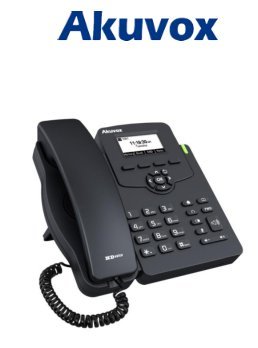
Image: Akuvox SP-R50 Business IP Phone, showing the main unit with the handset resting on its cradle and the stand attached, ready for setup.
Naudojimo instrukcijos
This section covers the basic operation of your Akuvox SP-R50 IP Phone.
Skambinimas ir skambučių priėmimas
- Norėdami paskambinti: Pick up the handset or press the Speaker button. Dial the desired number and press the Surinkite or # raktas.
- Norėdami gauti skambutį: Pakelkite ragelį arba paspauskite Pranešėjas mygtuką, kai suskamba telefonas.
- Norėdami baigti skambutį: Padėkite ragelį arba paspauskite Pranešėjas mygtuką.
Skambučio funkcijos
- Skambutis laukiamas: Allows you to answer a second incoming call while on an active call.
- Call Forward: Redirects incoming calls to another number.
- Skambučių perkėlimas: Perjungia aktyvų skambutį kitam asmeniui.
- Call on Hold: Sulaiko aktyvų skambutį.
- Nutildyti: Išjungia mikrofoną skambučio metu.
- Automatinis atsakymas: Configures the phone to automatically answer incoming calls.
- Perskambinti: Surenka paskutinį rinktą numerį.
- Netrukdyti (DND): Blocks all incoming calls.
- Local 3-Way Conference: Allows you to conduct a three-way conference call.
Phonebook and Settings
- Telefonų knyga: The phone supports a phonebook of up to 500 groups and 5 remote phone book URLs. Access and manage contacts through the menu.
- Garso reguliavimas: Use the volume keys on the phone to adjust the handset, speaker, or ringer volume.
- Skambėjimo tonai: Select from various ring tones through the phone's settings menu.
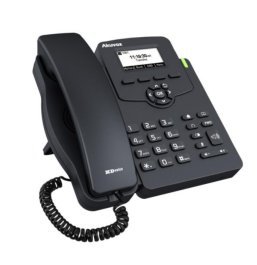
Image: Akuvox SP-R50 Business IP Phone, showcasing its ergonomic design and key layout from a slightly elevated angle, highlighting the display and navigation buttons.
Priežiūra
Tinkama priežiūra užtikrina jūsų IP telefono ilgaamžiškumą ir optimalų veikimą.
- Valymas: Telefono paviršių valykite minkšta, sausa šluoste. Įsisenėjusias dėmes šiek tiek nuvalykite.ampNuvalykite šluostę vandeniu. Nenaudokite stiprių cheminių medžiagų, abrazyvinių valiklių ar tirpiklių.
- Aplinka: Keep the phone away from direct sunlight, excessive heat sources, and moisture. Ensure it is placed on a stable surface to prevent accidental falls.
- Kabeliai: Periodically check all connected cables (handset, Ethernet, power) for any signs of wear or damage. Replace damaged cables immediately.
Trikčių šalinimas
If you encounter issues with your Akuvox SP-R50, refer to the following common problems and solutions:
| Problema | Galima priežastis | Sprendimas |
|---|---|---|
| Telefonas neįsijungia. | Nėra maitinimo jungties arba sugedęs maitinimo adapteris / „PoE“. | Check if the power adapter is securely plugged in or if the Ethernet cable is connected to a PoE-enabled port. Try a different power outlet or PoE port. |
| Nėra rinkimo tono. | Network connection issue or SIP registration failure. | Verify the Ethernet cable is properly connected. Check the network status on the phone's display. Contact your network administrator or SIP service provider if the issue persists. |
| Negalima skambinti arba priimti skambučių. | SIP registration failed, DND enabled, or network problem. | Ensure the phone is registered (check display). Disable DND if active. Confirm network connectivity. |
| Prasta skambučio kokybė (aidas, triukšmas). | Tinklo perkrova arba trukdžiai. | Ensure your network has sufficient bandwidth. Avoid placing the phone near other electronic devices that may cause interference. |
Specifikacijos
Key technical specifications for the Akuvox SP-R50 Business IP Phone:
| Funkcija | Aprašymas |
|---|---|
| Prekės ženklas | Akuvox |
| Modelis | Akuvox SP-R50 |
| Ekranas | 2.3'' 132*64 Graphical LCD with Backlight |
| SIP sąskaitos | 1 Line (Support 1 SIP account) |
| Balso funkcijos | HD Voice, 3-Way Conference |
| Telefonų knygos talpa | 500 groups, 5 Remote Phone Book URL Palaikoma |
| Skambučių žurnalai | 100 įrašų |
| Galia | PoE Support, Power Adapter (included) |
| Ypatingos savybės | Call Waiting, Call Forward, Call Transfer, Call on Hold, Mute, Auto-answer, Redial, DND, Speed Dial, Hotline, Direct IP call, Music on hold, Intercom, Call Pickup, Group Call Pickup, Anonymous Call, Anonymous Call Rejection |
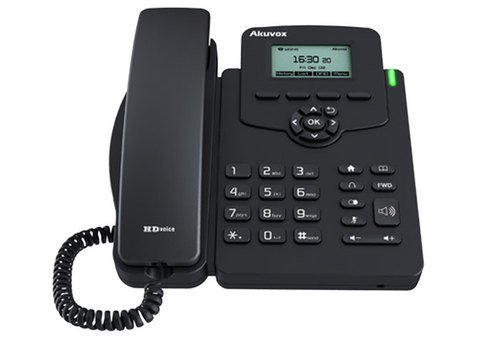
Vaizdas: priekis view of the Akuvox SP-R50 Business IP Phone, clearly showing the display, navigation keys, and numeric keypad.
Informacija apie garantiją
The Akuvox SP-R50 Business IP Phone comes with a 2 metų garantija from the date of purchase. This warranty covers manufacturing defects and malfunctions under normal use. Please retain your proof of purchase for warranty claims. For detailed terms and conditions, refer to the warranty card included with your product or contact Akuvox customer support.
Palaikymas
If you require further assistance or have questions not covered in this manual, please contact your vendor or Akuvox customer support. You may also visit the official Akuvox website for additional resources and frequently asked questions.


