1. Įvadas
This manual provides detailed instructions for the installation, operation, and maintenance of the Secukey XK3-BT RFID Pin Access Control System. The XK3-BT is a robust, standalone access control device designed for secure entry management, featuring RFID card, PIN code, and Bluetooth smartphone access. Its IP66 rating ensures durability in various environmental conditions.
2. Produktas baigtasview
2.1 Pagrindinės savybės
- Patvarumas: IP66 waterproof and anti-vandalism design.
- Ryšys: Bluetooth compatibility for smartphone control via a dedicated app.
- Prieigos būdai: Supports RFID card (125 Khz EM/Hid), PIN code, Card + PIN, Multiple Cards/PINs, and Smartphone access.
- Vartotojo talpa: Manages up to 1000 users (998 standard users + 2 panic users).
- Relės išėjimas: One internal relay for door opening (NO, NC, Com) with adjustable opening time (0-99 seconds, default 5 seconds).
- „Wiegand“ sąsaja: Wiegand 26-37 bits input/output for integration with other systems and user list transfer.
- Išplėstinės funkcijos: Supports door interlock between two XK3-BT units and a door/gate hold-open mode.
- Išorinės jungtys: Relay output, exit button, alarm, external contact, Wiegand In & Out.
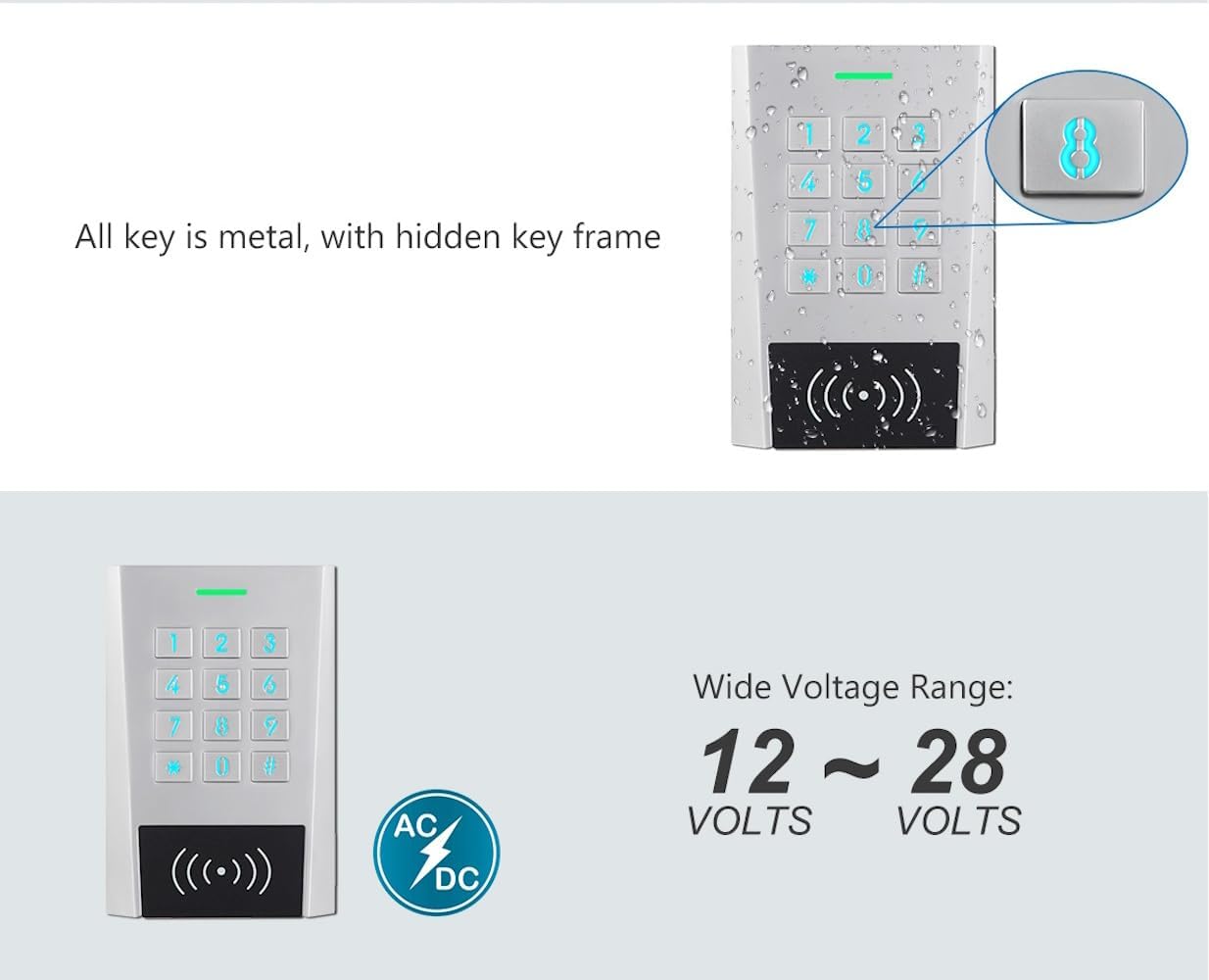
- Galios reikalavimai: Operates on 12-28 V AC/DC.
- Veikimo aplinka: Temperature range -40 °C to 60 °C, humidity 0% to 98% (non-condensing).
- Konstrukcija: Robust zinc alloy casing.
2.2 Produkto komponentai
The Secukey XK3-BT system primarily consists of the main access control unit. Additional components such as power supply, RFID cards, and wiring are typically purchased separately.

2.1 pav.: priekis view of the Secukey XK3-BT Access Control Unit, showing the keypad and RFID reader area.

2.2 pav.: Kampinis view of the Secukey XK3-BT Access Control Unit, highlighting its sleek design.
2.3 pav. Iš arti view illustrating the metal keys with a hidden key frame and the unit's water-resistant properties.
3. Sąranka ir diegimas
Proper installation is crucial for the optimal performance and security of your Secukey XK3-BT system. It is recommended that installation be performed by a qualified technician.
3.1 Maitinimo šaltinio prijungimas
The unit requires a power input of 12-28 Volts AC or DC. Ensure the power supply meets these specifications and is stable. Connect the power wires to the designated terminals on the unit. Refer to the wiring diagram provided with the product packaging for specific terminal identification.
3.2 Wiring for Door Control
The XK3-BT features an internal relay for controlling an electric lock. Connect the lock to the NO (Normally Open), NC (Normally Closed), and COM (Common) terminals as required by your lock type. An exit button can be connected to the designated terminals to allow egress from the secured area.
3.3 Wiegand Interface
The Wiegand In & Out connections (26-37 bits) allow the XK3-BT to function as part of a larger access control system or to transfer user data between units. Consult your system integrator for Wiegand integration details.
3.4 Montavimas
Mount the unit securely on a flat surface at an appropriate height for user access. Ensure the mounting location is free from excessive vibration and direct exposure to extreme weather conditions, despite its IP66 rating, to prolong its lifespan.
4. Naudojimo instrukcijos
4.1 Access Modes
The Secukey XK3-BT offers multiple ways to grant access:
- RFID kortelė: Present a registered 125 Khz EM/Hid card to the reader area.
- PIN kodas: Enter a registered PIN code on the keypad.
- Card + PIN: Requires both a registered card and its associated PIN for enhanced security.
- Multiple Cards/PINs: Allows for sequential presentation of multiple credentials for access.
- Smartphone (Bluetooth App): Use the dedicated Secukey app on your smartphone to unlock the door via Bluetooth.

Figure 4.1: Illustration of the multiple access methods supported by the XK3-BT unit.
4.2 pav. Pvzample of a user gaining access by pressing a button on their smartphone via Bluetooth.
4.2 Vartotojų valdymas
The XK3-BT allows for the addition and deletion of up to 1000 users. Detailed instructions for programming user cards and PINs are typically found in the quick start guide or advanced programming manual included with the product. User lists can also be transferred between master and receiver units via the Wiegand line.
4.3 Bluetooth App Usage
Download the official Secukey app from Google Play Store or Apple App Store. Once installed, pair your smartphone with the XK3-BT unit via Bluetooth. The app provides an interface for managing users, setting access parameters, and remotely unlocking the door within Bluetooth range.
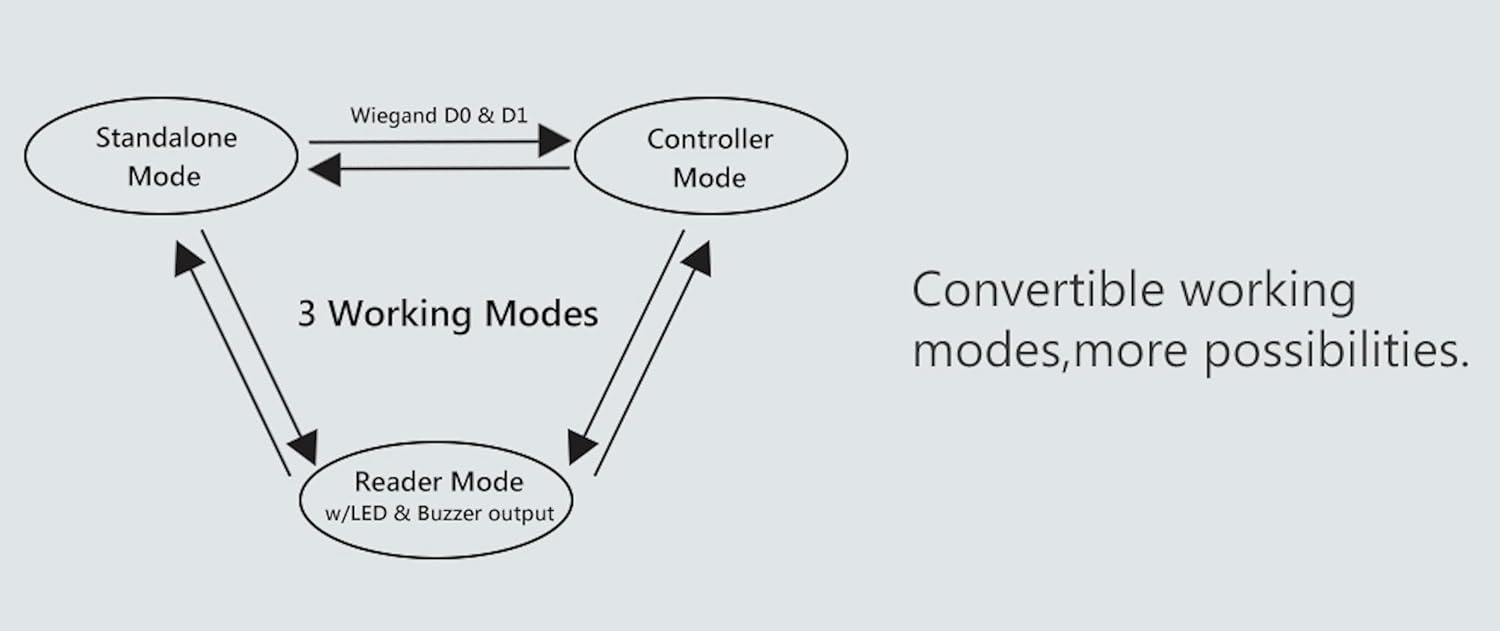
4.4 Išplėstiniai darbo režimai
- Door Interconnection: When two XK3-BT units are installed, they can be configured for interlock functionality, preventing the second door from opening until the first is securely closed.
- Hold-Open Mode: This mode allows a door or gate to remain unlocked for an extended period, useful for high-traffic times or deliveries.

Figure 4.3: Diagram showing the three convertible working modes: Standalone, Controller, and Reader.
5. Priežiūra
The Secukey XK3-BT is designed for minimal maintenance. However, regular checks can ensure its longevity and reliable operation:
- Valymas: Periodically wipe the unit's surface with a soft, damp skudurėliu. Venkite abrazyvinių valiklių ar tirpiklių.
- Ryšio patikrinimas: Kasmet patikrinkite visas laidų jungtis, ar nėra sandarumo ir korozijos požymių.
- Firmware atnaujinimai: Patikrinkite gamintojo websvetainėje ar programėlėje ieškokite galimų programinės įrangos atnaujinimų, kad užtikrintumėte optimalų našumą ir saugumą.
6. Problemų sprendimas
If you encounter issues with your XK3-BT unit, consider the following common troubleshooting steps:
- Nėra galios: Verify the power supply is connected correctly and providing the required 12-28V AC/DC. Check circuit breakers.
- Prieiga uždrausta:
- Ensure the RFID card or PIN is correctly registered in the system.
- Check if the card or PIN has expired or been deactivated.
- For Card + PIN mode, ensure both are entered correctly.
- Durys neatsirakina:
- Check the wiring to the electric lock and ensure it is receiving power.
- Verify the relay settings (NO/NC) match your lock type.
- Ensure the door opening time is set appropriately.
- Bluetooth App Issues:
- Ensure Bluetooth is enabled on your smartphone and the app has necessary permissions.
- Confirm your phone is within range of the XK3-BT unit.
- Paleiskite programėlę arba telefoną iš naujo.
If problems persist, contact Secukey customer support or your installer for further assistance.
7. Specifikacijos
| Funkcija | Specifikacija |
|---|---|
| Modelio numeris | XK3-BT |
| Matmenys (I x P x A) | 11.5 x 7.5 x 2.2 cm |
| Svoris | 360 gramų |
| Apsaugos nuo patekimo (IP) įvertinimas | IP66 (Waterproof, Anti-Vandalism) |
| Galios reikalavimai | 12-28 V AC/DC |
| Darbinė temperatūra | -40 °C ~ 60 °C |
| Darbinė drėgmė | 0 % ~ 98 % (nekondensuojantis) |
| Vartotojo talpa | 1000 (998 standard + 2 panic) |
| RFID kortelės tipas | 125 Khz EM/Hid card |
| Relės apkrova | 2 A maks |
| Relės atidarymo laikas | 0 ~ 99 seconds (default 5 seconds) |
| „Wiegand“ sąsaja | 26 ~ 37 bitai |
| Casing Medžiaga | Cinko lydinys |

Figure 7.1: Illustration of the wide voltage range (12-28 Volts AC/DC) supported by the unit.
8. Garantija ir palaikymas
For information regarding product warranty, technical support, or service, please refer to the documentation provided with your purchase or contact your authorized Secukey dealer or the manufacturer directly. Specific warranty terms and support channels may vary by region and reseller.