1. Įvadas
Thank you for choosing the TecTake Corner Computer Desk, Model 402405. This L-shaped workstation is designed to provide a practical and spacious area for your computer and work essentials. Its modern design, featuring a refined tabletop and stable steel construction, ensures durability and a timeless aesthetic. This manual provides essential information for the safe assembly, operation, and maintenance of your new desk.
Prieš surinkdami ir naudodami, atidžiai perskaitykite šį vadovą ir išsaugokite jį ateičiai.
2. Saugos instrukcijos
Norėdami užtikrinti saugų naudojimą ir išvengti žalos, laikykitės šių saugos nurodymų:
- Surinkimas: Assemble the desk on a soft, clean surface to prevent scratches. Ensure all components are correctly aligned and securely fastened according to the provided assembly instructions.
- Stabilumas: Do not overload the desk. The maximum load capacity is 100 kg (220 lbs). Distribute weight evenly across the surface.
- Vieta: Place the desk on a level and stable floor. Avoid placing it near heat sources, direct sunlight, or in excessively humid environments.
- Vaikai: Smulkias dalis ir pakavimo medžiagas laikykite vaikams nepasiekiamoje vietoje, kad išvengtumėte užspringimo pavojaus.
- Priežiūra: Reguliariai tikrinkite visus varžtus ir jungtis, kad jie būtų tvirtai priveržti. Jei reikia, priveržkite.
- Persikėlimas: Perkeldami stalą, jį kelkite, o ne tempkite, kad nepažeistumėte kojų ir grindų.
3. Pakuotės turinys
Before beginning assembly, please verify that all parts are present and undamaged. The package should contain:
- 1x Corner Desk (comprising main tabletop sections and frame components)
- 1x Computer Tower Holder
- 1x Illustrated Assembly Instructions
- All necessary screws, fittings, and tools for assembly (as specified in the assembly instructions)

Figure 1: Assembled TecTake Corner Computer Desk (Dark Wood Finish). This image shows the overall L-shaped design, the spacious work surface, and the integrated keyboard tray.
4. Sąranka ir surinkimas
The TecTake Corner Computer Desk requires assembly. Please follow the detailed, illustrated instructions provided in your package. It is recommended to have two people for assembly to ensure ease and safety.
- Išpakuoti: Carefully unpack all components and lay them out on a clean, soft surface to prevent damage.
- Atpažinkite dalis: Refer to the parts list in the assembly manual to identify each component.
- Atlikite veiksmus: Proceed step-by-step according to the illustrated assembly guide. Ensure all screws and connectors are tightened securely but do not overtighten.
- Klaviatūros dėklas: Install the sliding keyboard tray as indicated in the instructions. Ensure it slides smoothly.
- Computer Tower Holder: Position the included computer tower holder as desired.
- Galutinis patikrinimas: Once assembled, gently test the desk's stability and ensure all parts are firmly connected.

2 pav.: Iš viršaus į apačią view of the TecTake Corner Computer Desk (White Finish). This perspective highlights the L-shape and the ample surface area for multiple monitors or work items.
5. Naudojimo instrukcijos
Your TecTake Corner Computer Desk is designed for efficient and comfortable use. Here are some operational aspects:
- Darbinis paviršius: Utilize the large L-shaped surface for your monitor(s), laptop, documents, and other office supplies. The design provides amperdvės daugiafunkciniam darbui.
- Klaviatūros dėklas: The integrated sliding keyboard tray allows you to store your keyboard and mouse neatly under the desk when not in use, freeing up valuable desktop space. Gently pull it out for use and push it back in for storage.
- Computer Tower Holder: The included holder is designed to keep your computer tower off the floor, protecting it from dust and allowing for better airflow. It accommodates towers with a maximum width of 25 cm.
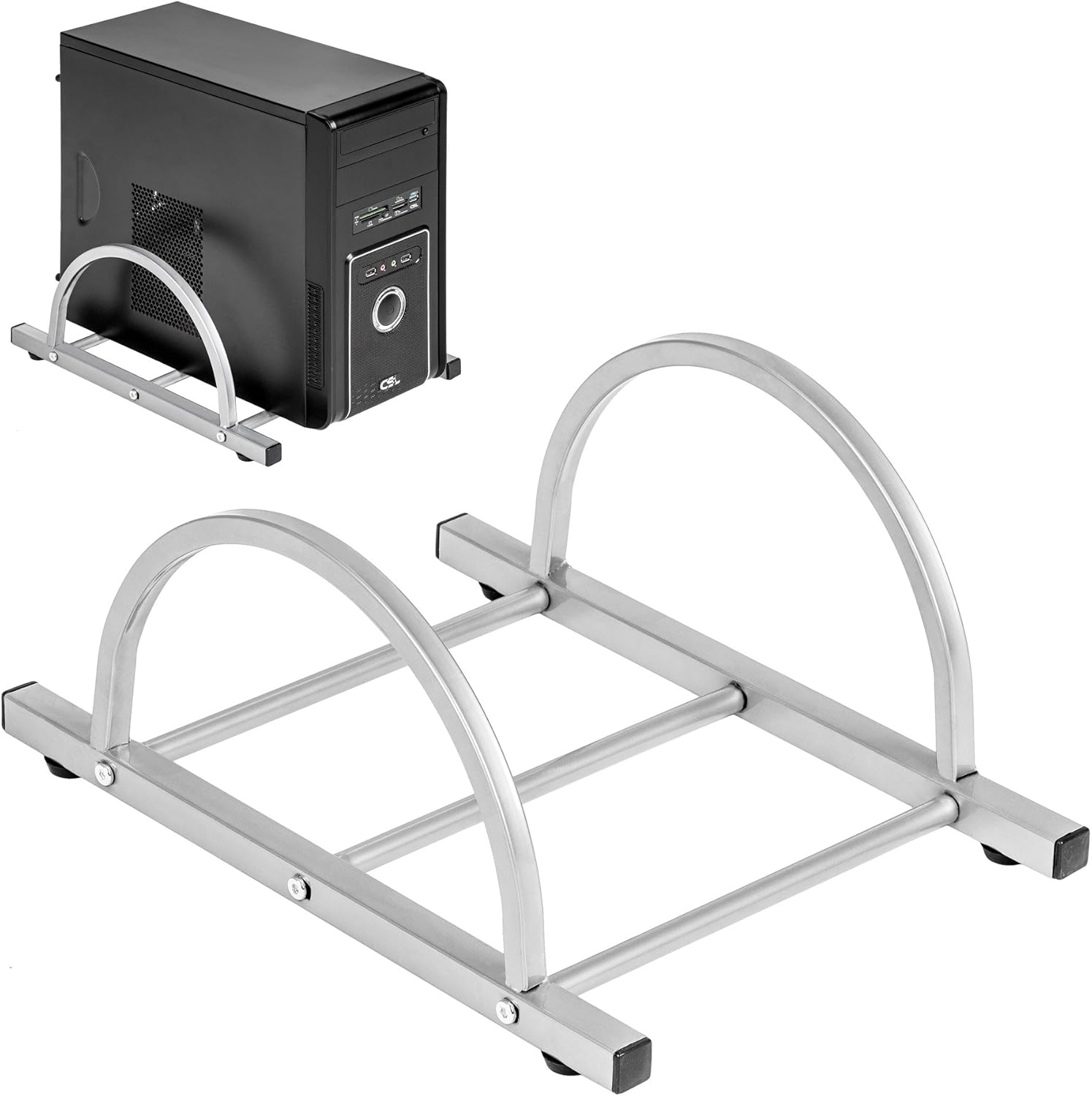
Figure 3: TecTake Computer Tower Holder. This image displays the separate holder designed to keep your PC tower elevated and secure.
6. Priežiūra
Tinkama priežiūra prailgins jūsų stalo tarnavimo laiką ir išvaizdą:
- Valymas: Paviršius nuvalykite minkšta, damp šluoste. Įsisenėjusioms dėmėms naudokite švelnų muilo tirpalą ir nedelsdami nusausinkite švaria šluoste. Venkite abrazyvinių valiklių ar stiprių cheminių medžiagų.
- Išsiliejimai: Clean up spills immediately to prevent staining or damage to the MDF surface.
- Techninė įranga: Periodically check all screws and fittings for tightness. Re-tighten as necessary to maintain stability.
- Apsauga: Use coasters for drinks and protective pads under hot items to prevent damage to the tabletop.
7. Problemų sprendimas
Jei kyla problemų dėl stalo, apsvarstykite šiuos įprastus sprendimus:
- Rašomasis stalas svyruoja:
- Įsitikinkite, kad stalas yra ant lygaus paviršiaus.
- Patikrinkite visus surinkimo varžtus ir veržles. Priveržkite visas atsilaisvinusias jungtis.
- Verify that all leg caps are properly installed and making full contact with the floor.
- Klaviatūros dėklas neslysta sklandžiai:
- Patikrinkite, ar slankiojančiame mechanizme nėra jokių kliūčių.
- Ensure the rails are correctly installed and aligned.
- Clean the rails if dust or debris is present.
- Trūksta dalių: If you find any parts missing upon unpacking, please refer to the "Warranty and Support" section to contact customer service.
8. Specifikacijos
| Funkcija | Detalė |
|---|---|
| Prekės ženklas | TecTake |
| Modelio numeris | 402405 |
| Bendri matmenys (I x P x A) | 170 x 135 x 75 cm (66.9 x 53.1 x 29.5 colio) |
| Stalviršio aukštis | 75 cm (29.5 coliai) |
| Large Tabletop Section (L x W) | 115 x 55 cm (45.3 x 21.7 colio) |
| Small Tabletop Section (L x W) | 80 x 55 cm (31.5 x 21.7 colio) |
| Rounded Corner Section (L x W) | 55 x 55 cm (21.7 x 21.7 colio) |
| Stalviršio storis | 1.5 cm (0.6 coliai) |
| Sliding Keyboard Tray (L x W) | 56.5 x 35 cm (22.2 x 13.8 colio) |
| Steel Tube Dimensions | 3x2 cm; 2x2 cm; 1.5x1.5 cm |
| Computer Tower Holder Width (Max) | 25 cm (9.8 coliai) |
| Didžiausia apkrova | 100 kg (220 svaro) |
| Medžiaga | Veneered MDF surface, powder-coated steel tube frame, plastic feet and end caps |
| Color (as per model) | Baltas |
9. Garantija ir palaikymas
TecTake products are manufactured with quality and durability in mind. For information regarding warranty coverage, please refer to the warranty card included with your product or visit the official TecTake websvetainę.
If you have any questions, require assistance with assembly, or need to report missing/damaged parts, please contact TecTake customer service. Contact details can typically be found on the product packaging, the included assembly instructions, or the official TecTake websvetainę.
Palaikymas internetu: www.tectake.de (Patikrinkite savo regiono website for specific contact information).


