1. Įvadas
Thank you for choosing the EDM 00780 Remote Control. This manual provides essential information for the proper setup, operation, and maintenance of your remote control, specifically designed for use with EDM Model 07214. Please read these instructions carefully before using the product to ensure optimal performance and longevity.
Svarbi saugos informacija: Always handle batteries with care. Do not mix old and new batteries, or different types of batteries. Remove batteries if the remote will not be used for an extended period.
2. Produktas baigtasview
2.1 Komponentai
The EDM 00780 remote control features an ergonomic design for comfortable handling and intuitive push-button operation. Key components include:
- Valdymo mygtukai: Various buttons for specific functions of the EDM Model 07214.
- Infrared Emitter: Located at the front, transmits signals to the device.
- Baterijų skyrius: Įsikūręs gale, skirtas akumuliatoriui įdėti.
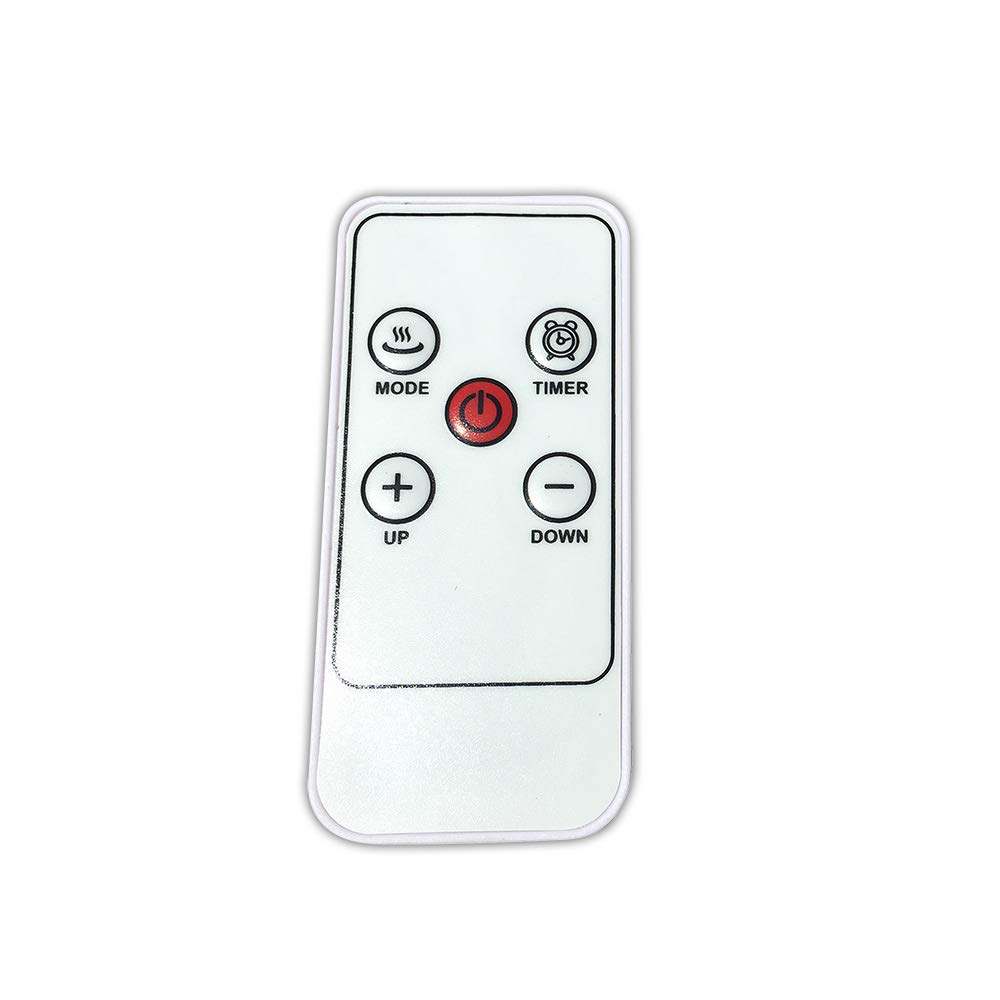
1 vaizdas: priekis view of the EDM 00780 Remote Control, showing its ergonomic shape and button layout.
3. Sąranka
3.1 Akumuliatoriaus įdėjimas
- Nuotolinio valdymo pulto gale raskite baterijų skyriaus dangtelį.
- Slide or gently press and lift the cover to open the compartment.
- Insert the required batteries (typically AAA, refer to the compartment for specific type and polarity) ensuring the positive (+) and negative (-) terminals align correctly with the markings inside the compartment.
- Uždėkite baterijų skyriaus dangtelį, įsitikindami, kad jis tvirtai užsifiksavo.
3.2 Pirmasis naudojimas
After installing the batteries, the remote control is ready for use. Point the infrared emitter directly towards the EDM Model 07214 device you wish to control. Ensure there are no obstructions between the remote and the device.
4. Operacija
4.1 Pagrindinės funkcijos
The EDM 00780 remote control operates via infrared technology, providing a maximum range of 10 meters under optimal conditions. To operate, simply press the desired button while pointing the remote at the EDM Model 07214.
4.2 Mygtukų funkcijos
Specific button functions will correspond to the features of your EDM Model 07214. Common button types include:
- Maitinimo mygtukas: Norėdami įjungti arba išjungti įrenginį.
- Funkciniai mygtukai: For specific operations (e.g., mode selection, timer, light control).
- Naršymo mygtukai: If applicable, for menu navigation.
Refer to the user manual of your EDM Model 07214 for detailed descriptions of each button's function.
5. Priežiūra
5.1 Valymas
Nuotolinio valdymo pultą valykite minkšta, sausa šluoste. Jei nešvarumai sunkiai įveikiami, šiek tiek nuvalykite.ampen the cloth with water or a mild cleaning solution. Do not use abrasive cleaners, alcohol, or solvents, as these can damage the surface or internal components.
5.2 Akumuliatoriaus keitimas
Replace batteries when the remote control's response becomes sluggish or stops working. Follow the battery installation steps outlined in Section 3.1. Always replace all batteries at the same time with new ones of the same type.
5.3 Saugykla
Store the remote control in a cool, dry place away from direct sunlight and extreme temperatures. If storing for an extended period, remove the batteries to prevent leakage and potential damage.
6. Problemų sprendimas
6.1 Bendros problemos
| Problema | Galima priežastis | Sprendimas |
|---|---|---|
| Nuotolinis nereaguoja | Neišsikrovusios arba neteisingai įdėtos baterijos. | Pakeiskite baterijas, užtikrindami teisingą poliškumą. |
| Limited range or intermittent response | Weak batteries, obstruction, or remote not pointed correctly. | Replace batteries. Ensure a clear line of sight to the device. Point directly at the device. |
| Neveikia konkretus mygtukas | Button malfunction or device not recognizing command. | Clean the remote. Test other buttons. If only one button fails, contact support. |
7. Specifikacijos
| Funkcija | Specifikacija |
|---|---|
| Modelio numeris | 00780 |
| Prekės ženklas | EDM |
| Ryšio technologija | Infraraudonųjų spindulių |
| Valdiklio tipas | Push-button Control |
| Didžiausias diapazonas | 10 metrai |
| Ypatinga funkcija | Ergonomiškas dizainas |
| Matmenys (I x P x A) | 10 x 10 x 10 cm |
| Svoris | 20 g |
| Spalva | Daugiaspalvis |
| Kilmės šalis | Ispanija |
8. Garantija ir palaikymas
This product is covered by a standard manufacturer's warranty. For specific warranty terms and conditions, please refer to the documentation provided with your EDM Model 07214 device or contact EDM customer support directly. For technical assistance or further inquiries, please visit the official EDM websvetainėje arba susisiekite su klientų aptarnavimo skyriumi.