1. Įvadas
The Kaito Voyager Pro KA600 is a versatile digital emergency radio designed for both daily use and emergency preparedness. It features multiple power options, comprehensive radio band coverage, and additional functions like a smartphone charger, reading lamp, and flashlight. This manual provides detailed instructions for its setup, operation, and maintenance.
2. Saugos informacija
- Nelaikykite radijo imtuvo itin aukštose temperatūrose, tiesioginiuose saulės spinduliuose ilgą laiką arba didelėje drėgmėje.
- Venkite radijo imtuvo numetimo ir stiprių smūgių.
- Laikykite radijo imtuvą atokiau nuo stiprių magnetinių laukų.
- Nebandykite ardyti ar modifikuoti radijo imtuvo. Tai panaikins garantiją.
- Use only recommended batteries and power adapters.
- When charging external devices, ensure they are compatible with 5V USB output.
3. Pakuotės turinys
Patikrinkite, ar pakuotėje yra visi reikalingi daiktai:
- Kaito Voyager Pro KA600 Digital Emergency Radio
- Ausinės
- Vartotojo vadovas (šis dokumentas)
- Garantijos kortelė
4. Produktas baigtasview
Familiarize yourself with the main components of your Kaito Voyager Pro KA600 radio.

1 pav. Priekinio skydelio išdėstymas
This image displays the front of the Kaito Voyager Pro KA600 radio, highlighting the digital display, numeric keypad, speaker grille, and various control buttons and knobs for tuning and volume.
Pagrindiniai komponentai:
- Skaitmeninis ekranas: Shows frequency, time, temperature, humidity, and other operational information.
- Pranešėjas: Garso išvestis.
- Klaviatūra: Numeric buttons for direct frequency entry and function selection.
- Derinimo rankenėlė: For manual frequency adjustment.
- Garsumo rankenėlė: Reguliuoja garso išvesties lygį.
- Power Select Switch: Choose between battery, solar/crank, or adapter power.
- Teleskopinė antena: Geresniam radijo signalo priėmimui.
- Rankinis švaistiklis: Rankiniam energijos generavimui.
- Saulės skydas: Įkrovimui saulės energija.
- USB išvesties prievadas: Skirta išoriniams įrenginiams įkrauti.
- LED skaitymas Lamp & Flashlight: Integrated lighting features.
Video 1: Kaito Voyager Pro KA600 Radio Overview
This video provides a visual demonstration of the Kaito Voyager Pro KA600 radio, showcasing its various features and components in action, including tuning and power options.
5. Sąranka
5.1 Radijo maitinimas
The KA600 offers multiple power options:
- Internal Rechargeable Ni-MH Battery: The radio includes a built-in rechargeable battery pack (3 Ni-MH batteries, 600mAh). This battery can be charged via hand crank, solar panel, USB input, or an optional AC/DC adapter.
- AA Batteries (Not Included): For extended use, insert three (3) AA batteries into the battery compartment.
- Hand Crank Dynamo: Rotate the hand crank on the side of the radio to generate power and charge the internal battery.
- Saulės skydas: Expose the integrated solar panel to direct sunlight to charge the internal battery.
- USB Input (5V): Connect the radio to a computer or a standard USB wall adapter using a USB cable (not included) to charge the internal battery.
- Kintamosios / nuolatinės srovės adapteris (pasirinktinai): A 6V DC wall power adapter (sold separately) can be used to power the radio and charge the internal battery.

2 pav.: Baterijų skyrius
This image shows the rear of the radio with the battery cover removed, revealing the internal rechargeable Ni-MH battery and the slots for optional AA batteries.
5.2 Antenos prailginimas
For optimal reception, extend the telescopic antenna fully when listening to FM, LW, SW, or NOAA Weather bands. For AM reception, the radio uses an internal ferrite bar antenna, so the telescopic antenna is not required.
6. Naudojimo instrukcijos
6.1 Turning On/Off and Band Selection
Paspauskite GALIA button to turn the radio on or off. Use the FM/WB button to cycle through FM and NOAA Weather bands. Use the AM button to select the AM band. For Longwave (LW) and Shortwave (SW), use the appropriate band selection buttons or direct frequency entry.
6.2 Derinimo metodai
The KA600 offers several ways to tune into stations:
- Rankinis derinimas: Pasukite TUNINGAS knob on the side of the radio to manually scan frequencies.
- Direct Keypad Entry: Enter the desired frequency directly using the numeric keypad and press ENTER (or similar confirmation button, refer to display).
- Automatinio derinimo sistema (ATS): This function automatically scans and stores strong stations. Refer to the on-screen prompts or specific button for ATS activation.
- Memory Tuning: Store your favorite stations into memory for quick access. Use the M+ ir M- mygtukai, skirti naršyti po išsaugotas stotis.
6.3 NOAA Weather Alert Function
The NOAA Weather Alert feature automatically activates the radio to broadcast emergency weather alerts. To enable this:
- Ensure the radio is set to a NOAA Weather channel (1-7).
- Activate the "Alert" mode (refer to the specific button or menu option on the radio, typically labeled PERSPĖJIMAS).
- The radio will remain in standby and automatically turn on with an audible alert and broadcast the weather warning when activated by the NOAA network.
6.4 RDS (radijo duomenų sistema)
When tuned to an FM station broadcasting RDS, the radio's display may show additional information such as station name, program type, or song title. This feature is automatic when available.
6.5 Emergency Mobile Charger
The KA600 can charge external devices via its built-in standard DC 5V USB output port.
- Connect your smartphone, GPS unit, MP3 player, or digital camera to the USB output port using a compatible USB cable.
- Ensure the radio has sufficient power (internal battery charged, or actively cranking/solar charging).
- Įkrovimas prasidės automatiškai.
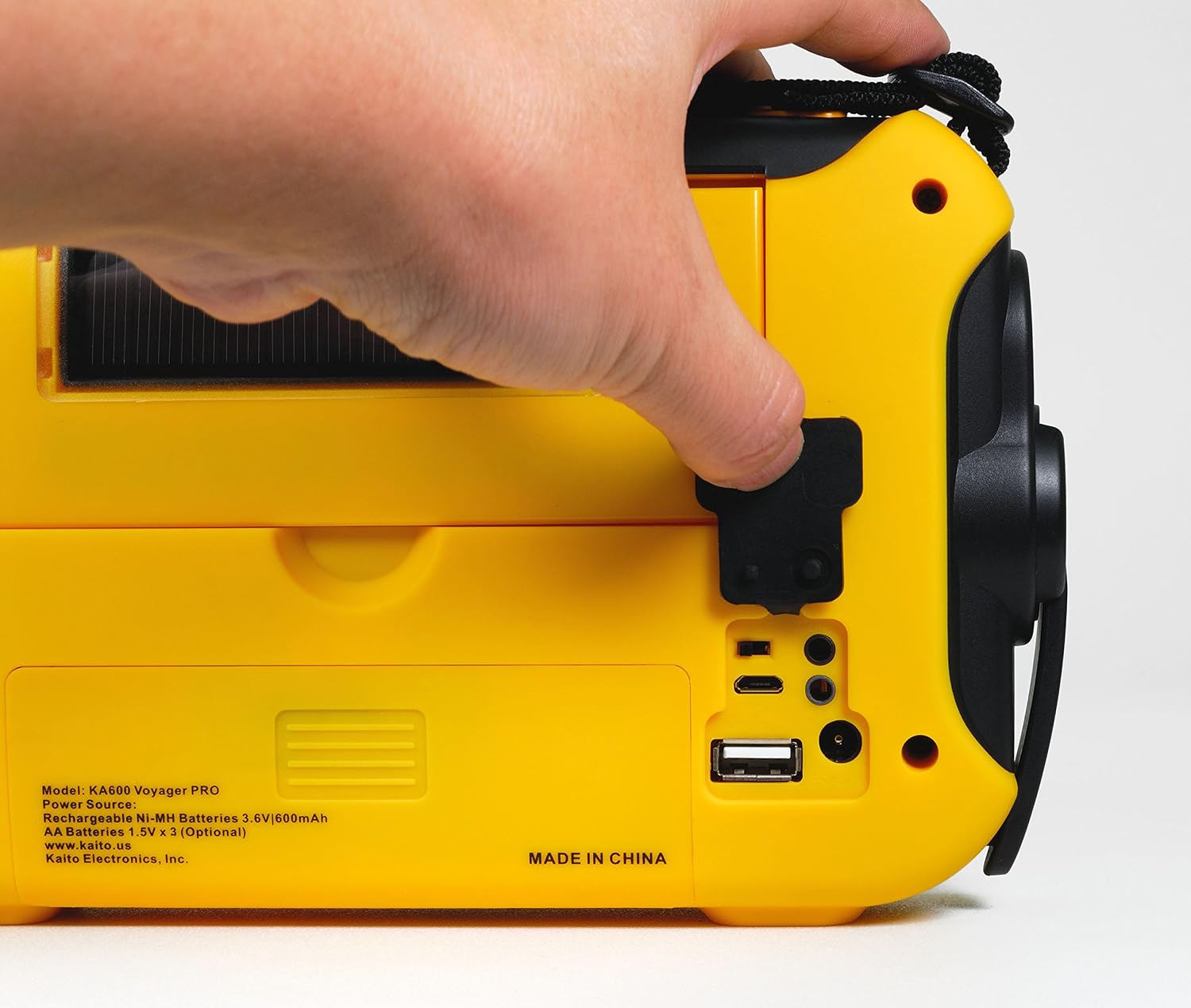
Figure 3: USB Output Port
This image highlights the USB output port on the side of the radio, used for charging external mobile devices.
6.6 Apšvietimo ypatybės
- 5-LED skaitymas Lamp: Flip up the solar panel to reveal the integrated reading lamp. Activate it using the designated button.
- LED žibintuvėlis: A powerful LED flashlight is integrated into the radio. Activate it using its dedicated button.
- Red LED S.O.S. Beacon Light: In emergencies, activate the S.O.S. beacon for signaling.

Figure 4: Reading Lamp and Solar Panel
This image shows the rear of the radio with the solar panel raised, exposing the 5-LED reading lamp apšvietimui.
7. Priežiūra
- Valymas: Nuvalykite radiją minkšta, damp audinys. Nenaudokite abrazyvinių valiklių ar tirpiklių.
- Akumuliatoriaus priežiūra: If storing the radio for an extended period, remove any non-rechargeable AA batteries to prevent leakage. Ensure the internal Ni-MH battery is charged periodically to maintain its lifespan.
- Saugykla: Radijo imtuvą laikykite vėsioje, sausoje vietoje, toliau nuo tiesioginių saulės spindulių ir ekstremalių temperatūrų.
8. Problemų sprendimas
| Problema | Galima priežastis | Sprendimas |
|---|---|---|
| Radijas neįsijungia. | Žemas arba išsikrovęs akumuliatorius; pasirinktas netinkamas maitinimo šaltinis. | Charge the internal battery via hand crank, solar, or USB. Insert fresh AA batteries. Ensure the power select switch is in the correct position. |
| Prastas radijo priėmimas. | Antena neištiesta; silpnas signalas; trukdžiai. | Fully extend the telescopic antenna. Reposition the radio for better signal. Avoid sources of electronic interference. |
| Nepavyksta įkrauti išorinio įrenginio. | Radio battery too low; incompatible device; faulty cable. | Ensure the radio's internal battery is sufficiently charged. Verify device compatibility. Try a different USB cable. |
| NOAA Alert not activating. | Not on a NOAA channel; Alert mode not enabled; no active alerts. | Tune to a NOAA Weather channel. Ensure Alert mode is activated. Confirm there are active alerts in your area. |
9. Specifikacijos
- FM: 88–108 MHz
- AM (MW): 520–1710 kHz
- LW (ilgosios bangos): 150–521 kHz
- SW (trumpųjų bangų): 2,300–23,000 kHz
- NOAA orai: Channels 1 - 7
- Vidinis garsiakalbis: Skersmuo 66 mm
- Ausinių lizdas: 3.5 mm
- Įkraunamos baterijos: 3 Ni-MH batteries, 600mAh
- Matmenys: 9.5 x 5.5 x 2.5 colio (24.13 x 13.97 x 6.35 cm)
- Svoris: 1 svaras (0.45 kg)
- Ryšys: USB (išoriniams įrenginiams įkrauti)
- Maitinimo šaltiniai: Hand crank, solar panel, 3x AA batteries (not included), 5V USB input, 6V DC adapter (optional), internal Ni-MH battery.
10. Garantija ir palaikymas
Your Kaito Voyager Pro KA600 radio comes with a warranty. Please refer to the included Warranty Card for details on coverage, terms, and how to register your product. For technical support or service inquiries, please visit the official Kaito websvetainėje arba susisiekite su klientų aptarnavimo skyriumi.
Kaito Official Websvetainė: www.kaito.us


