Įvadas
Thank you for choosing the BESTEK Power Strip Tower. This device is designed to provide a versatile and safe power solution for your home or office, featuring multiple AC outlets, USB charging ports, and a convenient wireless charging pad. Please read this manual thoroughly before use to ensure proper operation and to maximize the lifespan of your product.
Saugos instrukcijos
- Do not exceed the maximum power rating of 125V/15A/1875W.
- This product is designed for indoor use only. Avoid exposure to moisture or wet environments.
- Do not disassemble, modify, or attempt to repair the unit. Refer all servicing to qualified personnel.
- Saugoti nuo vaikų ir naminių gyvūnėlių.
- Įsitikinkite, kad maitinimo laidas yra visiškai įkištas į įžemintą sieninį lizdą.
- Venkite įrenginio statyti šalia šilumos šaltinių arba tiesioginiuose saulės spinduliuose.
- Jei viršįtampių apsaugos indikatoriaus lemputė nedega, viršįtampių apsaugos funkcija gali būti neaktyvi. Pakeiskite įrenginį, kad užtikrintumėte tolesnę apsaugą.
Produkto savybės
The BESTEK Power Strip Tower offers a comprehensive charging and power solution with the following features:
- 12 viename maitinimo sprendimas: Equipped with 8 AC outlets, 2 USB-A ports, 1 USB-C PD 20W port, and 1 wireless charger, allowing simultaneous charging of multiple devices.
- Integrated Wireless Charger: A built-in wireless charging pad (5V/2A) on the top surface supports Qi-standard compatible devices.

- USB-C greitas įkrovimas: The USB-C port supports PD3.0 with a maximum output of 20W (5V/3A, 9V/2.22A, or 12V/1.67A) for rapid charging of compatible Type-C devices. Each USB-A port provides up to 2.4A output. Smart technology automatically detects connected devices and delivers optimal charging speed.

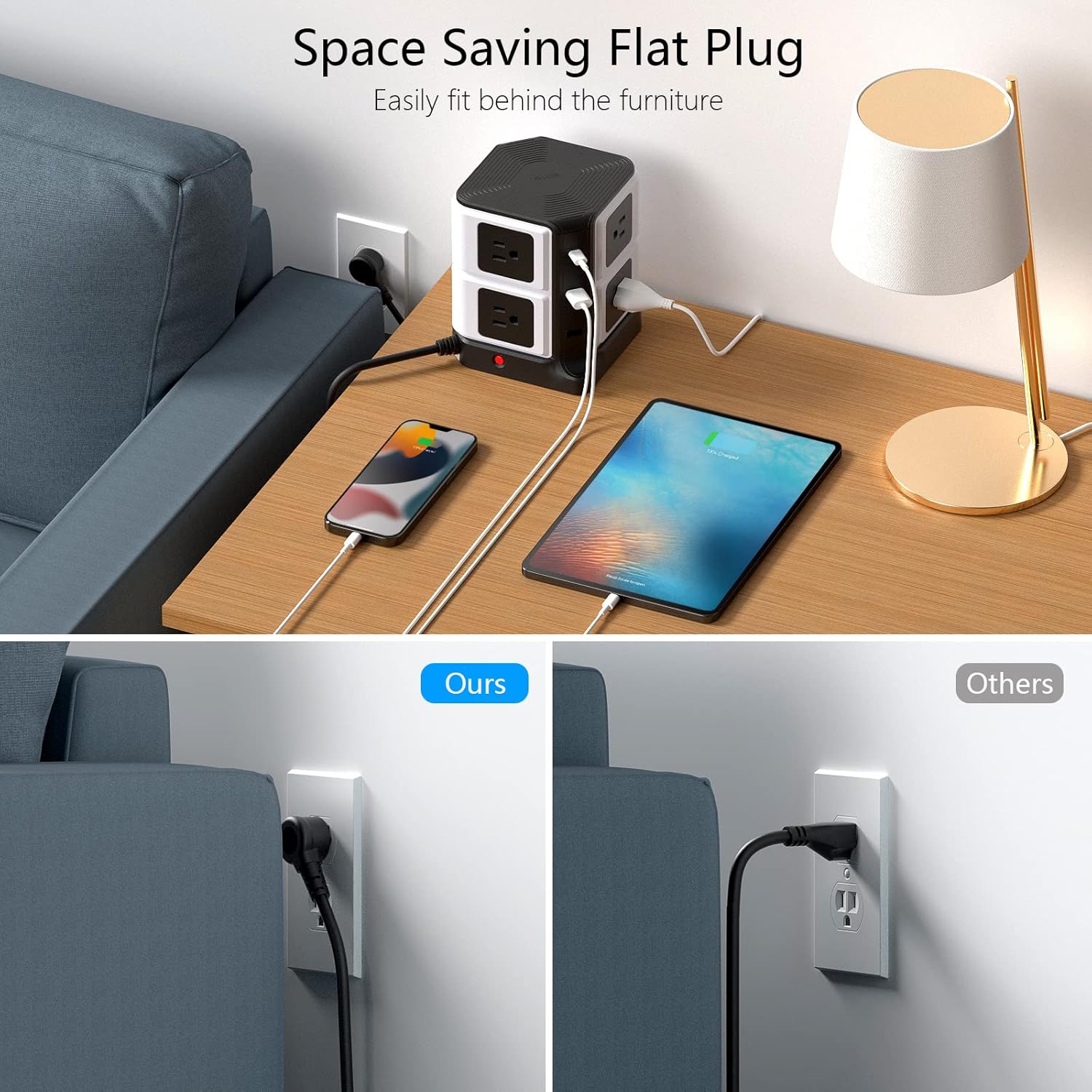
- Space-Saving Vertical Design: The desktop tower design (only 5.7 inches tall) is ideal for minimizing clutter. Widely spaced outlets on different directions and a 45-degree flat plug prevent blocking adjacent outlets and fit easily behind furniture.
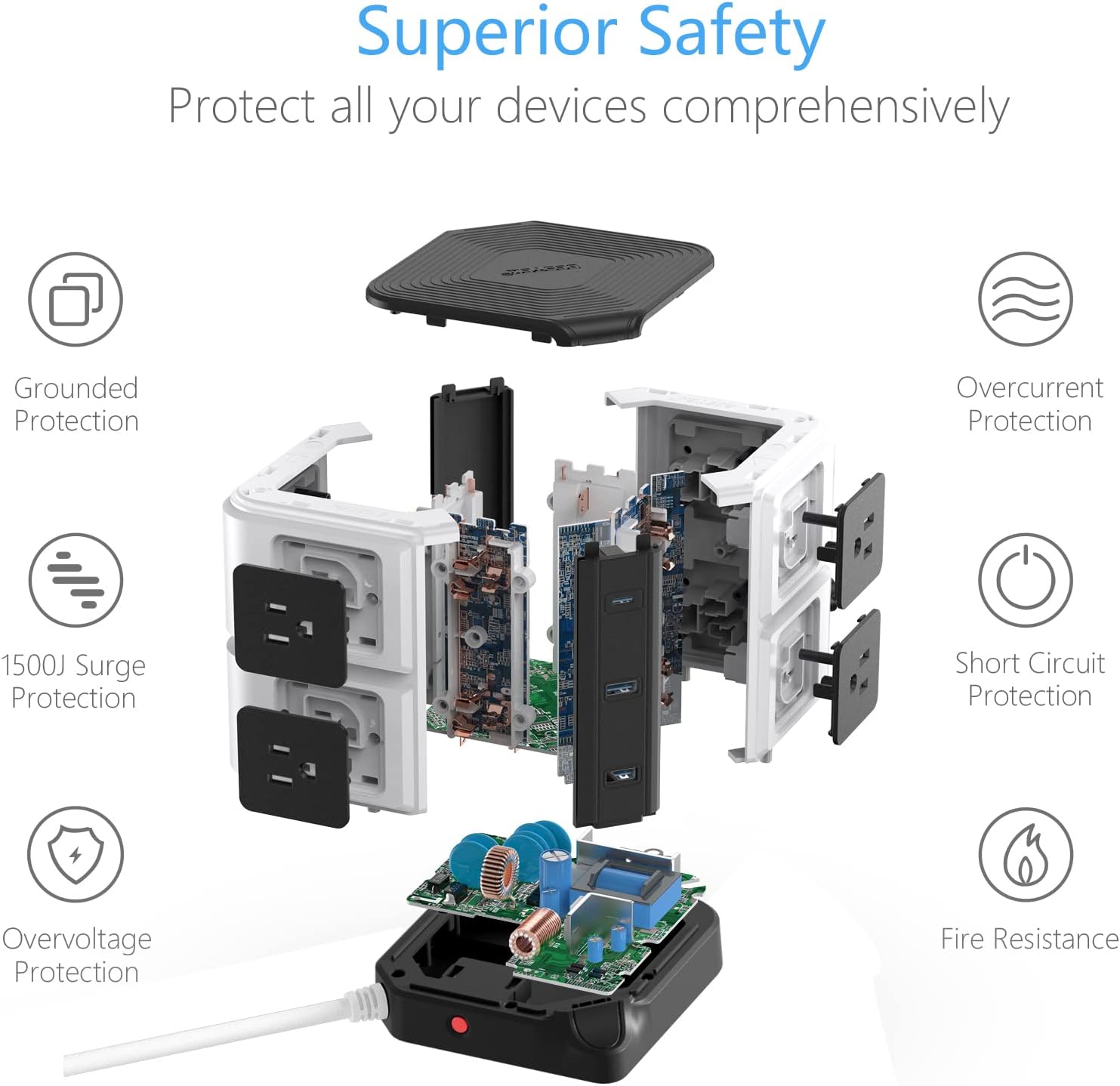
- Aukščiausias saugumas: Built-in 2100 Joules surge protection, overload protection with a reset button, short circuit protection, overvoltage protection, and fire-resistant casing ensure comprehensive safety for all connected devices. ETL listed for safety assurance.
Produktas baigtasview Vaizdo įrašas
Detailed Features Video
Pakuotės turinys
- 1 x BESTEK Power Strip Tower (Model CA-usb10100)
- 1 x Vartotojo vadovas
Sąranka
- Unpack the Power Strip Tower and ensure all components are present.
- Place the unit on a stable, flat surface, away from water or heat sources.
- Plug the power cord into a standard 125V AC grounded wall outlet. The power indicator light on the base should illuminate.
Naudojimo instrukcijos
Kintamosios srovės lizdų naudojimas
- The Power Strip Tower features 8 AC outlets distributed across its sides.
- Each tier of AC outlets (top and bottom) has an independent power button. Press the button next to the desired outlets to turn them on or off. An indicator light will show the status.
- Plug your devices directly into the AC outlets. The wide spacing accommodates larger power adapters without blocking other ports.
USB įkrovimo prievadų naudojimas
- Connect your USB-powered devices to the 2 USB-A ports or the 1 USB-C PD 20W port.
- The smart charging technology will automatically detect your device and deliver the optimal charging current.
- The USB ports operate independently of the AC outlet power buttons.
Belaidžio įkrovimo naudojimas
- Place your Qi-compatible smartphone or other device directly on the wireless charging pad located on the top of the tower.
- Ensure the device is centered on the pad for optimal charging. A charging indicator (if present on your device) will confirm charging has begun.
- Nuimkite nuo įrenginio visus metalinius daiktus ar storus dėklus, kurie gali trukdyti belaidžiam įkrovimui.
Priežiūra
- Prieš valydami atjunkite maitinimo laidą nuo sieninio lizdo.
- Nuvalykite įrenginį minkštu, sausu skudurėliu. Nenaudokite skystų valiklių ar abrazyvinių medžiagų.
- Keep the outlets free from dust and debris to ensure proper contact and prevent overheating.
Trikčių šalinimas
| Problema | Galima priežastis | Sprendimas |
|---|---|---|
| Nėra maitinimo lizduose / USB prievaduose. | Unit not plugged in; power button off; circuit breaker tripped; surge protection expired. | Ensure unit is plugged in. Press the power button for the specific tier of outlets. Check your home's circuit breaker. If the surge protection indicator is off, replace the unit. |
| Belaidis įkrovimas neveikia. | Device not Qi-compatible; device not properly aligned; foreign objects on pad; thick phone case. | Verify device compatibility. Realign device on the pad. Remove metal objects or thick cases. |
| Slow charging via USB. | Cable issue; device drawing more power than port can supply; multiple devices connected. | Try a different USB cable. Ensure the device is compatible with the port's output. Disconnect other devices to test. |
Specifikacijos
| Funkcija | Detalė |
|---|---|
| Modelio numeris | CA-usb10100 |
| Gaminio matmenys | 4.8 x 4.8 x 5.71 colio |
| Prekės svoris | 2.1 svaro |
| Iš viso maitinimo lizdų | 8 kintamosios srovės lizdai |
| USB prievadai | 2 USB-A (2.4A Max each), 1 USB-C (PD3.0, 20W Max) |
| Belaidis įkroviklis | 5V/2A (Qi Standard) |
| ttage | 125 voltų |
| Apsauga nuo viršįtampių | 2100 džaulių |
| Ypatingos savybės | Fireproof, Overvoltage Protection, Short Circuit Protection, Space Saving, Surge Protection, USB Slot |
| Sertifikatai | ETL įtrauktas į sąrašą |
Garantija ir palaikymas
For warranty information or technical support, please contact BESTEK customer service through their official websvetainėje arba mažmenininke, iš kurio įsigijote produktą. Išsaugokite pirkimo kvitą garantiniams reikalavimams.


