Įvadas
Ačiū, kad pirkoteasing the Aduro LED Wireless Speaker. This portable speaker combines high-quality audio with dynamic LED lighting, creating an immersive experience for any setting. Designed for ease of use and portability, it features wireless connectivity, hands-free calling, and multiple light modes. Please read this manual carefully to ensure proper operation and to maximize your enjoyment of the product.
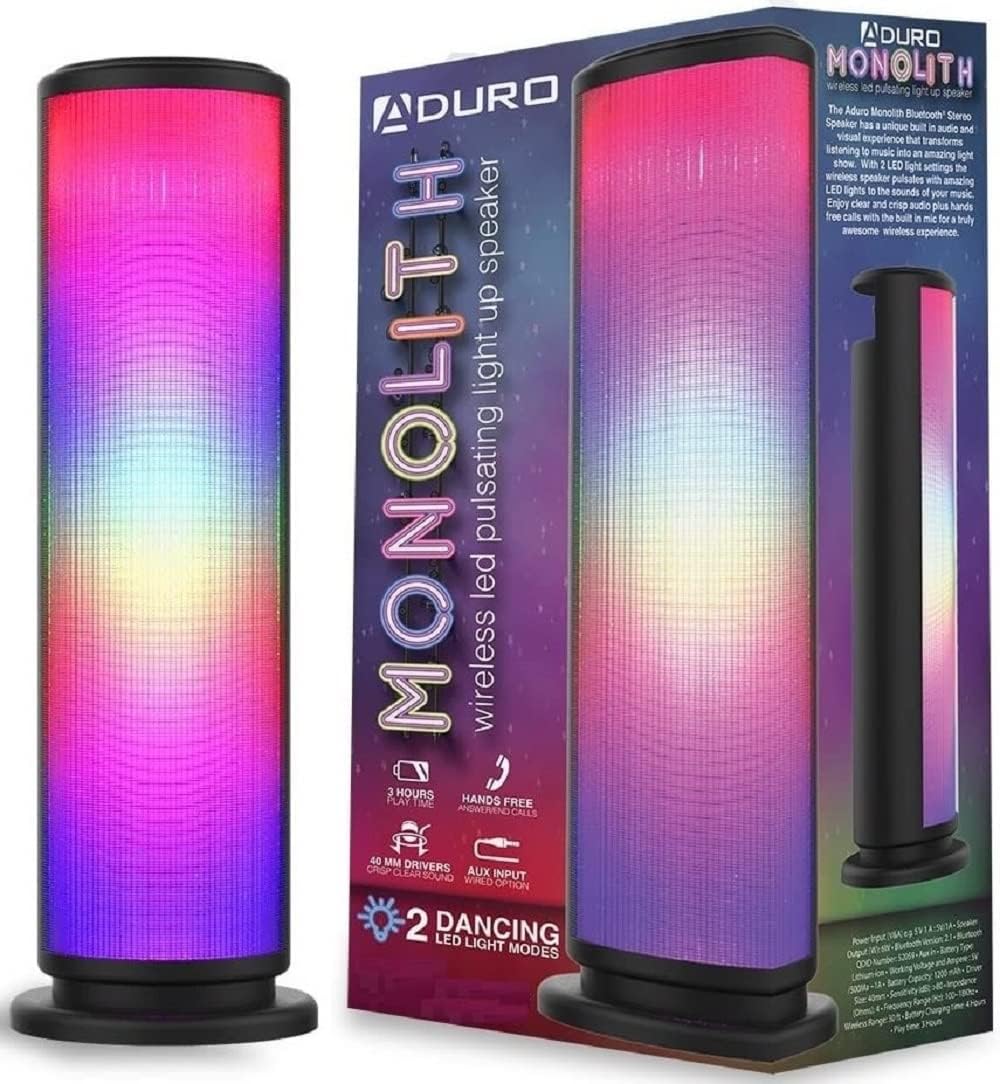
Image: The Aduro LED Wireless Speaker, showcasing its vibrant pulsating LED lights and sleek black design.
Saugos informacija
- Nelaikykite garsiakalbio ekstremaliose temperatūrose, tiesioginiuose saulės spinduliuose ar didelėje drėgmėje.
- Stenkitės, kad garsiakalbis nenumestų ar nepatirtų stipraus smūgio.
- Neardykite, neremontuokite ir nemodifikuokite garsiakalbio patys. Visus techninės priežiūros darbus patikėkite kvalifikuotiems specialistams.
- Keep the speaker away from water and liquids. This product is not waterproof.
- Naudokite tik nurodytą įkrovimo laidą ir maitinimo adapterį.
- Do not operate the speaker near medical equipment or in environments where radio frequency interference is prohibited.
Kas yra dėžutėje
Patikrinkite pakuotės turinį, kad įsitikintumėte, jog yra visi reikalingi daiktai:
- Aduro LED Wireless Speaker (1 unit)
- USB įkrovimo laidas (1 vnt.)
- Vartotojo vadovas (šis dokumentas)
Note: Wall adapter for charging is not included.
Produktas baigtasview
Susipažinkite su garsiakalbio komponentais ir valdikliais:
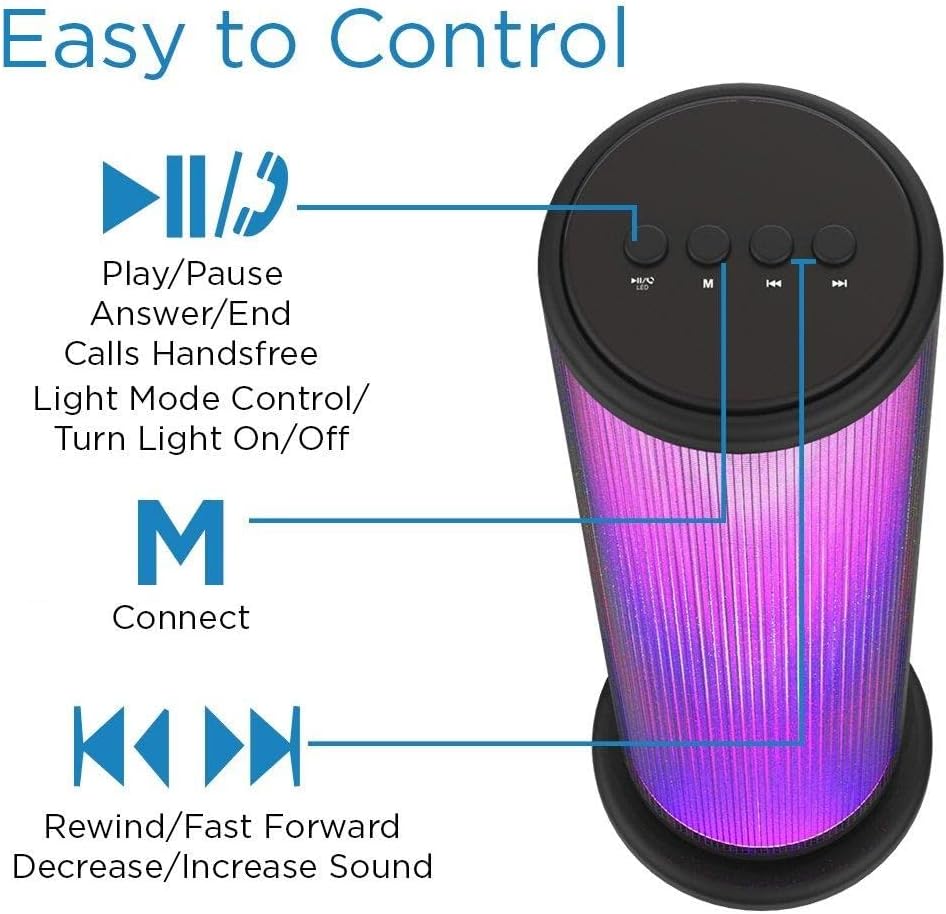
Image: Top panel of the Aduro speaker, illustrating the control buttons for play/pause, light mode, connect, and track/volume control.
Valdymo skydas (viršuje)
- Play/Pause Button (►▮▮): Press to play or pause audio. Also used to answer/end calls.
- Light Mode Button (●/LED): Press to switch between LED light modes (Rhythmic Lights, Still Pattern) or turn lights on/off.
- Mode/Connect Button (M): Press to switch between Bluetooth and AUX input modes. Long press to enter Bluetooth pairing mode.
- Previous Track/Volume Down (◀◀): Short press for previous track. Long press to decrease volume.
- Next Track/Volume Up (►►): Short press for next track. Long press to increase volume.

Image: Bottom panel of the Aduro speaker, showing the Micro USB charging port and the AUX input port.
Ports (Bottom)
- Mikro USB prievadas: Garsiakalbio įkrovimui.
- AUX įvestis: For wired audio connection using a 3.5mm audio cable.
Sąranka
Garsiakalbio įkrovimas
- Prijunkite įkrovimo laido „Micro USB“ galą prie garsiakalbio „Micro USB“ prievado.
- Prijunkite įkrovimo laido USB-A galą prie USB maitinimo šaltinio (pvz., kompiuterio USB prievado, USB sieninio adapterio).
- Įkrovimo metu LED indikatorius švies ir užges, kai bus visiškai įkrautas.
- A full charge takes approximately 4 hours. The speaker provides up to 3 hours of playtime with LED lights active.
Naudojimo instrukcijos
Maitinimo įjungimas/išjungimas
- To power on, press and hold the Play/Pause button (►▮▮) for a few seconds until you hear an audible prompt.
- To power off, press and hold the Play/Pause button (►▮▮) again for a few seconds.
"Bluetooth" poravimas
- Įsitikinkite, kad garsiakalbis įjungtas ir veikia „Bluetooth“ režimu (tai rodo mirksintis mėlynas šviesos diodas). Jei ne, paspauskite mygtuką „M“, kad perjungtumėte režimus.
- Savo įrenginyje (išmaniajame telefone, planšetiniame kompiuteryje ir kt.) įjunkite „Bluetooth“ ir ieškokite galimų įrenginių.
- Select "Aduro Monolith" from the list of devices.
- Once paired, the speaker will provide an audible confirmation, and the blue LED will stop flashing and remain solid.
- Įjungus garsiakalbį, jis automatiškai bandys prisijungti prie paskutinio suporuoto įrenginio.
Naudojant AUX įvestį
- Prijunkite vieną 3.5 mm garso kabelio (nepridedamas) galą prie garsiakalbio AUX įvesties prievado.
- Kitą garso kabelio galą prijunkite prie savo įrenginio ausinių lizdo arba garso išvesties.
- Garsiakalbis automatiškai persijungs į AUX režimą.
- Control audio playback and volume from your connected device.
LED šviesos režimai
The speaker features two LED light modes. Press the Light Mode button (●/LED) to cycle through the options:
- Rhythmic Lights: Lights pulsate and change color in sync with the music.
- Still Pattern: Lights display a continuous, non-pulsating color pattern.
- Pressing the button again will turn the lights off.

Image: The Aduro speaker demonstrating its two distinct LED light modes: Rhythmic Lights and Still Pattern.
Skambinimas laisvų rankų įranga
When connected via Bluetooth, the speaker's built-in microphone allows for hands-free calls:
- Atsiliepti į skambutį: Press the Play/Pause button (►▮▮) once.
- Baigti skambutį: Press the Play/Pause button (►▮▮) once during a call.
- Atmesti skambutį: Press and hold the Play/Pause button (►▮▮) for 2 seconds.
Priežiūra
- Garsiakalbį valykite minkšta, sausa šluoste. Nenaudokite abrazyvinių valiklių ar tirpiklių.
- Nenaudojamą garsiakalbį laikykite vėsioje, sausoje vietoje.
- Venkite ilgalaikio tiesioginių saulės spindulių ar ekstremalių temperatūrų poveikio.
- Reguliariai įkraukite akumuliatorių, net jei juo nesinaudojate dažnai, kad palaikytumėte jo būklę.
Trikčių šalinimas
| Problema | Galima priežastis | Sprendimas |
|---|---|---|
| Garsiakalbis neįsijungia. | Baterija išsikrovusi. | Visiškai įkraukite garsiakalbį. |
| Nepavyksta susieti per „Bluetooth“. | Garsiakalbis nėra susiejimo režime arba yra per toli nuo įrenginio. | Ensure speaker is in Bluetooth pairing mode (flashing blue LED). Move device closer to speaker (within 10 meters). Turn off and on Bluetooth on your device. |
| Iš garsiakalbio nėra garso. | Garsumas per mažas arba įrenginys netinkamai prijungtas. | Increase volume on both speaker and connected device. Re-pair Bluetooth or re-connect AUX cable. |
| LED lemputės neveikia. | Lights are turned off or battery is low. | Press the Light Mode button (●/LED) to turn lights on. Charge the speaker. |
| Prasta garso kokybė. | Device is too far, interference, or low battery. | Perkelkite įrenginį arčiau. Venkite kliūčių. Įkraukite garsiakalbį. |
Specifikacijos
| Funkcija | Detalė |
|---|---|
| Modelio pavadinimas | Monolitas |
| Modelio numeris | AY-MTSP-01 |
| Garsiakalbio tipas | Lauko, nešiojamas |
| Ryšio technologija | Bluetooth, AUX |
| Bluetooth diapazonas | Iki 10 metrų (33 pėdų) |
| Garso išvesties režimas | Stereo |
| Didžiausia garsiakalbio išėjimo galia | 6 vatų |
| Vairuotojo dydis | 40 mm |
| Baterijos tipas | Ličio jonas |
| Baterijos talpa | 1200 mAh |
| Baterijos veikimo laikas | Up to 3 hours (with LED lights active) |
| Įkrovimo laikas | Maždaug 4 val |
| Matmenys (I x P x A) | 3.5 x 5.8 x 11.8 colio |
| Prekės svoris | 15 uncijos (0.94 svaro) |
| Spalva | Juoda |
| Įtraukti komponentai | 40mm Drivers, rechargeable battery, sensitive control panel, speakers, built-in microphone |
Garantija ir palaikymas
Aduro products are designed with quality and reliability in mind. This product comes with a manufacturer's warranty. For specific warranty details and duration, please refer to the warranty card included with your purchase or visit the official Aduro websvetainę.
For technical support, troubleshooting assistance, or warranty claims, please contact Aduro customer service through their official channels. Please have your model number (AY-MTSP-01) and proof of purchase ready when contacting support.
Daugiau informacijos ir kontaktinius duomenis galite rasti adresu Aduro Store on Amazon.


