1. Įvadas
Thank you for choosing the revolt Digital Plug Thermostat ZX-2630. This device is designed to automatically control heating or cooling appliances by maintaining a desired temperature. Please read this manual carefully before use to ensure proper operation and to maximize the product's lifespan.
2. Saugos informacija
- Ensure the thermostat is connected to a properly grounded power outlet.
- Neviršykite maksimalios 3680 W (16 A) apkrovos.
- Do not immerse the device or its sensor in water or other liquids.
- Keep out of reach of children. The child lock function can be activated for added safety.
- Neatidarykite įrenginio c.asing. Remontą turėtų atlikti tik kvalifikuoti darbuotojai.
- Avoid placing the sensor in direct sunlight, near heat sources, or in drafts, as this can affect temperature readings.
3. Pakuotės turinys
- revolt Digital Plug Thermostat ZX-2630
- Temperature sensor with 3-meter cable
- Vartotojo vadovas

Image: The revolt Digital Plug Thermostat with its temperature sensor, shown coiled.
4. Produktas baigtasview
The revolt Digital Plug Thermostat ZX-2630 features a large LCD display and intuitive buttons for easy temperature control and programming.

Vaizdas: priekis view of the thermostat, highlighting the display, control buttons, and integrated power socket.
4.1. Komponentai
- LCD ekranas: Shows current room temperature, set temperature, time, day of the week, and operating modes.
- Maitinimo mygtukas: Įjungia/išjungia įrenginį.
- Nustatyti mygtukas: Įjungiamas programavimo režimas.
- Gerai mygtukas: Patvirtina pasirinkimus.
- Aukštyn/žemyn mygtukai: Koreguokite vertes ir naršykite meniu.
- Integruotas maitinimo lizdas: For connecting heating or cooling appliances.
- Temperatūros jutiklis: External probe with a 3-meter cable for accurate temperature measurement.

Paveikslėlis: Šonas ir nugara views of the thermostat, showing the plug and ventilation slots.
5. Sąranka
- Įdėkite bateriją: The device has an integrated button cell battery for backup memory. Ensure it is functional.
- Prijunkite jutiklį: Plug the temperature sensor cable into the designated port on the thermostat.
- Padėties jutiklis: Place the temperature sensor in the area where you want to measure the temperature. The 3-meter cable allows for flexible positioning, away from the thermostat itself, for more accurate readings. Avoid direct sunlight, drafts, or proximity to heat sources.
- Plug In Thermostat: Insert the thermostat into a standard 230V wall outlet.
- Prijunkite prietaisą: Plug your heating or cooling appliance (e.g., heater, air conditioner) into the power socket on the front of the thermostat.
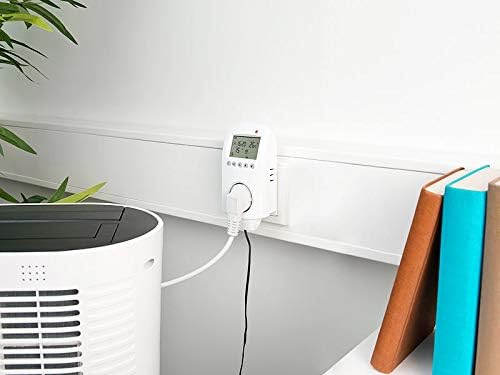
Image: The thermostat plugged into a wall, with its sensor extended and connected to an air conditioning unit.
6. Veikimo režimai
The thermostat offers both automatic and manual operating modes, along with an anti-frost function.
6.1. Automatinis režimas
In automatic mode, the thermostat follows your programmed weekly schedule to switch the connected appliance on or off, maintaining the desired temperature at specific times.
6.2. Rankinis režimas
Manual mode allows you to set a constant target temperature that the thermostat will maintain until you switch back to automatic mode or change the setting. This is useful for temporary adjustments.
6.3. Apsaugos nuo užšalimo funkcija
The anti-frost function is a safety feature. If the ambient temperature measured by the sensor drops below 2 °C, the thermostat will automatically activate the connected heating appliance, regardless of the current operating mode or programmed settings, to prevent freezing.
7. Programavimas
The thermostat allows for individual weekly programming to optimize energy consumption and comfort.
7.1. Laiko ir dienos nustatymas
- Paspauskite Nustatyti button repeatedly until the time or day setting flashes.
- Naudokite Up ir Žemyn mygtukai vertei reguliuoti.
- Paspauskite OK patvirtinti ir pereiti prie kito nustatymo.
7.2. Weekly Program
You can set up to 6 switching times for Monday to Friday and 2 switching times for Saturday and Sunday. Each switching time includes a target temperature.
- Paspauskite Nustatyti button until the programming mode for the weekly schedule is displayed.
- Naudokite Up ir Žemyn buttons to select the day group (Mon-Fri or Sat-Sun) and the specific switching period (e.g., P1, P2).
- Paspauskite OK to enter the time setting for that period. Adjust with Aukštyn/Žemyn, patvirtinkite su OK.
- Next, set the target temperature for that period. Adjust with Aukštyn/Žemyn, patvirtinkite su OK.
- Repeat for all desired switching periods.
- Išeikite iš programavimo režimo paspausdami Nustatyti until the normal display appears, or wait for automatic exit.
7.3. Laikmačio funkcija
The timer function allows for two adjustable times to switch devices on and off, independent of the weekly program.
- Access the timer settings via the Nustatyti mygtuką.
- Set the desired ON time and OFF time using the Aukštyn/Žemyn ir OK mygtukai.
- Activate the timer function as needed.
8. Išplėstiniai nustatymai
The thermostat includes advanced settings for fine-tuning its operation, such as hysteresis and temperature calibration.
8.1. Hysteresis (Temperature Difference)
The hysteresis setting (often labeled as A2 in advanced menus) determines the temperature difference around the set point before the appliance switches on or off. For example, if set to 1°C, and the target is 22°C in heating mode, the heater will turn on at 21°C and off at 23°C. The default setting is often 2°C (meaning a 4°C swing), but it can typically be reduced to 1°C (for a 2°C swing) for more precise control.
8.2. Temperatūros kalibravimas
If you suspect the temperature sensor is inaccurate, you can calibrate it (often labeled as A5). Compare the thermostat's reading with a known accurate thermometer placed next to the sensor. Adjust the calibration value to match the accurate reading. Be cautious when changing this setting, as incorrect calibration will lead to inaccurate temperature control.
8.3. Šildymo / vėsinimo režimo pasirinkimas
The device can operate in either heating or cooling mode (often labeled as A8). Ensure the correct mode is selected based on whether you are controlling a heater or an air conditioner. In heating mode, the appliance turns on when the temperature drops below the set point. In cooling mode, it turns on when the temperature rises above the set point.
9. Priežiūra
- Valymas: Prietaisą valykite minkštu, sausu skudurėliu. Nenaudokite abrazyvinių valiklių ar tirpiklių.
- Jutiklio priežiūra: Keep the temperature sensor clean and free from dust or debris to ensure accurate readings.
- Baterijos keitimas: The integrated button cell battery provides backup for settings. If settings are lost during a power outage, the battery may need replacement. Consult a qualified technician for battery replacement.
10. Problemų sprendimas
| Problema | Galima priežastis | Sprendimas |
|---|---|---|
| Įrenginys neįsijungia. | No power supply; device is switched off. | Check power outlet; press the Power button. |
| Appliance not switching on/off. | Incorrect mode selected; programming error; appliance fault. | Verify operating mode (Auto/Manual); check programmed times and temperatures; test appliance directly. |
| Netikslus temperatūros rodmuo. | Sensor improperly placed; sensor dirty/damaged; calibration needed. | Relocate sensor away from drafts/heat; clean sensor; perform temperature calibration (refer to Advanced Settings). |
| Nustatymai prarandami išjungus maitinimątage. | Backup battery depleted or faulty. | Replace the internal button cell battery (professional service recommended). |
| Child lock activated unexpectedly. | Atsitiktinis aktyvavimas. | Refer to the manual for specific key combination to deactivate child lock. |
11. Specifikacijos
- Modelis: „ZX-2630“
- Maitinimo šaltinis: 230V kintamoji srovė, 50/60Hz
- Didžiausia apkrova: 3680 W / 16 A
- Temperatūros nustatymo diapazonas: 1 °C to 70 °C (in 0.5 °C increments)
- Temperature Sensor Cable Length: 3 metrų
- Temperatūros tikslumas: +/- 1 ° C
- Ekranas: Multi-line XXL LCD (5 cm / 2" diagonal)
- Programavimas: Individually adjustable weekly program (6 periods Mon-Fri, 2 periods Sat-Sun)
- Ypatingos savybės: Automatic programming, Anti-frost function, Child lock, Timer function
- Atsarginė atmintis: Integrated button cell battery
- Dimensions (without plug): Apytiksliai 62 x 135 x 34 mm
- Prekės svoris: Maždaug 265 g
- Medžiaga: Thermostat plug with probe
12. Garantija ir palaikymas
This revolt product is covered by a standard manufacturer's warranty. For detailed warranty terms, technical support, or service inquiries, please refer to the documentation provided with your purchase or contact your retailer. Keep your proof of purchase for warranty claims.


