Įvadas
The Mitel 6920W is a powerful, feature-rich IP phone designed for business communication. Equipped with Wi-Fi connectivity, it offers flexibility in deployment and ensures reliable voice communication. This manual provides comprehensive instructions for setting up, operating, maintaining, and troubleshooting your Mitel 6920W IP Phone.
Pakuotės turinys
Prieš pradėdami, patikrinkite, ar jūsų pakuotėje yra šie elementai:
- Mitel 6920W IP Phone Unit
- Ragelis
- Ragelio laidas
- Telefono stovas
- Ethernet kabelis
- Maitinimo adapteris (jei nenaudojate „Power over Ethernet“ – PoE)
- Greito paleidimo vadovas (jei pridėtas)
Sąranka
1. Attaching the Phone Stand
The phone stand allows you to position your phone at an optimal viewing angle. Align the tabs on the stand with the slots on the back of the phone and push firmly until it clicks into place.
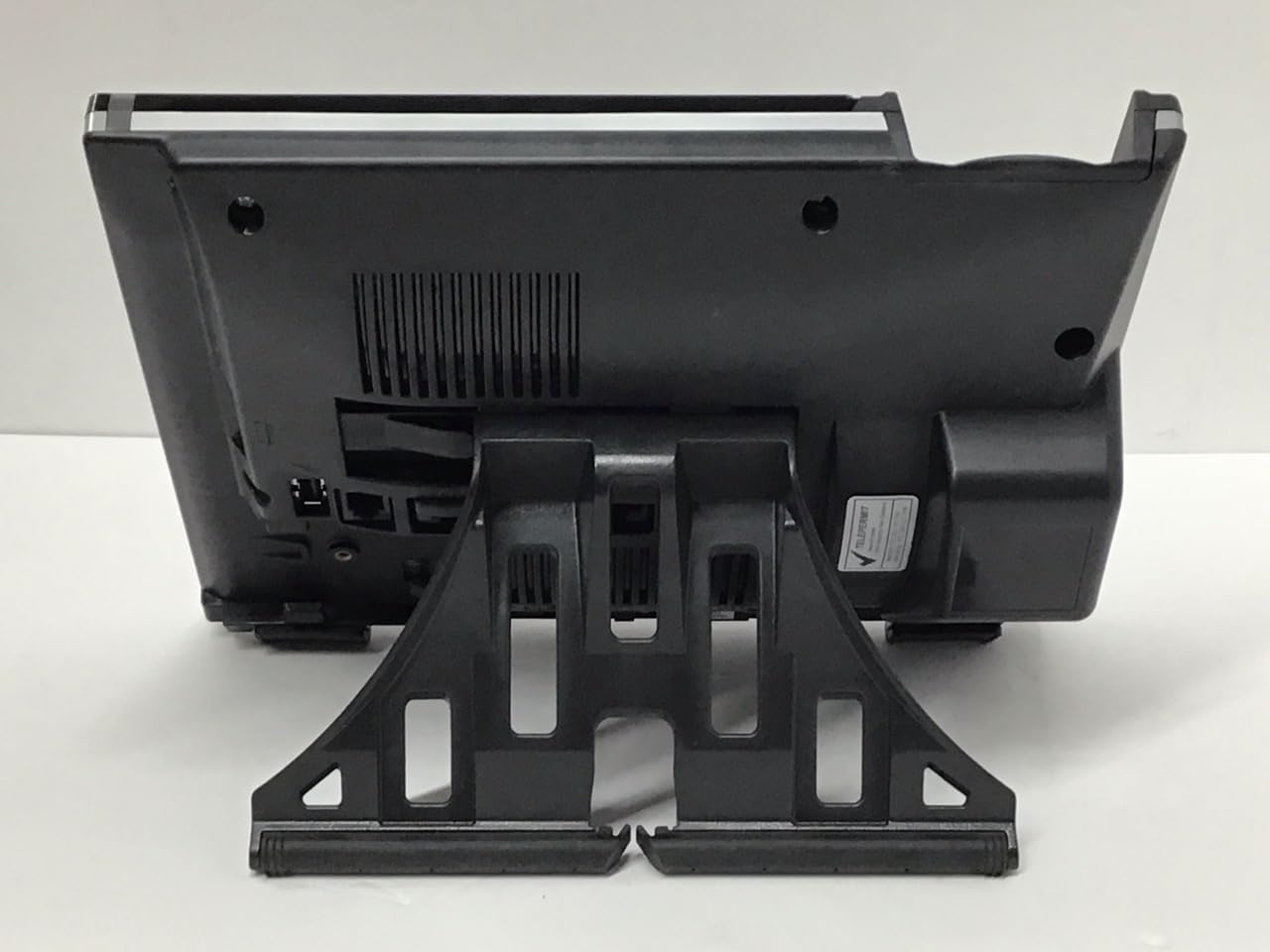
Vaizdas: Atgal view of the Mitel 6920W IP Phone with its stand attached, showing the connection points and the angled support.
2. Ragelio ir ausinių prijungimas
- Connect one end of the coiled handset cord to the handset and the other end to the handset port on the back of the phone (usually marked with a handset icon).
- If using a headset, connect it to the dedicated headset port (usually marked with a headset icon).
3. Connecting to the Network and Power
- Ethernet jungtis: Connect one end of the Ethernet cable to the LAN port on the back of the phone and the other end to your network switch or router. If your network provides Power over Ethernet (PoE), the phone will power on automatically.
- Maitinimo adapteris (jei nėra PoE): If PoE is not available, connect the power adapter to the power port on the back of the phone and then plug it into a wall outlet.

Vaizdas: Priekyje view of the Mitel 6920W IP Phone, displaying its screen, physical keypad, and programmable soft keys.
4. Pradinis įjungimas ir konfigūravimas
Once powered on, the phone will boot up and attempt to connect to your network. It may automatically download configuration settings from your VoIP system. Follow any on-screen prompts for initial setup, such as language selection or time zone.
5. Wi-Fi ryšio sąranka
To connect your 6920W to a Wi-Fi network:
- Paspauskite Nustatymai button (gear icon) on the phone.
- Eikite į Tinklo nustatymai or „Wi-Fi“ nustatymai.
- Enable Wi-Fi and select your desired network from the list of available networks.
- Enter the Wi-Fi password (if required) using the keypad and on-screen prompts.
- Confirm the connection. The phone should display a Wi-Fi icon indicating a successful connection.
Operating Your Mitel 6920W IP Phone
Pagrindinės skambučių funkcijos
- Skambinimas: Pakelkite ragelį arba paspauskite Garsiakalbis button. Dial the number and press the Surinkite or Siųsti programinis mygtukas.
- Atsiliepimas į skambutį: Pakelkite ragelį, paspauskite Garsiakalbis mygtuką arba paspauskite Atsakymas programinis mygtukas.
- Skambučio pabaiga: Padėkite ragelį arba paspauskite Baigti skambutį programinis mygtukas.
Keypad and Navigation
The phone features a standard 12-button dial pad. Use the navigation cluster (up, down, left, right arrows, and select button) to move through menus and options on the display.
Ekranas ir programiniai klavišai
The phone's display shows call information, menus, and status indicators. The soft keys located directly below the display change their function based on the current context (e.g., during a call, in a menu). Their current function is indicated on the display above each key.
Prieiga prie balso pašto
Norėdami pasiekti balso paštą, paspauskite Balso paštas button (envelope icon) and follow the audio prompts.
Išplėstinės skambučių funkcijos
- Laikyti: Aktyvaus skambučio metu paspauskite Laikykis soft key. Press it again to resume the call.
- Pervedimas: Aktyvaus skambučio metu paspauskite Perdavimas soft key. Dial the number to transfer to, and once connected, press Perdavimas again (consultative transfer) or hang up (blind transfer).
- Konferencija: Aktyvaus skambučio metu paspauskite Konferencija programinį klavišą. Surinkite trečiojo asmens numerį ir, kai bus sujungta, paspauskite Konferencija vėl prisijungti prie visų partijų.
- Garsiakalbis: Paspauskite Garsiakalbis mygtuką, kad įjungtumėte arba išjungtumėte garsiakalbio režimą.
- Nutildyti: Paspauskite Nutildyti mygtuką, kad nutildytumėte mikrofoną skambučio metu. Paspauskite jį dar kartą, kad įjungtumėte nutildymą.
Priežiūra
Telefono valymas
To keep your phone clean, gently wipe the surfaces with a soft, damp, lint-free cloth. Avoid using abrasive cleaners, solvents, or aerosol sprays, as these can damage the phone's finish and internal components.
Programinės įrangos atnaujinimai
Your Mitel 6920W IP Phone may receive software updates periodically to improve performance and add new features. These updates are typically managed by your system administrator. Do not attempt to manually update the firmware unless instructed by your IT department or Mitel support.
Trikčių šalinimas
Bendros problemos ir sprendimai
| problema | Galimas sprendimas |
|---|---|
| Nėra rinkimo tono | Check all cable connections (Ethernet, power, handset). Ensure the phone is powered on. Contact your system administrator if the issue persists. |
| Nepavyksta prisijungti prie „Wi-Fi“ | Verify Wi-Fi password. Ensure the phone is within range of the Wi-Fi access point. Restart the phone and try again. Check network settings. |
| Ekranas neveikia | Check power connection. Restart the phone. If the display remains blank or faulty, contact support. |
| Prasta skambučių kokybė | Check network connection stability (wired or Wi-Fi signal strength). Ensure no other devices are heavily using network bandwidth. |
Atstatyti gamyklinius nustatymus
A factory reset will erase all custom settings and return the phone to its default state. This should only be performed as a last resort and typically under the guidance of your system administrator or Mitel support. Consult your system administrator for the specific procedure for your deployment.
Specifikacijos
| Funkcija | Detalė |
|---|---|
| Prekės ženklas | Mitel |
| Modelis | 6920W |
| ASIN | B07DD9BW2Z |
| Spalva | Juoda |
| Telefono tipas | Virveli |
| Medžiaga | Plastikiniai |
| Maitinimo šaltinis | Su laidu elektra |
| Rinkiklio tipas | Viena klaviatūra |
| Atsiliepimo sistemos tipas | Skaitmeninis |
| Suderinami įrenginiai | Computer Systems, VoIP Services, Telephone Networks |
| Daugiaeilė operacija | Daugiaeilis valdymas |
| Skambinančiojo identifikavimas | Taip |
| Pakuotės matmenys | 10.71 x 7.91 x 3.66 colio |
| Prekės svoris | 2.38 svaro |
| Gamintojas | Mitel |
| Pasiekiama pirmoji data | 20 m. gruodžio 2022 d |
Garantija ir palaikymas
The Mitel 6920W IP Phone comes with a standard manufacturer's warranty. For specific warranty terms and conditions, please refer to the documentation provided with your purchase or visit the official Mitel websvetainę.
For technical support, troubleshooting assistance, or warranty claims, please contact your system administrator or authorized Mitel reseller. You can also find additional resources and contact information on the official Mitel support websvetainė: www.mitel.com/support


