1. Įvadas
This manual provides instructions for the setup, operation, maintenance, and troubleshooting of your iKBC CD87BT mechanical keyboard. Please read this manual thoroughly to ensure proper use and to maximize the lifespan of your device.
2. Produktas baigtasview
The iKBC CD87BT is an 87-key mechanical keyboard offering both wired USB Type-C and wireless Bluetooth 3.0 connectivity. It features Cherry MX Brown switches, known for their tactile feedback, and durable PBT OEM profile keycaps. The keyboard is compatible with iOS, Android, Windows, and Mac operating systems.
Pagrindinės funkcijos:
- Cherry MX Brown Switches: Tactile feedback suitable for typing and gaming.
- Dual Connectivity: Wired (USB Type-A to C) and Wireless (Bluetooth 3.0).
- Multi-Device Support: Connects up to 4 Bluetooth devices simultaneously.
- Durable PBT Keycaps: OEM profile with laser-engraved legends.
- Adjustable Ergonomics: 3-level adjustable feet for preferred typing angle.
- Anti-Ghosting: 100% anti-ghosting with full key rollover in USB mode.
- Multimedia Keys: Dedicated functions via FN key combinations.
- DIP Switches: For advanced customization.
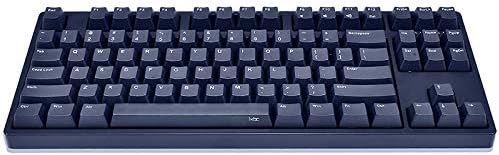
Image 1: The iKBC CD87BT 87-key mechanical keyboard in navy blue. This image displays the full keyboard layout, highlighting its compact tenkeyless design and the dark blue PBT keycaps.
3. Sąranka
3.1 Išpakavimas ir turinys
Carefully remove all items from the packaging. The package should contain:
- iKBC CD87BT Mechanical Keyboard
- USB tipo A–C laidas
- Apsauga nuo dulkių
- Raktų ištraukiklis
- 2 AAA baterijos (iš anksto įdėtos arba pridedamos atskirai)
3.2 Akumuliatoriaus įdėjimas
The keyboard requires 2 AAA batteries for wireless operation. If not pre-installed, locate the battery compartment on the underside of the keyboard, open it, and insert the batteries according to the polarity indicators. Close the compartment securely.
3.3 Laidinis ryšys
Norėdami naudoti klaviatūrą laidiniu režimu:
- Connect the USB Type-C end of the provided cable to the port on the keyboard.
- Prijunkite USB A tipo kabelio galą prie laisvo kompiuterio USB prievado.
- Klaviatūra bus automatiškai aptikta ir paruošta naudoti.
3.4 Belaidis („Bluetooth“) ryšys
The iKBC CD87BT can connect to up to four Bluetooth devices. Follow these steps to pair your keyboard:
- Ensure the keyboard is powered on and in Bluetooth mode (if there's a physical switch, refer to the keyboard's underside).
- Savo įrenginyje (kompiuteryje, planšetiniame kompiuteryje, išmaniajame telefone) įjunkite „Bluetooth“ ir ieškokite naujų įrenginių.
- On the iKBC CD87BT, press and hold the FN raktas ir vienas iš F1, F2, F3, arba F4 keys for approximately 3 seconds. The indicator light above the corresponding F key will flash, indicating pairing mode.
- Select "iKBC CD87BT" from the list of available Bluetooth devices on your computer or mobile device.
- If prompted, enter the pairing code displayed on your screen using the iKBC CD87BT keyboard and press Įeikite.
- Once paired, the indicator light will stop flashing and remain solid for a few seconds, then turn off. The keyboard is now connected.
Norėdami perjungti susietus įrenginius, paspauskite FN + F1, F2, F3, arba F4 corresponding to the desired device.
4. Naudojimo instrukcijos
4.1 Pagrindinis spausdinimas
The iKBC CD87BT functions as a standard 87-key keyboard. Simply type as you would on any other keyboard.
4.2 Multimedijos funkcijos
Access multimedia controls by holding the FN key and pressing the corresponding function key:
- FN + F9: Nutildyti
- FN + F10: Patildyti
- FN + F11: Pagarsink
- FN + F12: Skaičiuoklė
4.3 „Windows“ klavišų užraktas
To prevent accidental presses of the Windows key during gaming or other activities, the Windows key can be locked. Refer to the keyboard's specific key combination for this function, typically FN + Laimėjimo raktas or a dedicated switch.
4.4 DIP jungikliai
The keyboard features 4 DIP switches on its underside for advanced customization of key functions or layout. Consult the detailed manual provided with the product or the manufacturer's website for specific DIP switch configurations and their effects.
4.5 reguliuojamos pėdos
The keyboard is equipped with three levels of adjustable feet on the underside. Adjust them to find your preferred typing angle for comfort and ergonomics.
5. Priežiūra
5.1 Klaviatūros valymas
Norint išlaikyti optimalų našumą ir išvaizdą:
- Disconnect the keyboard from your computer or turn off Bluetooth before cleaning.
- Šiek tiek naudokite minkštą, be pūkelių šluostę dampKlaviatūros dangtelius ir korpusą nuvalykite vandeniu arba švelniu valymo tirpalu. Venkite stiprių cheminių medžiagų.
- Dulkėms ir šiukšlėms tarp klavišų dangtelių pašalinti naudokite suslėgtą orą.
- The included key puller can be used to carefully remove keycaps for deeper cleaning. Ensure to re-install them correctly.
5.2 Apsauga nuo dulkių
Utilize the provided dust cover when the keyboard is not in use to protect it from dust and spills, extending its lifespan.
6. Problemų sprendimas
6.1 Klaviatūra nereaguoja (laidinė)
- Įsitikinkite, kad USB laidas yra tvirtai prijungtas prie klaviatūros ir kompiuterio.
- Pabandykite prijungti laidą prie kito kompiuterio USB prievado.
- Išbandykite klaviatūrą kitame kompiuteryje, kad atmestumėte su kompiuteriu susijusią problemą.
6.2 Keyboard Not Connecting (Bluetooth)
- Verify that the keyboard has fresh batteries and is powered on.
- Įsitikinkite, kad jūsų įrenginyje įjungtas „Bluetooth“.
- Pakartokite susiejimo procesą (3.4 skyrius).
- If previously paired, try removing the keyboard from your device's Bluetooth list and re-pairing.
- Įsitikinkite, kad klaviatūra yra jūsų „Bluetooth“ įrenginio veikimo diapazone.
6.3 Raktai neregistruojami arba įvedami du kartus
- Check for debris under the keycap. Use a key puller to remove the keycap and clean the switch area with compressed air.
- Ensure the keyboard firmware is up to date (check the iKBC official websvetainė).
7. Specifikacijos
| Prekės ženklas | IKBC |
| Modelis | CD87BT |
| Jungiklio tipas | Cherry MX Brown (Tactile) |
| Keycap medžiaga | PBT (OEM Profile, Laser Engraved) |
| Išdėstymas | 87-Key (Tenkeyless), ANSI/US |
| Ryšys | Wired (USB Type-C), Wireless (Bluetooth 3.0) |
| „Bluetooth“ įrenginių palaikymas | Iki 4 įrenginių |
| OS suderinamumas | iOS, Android, Windows, Mac |
| Matmenys (I x P x A) | 38.58 x 20.4 x 5.49 cm (14.09" x 8.03" x 2.16" approx.) |
| Svoris | 1.43 kg (apie 2.42 svaro) |
| Maitinimo šaltinis | Wired (USB), 2 AAA Batteries (Wireless) |
| Įtraukti komponentai | USB Cable, Dust Cover, Key Puller |
8. Garantija ir palaikymas
For warranty information and technical support, please refer to the documentation included with your product or visit the official iKBC websvetainėje. Garantijos sąlygos gali skirtis priklausomai nuo regiono ir mažmenininko.


