1. Įvadas
This manual provides comprehensive instructions for the operation, maintenance, and troubleshooting of the OBDSTAR X300 DP PAD PLUS, also known as the X300 Key Master DP Plus. This device is a powerful diagnostic tool designed for automotive professionals, offering advanced functions for immobilizer systems, special vehicle functions, and ECU management.
2. Produktas baigtasview ir Savybės
The OBDSTAR X300 DP PAD PLUS is an advanced automotive diagnostic and key programming tool. It features an 8.0-inch touchscreen and an Android 5.1.1 operating system, providing a user-friendly interface for various automotive tasks.
Pagrindinės funkcijos:
- Built-in VCI Box: Enhances communication stability and eliminates concerns about losing an external VCI.
- 8-inch Touchscreen and Back Bracket Design: Offers an improved user experience with a large display and convenient stand for hands-free operation. The device can be charged directly via the OBD interface.
- 3-in-1 P001 Programmer: Includes EEPROM adapter, RFID adapter, and Key Renew adapter for comprehensive key programming capabilities.
- Galingos funkcijos: Supports IMMO (Immobilizer), Adjustment, Diagnosis, and a wide range of Special Functions including Oil Reset, ABS, Battery Matching, ECU Programming, EPB, Throttle Programming, Airbag Reset, TPMS, Steering Angle Reset, OBDII, DPF, Injector Code, Suspension Matching, Gear Learning, CVT Learning, EEPROM, Key Renewing, and ECU Cloning.
- ECU Clone Function: Allows for direct duplication of ECU data, enabling replacement of new or used ECUs without online matching or dismantling.
- Switch Activation Function: Facilitates testing and verification of vehicle instruments or audio systems, reducing the need for multiple startup platforms.
Produkto komponentai:

2.1 paveikslas: Priekyje view of the OBDSTAR X300 DP PAD PLUS diagnostic tablet, showing its 8-inch touchscreen display with various application icons.
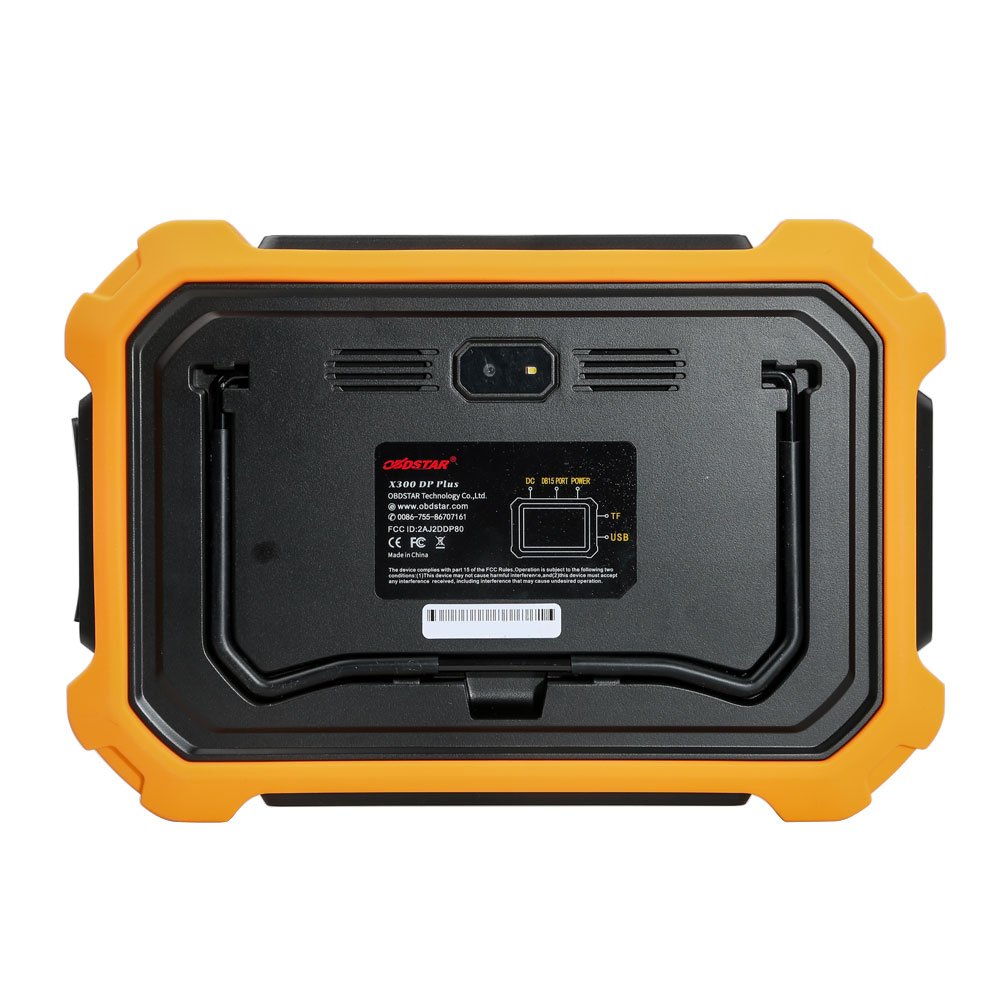
2.2 paveikslas: Galinis view of the OBDSTAR X300 DP PAD PLUS, highlighting the built-in VCI box, power input, TF card slot, and USB port.
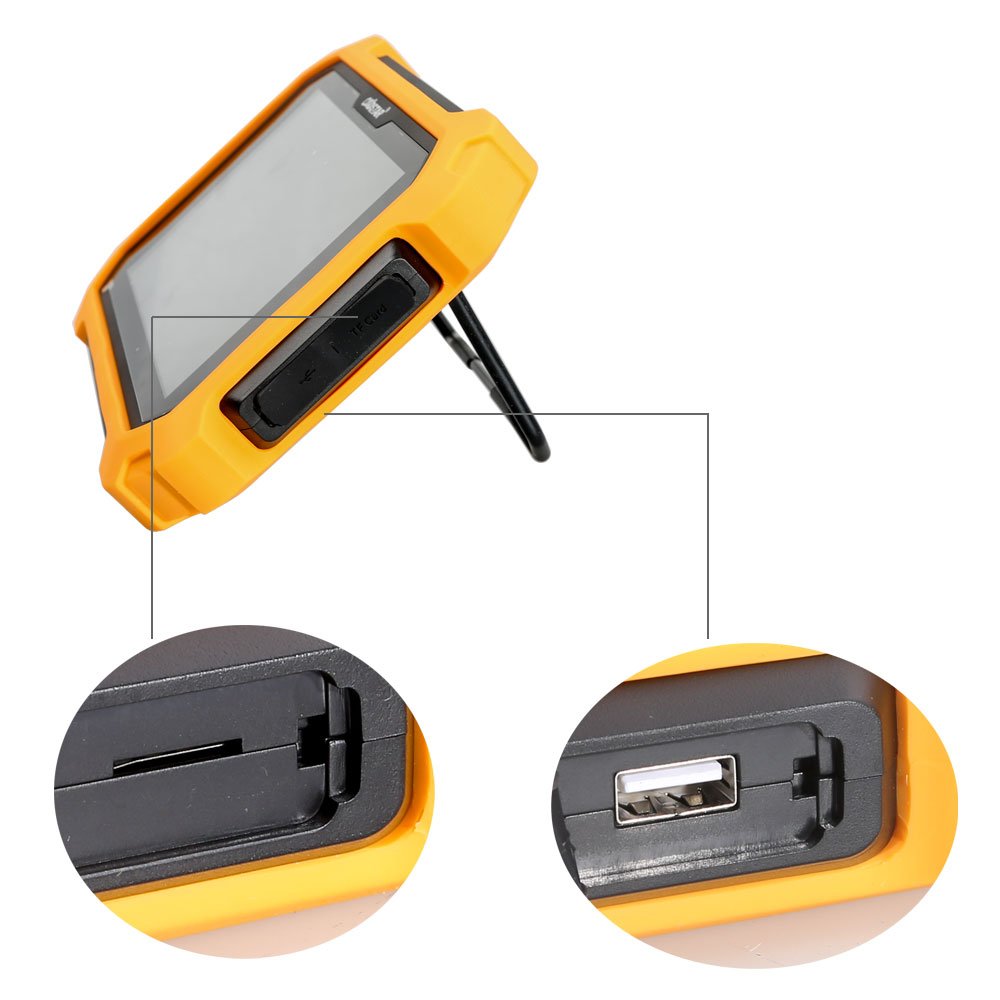
2.3 paveikslas: Šoninė view of the OBDSTAR X300 DP PAD PLUS, showing the TF card slot and USB port with a pull-out stand.

2.4 paveikslas: The OBDSTAR RT100 Remote Tester, used for checking remote key frequencies and infrared signals.

2.5 paveikslas: The OBDSTAR C002 circuit board, part of the P001 programmer, used for specific programming tasks.

2.6 paveikslas: The OBDSTAR C001 circuit board, another component of the P001 programmer, designed for various programming functions.

2.7 paveikslas: The OBDSTAR X300 DP PAD PLUS kit displayed open in its carrying case, showing the main unit and various cables and adapters.

2.8 paveikslas: The durable carrying case for the OBDSTAR X300 DP PAD PLUS, designed for protection and portability.

2.9 paveikslas: Pilnas view of all components included with the OBDSTAR X300 DP PAD PLUS, including the main unit, cables, adapters, and programmers.
3. Sąrankos vadovas
- Išpakavimas: Carefully remove all components from the packaging. Verify that all items listed in the product overview yra.
- Pradinis mokestis: Connect the device to a power source using the provided adapter or directly via the vehicle's OBD-II port for initial charging. Ensure the device is fully charged before first use.
- Maitinimas: Press and hold the power button to turn on the device. The Android operating system will boot up.
- Tinklo prisijungimas: Connect the device to a Wi-Fi network to enable software updates and online functions. Navigate to "Settings" and select "Wi-Fi" to configure.
- Programinės įrangos naujinimas: It is recommended to perform a software update upon first use to ensure the latest features and vehicle coverage. Access the "Upgrade" icon on the main screen.
- Priedo jungtis: Connect necessary adapters (e.g., P001 programmer, C001/C002 circuit boards) and cables as required for specific diagnostic or programming tasks.
4. Naudojimo instrukcijos
The OBDSTAR X300 DP PAD PLUS operates through a touch-based interface. Below are general steps for common operations:
4.1. Vehicle Diagnosis
- Prisijunkite prie transporto priemonės: Plug the OBD-II cable into the vehicle's diagnostic port and connect the other end to the X300 DP PAD PLUS.
- Select "Diag Program": On the main screen, tap the "Diag Program" icon.
- Transporto priemonės pasirinkimas: Choose the vehicle manufacturer, model, and year from the menu.
- Sistemos nuskaitymas: Select the desired diagnostic function (e.g., Read DTCs, Clear DTCs, Live Data, Actuation Test) and follow the on-screen prompts.
4.2. IMMO (Immobilizer) Functions
- Access IMMO: From the main menu, select the "IMMO" function.
- Pasirinkite funkciją: Select the specific IMMO operation, such as "Key Programming," "Remote Programming," "EEPROM," or "Renew Key."
- Vykdykite raginimus: The device will guide you through the necessary steps, which may include connecting the P001 programmer or other adapters.
4.3. Specialiosios funkcijos
The device supports numerous special functions for vehicle maintenance and service resets.
- Access Special Functions: Navigate to the "Special Functions" section from the main menu.
- Pasirinkite paslaugą: Choose the required service reset or special function (e.g., Oil/Service Reset, EPB, TPMS, Battery Matching).
- Vykdyti: Vykdykite ekrane pateikiamus nurodymus, kad atliktumėte pasirinktą funkciją.
4.4. ECU Clone
This function allows for the duplication of ECU data, facilitating ECU replacement.
- Select ECU Clone: Choose the "ECU Clone" option.
- Identify ECU: Follow prompts to identify the original ECU.
- Skaityti duomenis: The device will read all data from the original ECU.
- Rašyti duomenis: Write the copied data to the new or used ECU. This process is designed to be non-dismantling and can often be done via OBD.
5. Priežiūra
- Valymas: Įrenginį valykite minkšta, sausa šluoste. Venkite abrazyvinių valiklių ar tirpiklių.
- Saugykla: Store the device in its protective carrying case in a cool, dry place when not in use. Avoid extreme temperatures.
- Programinės įrangos atnaujinimai: Regularly check for and install software updates via Wi-Fi to ensure optimal performance, expanded vehicle coverage, and new features.
- Akumuliatoriaus priežiūra: To prolong battery life, avoid fully discharging the battery frequently. Charge the device regularly, especially if stored for extended periods.
- Kabelio apžiūra: Reguliariai tikrinkite visus laidus ir jungtis, ar nėra susidėvėjimo ar pažeidimų požymių. Nedelsdami pakeiskite pažeistus komponentus.
6. Problemų sprendimas
| Problema | Galima priežastis | Sprendimas |
|---|---|---|
| Įrenginys neįsijungia. | Low battery; Power button not held long enough; Device malfunction. | Charge the device for at least 30 minutes. Press and hold the power button for 5-10 seconds. If problem persists, contact support. |
| Nepavyksta prisijungti prie transporto priemonės. | Loose OBD-II connection; Vehicle ignition off; Damaged cable; Incompatible vehicle protocol. | Ensure cable is securely connected. Turn vehicle ignition to ON position. Try a different OBD-II cable if available. Verify vehicle compatibility. |
| Nepavyksta atnaujinti programinės įrangos. | Unstable Wi-Fi connection; Insufficient storage; Server issues. | Ensure strong Wi-Fi signal. Clear some storage space if needed. Try updating again later. |
| Functions not working for specific car model. | Software not updated; Specific model not supported; Incorrect procedure. | Ensure software is up to date. Consult the official OBDSTAR vehicle coverage list. Review the operating instructions for the specific function. |
7. Techninės specifikacijos
- Operacinė sistema: Android 5.1.1
- CPU: Exynos4418 Dual Core ARM Cortex A9 1.4GHz
- Baterija: 3700mA, rechargeable polymer lithium battery
- Atminties kortelės išplėtimas: Palaikoma 32G Micro SD (TF) kortelė
- Atminties talpa: 1 GB
- Saugojimo talpa: 32 GB
- LCD: 8.0 colio
- LCD raiška: 1280*800
- Jutiklinis ekranas: Talpinis jutiklinis ekranas
- Kamera: 5 mega rear view fotoaparatas
- „Wi-Fi“: Palaikoma
- Darbinė temperatūra: -10 ℃ ~ 55 ℃ (14 ℉ ~ 131 ℉)
- Laikymo temperatūra: -20 ℃ ~ 70 ℃ (-4 ℉ ~ 158 ℉)
- Svoris: Apytiksliai 1.0 kg (2.2 svaro)
- Matmenys: 254mm*174mm*35mm (10 in * 6.85 in * 1.38 in)
8. Garantija ir palaikymas
OBDSTAR products typically come with a manufacturer's warranty. For specific warranty terms and conditions, please refer to the warranty card included with your product or visit the official OBDSTAR websvetainėje. Išsaugokite pirkimo kvitą kaip pirkimo įrodymą.
For technical support, software updates, or service inquiries, please contact OBDSTAR customer service or your authorized dealer. You may also find additional resources and FAQs on the official OBDSTAR websvetainė: www.obdstar.com.
When contacting support, please have your product model (X300 DP PAD2) and serial number ready.


