1. Įvadas
This manual provides detailed instructions for the setup, operation, and maintenance of your CAME TOP432EV remote control. The CAME TOP432EV is designed for controlling compatible gate openers, garage door systems, and other access control devices. It features a durable design and a reliable operating range.
Included with your remote control are the necessary batteries, ensuring it is ready for initial setup upon arrival.

1.1 paveikslas: kampinis view of the CAME TOP432EV remote control, showcasing its two primary buttons and the CAME logo at the bottom.
2. Sąranka ir programavimas
2.1 Akumuliatoriaus įdėjimas
The CAME TOP432EV remote control comes with a pre-installed battery. If replacement is needed, follow these steps:
- Nuotolinio valdymo pulto gale raskite baterijų skyriaus dangtelį.
- Using a small screwdriver or coin, carefully pry open the cover.
- Remove the old battery and insert a new CR2032 type battery, ensuring the positive (+) side faces upwards.
- Uždėkite baterijų skyriaus dangtelį, įsitikindami, kad jis tvirtai užsifiksavo.
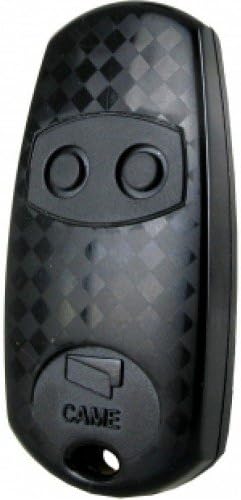
2.1 pav.: Tiesioginis frontas view of the CAME TOP432EV remote control, highlighting the two circular buttons and the CAME branding.
2.2 Nuotolinio valdymo pulto programavimas
Programming the CAME TOP432EV typically involves cloning from an existing remote or programming directly to the receiver unit. Consult your receiver's manual for specific programming modes. A common cloning procedure is as follows:
- Išvalyti esamus kodus (jei reikia): On the new remote, press and hold both buttons simultaneously until the LED flashes rapidly, then release. This clears any pre-existing codes.
- Įeikite į mokymosi režimą: Press and hold the button on the new remote that you wish to program. The LED will light up steadily.
- Klonuoti iš originalaus nuotolinio valdymo pulto: While still holding the button on the new remote, bring the original, working remote close to it (typically back-to-back or side-by-side). Press and hold the corresponding button on the original remote.
- Patvirtinimas: The LED on the new remote should flash rapidly, then turn solid, indicating successful code transfer. Release both buttons.
- Testas: Test the newly programmed button with your device. If it does not work, repeat the steps or refer to your receiver's specific programming instructions.
For direct programming to a receiver, activate the receiver's learning mode (often by pressing a button on the receiver itself), then press the desired button on the CAME TOP432EV remote. The receiver will typically provide visual or audible confirmation.

2.2 pav.: Stambus planas view of the CAME TOP432EV remote control's buttons, illustrating their placement for programming and operation.
3. Naudojimo instrukcijos
Once programmed, operating your CAME TOP432EV remote control is straightforward:
- Aktyvinimas: Press the programmed button corresponding to the desired function (e.g., open gate, close garage door).
- Diapazonas: The remote control has an operational range of up to 150 meters under optimal conditions. Ensure there are no significant obstructions between the remote and the receiver for best performance.
- Indikatoriaus lemputė: The LED on the remote will illuminate when a button is pressed, indicating that a signal is being transmitted.
4. Priežiūra
4.1 Akumuliatoriaus keitimas
If the remote's operational range decreases significantly or the LED indicator light becomes dim or fails to illuminate, it is likely time to replace the battery. Refer to Section 2.1 for battery installation instructions.
4.2 Valymas
To clean the remote control, use a soft, dry cloth. Avoid using abrasive cleaners, solvents, or excessive moisture, as these can damage the device's electronics and casing.
4.3 Saugykla
Store the remote control in a dry place, away from extreme temperatures and direct sunlight. Avoid placing heavy objects on the remote to prevent damage to the buttons or internal components.
5. Problemų sprendimas
Dažniausiai pasitaikančias problemas ir galimus jų sprendimus rasite toliau pateiktoje lentelėje:
| Problema | Galima priežastis | Sprendimas |
|---|---|---|
| Remote not working / No response | Išsikrovusi arba išsikrovusi baterija Neteisingas programavimas Nuotolinio valdymo pultas už diapazono ribų | Replace battery (CR2032) Reprogram the remote (Section 2.2) Judėkite arčiau imtuvo |
| Short operational range | Silpna baterija Obstructions between remote and receiver Trukdymas | Replace battery (CR2032) Užtikrinkite aiškią matomumo liniją Check for other radio frequency devices |
| LED indikatorius nedega | Išsikrovęs akumuliatorius Vidinis gedimas | Replace battery (CR2032) Jei problema išlieka, susisiekite su klientų aptarnavimo tarnyba |
6. Specifikacijos
- Prekinis ženklas: ATĖJO
- Modelis: TOP432EV
- Spalva: Juoda
- Ypatinga funkcija: Ergonomiškas dizainas
- Maksimalus palaikomų įrenginių skaičius: 1 (per button, typically two buttons available)
- Suderinami įrenginiai: Gate openers, garage door systems, and other CAME-compatible access control systems. (Note: While product data may list 'Television', this model is primarily designed for gate/garage systems.)
- Veikimo diapazonas: Up to 150 meters (under optimal conditions)
- Baterijos tipas: CR2032 (įtraukta)
7. Garantija ir palaikymas
Your CAME TOP432EV remote control is covered by a standard manufacturer's warranty against defects in materials and workmanship. Please retain your proof of purchase for warranty claims.
For technical assistance, troubleshooting beyond this manual, or warranty inquiries, please contact the retailer or authorized CAME service center where the product was purchased. Provide your model number (TOP432EV) and a detailed description of the issue to facilitate support.


