1. Įvadas
This manual provides instructions for the installation, operation, and maintenance of your GAMEMAX G561 FRGB Black ATX Mid Tower Gaming Case. The G561 is designed to accommodate ATX, Micro ATX, and Mini-ITX motherboards, featuring an acrylic front panel, an acrylic side window, and integrated FRGB fans for system cooling.
Please read this manual thoroughly before beginning installation to ensure proper setup and to prevent damage to the product or other components.
2. Saugos informacija
- Prieš montuodami arba išimdami bet kokius komponentus, visada atjunkite maitinimo šaltinį nuo sieninio lizdo.
- Dėvėkite antistatinį riešo dirželį, kad išvengtumėte elektrostatinės iškrovos (ESD) žalos jautriems komponentams.
- Handle all components with care. Avoid touching circuit boards or connector pins directly.
- The case features rolled edges to minimize the risk of injury during installation. Exercise caution when working inside the case.
- Keep the case and components away from moisture, dust, and extreme temperatures.
3. Produktas baigtasview
The GAMEMAX G561 case features a transparent acrylic front panel and a clear acrylic side window, allowing visibility of internal components and the integrated FRGB fans. The I/O ports are located on the top panel for convenient access.

3.1 pav.: Priekinė pusė view of the GAMEMAX G561 case with illuminated FRGB fans.
3.1 Front Panel and I/O Ports
The front panel includes three fixed-color FRGB fans. The top panel provides essential connectivity and control options.

Figure 3.2: Top I/O Panel layout.
- Atkūrimo mygtukas: Sistemos atstatymui.
- USB 3.0 prievadas: Didelės spartos duomenų perdavimas.
- USB 2.0 prievadai (x2): Standard data transfer.
- Mikrofono lizdas: Garso įvestis.
- Ausinių lizdas: Garso išvestis.
- Fan Control Key: Toggles fan speed and FRGB lighting (Off, Low speed/no LEDs, High speed/LEDs on).
3.2 Vidinis išdėstymas ir komponentų palaikymas
The G561 case offers ample space for various components, including support for CPU coolers up to 160mm and VGA cards up to 360mm.

Figure 3.3: Internal dimensions for CPU cooler (160mm) and VGA card (360mm).
Drive bays are located behind the motherboard tray and at the bottom of the case for efficient cable management and airflow.

Figure 3.4: Drive bay locations for 2x 2.5" SSDs and 2x 3.5" HDDs.
4. Sąranka ir diegimas
4.1 Bylos parengimas
- Padėkite dėklą ant stabilaus, lygaus paviršiaus.
- Remove the side panel by unscrewing the thumbscrews at the rear and sliding the panel backward.
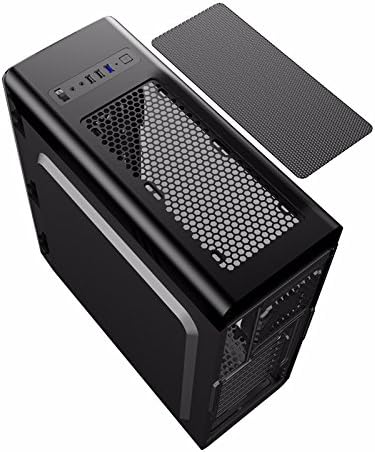
Figure 4.1: Side panel removal.
4.2 Pagrindinės plokštės montavimas
- Įdėkite prie pagrindinės plokštės pridedamą įvesties / išvesties skydą į angą korpuso gale.
- Align the motherboard with the standoffs inside the case. Ensure the standoffs match your motherboard's form factor (ATX, Micro ATX, or Mini-ITX).
- Pritvirtinkite pagrindinę plokštę atitinkamais varžtais.
4.3 Drive Installation (SSD/HDD)
- For 2.5" SSDs: Mount SSDs to the designated trays behind the motherboard tray using screws. Note that some mounts may use a combination of screws and retention clips.
- For 3.5" HDDs: Slide HDDs into the drive cages located at the bottom of the case. Secure them with screws or tool-less clips if available.
4.4 Maitinimo šaltinio įrengimas
- Position the power supply unit (PSU) in the dedicated compartment at the bottom rear of the case.
- Pritvirtinkite maitinimo bloką prie korpuso varžtais iš galinės pusės.
4.5 Vaizdo plokštės ir išplėtimo plokštės įdiegimas
- Nuimkite reikiamus PCI-E lizdų dangtelius nuo korpuso galo.
- Insert the graphics card or other expansion cards into the appropriate PCI-E slots on the motherboard.
- Pritvirtinkite korteles varžtais.
4.6 Kabelių valdymas
Utilize the cutouts and tie-down points behind the motherboard tray to route and secure cables. This improves airflow and maintains a clean internal appearance.
4.7 Ventiliatoriaus ir radiatoriaus montavimas
The case comes with four pre-installed FRGB fans (three front, one rear). The front panel supports a 240mm radiator for liquid cooling solutions.
- If installing an additional radiator, ensure it is compatible with the designated mounting points.
- Secure the radiator and any additional fans using the provided screws.
5. Naudojimo instrukcijos
5.1 Įjungimas / išjungimas
Press the power button on the top I/O panel to turn your system on or off. A short press typically powers on, while a longer press (usually 4-5 seconds) forces a shutdown.
5.2 Fan and Lighting Control
Use the 'Fan Control Key' on the top I/O panel to adjust the speed of the pre-installed FRGB fans and their lighting:
- Išjungta: Fans and FRGB lighting are turned off.
- Žemas: Fans operate at a lower speed; FRGB lighting is off.
- Aukštas: Fans operate at a higher speed; FRGB lighting is active.
6. Priežiūra
6.1 Korpuso valymas
Regular cleaning helps maintain optimal airflow and component longevity.
- Išorė: Naudokite minkštą, damp šluoste išoriniams paviršiams valyti. Venkite abrazyvinių valiklių.
- Dulkių filtrai: The top panel features a magnetic dust filter. Periodically remove and clean it with water or a soft brush. Ensure it is completely dry before reattaching.
- Interjeras: Use compressed air to remove dust from internal components and fans. Hold fan blades gently to prevent over-spinning during cleaning.

Figure 6.1: Top magnetic dust filter.
7. Problemų sprendimas
- Sistema neįsijungia: Check all power connections, including the 24-pin ATX power, 8-pin CPU power, and front panel power switch headers. Ensure the power supply is switched on.
- Fans not spinning/LEDs not lighting up: Verify that the fan control key is set to 'High'. Check fan power connections to the motherboard or fan controller.
- USB prievadai neveikia: Ensure the USB headers from the case are correctly connected to the motherboard.
- Audio jacks not working: Confirm the front panel audio header is securely connected to the motherboard's audio pins.
8. Specifikacijos
| Funkcija | Specifikacija |
|---|---|
| Prekės ženklas | GAMEMAX |
| Modelio numeris | casegamemax (G561) |
| Atvejo tipas | Mid Tower |
| Pagrindinės plokštės suderinamumas | ATX, mikro ATX, mini-ITX |
| Gaminio matmenys | 44 x 20.5 x 47 cm |
| Prekės svoris | 5.3 kilogramo |
| Spalva | Juoda |
| Medžiaga | Akrilas |
| Aušinimo būdas | Oras |
| Įtraukti gerbėjai | 4x Fixed Color FRGB Fans (3 front, 1 rear) |
| Priekinio radiatoriaus palaikymas | Iki 240 mm |
| Maksimalus procesoriaus aušintuvo aukštis | 160 mm |
| Maksimalus VGA kortelės ilgis | 360 mm |
| Drive Bays | 2 x 2.5 colio SSD, 2 x 3.5 colio HDD |
| Iš viso USB prievadų | 3 (1 USB 3.0, 2 USB 2.0) |
| Rekomenduojami naudojimo būdai | Žaidimas |
9. Garantija ir palaikymas
Dėl garantijos informacijos ir techninės pagalbos kreipkitės į oficialią „GAMEMAX“ svetainę. websvetainėje arba susisiekite su vietiniu pardavėju. Išsaugokite pirkimo įrodymą, jei prireiktų pateikti garantinį prašymą.