Produktas baigtasview
The SteelSeries Arctis 3 headset redefines gaming audio with its innovative design, delivering superior sound, comfort, and style across all major gaming platforms. It features a completely overhauled audio system and a new microphone design for unmatched clarity.
Pagrindinės savybės
- Optimal PS5 compatibility: Requires user to change settings on Sony PS5 – disable Sony 3D Audio and then increase default volume to 100%.
- All-Platform Design: Designed for everywhere you game, with superior sound, comfort and style on all gaming platforms, including PC, PlayStation, Xbox One, Nintendo Switch via detachable 3.5 millimeter cables.
- ClearCast Microphone: Widely recognized as the best mic in gaming, the Discord certified ClearCast microphone delivers studio quality voice clarity and background noise cancellation.
- Geresnis garsas: Sound is your competitive advantage with the S1 speaker drivers, engineered to produce ultra-low distortion audio so you hear every detail.
- Visos dienos komfortas: Play all day with athletics inspired performance fabric AirWeave ear cushions that keep your ears cool and dry.
- Spatial Audio Ready: Windows Sonic Spatial Audio fully compatible with native surround sound built into Windows 10 PCs and Xbox One consoles; Headphone sensitivity: 98 dB.
Kas yra dėžutėje
- Ausinės
- Vartotojo vadovas

The SteelSeries Arctis 3 headset and its included accessories, ready for setup.
Sąranka
Ausinių prijungimas
The Arctis 3 headset connects via detachable 3.5mm cables, ensuring broad compatibility across various gaming platforms.
PC prijungimas
For PC, use the included splitter extension cable to connect the headset's 3.5mm jack to separate microphone and headphone ports on your computer.
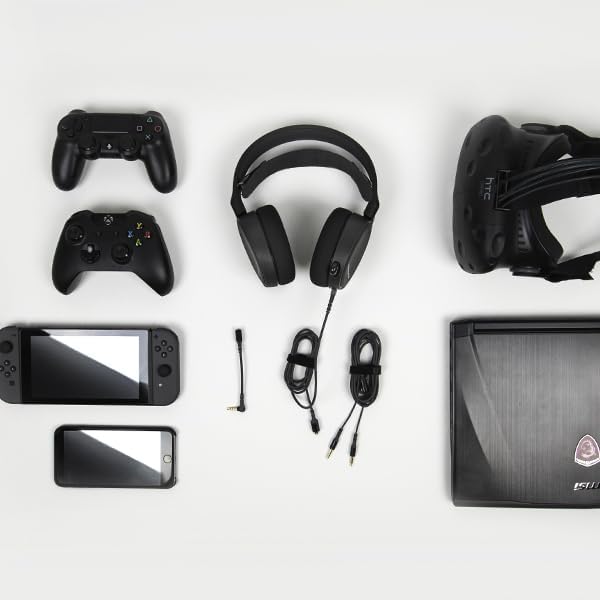
The SteelSeries Arctis 3 headset shown with various compatible devices and connection cables, highlighting its multi-platform design.
Console Connection (PlayStation, Xbox One, Nintendo Switch)
For consoles, connect the headset directly to your controller's 3.5mm audio jack.
Important PS5 Compatibility Note: To ensure optimal PS5 compatibility, disable Sony 3D Audio in your PS5 settings and increase the default volume to 100%.
Official SteelSeries video demonstrating the features and compatibility of the Arctis 3 Black Gaming Headset.
Ausinių valdymas
Mikrofono naudojimas
The Discord-certified ClearCast microphone is retractable and delivers studio-quality voice clarity with background noise cancellation.
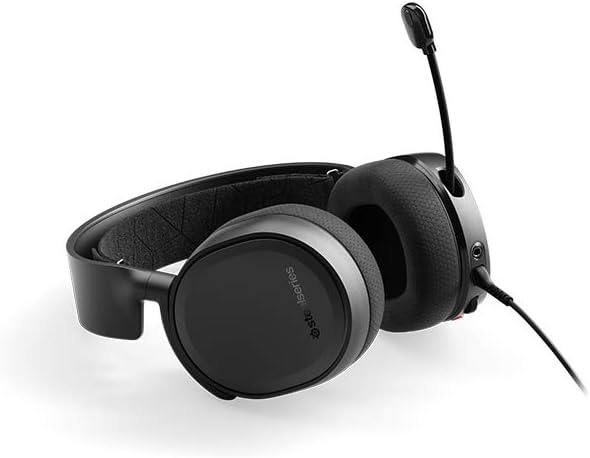
The SteelSeries Arctis 3 headset with its ClearCast microphone extended, ready for voice communication.
To extend the microphone, gently pull it out from the left earcup. To retract, push it back into the earcup until it is flush.
On-Headset Controls
The left earcup features convenient controls for volume adjustment and microphone muting.
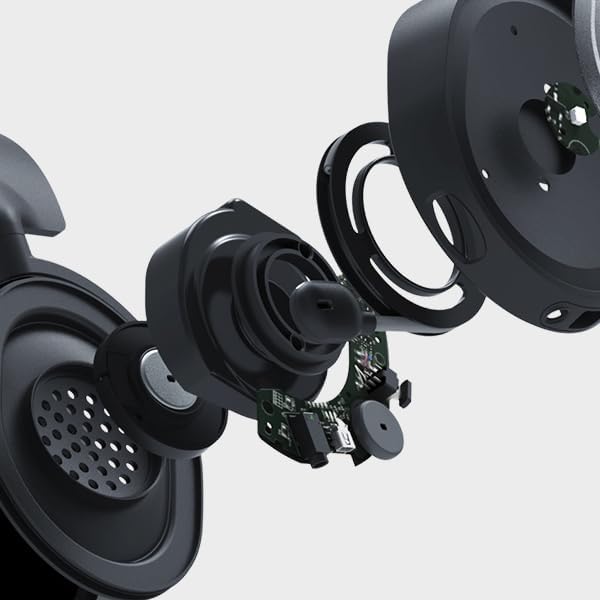
Iš arti view of the volume scroll wheel and microphone mute button located on the left earcup of the Arctis 3 headset.
- Tūrio ratas: Norėdami reguliuoti garso stiprumą, slinkite aukštyn arba žemyn.
- Mikrofono nutildymo mygtukas: Paspauskite, kad nutildytumėte arba įjungtumėte mikrofono garsą.
Priežiūra
To ensure the longevity and optimal performance of your SteelSeries Arctis 3 headset, follow these maintenance guidelines:
- Valymas: Use a soft, dry cloth to wipe down the earcups and headband. Avoid abrasive cleaners or solvents.
- Saugykla: Store the headset in a cool, dry place away from direct sunlight and extreme temperatures. When not in use, retract the microphone to protect it.
- Kabelio priežiūra: Handle cables gently. Avoid sharp bends or excessive pulling to prevent damage.
- Earcup Maintenance: The AirWeave ear cushions are designed for comfort and breathability. Periodically check them for wear and tear.
Trikčių šalinimas
If you encounter issues with your SteelSeries Arctis 3 headset, refer to the following common troubleshooting steps:
- Nėra garso / mažas garsumas:
- Ensure the 3.5mm cable is securely connected to both the headset and your device.
- Patikrinkite ausinių garsumo ratuką ir savo įrenginio garso nustatymus.
- Verify that the microphone mute button is not engaged.
- For PS5 users, confirm Sony 3D Audio is disabled and volume is at 100% as per setup instructions.
- Mikrofonas neveikia:
- Įsitikinkite, kad mikrofonas yra visiškai ištiestas.
- Check that the microphone mute button is not engaged.
- Verify microphone input settings on your PC or console.
- If using the PC splitter cable, ensure both jacks are correctly inserted into the microphone and headphone ports.
- Garso iškraipymas:
- Sumažinkite garsumą tiek ausinėse, tiek savo įrenginyje.
- Išbandykite ausines su kitu įrenginiu, kad atmestumėte su įrenginiu susijusią problemą.
Specifikacijos
| Funkcija | Detalė |
|---|---|
| Ausinės Jack | Mini-phone |
| Modelio pavadinimas | arctis |
| Ryšio technologija | Laidinis |
| Įtraukti komponentai | User Manual, Headset |
| Specifinis produkto naudojimas | Žaidimas |
| tema | Vaizdo žaidimas |
| Valdymo tipas | Triukšmo valdymas |
| Kabelio funkcija | Nuimamas |
| Prekės svoris | 10.4 uncijos |
| Kliento paketo tipas | Standartinė pakuotė |
| Vienetų skaičius | 1.0 Skaičius |
| Stilius | Arctis 3 |
| Prekių skaičius | 1 |
| UPC | 813682025212 |
| Pasaulinis prekybos identifikavimo numeris | 00813682025212 |
| Gamintojas | SteelSeries APS |
| Gaminio matmenys | 7.93 x 7.08 x 3.58 colio |
| ASIN | B07G12Z1HR |
| Prekės modelio numeris | 61503 |
| Baterijos | Reikalinga 1 ličio polimero baterija. |
| Klientas Reviews | 4.2 iš 5 žvaigždučių (12,688 XNUMX įvertinimai) |
| Pardavėjų reitingas | #23,643 in Video Games, #856 in PC Game Headsets |
| Gamintojas nutraukė gamybą | Nr |
| Pasiekiama pirmoji data | 28 m. rugpjūčio 2018 d |
| Prekės ženklas | SteelSeries |
| Spalva | Juoda |
| Formos faktorius | Virš ausies |
| Varža | 32 omų |
| Dažnio atsakas | 22000 Hz |
Garantija ir palaikymas
The SteelSeries Arctis 3 headset comes with a manufacturer's warranty. For detailed warranty information and support, please refer to the official SteelSeries website or the user manual.
You can download the full User Manual in PDF format: Vartotojo vadovas (PDF)
For further assistance, visit the official SteelSeries store page: SteelSeries Store


