Įvadas
Welcome to the user manual for the TC Electronic Ditto JAM X2 Looper Pedal. This intuitive looper pedal is designed for musicians seeking intelligent loop synchronization that responds to their band's rhythm. It features innovative BeatSense technology, allowing for automatic adjustment of loop tracks to your beat, and offers both Record-then-Play and Record-then-Overdub functionalities with unlimited overdubs and undo/redo capabilities. This manual provides essential information for setting up, operating, maintaining, and troubleshooting your Ditto JAM X2 Looper.
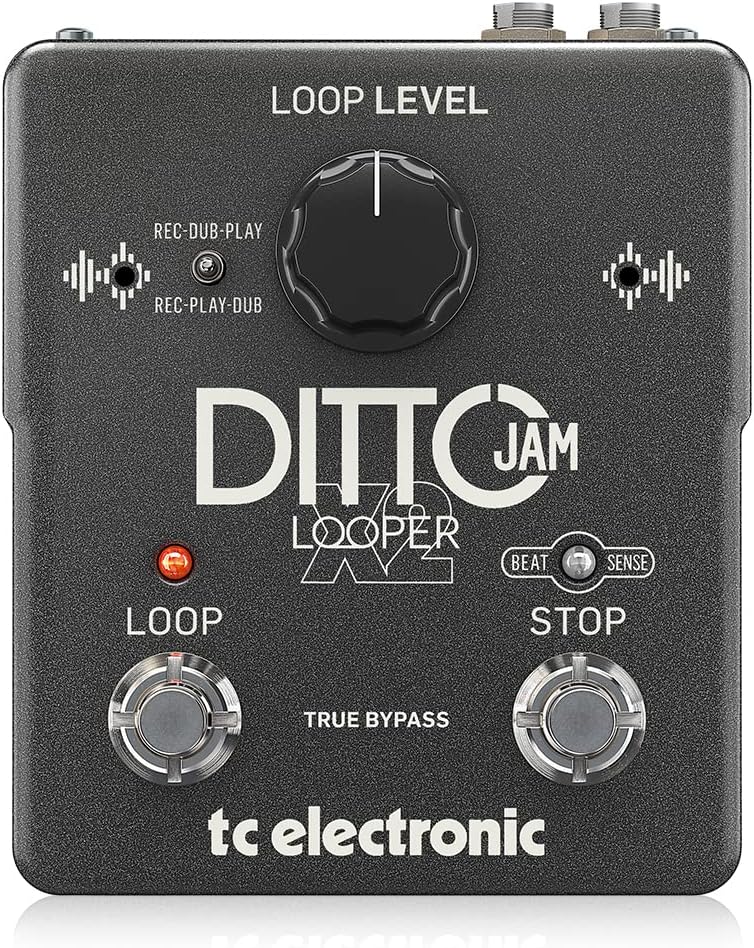
Vaizdas: priekis view of the TC Electronic Ditto JAM X2 Looper Pedal, showcasing the 'LOOP LEVEL' knob, 'REC-DUB-PLAY' and 'REC-PLAY-DUB' switches, 'LOOP' and 'STOP' footswitches, and 'BEAT SENSE' indicator.
Pagrindinės savybės
- Intuitive looper pedal with intelligent loop synchronization that responds to your band.
- Innovative responsive BeatSense technology automatically adjusts loop tracks to your beat.
- Choose between Record-then-Play or Record-then-Overdub functionalities.
- Unlimited overdubs and undo/redo for total creative freedom.
- Dual built-in mics accurately track band tempo by focusing only on rhythmic elements.

Vaizdas: Stambus planas view of the "BEAT SENSE" indicator on the pedal, highlighting its function.

Image: An external microphone, likely used for the BeatSense technology, clipped onto a drum kit component.
Sąranka
Maitinimo šaltinis
The Ditto JAM X2 Looper requires a 9V power supply. Ensure you use a compatible power adapter (not included) to power the unit.
Jungtys
- Prijunkite savo instrumentą (pvz., gitarą) prie ĮVESTIS lizdą naudodami standartinį 6,35 mm instrumentinį kabelį.
- Prijunkite IŠVADA Džekas prie tavo amplifier or next pedal in the signal chain using a standard 1/4-inch instrument cable.
- An EXT MIC input is available for connecting an external microphone to enhance BeatSense accuracy, particularly in complex rhythmic environments.

Vaizdas: Galinis view of the Ditto JAM X2 pedal, clearly showing the INPUT, OUTPUT, EXT MIC jacks, and the power input.
Naudojimo instrukcijos
Pagrindinė kilpa
- Įrašas: Paspauskite KILPA footswitch once to start recording your loop. The LED will illuminate red.
- Playback/Overdub: Paspauskite KILPA footswitch again to stop recording and begin playback. If you press it again during playback, you will start overdubbing.
- Sustabdyti: Paspauskite STOP footswitch once to stop playback.
- Anuliuoti / perdaryti: Paspauskite ir palaikykite STOP footswitch to undo the last overdub. Press and hold again to redo it.
- Skaidrus ciklas: Paspauskite ir palaikykite KILPA kojinis jungiklis srovės kilpai išvalyti.
Loop Level Control
The KILPOS LYGIS knob adjusts the overall volume of your recorded loop. Turn clockwise to increase volume, counter-clockwise to decrease.
Record Modes (REC-DUB-PLAY / REC-PLAY-DUB)
The Ditto JAM X2 offers two recording modes, selectable via the small toggle switch:
- REC-DUB-PLAY: In this mode, the first press of the LOOP footswitch records, the second press starts overdubbing, and a third press initiates playback without further overdubbing.
- REC-PLAY-DUB: In this mode, the first press records, the second press starts playback, and a third press initiates overdubbing.

Paveikslėlis: detalus view of the toggle switch for selecting between REC-DUB-PLAY and REC-PLAY-DUB modes.
BeatSense Technology
The innovative BeatSense technology uses dual built-in microphones to listen to your band's rhythmic elements (like drums) and automatically synchronize your loops to the detected tempo. This ensures your loops stay perfectly in time with the rest of the band.

Image: A musician's feet operating the Ditto JAM X2 pedal on a stage floor, demonstrating its use in a live setting.
Priežiūra
- Pedalą laikykite švarų, be dulkių ir šiukšlių. Valymui naudokite minkštą, sausą šluostę.
- Saugokite pedalą nuo ekstremalių temperatūrų, drėgmės ar tiesioginių saulės spindulių.
- Do not attempt to open the unit or perform repairs yourself, as this will void the warranty. Refer to qualified service personnel for any issues.
- Ensure proper ventilation around the pedal during use.

Image: The bottom label of the Ditto JAM X2 pedal, displaying compliance information, manufacturer details, and power requirements.
Trikčių šalinimas
Nėra garso išvesties
- Patikrinkite visas kabelių jungtis (įvesties, išvesties, maitinimo).
- Įsitikinkite, kad pedalas gauna energiją.
- Verify the LOOP LEVEL knob is not set to minimum.
- Test with different cables and amplifier/instrument to isolate the issue.
Loop Not Synchronizing
- Ensure the BeatSense microphones are not obstructed.
- Verify the external microphone (if used) is properly connected and functioning.
- The BeatSense technology works best with clear, consistent rhythmic input (e.g., drums). Complex or irregular rhythms may affect synchronization accuracy.
- Ensure the pedal is placed in an optimal position to pick up rhythmic sounds from the band.
Footswitches Not Responding
- Patikrinkite maitinimo šaltinį.
- Jei problema išlieka, susisiekite su klientų aptarnavimo tarnyba.
Specifikacijos
| Funkcija | Specifikacija |
|---|---|
| Modelis | DITTO JAM X2 LOOPER |
| Prekės ženklas | TC Elektronika |
| Prekės svoris | 1.26 svaro (570 gramų) |
| Gaminio matmenys | 4.45 x 5.31 x 2.13 colio (5.31 colio ilgio x 4.45 colio pločio x 2.13 colio aukščio) |
| Spalva | Juoda |
| Maitinimo šaltinis | Maitinamas su baterijomis (9 voltai) |
| Techninės įrangos sąsaja | 1/4 colio garsas |
| Signalo formatas | Analoginis |
Garantija ir palaikymas
Dėl garantijos informacijos ir techninės pagalbos kreipkitės į oficialią TC Electronic svetainę. websvetainėje arba susisiekite tiesiogiai su jų klientų aptarnavimo tarnyba. Išsaugokite pirkimo įrodymą garantiniams reikalavimams.
Internetiniai ištekliai: Aplankykite TC elektronikos parduotuvė „Amazon“ platformoje papildomos informacijos apie gaminį ir išteklių.