Įvadas
Ačiū, kad pirkoteasing the VTech VT1091 Cordless Phone. This manual provides essential information for setting up, operating, and maintaining your new phone. Please read these instructions carefully to ensure proper use and to fully benefit from its features.
Pakuotės turinys
Prieš pradėdami, įsitikinkite, kad pakuotėje yra visi reikalingi daiktai:
- Belaidis ragelis
- Bazinis blokas
- Bazinio įrenginio maitinimo adapteris
- Telefono linijos laidas
- Įkraunamos baterijos (iš anksto įdiegtos arba atskiros)
- Vartotojo vadovas (šis dokumentas)
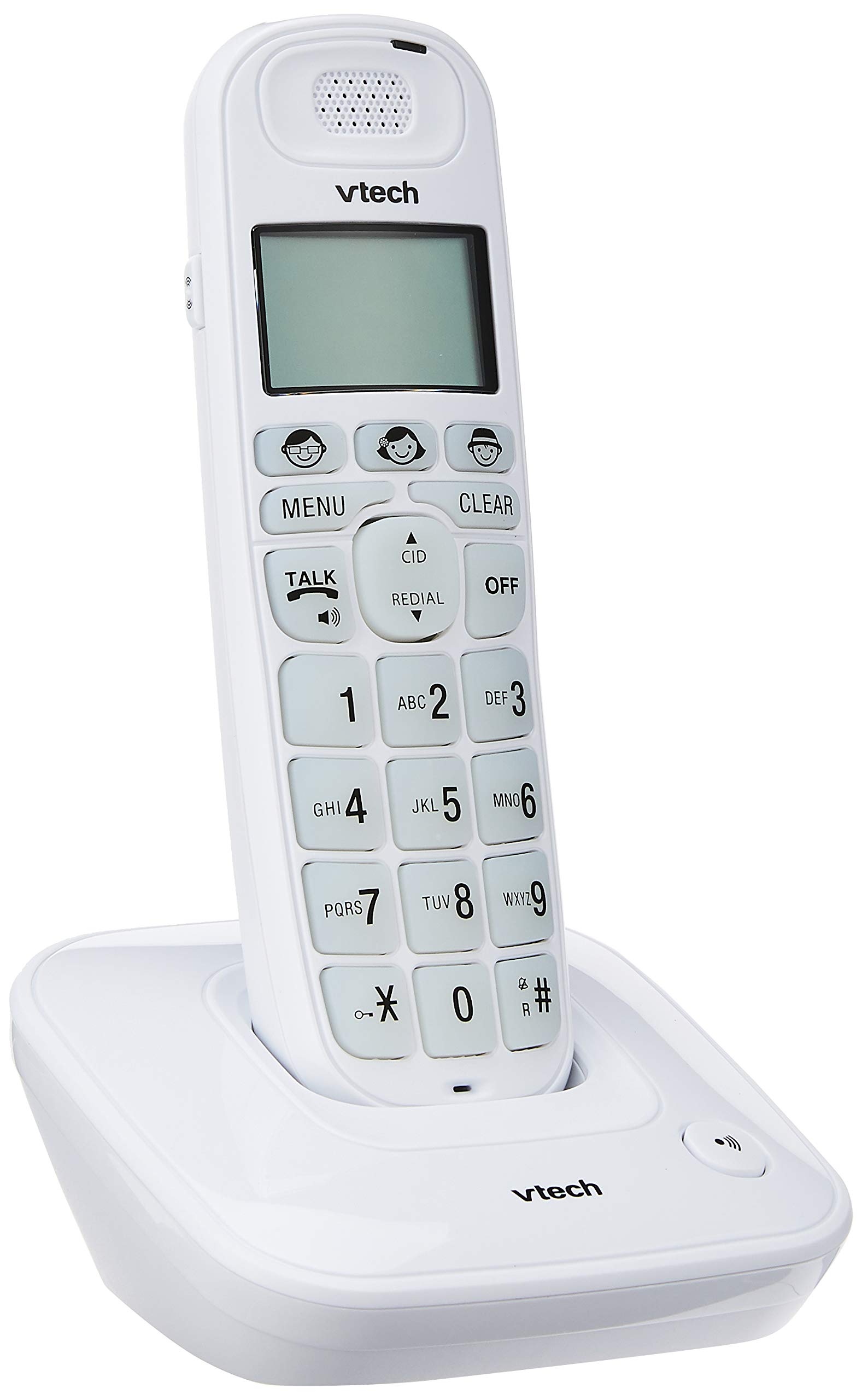
Image: The VTech VT1091 cordless phone handset resting in its base unit, showing the front view of the keypad and screen.
Sąranka
1. Akumuliatoriaus įdėjimas
- Raskite baterijų skyriaus dangtelį, esantį ragelio gale.
- Norėdami atidaryti, stumkite dangtelį žemyn.
- Įdėkite pridedamas įkraunamas baterijas, laikydamiesi teisingo poliškumo (+ ir -).
- Uždėkite akumuliatoriaus skyriaus dangtelį.
2. Pagrindinio įrenginio prijungimas
- Prijunkite vieną telefono linijos laido galą prie TEL LINE lizdo, esančio pagrindinio įrenginio gale.
- Prijunkite kitą telefono linijos laido galą prie telefono sieninio lizdo.
- Connect the small end of the power adapter to the DC IN jack on the back of the base unit.
- Prijunkite didelį maitinimo adapterio galą į standartinį elektros lizdą.

Vaizdas: Galinis view of the VTech VT1091 base unit, showing the ports for the telephone line cord and the power adapter.
3. Ragelio įkrovimas
Place the handset on the base unit with the display facing forward. The handset will begin charging. For optimal battery performance, allow the handset to charge for at least 16 hours before initial use.

Vaizdas: Šoninė view of the VTech VT1091 cordless phone handset securely placed in its charging base.
Pagrindinės savybės
- Ampsušvelninimas: Amplification of incoming sounds by up to 30 decibels.
- Ultra-low Radiation Mode: Operates with reduced radiation levels.
- BOOSTER Button: One-touch button for easy sound ampsušvelninimas.
- Didelė klaviatūra: Big buttons with backlit keypad for improved visibility.
- Apšviestas LCD ekranas: Large display with orange backlight.
- Ragelis garsiakalbis: Laisvų rankų bendravimui.
- Puslapio / ragelio ieškiklis: Helps locate a misplaced handset.
- Auto Answer/Keypad Lock: Convenient call handling and security features.
- Alarm/Secrecy: Includes alarm function and call secrecy feature.
- GAP Compliant: Compatible with other GAP-enabled DECT devices.
- Telefonų knygos katalogas: 20 name and number entries.
- Skambintojo ID: Displays the last 10 caller numbers.
- Perskambinti: Stores the last 5 numbers dialed.
- Skambučio melodijos: 10 selectable ringer melodies (5 polyphonic and 5 standard).
- Baterijos veikimo laikas: Approximately 10 hours talk time / 100 hours standby time.
- Atminties mygtukai: 3 one-touch memory buttons.
- Greitasis rinkimas: 8 number (2-9) speed dial memories.
- Suderinamas su klausos aparatu: Designed for use with hearing aids.
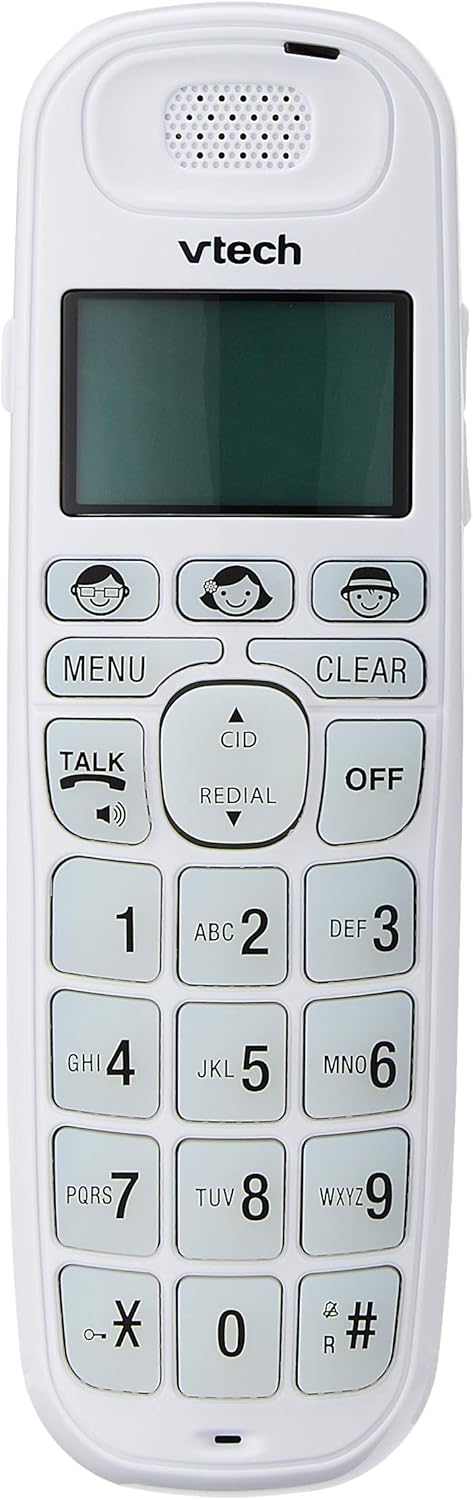
Image: Close-up of the VTech VT1091 handset, highlighting the large backlit keypad, LCD display, and dedicated function buttons.
Naudojimo instrukcijos
Skambinimas
- Paspauskite KALBĖKITE mygtuką, kad suskambėtų rinkimo signalas.
- Surinkite norimą telefono numerį.
- Norėdami baigti pokalbį, paspauskite IŠJUNGTA mygtuką arba padėkite ragelį atgal ant pagrindinio įrenginio.
Atsiliepimas į skambutį
Kai suskamba telefonas, paspauskite KALBĖKITE mygtuką atsiliepti į skambutį.
Naudojant garsiakalbį
Pokalbio metu paspauskite KALBĖKITE button again (with the speaker icon) to activate the speakerphone function. Press it again to switch back to the earpiece.
Garso reguliavimas
Pokalbio metu naudokite UP ir ŽEMYN arrow buttons on the side of the handset to adjust the earpiece or speakerphone volume.
Telefonų knygos katalogas
- Paspauskite MENIU mygtuką.
- Navigate to "Phonebook" using the arrow buttons and press MENIU pasirinkti.
- Follow the on-screen prompts to add, edit, or delete entries.
Perrinkimo funkcija
Paspauskite PERSKAMBINTI mygtuką prie view a list of the last 5 dialed numbers. Use the arrow buttons to select a number and press KALBĖKITE rinkti.
Skambintojo ID
When the phone rings, the caller's number (if available) will be displayed on the screen. Press the CID mygtuką pakartotiview the caller ID list. Use the arrow buttons to scroll through entries.
BOOSTER Function
Skambučio metu paspauskite specialų mygtuką stiprintuvas button (if available, often integrated with volume or a specific key) to instantly amplify the incoming audio by up to 30 decibels. Press again to deactivate.
Ragelis lokatorius
To locate a misplaced handset, press the PUSLAPIS mygtuką ant pagrindinio bloko. Ragelis suskambės.
Priežiūra
Valymas
Nuvalykite ragelį ir pagrindinį bloką minkšta,amp cloth. Do not use cleaning sprays or abrasive cleaners, as these can damage the finish or electrical components.
Akumuliatoriaus priežiūra
- Only use the supplied rechargeable batteries.
- Jei telefonas nebus naudojamas ilgesnį laiką, išimkite baterijas, kad išvengtumėte elektrolito pratekėjimo.
- Nemeskite baterijų į ugnį.
Trikčių šalinimas
| Problema | Sprendimas |
|---|---|
| Nėra rinkimo tono |
|
| Ragelis neįkraunamas |
|
| Prasta garso kokybė |
|
| Skambinančiojo ID nerodomas |
|
Specifikacijos
| Prekės ženklas | „VTech“ |
| Modelis | VT1091 |
| Telefono tipas | Belaidis |
| Spalva | Baltas |
| Medžiaga | Plastikiniai |
| Maitinimo šaltinis | Laidinis elektrinis (pagrindiniam įrenginiui) |
| Rinkiklio tipas | Viena klaviatūra |
| Atsiliepimo sistemos tipas | Digital (Note: This model's primary features do not highlight an integrated answering machine, but refers to general digital phone capabilities.) |
| Daugiaeilė operacija | Vienišas |
| Telefoninių pokalbių laikas | 10 valandų |
| Telefono budėjimo laikas | 100 valandų |
| Skambintojo ID | Taip |
| UPC | 735078026569 |

Image: The VTech VT1091 cordless phone in its base, with a measurement overlay indicating a height of 8.3 inches (21 cm).
Garantija ir palaikymas
This VTech VT1091 Cordless Phone comes with a 2 metų vietinė (Singapūro) gamintojo garantija. For warranty claims or technical support, please refer to the contact information provided with your purchase documentation or visit the official VTech Singapore websvetainę.
Dėl papildomos pagalbos kreipkitės į „VTech“ klientų aptarnavimo tarnybą.


