1. Įvadas
The Optex ORT 8930-HD is a digital terrestrial receiver designed to receive free-to-air digital programs broadcast in MPEG2/MPEG4 format, compatible with DVB-T2 and HEVC/H.265 standards. This device connects to your television via HDMI or SCART. It features a USB input for future software updates, multimedia file playback (photos, music, videos), and direct recording to an external USB storage device (not included).
This manual provides detailed instructions for the proper installation, operation, and maintenance of your Optex ORT 8930-HD receiver. Please read it thoroughly before use to ensure optimal performance and to prevent damage.
2. Saugos informacija
- Užtikrinkite tinkamą vėdinimą aplink prietaisą, kad išvengtumėte perkaitimo.
- Saugokite imtuvą nuo lietaus, drėgmės ar ekstremalių temperatūrų.
- Nestatykite prietaiso šalia šilumos šaltinių, tokių kaip radiatoriai ar krosnys.
- Naudokite tik su įrenginiu pateiktą maitinimo adapterį.
- Neatidarykite casing; visus techninės priežiūros darbus patikėkite kvalifikuotiems darbuotojams.
- Žaibuojant arba ilgą laiką nenaudojant, atjunkite maitinimo kištuką nuo sieninio lizdo.
3. Pakuotės turinys
Patikrinkite, ar pakuotėje yra visi reikalingi daiktai:
- 1 x Optex ORT 8930-HD Digital Receiver
- 1x nuotolinio valdymo pultas
- 1 x Vartotojo vadovas
4. Produktas baigtasview
4.1 Priekinis skydelis

1 vaizdas: Priekyje view of the Optex ORT 8930-HD receiver, showing the display, USB port, and control buttons.
The front panel includes a digital display for channel numbers, a USB 2.0 port for external storage, and basic control buttons (CH+, CH-, Power).
4.2 Galinis skydelis
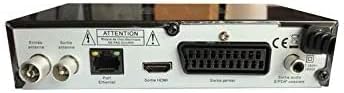
2 vaizdas: Galinis view of the Optex ORT 8930-HD receiver, displaying various connectivity ports.
Galiniame skydelyje yra šios jungtys:
- Antenos įėjimas/išėjimas: IEC 9.52 mm connectors for terrestrial antenna.
- HDMI išvestis: For connecting to an HD television.
- SCART Connector: For connecting to older televisions.
- S/PDIF Coaxial Audio: Skaitmeninė garso išvestis.
- Maitinimo įvestis: For the external power adapter.
4.3 Nuotolinis valdymas

3 vaizdas: The remote control unit for the Optex ORT 8930-HD receiver.
The remote control allows full operation of the receiver, including power, channel selection, volume, menu navigation, recording functions, and multimedia playback controls.
5. Sąranka
5.1 Antenos prijungimas
- Connect your terrestrial antenna cable to the "Antenna In" port on the rear panel of the receiver.
- If you wish to loop the antenna signal to another device, connect a coaxial cable from the "Antenna Out" port to the input of the next device.
5.2 Prijungimas prie televizoriaus
Pasirinkite vieną iš šių prisijungimo būdų:
- HDMI (Recommended for HD): Connect an HDMI cable from the "HDMI Output" port on the receiver to an available HDMI input on your television.
- SCART: Connect a SCART cable from the "SCART Connector" on the receiver to the SCART input on your television.
5.3 Maitinimo jungtis
- Connect the power adapter to the power input port on the receiver.
- Prijunkite maitinimo adapterį į tinkamą sieninį lizdą.
5.4 Pradinis kanalų nuskaitymas
- Turn on your television and select the correct input source (HDMI or SCART) corresponding to your connection.
- Power on the Optex ORT 8930-HD receiver.
- The first-time setup wizard should appear. Follow the on-screen instructions to perform an automatic channel search. This will scan for all available digital terrestrial channels in your area.
- If the wizard does not appear, navigate to the "Menu" > "Installation" > "Automatic Search" using the remote control.
6. Naudojimo instrukcijos
6.1 Pagrindinės operacijos
- Maitinimo įjungimas/išjungimas: Paspauskite GALIA mygtuką nuotolinio valdymo pulte arba priekiniame skydelyje.
- Kanalo pasirinkimas: Naudokite CH+ / CH- mygtukus arba įveskite kanalo numerį tiesiogiai naudodami skaitmeninę klaviatūrą.
- Garsumo valdymas: Naudokite VOL+ / VOL- mygtukai.
- Nutildyti: Paspauskite Nutildyti mygtuką, kad laikinai nutildytumėte garsą.
6.2 Kanalų valdymas
- Automatic/Manual Search: Prieiga per Meniu > Montavimas to rescan for channels.
- LCN funkcija: The Logical Channel Numbering (LCN) function automatically sorts channels into a logical order. This can usually be enabled/disabled in the installation menu.
- Mėgstamiausių sąrašas: Create personalized lists of your preferred channels for quick access. Refer to the on-screen menu for instructions on adding and managing favorite channels.
6.3 Įrašymas ir atkūrimas
To use recording and multimedia playback features, connect a USB storage device (e.g., USB flash drive or external hard drive) to the USB port on the front panel.
- USB įrašymas: Paspauskite REC button on the remote control to start recording the current program. Press STOP įrašymui baigti.
- Laiko poslinkio funkcija: This allows you to pause live TV and resume watching later. Activate Timeshift via the remote control (usually a dedicated button or through the menu).
- Multimedijos atkūrimas: Access the multimedia player via the Meniu. You can browse and play music, photo, and video files stored on your connected USB device.
6.4 Elektroninis programų vadovas (EPG)
Paspauskite EPG nuotolinio valdymo pulto mygtuką view the Electronic Program Guide, which displays program schedules for upcoming broadcasts.
6.5 Tėvų užraktas
Set up a parental lock to restrict access to certain channels or programs. This feature is typically found in the Meniu > Sistemos nustatymai > Tėvų kontrolė skyrių.
6.6 Laikmačio funkcija
The timer function allows you to schedule the receiver to turn on/off or record a specific program at a set time. Access this feature through the Meniu.
6.7 Software Update via USB
Periodiškai tikrinkite gamintojo website for available software updates. Download the update file to a USB drive and follow the instructions in the Meniu > Sistemos nustatymai > Programinės įrangos atnaujinimas section to install it.
7. Priežiūra
- Valymas: Imtuvo išorę valykite minkšta, sausa šluoste. Nenaudokite skystų ar aerozolinių valiklių.
- Vėdinimas: Ensure that the ventilation slots on the device are not blocked to prevent overheating.
- Programinė įranga: Keep the receiver's software updated to ensure optimal performance and access to the latest features.
8. Problemų sprendimas
| Problema | Galima priežastis | Sprendimas |
|---|---|---|
| Nėra galios | Atjungtas maitinimo laidas; sugedęs maitinimo lizdas. | Patikrinkite maitinimo laido jungtį; pabandykite įjungti į kitą lizdą. |
| Nėra signalo / Nėra kanalų | Antenna not connected; incorrect input source on TV; no channel scan performed. | Check antenna connection; select correct TV input; perform an automatic channel scan. |
| Nuotolinio valdymo pultas neveikia | Batteries depleted; obstruction between remote and receiver. | Replace batteries; ensure clear line of sight to the receiver's IR sensor. |
| USB įrašymas neveikia | USB device not connected or formatted incorrectly; insufficient storage space. | Ensure USB device is properly connected; format USB device (FAT32/NTFS); check available space. |
| Įrenginys užstringa arba nereaguoja | Laikinas programinės įrangos triktis. | Disconnect power for a few seconds, then reconnect. If problem persists, check for software updates. |
9. Specifikacijos
| Funkcija | Detalė |
|---|---|
| Modelis | ORT 8930-HD |
| Prekės ženklas | Optex |
| Tunerio tipas | Antžeminis (DVB-T2) |
| Vaizdo įrašų dekodavimas | HEVC/H.265, MPEG-2.5 |
| Ryšys | 1x HDMI, 1x SCART, 1x USB 2.0, 1x S/PDIF Coaxial Audio, Antenna In/Out |
| Kanalo talpa | Over 1000 channels |
| Įrašymas | External USB media (PVR function) |
| Daugialypės terpės atkūrimas | Music, Photos, Videos |
| Ypatingos savybės | Timeshift, EPG, Parental Lock, Favorite List, Multi-language Menu, LCN, 5V Antenna Power, Timer Function, Dolby Digital+ compatible |
| Garso išvesties režimas | [SOM] |
| Garsiakalbių erdvinio garso konfigūracija | 5.1 |
| Maitinimo išvestis | 5 vatų |
| Produkto svoris | 600 g |
10. Garantija ir palaikymas
Specific warranty information is not provided within this manual. Please refer to the warranty card included with your purchase, contact your retailer, or visit the official Optex websvetainėje, kurioje pateikiamos išsamios garantijos sąlygos.
For technical support or service inquiries, please contact your local Optex distributor or the customer service department as indicated on the product packaging or manufacturer's websvetainę.


