1. Įvadas
Ačiū, kad pirkoteasing the MIFA A30 Bluetooth Speaker. This manual provides essential information for setting up, operating, and maintaining your device. Please read it thoroughly before use to ensure optimal performance and longevity of your speaker.
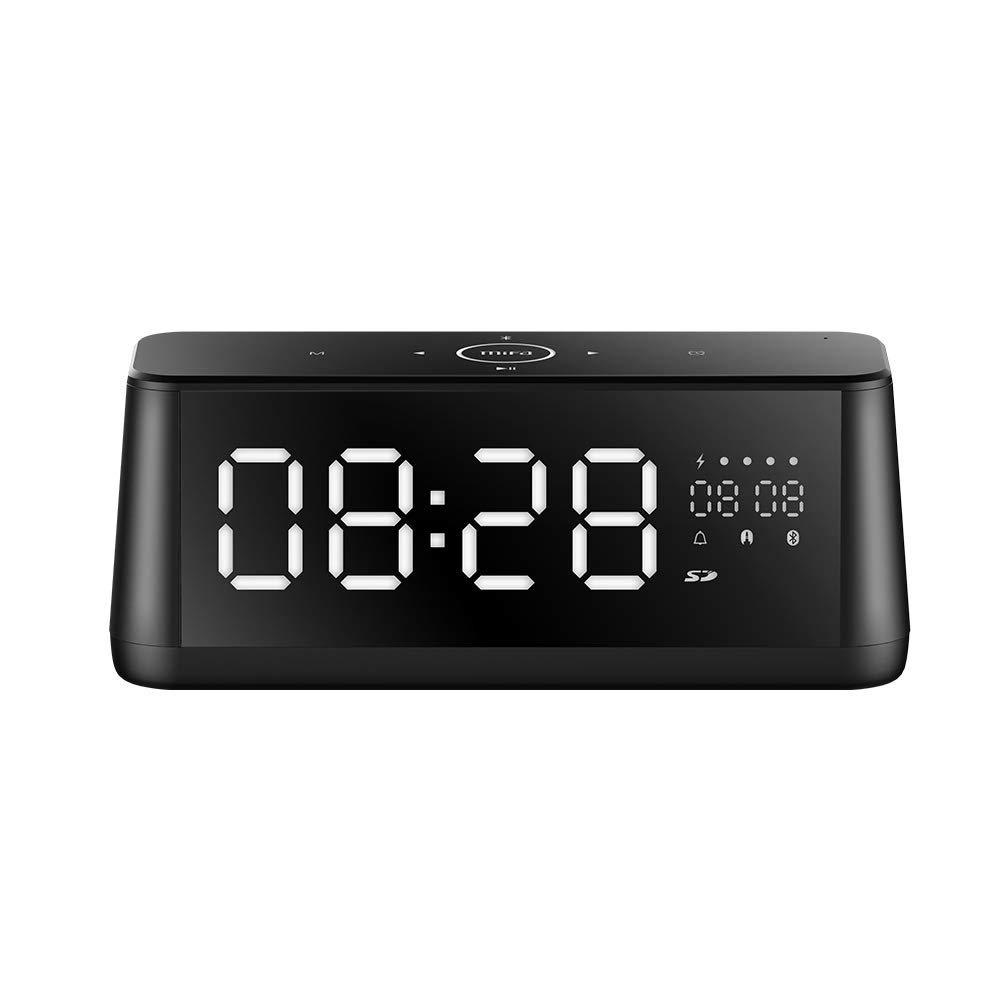
1.1 vaizdas: priekis view of the MIFA A30 Bluetooth Speaker, displaying the time on its large LED screen.
2. Saugos informacija
- Nelaikykite garsiakalbio ekstremaliose temperatūrose, tiesioginiuose saulės spinduliuose ar didelėje drėgmėje.
- Stenkitės, kad garsiakalbis nenumestų ar nepatirtų stipraus smūgio.
- Do not disassemble, repair, or modify the device yourself. Contact authorized service personnel for any repairs.
- Keep the speaker away from water and other liquids, despite its waterproof rating, to prevent damage to ports when open.
- Naudokite tik nurodytą įkrovimo laidą ir adapterį.
- Garsiakalbį valykite minkšta, sausa šluoste. Nenaudokite abrazyvinių valiklių.
3. Pakuotės turinys
Patikrinkite pakuotę, ar joje yra šie daiktai:
- MIFA A30 Bluetooth Speaker
- USB įkrovimo laidas
- 3.5 mm garso laidas
- Vartotojo vadovas (šis dokumentas)
4. Produktas baigtasview
4.1. Komponentai
The MIFA A30 speaker features a robust design with advanced audio components for high-quality sound reproduction.

4.1 paveikslas: Išsklaidytas view illustrating the internal components of the MIFA A30, including two 15-watt drivers and two low-frequency passive radiators.
4.2. Control Panel and Ports
The speaker's top panel features capacitive touch controls, and the rear panel houses various connectivity ports.
4.2 paveikslėlis: Iš viršaus į apačią view of the MIFA A30 control panel, indicating the functions of each touch button for mode, playback, volume, and clock adjustment.
- M (režimo) mygtukas: Short press to switch between Bluetooth, TF Card, and AUX modes.
- „Bluetooth“ valdymas: Long press to turn off Bluetooth, short press to turn on.
- Ankstesnio takelio mygtukas: Trumpai paspauskite norėdami pereiti prie ankstesnio takelio.
- Play/Pause/Hands-Free Button: Trumpas paspaudimas, norint paleisti / pristabdyti muziką. Trumpas paspaudimas, norint atsiliepti / baigti skambučius. Ilgas paspaudimas, norint atmesti skambučius.
- Kitas takelis mygtukas: Trumpai paspauskite, kad pereitumėte prie kito takelio.
- Laikrodžio mygtukas: Long press for clock adjustment.
- Pagarsink: Pasukite pagal laikrodžio rodyklę, kad padidintumėte garsumą.
- Patildyti: Rotate counter-clockwise to decrease volume.
- Mikrofonas: Integruotas mikrofonas skambučiams be rankų.
- Skystųjų kristalų ekranas: Shows time, date, battery level, and current mode.
5. Sąranka
5.1. Įkraukite garsiakalbį
Before first use, fully charge the speaker. Connect the provided USB charging cable to the speaker's charging port and the other end to a USB power adapter (not included) or a computer's USB port. The LED display will indicate charging status.
5.2. Įjungimas/išjungimas
- Norėdami įjungti: Press and hold the Play/Pause button until the LED display lights up.
- Norėdami išjungti: Press and hold the Play/Pause button until the LED display turns off. The speaker will automatically screen out and power off to save battery after a period of inactivity.
6. Naudojimo instrukcijos
6.1. „Bluetooth“ poravimas
- Ensure the speaker is powered on and in Bluetooth mode (indicated by the Bluetooth icon on the LED display). If not, short press the 'M' button to switch to Bluetooth mode.
- Išmaniajame telefone arba planšetiniame kompiuteryje įjunkite Bluetooth ir ieškokite galimų įrenginių.
- Select "MIFA A30" from the list of devices.
- Once paired, the speaker will emit a confirmation sound, and the Bluetooth icon on the display will stop flashing.
- The speaker will automatically re-connect to the last paired device when powered on, if the device is within range.
6.2. Garso atkūrimas
- Leisti / pristabdyti: Trumpai paspauskite paleidimo/pauzės mygtuką.
- Kitas takelis: Trumpai paspauskite mygtuką „Kitas takelis“.
- Ankstesnis takelis: Trumpai paspauskite mygtuką „Ankstesnis takelis“.
- Garso reguliavimas: Pasukite garsumo valdiklį pagal laikrodžio rodyklę, kad padidintumėte garsumą, prieš laikrodžio rodyklę, kad sumažintumėte garsumą.
6.3. Skambinimas laisvų rankų įranga
Prijungus prie išmaniojo telefono per „Bluetooth“:
- Atsiliepti į skambutį: Trumpai paspauskite paleidimo/pauzės mygtuką.
- Baigti skambutį: Skambučio metu trumpai paspauskite mygtuką „Paleisti / pristabdyti“.
- Atmesti skambutį: Kai skambinate, ilgai paspauskite mygtuką „Groti / pristabdyti“.
6.4. TF kortelės atkūrimas
- Insert a Micro-SD (TF) card with supported audio files (FLAC/APE/MP3/WMA/WAV) into the TF card slot.
- Short press the 'M' button to switch to TF Card mode. The speaker will automatically begin playing music from the card.
6.5. AUX įvestis
- Connect one end of the 3.5mm audio cable to the speaker's AUX input port and the other end to the audio output of your device (e.g., MP3 player, computer).
- Short press the 'M' button to switch to AUX mode.
- Dabar garsas bus grojamas per prijungto įrenginio garsiakalbį.
6.6. Clock and Display Settings
- Laikrodžio reguliavimas: Long press the Clock button to enter time setting mode. Use the Next/Previous buttons to adjust values and the Play/Pause button to confirm.
- Display Luminance: The LED display has 7 adjustable luminance levels. Refer to the full product documentation for specific adjustment steps, typically involving short presses of the Clock button or a combination with volume controls.
7. Priežiūra
- Valymas: Wipe the speaker's surface with a soft, dry, lint-free cloth. Do not use liquid or aerosol cleaners.
- Saugykla: Kai garsiakalbio nenaudojate ilgesnį laiką, laikykite jį vėsioje, sausoje vietoje, toliau nuo tiesioginių saulės spindulių ir ekstremalių temperatūrų.
- Akumuliatoriaus priežiūra: Norėdami pailginti baterijos veikimo laiką, venkite dažnai visiškai ją iškrauti. Reguliariai įkraukite garsiakalbį, net jei jo nenaudojate.
8. Problemų sprendimas
| Problema | Galima priežastis | Sprendimas |
|---|---|---|
| Garsiakalbis neįsijungia. | Senka baterija. | Kraukite garsiakalbį bent 2 valandas. |
| Nėra garso. | Per mažas garsumas; netinkamas režimas; įrenginys neprijungtas. | Increase speaker and device volume. Ensure correct mode (Bluetooth/AUX/TF Card). Re-pair Bluetooth device or check AUX cable connection. |
| „Bluetooth“ susiejimas nepavyksta. | Garsiakalbis neįjungtas susiejimo režimu; įrenginys per toli; trukdžiai. | Ensure speaker is in Bluetooth mode. Move device closer to speaker. Turn off other Bluetooth devices. Try forgetting "MIFA A30" on your device and re-pairing. |
| TF Card not playing. | Neteisingas režimas; nepalaikomas file format; card error. | Switch to TF Card mode. Ensure files are FLAC/APE/MP3/WMA/WAV. Reinsert TF card or try a different card. |
9. Specifikacijos
| Funkcija | Detalė |
|---|---|
| Modelio pavadinimas | A30 |
| Garsiakalbio tipas | Knygų lentyna |
| Ryšio technologija | Bluetooth 4.2, Auxiliary (3.5mm), Micro-SD (TF Card) |
| Garso išvesties režimas | Stereo |
| Didžiausia garsiakalbio išėjimo galia | 30 vatų (2 x 15 W garsiakalbiai) |
| Žemųjų dažnių stiprinimas | Two low-frequency boosters |
| Baterijos talpa | 4000 mAh |
| Žaidimo laikas | Up to 10-12 hours (depending on volume and content) |
| Kontrolės metodas | Talpinis jutiklinis skydelis |
| Ekranas | 7.2" x 2.8" Mirror LED Screen with 106 LEDs, 7-level adjustable luminance |
| Palaikomi garso formatai | FLAC/APE/MP3/WMA/WAV |
| Integruotas mikrofonas | Taip, skambinant laisvų rankų įranga |
| Atsparus vandeniui | Yes (Note: Ensure ports are covered for water resistance) |
| Spalva | Juoda |
| Montavimo tipas | Stalviršio laikiklis |
10. Garantija ir palaikymas
The MIFA A30 Bluetooth Speaker typically comes with a 30-day warranty from the date of purchase, covering manufacturing defects. Please retain your proof of purchase for warranty claims.
For technical support, troubleshooting assistance beyond this manual, or warranty inquiries, please contact MIFA customer service through their official website or the retailer where the product was purchased. Provide your product model (A30) and purchase details when seeking support.


