1. Įvadas
This manual provides essential information for the safe and efficient operation of your Xerox VersaLink C8000/DT Color Printer. It covers setup, daily use, maintenance, and troubleshooting. Please read this manual thoroughly before using the printer and retain it for future reference.
2. Kas yra dėžutėje
Verify that all items are present in the packaging.
- Xerox VersaLink C8000/DT Color Printer
- Maitinimo laidas
- Dokumentacija (šis vadovas, saugos informacija)
- Initial Toner Cartridges (Black, Cyan, Magenta, Yellow)
3. Sąranka
3.1 Išpakavimas
- Atsargiai išimkite spausdintuvą iš pakuotės.
- Remove all protective tapes and packing materials from the exterior and interior of the printer. Refer to the quick setup guide for specific locations.
3.2 Fizinis išdėstymas
Place the printer on a sturdy, level surface capable of supporting its weight (approximately 178 pounds). Ensure adequate ventilation around the printer.

3.2.1 paveikslas: Priekyje view of the Xerox VersaLink C8000/DT Color Printer, showing its overall design and paper trays.
3.3 Maitinimo jungtis
- Connect the power cord to the printer's power inlet.
- Kitą maitinimo laido galą įkiškite į įžemintą elektros lizdą.
- Paspauskite maitinimo mygtuką, kad įjungtumėte spausdintuvą.
3.4 Pradinė konfigūracija ir tinklo sąranka
Upon first power-on, the printer's user interface will guide you through initial setup steps, including language selection, date/time, and network configuration. The printer supports Ethernet connectivity.

3.4.1 paveikslas: Close-up of the printer's control panel, displaying the touch screen interface with various application icons.
For network connection, connect an Ethernet cable from your network router or switch to the Ethernet port on the printer. Follow the on-screen prompts to complete network settings.
4. Naudojimo instrukcijos
4.1 Pagrindinis spausdinimas
- Įsitikinkite, kad spausdintuvas įjungtas ir prijungtas prie tinklo.
- Load paper into the paper trays. The printer supports standard paper sizes up to 8.5 x 14 inches.
- From your computer or mobile device, select the Xerox VersaLink C8000/DT as your printer.
- Adjust print settings (e.g., color, duplex, paper type) as needed.
- Pradėkite spausdinimo užduotį.
4.2 Mobilusis ir debesijos ryšys
The VersaLink C8000/DT offers instant connectivity to cloud services and mobile devices directly from its user interface. Access pre-loaded, cloud-hosted services to manage documents and print from various platforms. Compatible with smartphones and controlled via an app.
4.3 Dvipusis spausdinimas
The printer supports automatic dual-sided (duplex) printing. This feature can be enabled through the print settings on your computer or directly from the printer's control panel for supported functions.
5. Priežiūra
5.1 Tonerio kasetės keitimas
When a toner cartridge is low or empty, the printer's control panel will display a notification.
- Atidarykite priekinį spausdintuvo dangtį.
- Locate the toner cartridge that needs replacement (Black, Cyan, Magenta, or Yellow).
- Grasp the handle of the cartridge and pull it straight out.
- Išpakuokite naują tonerio kasetę ir švelniai ją pakratykite, kad tolygiai paskirstytumėte tonerį.
- Įkiškite naują kasetę į atitinkamą angą, kol ji užsifiksuos vietoje.
- Uždarykite priekinį dangtelį.
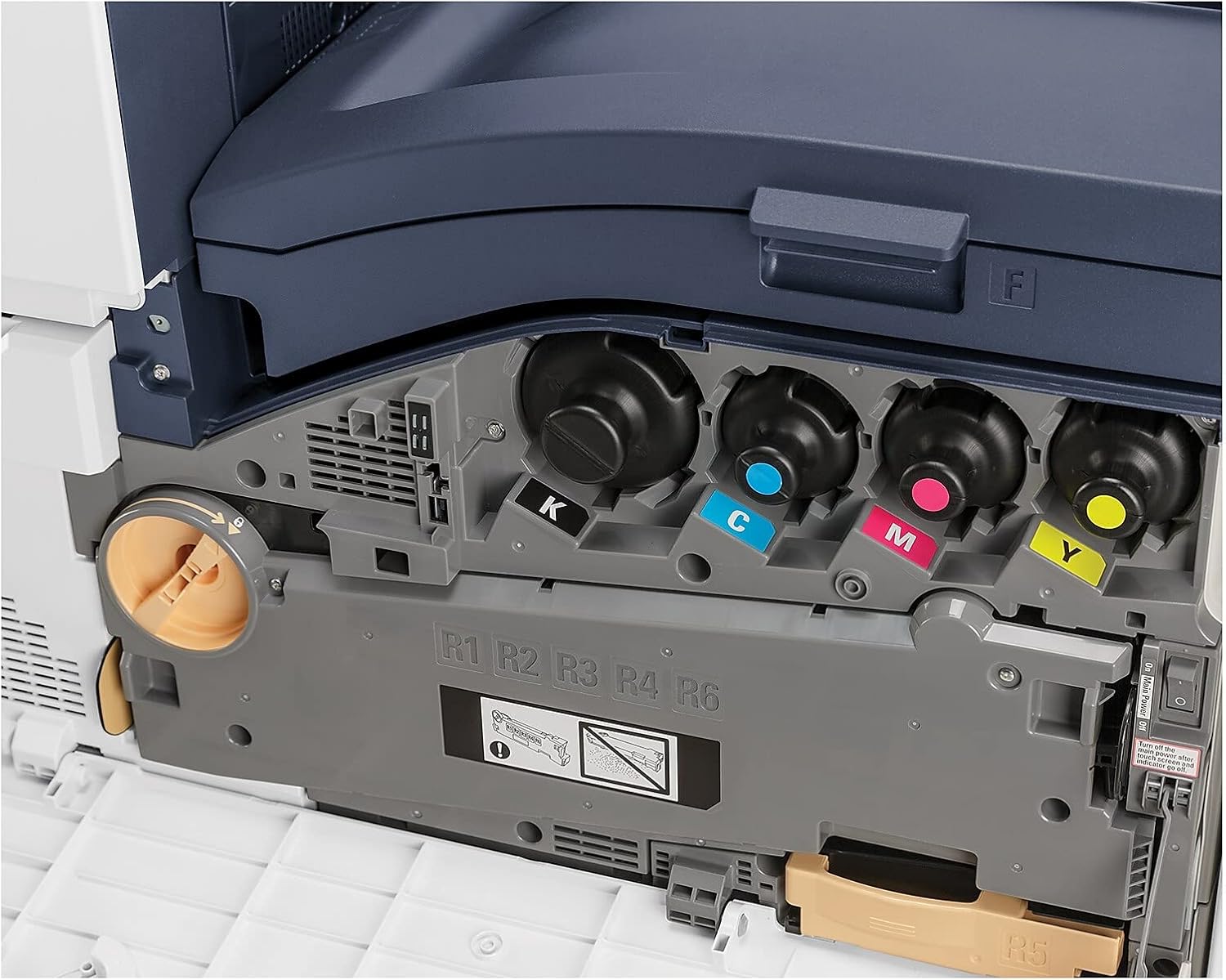
5.1.1 paveikslas: View of the toner cartridge compartment, showing the slots for Black (K), Cyan (C), Magenta (M), and Yellow (Y) toner.
5.2 Valymas
Regularly clean the exterior of the printer with a soft, lint-free cloth. Do not use abrasive cleaners or solvents. Refer to the printer's internal cleaning procedures via the control panel for specific instructions on cleaning internal components.
6. Problemų sprendimas
This section provides solutions to common issues. For more complex problems, refer to the online support resources or contact Xerox customer service.
- Spausdintuvas neatsako: Check power connection, network cable, and ensure the printer is powered on. Restart the printer and the connected device.
- Spausdinimo kokybės problemos: Check toner levels. Perform a print quality calibration from the printer's control panel. Ensure correct paper type settings.
- Popieriaus strigtys: Follow the on-screen instructions or refer to the printer's internal guides for clearing paper jams from specific areas.
- Tinklo ryšio problemos: Verify Ethernet cable connection. Check network settings on the printer and your computer. Restart network devices.
7. Specifikacijos
| Funkcija | Detalė |
|---|---|
| Prekės ženklas | Xerox |
| Modelio numeris | C8000/DT |
| Spausdinimo technologija | Lazeris |
| Spausdintuvo išvestis | Spalva |
| Didžiausias spausdinimo greitis (spalva) | 42 ppm |
| Maksimalus spausdinimo greitis (vienspalvis) | 42 ppm |
| Maksimali spalvoto spausdinimo raiška | 1200 x 2400 dpi |
| Maksimali juodai balto spausdinimo skiriamoji geba | 1200 x 2400 dpi |
| Dvipusis spausdinimas | Automatinis |
| Ryšio technologija | Ethernet |
| Techninės įrangos sąsaja | Ethernet |
| Suderinami įrenginiai | Išmanieji telefonai |
| Kontrolės metodas | Programėlė |
| Maksimalus laikmenos dydis | 8.5x14 colių |
| Spausdinimo medijos tipai | Vokai, popierius (paprastas) |
| Maksimali įvesties lapo talpa | 45 |
| Padėklų skaičius | 2 |
| Prekės svoris | 178 svaro |
| Gaminio matmenys | 28.5 x 24.4 x 31.9 colio |
| Atminties talpa | 4096 MB |
| Vattage | 2300 vatų |
| Skaitytuvo tipas | Plokščiasis |
| Papildomos spausdintuvo funkcijos | Viskas viename |
8. Garantija ir palaikymas
8.1 Gaminio garantija
The Xerox VersaLink C8000/DT Color Printer comes with a standard one-year warranty. For detailed terms and conditions, please refer to the warranty documentation included with your product or visit the official Xerox support websvetainę.
8.2 Pagalba klientams
For technical assistance, troubleshooting, or service requests, please contact Xerox customer support. Support contact information can typically be found on the Xerox websvetainėje arba spausdintuvo dokumentacijoje.


