Įvadas
This manual provides essential information for the installation, operation, and maintenance of your SilverStone SST-ST65F-GS 650W 80 Plus Gold Fully Modular ATX Power Supply. The SST-ST65F-GS is designed to meet the demands of modern desktop computers, offering a compact, fully modular design with 80 PLUS Gold level efficiency. It features a 650W maximum DC output, strict voltage regulation, low ripple and noise, and a silent 120mm fan for continuous 24/7 operation at 40°C.
Saugos informacija
- Always disconnect the AC power cord from the wall outlet before installing, removing, or cleaning the power supply unit (PSU).
- Maitinimo bloke yra didelės talpostage komponentai. Neatidarykite maitinimo bloko casing. Viduje nėra dalių, kurias galėtų aptarnauti vartotojas.
- Ensure the PSU is installed in a well-ventilated area. Do not block the fan or ventilation openings.
- Use only the modular cables provided with this power supply. Using third-party cables may cause damage to the PSU or connected components.
- Connect the correct cables to the appropriate ports on the PSU and your system components. Incorrect connections can cause severe damage.
- Šis gaminys skirtas naudoti asmeniniuose kompiuteriuose. Nenaudokite jo jokiems kitiems tikslams.
- Saugokite maitinimo šaltinį nuo vandens, drėgmės ir ekstremalių temperatūrų.
Pakuotės turinys
Prieš montuodami patikrinkite, ar pakuotėje yra visi reikalingi daiktai.
- SilverStone SST-ST65F-GS 650W Power Supply Unit
- Modular Cable Set (including ATX 24-pin, EPS/ATX 8-pin, PCIe 6+2-pin, SATA, Peripheral 4-pin cables)
- Kintamosios srovės maitinimo laidas
- Tvirtinimo varžtai
- Kabelių raiščiai / Velcro dirželiai
- Naudotojo vadovas / Garantijos informacija

Image: The SilverStone SST-ST65F-GS power supply unit shown with its full set of modular cables, mounting screws, and documentation.
Produktas baigtasview
The SilverStone SST-ST65F-GS is a high-performance, fully modular power supply designed for reliability and efficiency. Key features include:
- 650 Watt Maximum DC Output: Suteikia ample power for most gaming and workstation systems.
- Kompaktiškas dizainas: With a depth of 140mm, it allows for easy integration into various PC cases.
- 100 % moduliniai kabeliai: Enables users to connect only the necessary cables, reducing clutter and improving airflow.
- 80 PLUS aukso sertifikatas: Ensures high power efficiency, reducing heat generation and operating costs.
- Class-Leading Single +12V Rail: Delivers stable and reliable power to demanding components.
- Strict Voltage reglamentas: Maintains output voltages within 3% of the nominal value.
- Mažas pulsavimas ir triukšmas: Ensures clean power delivery to sensitive components.
- 24/7 Continuous Power Output: Capable of sustained operation at 40°C ambient temperature.
- Tyliai veikiantis 120 mm ventiliatorius: Operates with a minimum noise level of 18dBA for quiet performance.
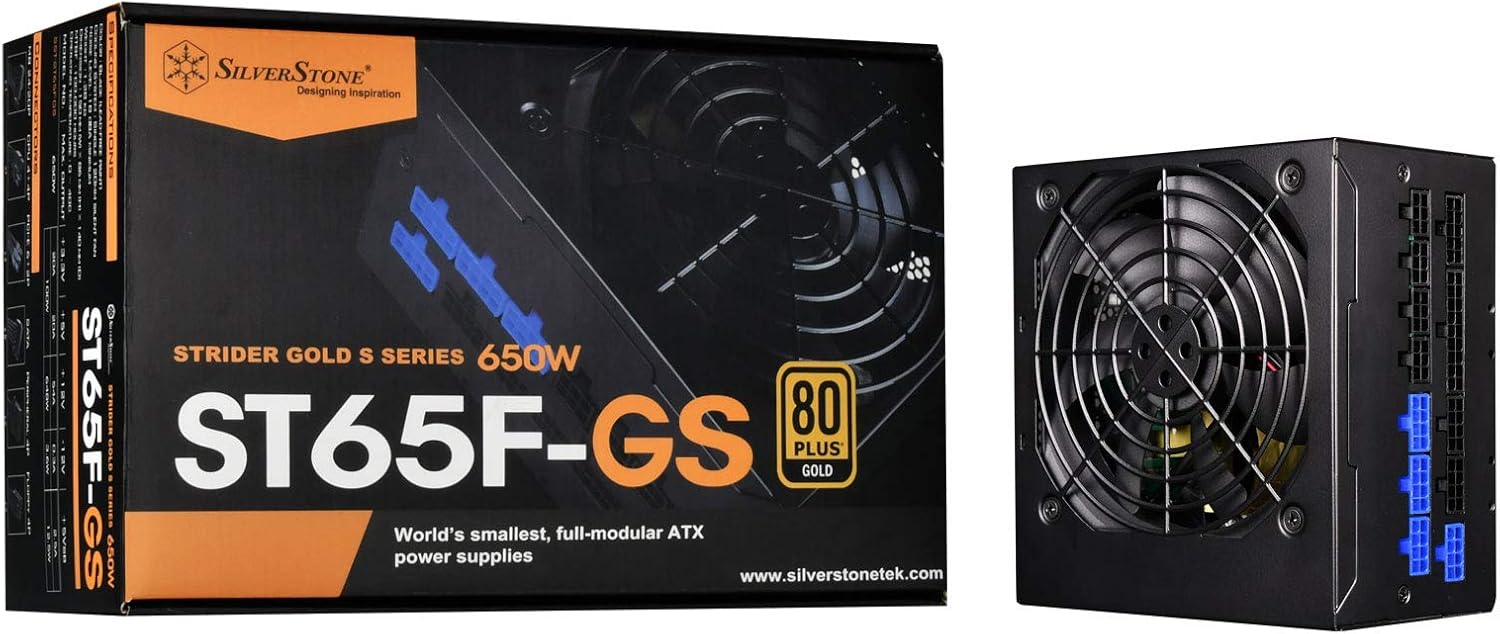
Image: The SilverStone SST-ST65F-GS power supply unit alongside its retail packaging, highlighting its compact size and 80 PLUS Gold certification.

Paveikslėlis: kampuotas view of the SilverStone SST-ST65F-GS power supply, showing the fan grill and modular cable connectors.

Vaizdas: Stambus planas view of the fully modular cable connection panel on the SilverStone SST-ST65F-GS, with blue connectors for main power and black for peripherals.

Vaizdas: Iš viršaus į apačią view of the 120mm cooling fan and grill on the SilverStone SST-ST65F-GS power supply.

Vaizdas: Galinis view of the SilverStone SST-ST65F-GS power supply, showing the AC power inlet, ventilation grille, and the main power switch.
Sąranka ir diegimas
- Paruoškite savo sistemą: Ensure your computer is completely powered off and unplugged from the wall outlet. Open your computer case to access the PSU mounting area.
- Išimkite seną maitinimo šaltinį (jei taikoma): Disconnect all cables from your old power supply and remove its mounting screws. Carefully slide the old PSU out of the case.
- Prijunkite naują maitinimo šaltinį: Slide the SilverStone SST-ST65F-GS into the designated PSU bay in your computer case. Align the screw holes and secure the PSU with the provided mounting screws. Ensure the fan is facing the correct direction for optimal airflow (typically facing down if there's a bottom vent, or up if there isn't).
- Prijunkite modulinius kabelius:
- Main ATX Power (20+4 pin): Connect the 24-pin cable to the corresponding port on the PSU and the motherboard.
- CPU Power (4+4 pin EPS/ATX): Connect the 8-pin (or 4+4 pin) CPU power cable to the PSU and the motherboard's CPU power connector.
- PCIe Power (6+2 pin): Connect the necessary PCIe cables to the PSU and your graphics card(s). Each 6+2 pin connector can be used for either 6-pin or 8-pin PCIe power.
- SATA galia: Prijunkite SATA maitinimo laidus prie SSD, HDD ir optinių diskų.
- Peripheral (Molex) Power: Connect peripheral cables for case fans, older drives, or other accessories as needed.
Svarbu: Ensure all cable connections are firm and correctly oriented. Do not force connectors.
- Kabelių valdymas: Route cables neatly to improve airflow and aesthetics within your case. Use the provided cable ties or Velcro straps.
- Uždarykite korpusą ir prijunkite kintamosios srovės maitinimą: Once all internal connections are made, close your computer case. Connect the AC power cord to the PSU's inlet and then to a wall outlet or surge protector.
- Maitinimas: Flip the power switch on the back of the PSU to the "I" (On) position. Then, power on your computer.
Naudojimo instrukcijos
The SilverStone SST-ST65F-GS power supply operates automatically once installed and powered on. It is designed for continuous operation under normal computing loads.
- Maitinimo įjungimas/išjungimas: Use the main power switch on the back of the PSU to completely cut power to the unit. For daily use, power your computer on and off via the operating system or case power button.
- Ventiliatoriaus veikimas: The integrated 120mm fan will automatically adjust its speed based on the PSU's internal temperature and load to maintain optimal cooling and quiet operation.
- Efektyvumas: The 80 PLUS Gold certification indicates high efficiency, meaning less power is wasted as heat, contributing to lower energy consumption and a cooler system.
Priežiūra
Tinkama priežiūra užtikrina jūsų maitinimo šaltinio ilgaamžiškumą ir optimalų veikimą.
- Dulkių valymas: Periodically (e.g., every 6-12 months), disconnect the PSU from AC power and use compressed air to gently clean dust from the fan grille and ventilation openings. Do not open the PSU casing.
- Užtikrinti oro srautą: Make sure that the PSU's intake and exhaust vents are not obstructed by cables, dust, or other components within the PC case. Good airflow is crucial for cooling.
- Kabelio apžiūra: Occasionally check that all modular cables are securely connected to both the PSU and your components.
Trikčių šalinimas
Jei kyla problemų dėl maitinimo šaltinio, vadovaukitės toliau pateiktais įprastais trikčių šalinimo veiksmais.
- Nėra galios:
- Įsitikinkite, kad kintamosios srovės maitinimo laidas yra tvirtai prijungtas tiek prie maitinimo bloko, tiek prie sieninio lizdo.
- Check that the power switch on the back of the PSU is in the "I" (On) position.
- Verify all modular cables are correctly and firmly seated in the PSU and connected components (motherboard, CPU, GPU).
- Patikrinkite sieninį lizdą su kitu įrenginiu, kad įsitikintumėte, jog jame yra maitinimas.
- Sistemos nestabilumas / gedimai:
- Įsitikinkite, kad jūsų sistemos energijos poreikiai neviršija maitinimo šaltinio 650 W galios.
- Patikrinkite, ar nėra laisvų kabelių jungčių.
- Monitor system temperatures to ensure components are not overheating, which can be exacerbated by poor PSU performance or airflow.
- Garsus ventiliatoriaus triukšmas:
- Clean any dust buildup from the PSU fan and vents.
- Ensure adequate airflow within the PC case.
- If the noise is excessive and persistent even under low load, contact SilverStone support.
If these steps do not resolve your issue, please contact SilverStone customer support for further assistance.
Specifikacijos
| Funkcija | Specifikacija |
|---|---|
| Prekės ženklas | Sidabrinis akmuo |
| Modelio numeris | SST-ST65F-GS |
| Serija | Strider Gold S |
| Maximum DC Output | 650W |
| 80 PLUS sertifikatas | Auksas |
| Formos faktorius | ATX |
| Modulinis tipas | Visiškai modulinė |
| Aušinimo būdas | 120mm Fan (Silent running, 18dBA minimum) |
| ttage reglamentas | Strict 3% |
| Ripple & Noise | Žemas 3 % |
| Continuous Output Temperature | 40°C (24/7 operation) |
| Matmenys (IxPxH) | 5.91 x 5.51 x 3.39 colio (150 x 140 x 86 mm) |
| Prekės svoris | 2.83 svaro (1.28 kg) |
| Suderinami įrenginiai | Asmeninis kompiuteris |
| Jungties tipas | ATX |
Garantija ir palaikymas
SilverStone Technology provides a limited warranty for its power supply units. Please refer to the warranty information included in your product package for specific terms and conditions, including warranty duration and coverage details. You can also visit the official SilverStone Technology website for the most up-to-date warranty policy and to access customer support resources.
For technical support, troubleshooting assistance beyond this manual, or warranty claims, please contact SilverStone Technology customer service through their official websvetainė:


