Įvadas
Welcome to your new MIFA F6 Portable Bluetooth Speaker. This manual provides detailed instructions for the proper setup, operation, and maintenance of your device. Please read this manual thoroughly before using the product to ensure optimal performance and longevity.
Saugos informacija
To ensure safe and proper use of your MIFA F6 speaker, please observe the following guidelines:
- Do not expose the speaker to extreme temperatures (hot or cold) or direct sunlight for extended periods.
- While the speaker is IP56 dust-proof and water-resistant, do not submerge it in water or expose it to strong jets of water.
- Nebandykite patys ardyti, taisyti ar modifikuoti garsiakalbio. Tai gali panaikinti garantiją ir sukelti gedimų.
- Keep the speaker away from medical devices, as it contains magnets that may interfere with their operation.
- Įkrovimui naudokite tik pridedamą „Micro USB“ laidą.
- Laikyti vaikams nepasiekiamoje vietoje.
Pakuotės turinys
Pažymėkite langelį prie šių elementų:
- MIFA F6 Portable Bluetooth Speaker
- Mikro USB įkrovimo laidas
- Vartotojo vadovas
Produktas baigtasview
Familiarize yourself with the components and controls of your MIFA F6 speaker.
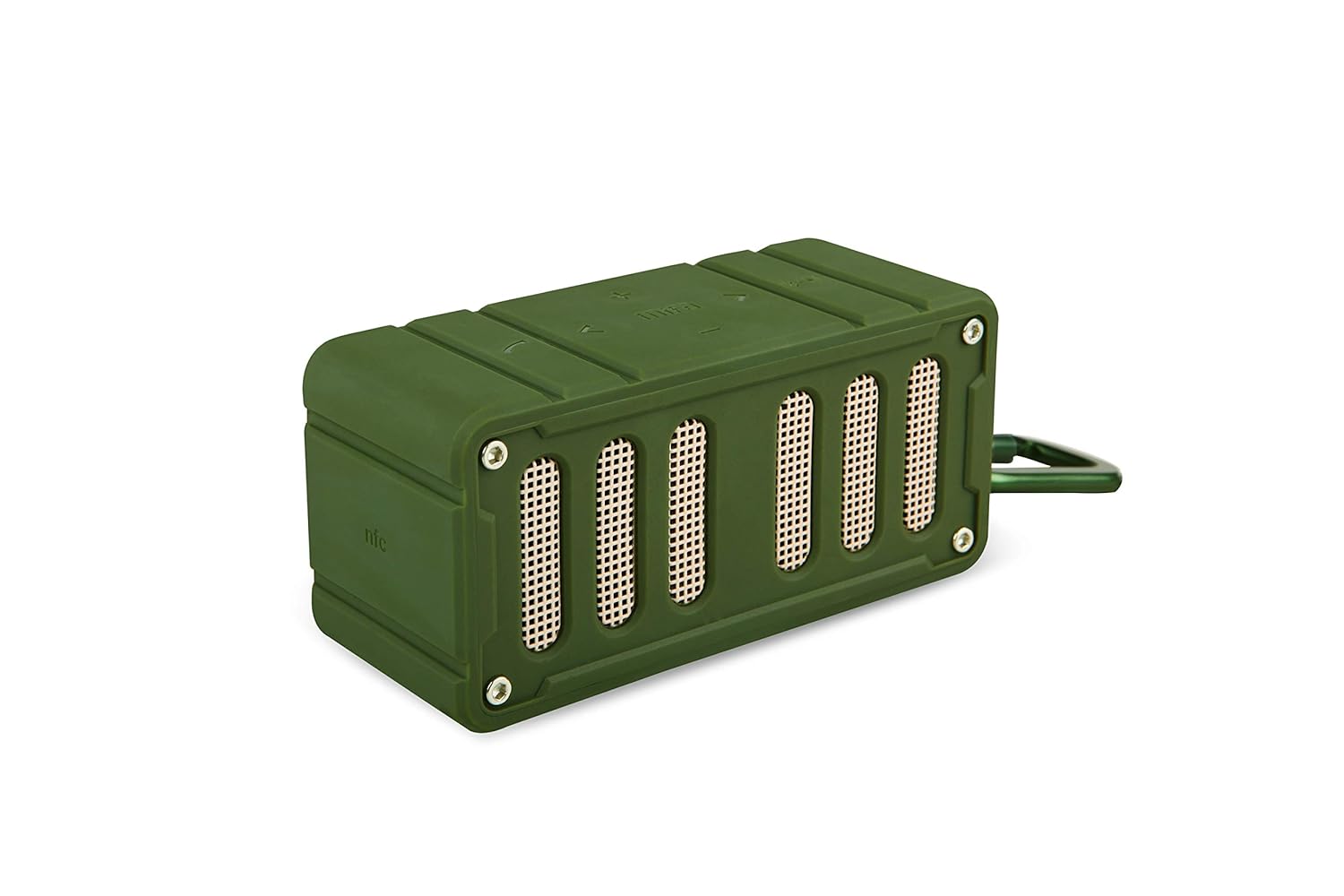
This image displays the MIFA F6 speaker in green, highlighting the front speaker grille and the control buttons located on the side panel.

This image shows the MIFA F6 speaker from a side angle, emphasizing its compact size and the detachable alloy metal loop hook (carabiner) for portability.
Valdikliai ir prievadai
- Maitinimo mygtukas: Paspauskite ir palaikykite, kad įjungtumėte/išjungtumėte.
- Garsumo didinimo / kito takelio mygtukas (+): Paspauskite, jei norite padidinti garsumą. Paspauskite ir palaikykite, jei norite pereiti į kitą takelį.
- Garsumo mažinimo / ankstesnio takelio mygtukas (-): Paspauskite, jei norite sumažinti garsumą. Paspauskite ir palaikykite, jei norite pereiti į ankstesnį takelį.
- Play/Pause / Call Answer Button: Press to play/pause music. Press to answer/end calls.
- Mikrofonas: Skambinimas laisvų rankų įrangai.
- Mikro USB įkrovimo prievadas: Garsiakalbio įkrovimui.
- „Micro SD“ kortelės lizdas: For playing music directly from a Micro SD card (up to 32GB).
Sąranka
Garsiakalbio įkrovimas
Before first use, fully charge your MIFA F6 speaker.
- Prijunkite „Micro USB“ įkrovimo laidą prie garsiakalbio įkrovimo prievado.
- Kitą laido galą prijunkite prie USB maitinimo šaltinio (pvz., kompiuterio USB prievado, USB sieninio adapterio).
- The LED indicator will illuminate to show charging status. It takes approximately 3 hours for a full charge.
Maitinimo įjungimas/išjungimas
- Norėdami įjungti: Paspauskite ir palaikykite maitinimo mygtuką kelias sekundes, kol išgirsite garsinį signalą ir užsidegs LED indikatorius.
- Norėdami išjungti: Paspauskite ir palaikykite maitinimo mygtuką kelias sekundes, kol išgirsite garsinį signalą ir užges LED indikatorius.
Naudojimo instrukcijos
"Bluetooth" poravimas
To connect your MIFA F6 speaker to a Bluetooth-enabled device:
- Ensure the speaker is powered on and within 33 feet (10 meters) of your device. The speaker will automatically enter Bluetooth pairing mode, indicated by a flashing LED.
- Išmaniajame telefone, planšetiniame kompiuteryje ar kitame „Bluetooth“ įrenginyje įjunkite „Bluetooth“ ir ieškokite galimų įrenginių.
- Select "MIFA F6" from the list of devices.
- Once successfully paired, the speaker will provide an audible confirmation, and the LED indicator will stop flashing. The speaker will automatically reconnect to the last-used device when powered on, if available.
Groja muzika
- Per Bluetooth: After successful pairing, play music from your connected device. Use the speaker's Play/Pause button or your device's controls.
- Per „Micro SD“ kortelę: Insert a Micro SD card (up to 32GB) containing audio files into the designated slot. The speaker will automatically detect the card and begin playing music.
Skambinimo funkcija
The MIFA F6 speaker features a built-in microphone for hands-free calling.
- Atsiliepimas į skambutį: When an incoming call is received, press the Play/Pause button once to answer.
- Skambučio pabaiga: Skambučio metu vieną kartą paspauskite mygtuką „Groti / pristabdyti“, kad baigtumėte skambutį.
Garsumo ir takelio valdymas
- Garso reguliavimas: Press the "+" button to increase volume, and the "-" button to decrease volume.
- Kitas takelis: Press and hold the "+" button to skip to the next track.
- Ankstesnis takelis: Press and hold the "-" button to go to the previous track.
Priežiūra
Valymas
To keep your speaker in good condition:
- Wipe the exterior of the speaker with a soft, slightly damp audinys.
- Do not use abrasive cleaners, alcohol, or harsh chemicals, as these can damage the surface.
- Prieš įkraudami arba prijungdami kitus įrenginius, įsitikinkite, kad visi prievadai yra sausi.
Sandėliavimas
Kai nenaudojamas ilgesnį laiką:
- Garsiakalbį laikykite vėsioje, sausoje vietoje, toliau nuo tiesioginių saulės spindulių ir ekstremalių temperatūrų.
- Charge the battery periodically (e.g., every 3 months) to maintain battery health.
Trikčių šalinimas
If you encounter issues with your MIFA F6 speaker, refer to the following common problems and solutions:
- Garsiakalbis neįsijungia: Įsitikinkite, kad baterija įkrauta. Prijunkite garsiakalbį prie maitinimo šaltinio naudodami „Micro USB“ laidą.
- Nepavyksta susieti per „Bluetooth“:
- Make sure the speaker is in pairing mode (flashing LED).
- Ensure Bluetooth is enabled on your device and it's within range (33 feet/10 meters).
- Forget "MIFA F6" from your device's Bluetooth settings and try pairing again.
- Iš naujo paleiskite garsiakalbį ir įrenginį.
- Nėra garso arba garsas per mažas:
- Patikrinkite garsumo lygius tiek garsiakalbyje, tiek prijungtame įrenginyje.
- Įsitikinkite, kad garsiakalbis tinkamai suporuotas ir prijungtas.
- If using a Micro SD card, ensure the audio fileyra suderinamo formato ir kortelė įdėta teisingai.
- Prasta garso kokybė:
- Perkelkite garsiakalbį arčiau „Bluetooth“ įrenginio, kad sumažintumėte trukdžius.
- Įsitikinkite, kad tarp garsiakalbio ir jūsų įrenginio nėra jokių kliūčių.
- Patikrinkite, ar garso šaltinio kokybė yra aukšta.
Specifikacijos
Detailed technical specifications for the MIFA F6 Portable Bluetooth Speaker:
| Funkcija | Detalė |
|---|---|
| Modelio pavadinimas | MIFA F6 |
| Garsiakalbio tipas | 3D |
| Ypatingos savybės | Built-in Microphone, Portable, Micro SD Card Support, USB Port |
| Rekomenduojami naudojimo būdai | Volume control, Music Playback |
| Suderinami įrenginiai | Išmanusis telefonas, planšetinis kompiuteris |
| Belaidžio ryšio technologija | Bluetooth 4.0 |
| Maitinimo šaltinis | Battery Powered (1200 mAh Lithium Polymer) |
| Atsparumo vandeniui įvertinimas | IP56 (Dust-proof & Water-resistant) |
| Žaidimo laikas | Iki 10 valandų (esant 75% garsumui) |
| Įkrovimo laikas | Maždaug 3 val |
| Matmenys | 3.8 x 3.4 x 1.4 colio |
| Svoris | 5.9 uncijos |
| Medžiaga | Aliuminis |
| Garso išvesties režimas | Stereo |
| Kontrolės metodas | Palieskite |
Garantija ir palaikymas
Informacija apie garantiją
This MIFA F6 Portable Bluetooth Speaker comes with a 30-day warranty from the date of purchase. Please retain your proof of purchase for any warranty claims. The warranty covers manufacturing defects under normal use. It does not cover damage caused by misuse, accidents, unauthorized modifications, or normal wear and tear.
Pagalba klientams
For further assistance, technical support, or warranty inquiries, please contact MIFA customer support through the retailer where you purchased the product or visit the official MIFA websvetainė kontaktinei informacijai.


