Įvadas
This manual provides detailed instructions for the installation, operation, and maintenance of the Gree XK-60 Wired Programmable Controller. This controller is designed to interface with Gree U-Match air conditioning systems, offering precise control over your indoor climate. Please read this manual thoroughly before installation and operation to ensure proper use and optimal performance.
Produktas baigtasview
The Gree XK-60 is a wired, programmable controller featuring a backlit LCD display and intuitive button controls. It allows users to manage various functions of their U-Match system, including operating modes, temperature settings, fan speeds, and programmable timers.
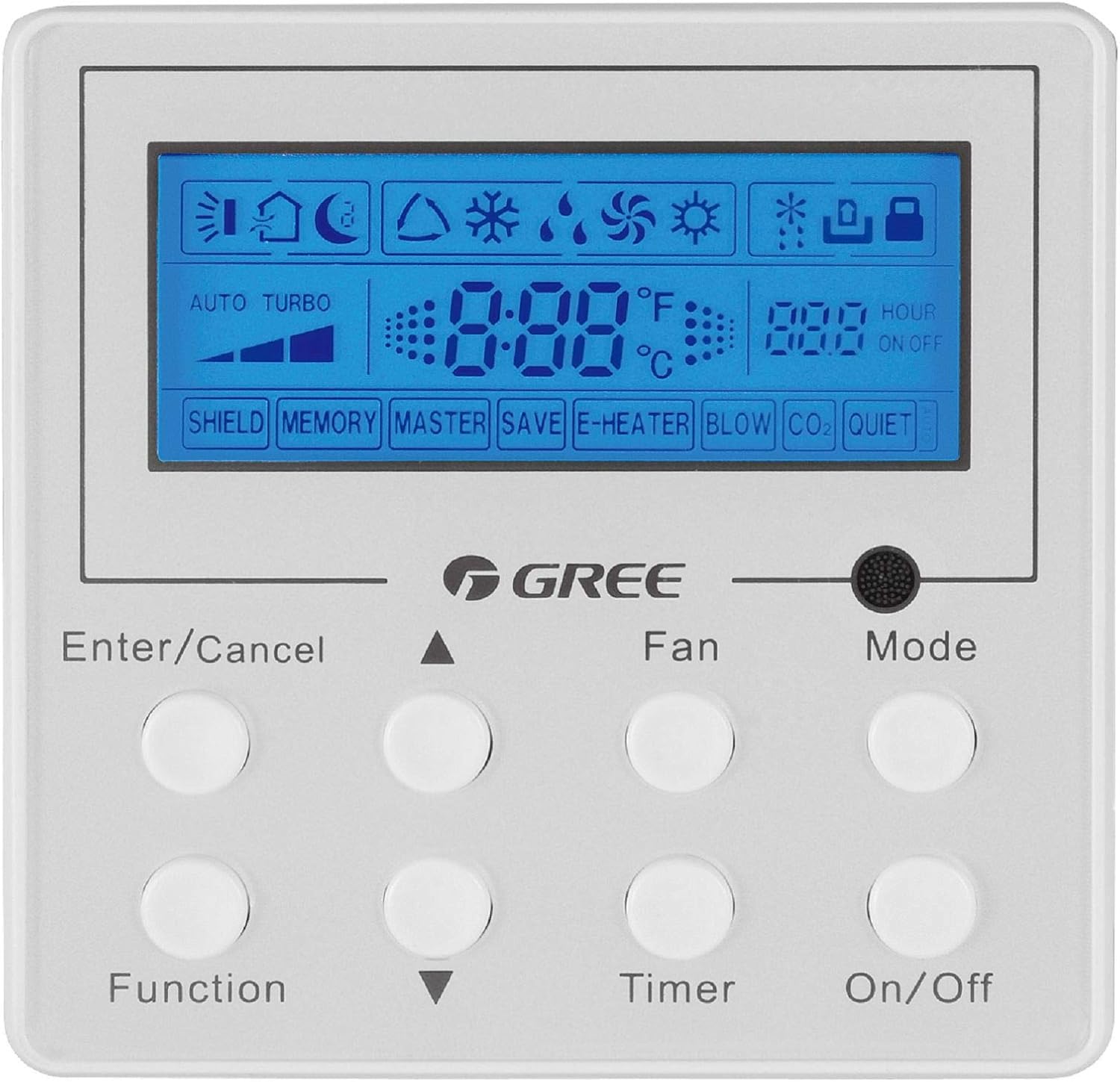
Vaizdo aprašymas: Priekinė dalis view of the Gree XK-60 wired programmable controller. The controller is white with a blue backlit LCD screen at the top. Below the screen are eight circular white buttons arranged in two rows of four. Text labels are printed below each button or pair of buttons. The GREE logo is centered between the screen and the buttons. The screen displays various icons for operating modes, fan speed, temperature, and timer settings.
Saugos informacija
- Installation must be performed by a qualified and licensed HVAC technician.
- Disconnect all power to the indoor and outdoor units before performing any wiring or maintenance.
- Įsitikinkite, kad visos laidų jungtys atitinka vietinius ir nacionalinius elektros kodeksus.
- Do not attempt to repair or modify the controller yourself. Contact qualified service personnel.
- Laikykite valdiklį atokiau nuo vandens ir per didelės drėgmės.
Diegimas ir sąranka
Valdiklio montavimas
The XK-60 controller is designed for wall mounting. Choose a location that is easily accessible, away from direct sunlight, heat sources, and drafts, which could affect temperature readings.
Laidų sujungimo instrukcijos
The controller connects to the indoor unit via a wired connection.
- Turn off the main power supply to the U-Match system.
- Open the wiring cover on the indoor unit and locate the control terminal block.
- Connect the communication wires from the XK-60 controller to the designated terminals on the indoor unit's control board. Refer to the U-Match system's indoor unit installation manual for specific wiring diagrams.
- Įsitikinkite, kad visos jungtys yra tvirtos ir tinkamai poliarizuotos.
- Close the wiring cover and restore power to the system.
Pastaba: Incorrect wiring can damage the controller or the U-Match system. If you are unsure, consult a professional technician.
Naudojimo instrukcijos
The Gree XK-60 controller features an LCD display and eight control buttons.
Mygtukų funkcijos
- Įvesti / Atšaukti: Patvirtina pasirinkimus arba atšaukia dabartines operacijas.
- Rodyklė aukštyn (▲): Increases temperature, fan speed, or navigates menu options upwards.
- Rodyklė žemyn (▼): Decreases temperature, fan speed, or navigates menu options downwards.
- Funkcija: Pasiekia išplėstinius nustatymus arba specialias funkcijas.
- Ventiliatorius: Reguliuoja ventiliatoriaus greitį (automatinis, mažas, vidutinis, didelis).
- Laikmatis: Sets the On/Off timer.
- Režimas: Perjungia veikimo režimus (automatinis, vėsinimas, džiovinimas, šildymas, ventiliatorius).
- Įjungta/Išjungta: Įjungia arba išjungia įrenginį.
LCD ekrano indikatoriai
- Temperatūros rodymas: Shows the current room temperature or set temperature in °F or °C.
- Operating Mode Icons:
- Sun (Heat)
- Snowflake (Cool)
- Water Drop (Dry)
- Fan Blade (Fan Only)
- Auto (Automatic mode)
- Ventiliatoriaus greičio indikatorius: Bar graph or specific icon showing current fan speed.
- Laikmačio indikatorius: "HOUR ON OFF" with numerical display for programmed times.
- Special Function Indicators: "SHIELD", "MEMORY", "MASTER", "SAVE", "E-HEATER", "BLOW", "CO2", "QUIET" indicate active special features.
Pagrindinė operacija
- Maitinimo įjungimas/išjungimas: Paspauskite Įjungta/Išjungta mygtuką, norėdami įjungti arba išjungti sistemą.
- Pasirinkite režimą: Paspauskite Režimas button repeatedly to cycle through available operating modes (Auto, Cool, Dry, Heat, Fan).
- Nustatyti temperatūrą: Vėsinimo arba šildymo režimu naudokite Rodyklė aukštyn (▲) or Rodyklė žemyn (▼) mygtukai norimai temperatūrai reguliuoti.
- Sureguliuokite ventiliatoriaus greitį: Paspauskite Ventiliatorius button repeatedly to select the desired fan speed (Auto, Low, Medium, High).
- Nustatyti laikmatį: Paspauskite Laikmatis button to enter timer setting mode. Use the Rodyklė aukštyn (▲) or Rodyklė žemyn (▼) buttons to set the desired ON or OFF time, then press Įvesti/atšaukti patvirtinti.
Išplėstinės funkcijos
To access advanced functions like "SHIELD" or "QUIET" mode, press the Funkcija button. Use the arrow buttons to navigate through options and Įvesti/atšaukti to select or confirm. Refer to the U-Match system's specific feature documentation for detailed explanations of each advanced function.
Priežiūra
Valdiklio valymas
- Wipe the surface of the controller with a soft, dry cloth.
- Nenaudokite abrazyvinių valiklių, tirpiklių ar cheminių purškiklių, nes jie gali pažeisti plastiką ir elektroninius komponentus.
- Ensure no liquid enters the controller casing.
System Filter Maintenance
While the controller itself does not require filter maintenance, regular cleaning or replacement of the U-Match indoor unit's air filters is crucial for optimal system performance and air quality. Refer to your U-Match indoor unit manual for filter maintenance instructions.
Trikčių šalinimas
If you encounter issues with your Gree XK-60 controller, refer to the following common problems and solutions.
| Problema | Galima priežastis | Sprendimas |
|---|---|---|
| Valdiklio ekranas tuščias. | No power to the unit or controller. | Check the main power supply to the U-Match system. Ensure wiring connections are secure. |
| Valdiklis nereaguoja į mygtukų paspaudimus. | Temporary software glitch or communication error. | Turn off power to the system for a few minutes, then restore power. If the issue persists, check wiring. |
| Neteisingas temperatūros rodmuo. | Controller located near a heat source or draft. | Relocate the controller if possible, or ensure no external factors are influencing the sensor. |
| System not operating in selected mode. | Communication error with indoor unit or system fault. | Check for error codes on the indoor unit. Consult a qualified technician if the problem persists. |
For complex issues or error codes not listed, contact a qualified HVAC technician or Gree customer support.
Specifikacijos
- Modelis: Gree XK-60
- Valdymo tipas: Laidinis programuojamas valdiklis
- Suderinamumas: Gree U-Match Systems
- ttage: 230 voltų
- Ypatinga funkcija: Programmable, Backlight
- Kontrolės metodas: Mygtukų valdymas
- Pakuotės matmenys: Maždaug 13.62 x 1.54 x 0.98 colio
- Prekės svoris: Maždaug 6.7 uncijos
Garantija ir palaikymas
For warranty information and technical support, please refer to the documentation provided with your Gree U-Match system or contact Gree customer service directly. Keep your purchase receipt as proof of purchase for warranty claims.
Gree Customer Support: Visit the official Gree website or contact your local distributor for support.


